当前位置:网站首页>Flinktable & SQL (VII)
Flinktable & SQL (VII)
2022-07-24 13:44:00 【Hua Weiyun】
Dynamic table & Continuous query
Dynamic tables are unbounded data tables , Continuously input and output data
demand : Use SQL and Table Two ways to DataStream Count the words in .
package cn.itcast.flink.sql;import lombok.AllArgsConstructor;import lombok.Data;import lombok.NoArgsConstructor;import org.apache.flink.api.java.tuple.Tuple2;import org.apache.flink.streaming.api.datastream.DataStream;import org.apache.flink.streaming.api.environment.StreamExecutionEnvironment;import org.apache.flink.table.api.Table;import org.apache.flink.table.api.bridge.java.StreamTableEnvironment;import org.apache.flink.types.Row;import java.util.Arrays;import static org.apache.flink.table.api.Expressions.$;/** * Author itcast * Date 2021/6/22 11:16 * Desc TODO */public class FlinkSQLDemo { public static void main(String[] args) throws Exception { //1. Prepare the environment Get the stream execution environment Flow table environment StreamExecutionEnvironment env = StreamExecutionEnvironment.getExecutionEnvironment(); env.setParallelism(1); // Flow table environment StreamTableEnvironment tEnv = StreamTableEnvironment.create(env); //2.Source obtain Word information //2.Source DataStream<Order> orderA = env.fromCollection(Arrays.asList( new Order(1L, "beer", 3), new Order(1L, "diaper", 4), new Order(3L, "rubber", 2))); DataStream<Order> orderB = env.fromCollection(Arrays.asList( new Order(2L, "pen", 3), new Order(2L, "rubber", 3), new Order(4L, "beer", 1))); //3. Create view WordCount tEnv.createTemporaryView("t_order",orderA,$("user"),$("product"),$("amount")); //4. Execute the query Count the total number of orders according to users Table table = tEnv.sqlQuery( "select user,sum(amount) as totalAmount " + " from t_order " + " group by user " ); //5. Output results retractStream Get data flow ( Alias ) DataStream<Tuple2<Boolean, Row>> result = tEnv.toRetractStream(table, Row.class); //6. printout result.print(); //7. perform env.execute(); } @Data @NoArgsConstructor @AllArgsConstructor public static class Order { public Long user; public String product; public int amount; }}demand
Word count , The number of words counted is 2 Data stream printout of words , Use Flink Table
Development steps
package cn.itcast.flink.sql;import lombok.AllArgsConstructor;import lombok.Data;import lombok.NoArgsConstructor;import org.apache.flink.api.java.tuple.Tuple2;import org.apache.flink.streaming.api.datastream.DataStream;import org.apache.flink.streaming.api.environment.StreamExecutionEnvironment;import org.apache.flink.table.api.Table;import org.apache.flink.table.api.bridge.java.StreamTableEnvironment;import org.apache.flink.types.Row;import static org.apache.flink.table.api.Expressions.$;/** * Author itcast * Date 2021/6/22 11:29 * Desc TODO */public class FlinkTableDemo { public static void main(String[] args) throws Exception { //1. Prepare the environment StreamExecutionEnvironment env = StreamExecutionEnvironment.getExecutionEnvironment(); StreamTableEnvironment tEnv = StreamTableEnvironment.create(env); //2.Source DataStream<WC> input = env.fromElements( new WC("Hello", 1), new WC("World", 1), new WC("Hello", 1) ); //3. The registry Table table = tEnv.fromDataStream(input, $("word"), $("frequency")); //4. adopt FLinkTable API Filter grouped queries // select word,count(frequency) as frequency // from table // group by word // having count(frequency)=2; Table filter = table .groupBy($("word")) .select($("word"), $("frequency").count().as("frequency")) .filter($("frequency").isEqual(2)); //5. Convert the result set to DataStream DataStream<Tuple2<Boolean, Row>> result = tEnv.toRetractStream(filter, Row.class); //6. Printout result.print(); //7. perform env.execute(); } @Data @NoArgsConstructor @AllArgsConstructor public static class WC { public String word; public long frequency; }}demand
Use Flink SQL To statistics 5 Seconds For each user The total number of orders 、 The maximum amount of the order 、 Minimum order amount
That is, every 5 Second statistics recent 5 Total number of orders per user in seconds 、 The maximum amount of the order 、 Minimum order amount
The above requirements use stream processing Window A time-based scrolling window can be done !
Then use FlinkTable&SQL-API To achieve
Development steps
package cn.itcast.flink.SQL;import lombok.AllArgsConstructor;import lombok.Data;import lombok.NoArgsConstructor;import org.apache.flink.api.common.eventtime.WatermarkStrategy;import org.apache.flink.api.java.tuple.Tuple2;import org.apache.flink.streaming.api.datastream.DataStream;import org.apache.flink.streaming.api.datastream.DataStreamSource;import org.apache.flink.streaming.api.datastream.SingleOutputStreamOperator;import org.apache.flink.streaming.api.environment.StreamExecutionEnvironment;import org.apache.flink.streaming.api.functions.source.RichSourceFunction;import org.apache.flink.table.api.EnvironmentSettings;import org.apache.flink.table.api.Table;import org.apache.flink.table.api.bridge.java.StreamTableEnvironment;import org.apache.flink.types.Row;import java.time.Duration;import java.util.Random;import java.util.UUID;import static org.apache.flink.table.api.Expressions.$;/** * Author itcast * Date 2021/6/23 8:42 * Desc TODO */public class FlinkTableWindow { public static void main(String[] args) throws Exception { //1. Prepare the environment Create flow execution environment and flow table environment // Prepare the flow execution environment StreamExecutionEnvironment env = StreamExecutionEnvironment.getExecutionEnvironment(); // Set up Flink table To configure EnvironmentSettings settings = EnvironmentSettings.newInstance().useBlinkPlanner().inStreamingMode().build(); // Prepare the flow table environment StreamTableEnvironment tEnv = StreamTableEnvironment.create(env, settings); //2.Source Customize Order Sleep once every second DataStreamSource<Order> source = env.addSource(new MyOrder()); //3.Transformation Assign timestamp and watermark 2 second SingleOutputStreamOperator<Order> watermarkDS = source.assignTimestampsAndWatermarks(WatermarkStrategy.<Order>forBoundedOutOfOrderness( Duration.ofSeconds(2) ).withTimestampAssigner((element, recordTimestamp) -> element.createTime)); //4. The registry Create a temporary view and allocate time to events rowtime tEnv.createTemporaryView("t_order", watermarkDS,$("orderId"),$("userId"),$("money"),$("createTime").rowtime()); //5. To write SQL, according to userId and createTime Rolling group statistics userId、 Total number of orders 、 Maximum 、 Minimum amount String sql="SELECT userId,count(orderId) totalCount,max(money) maxMoney,min(money) minMoney " + "FROM t_order " + "group by userId," + "tumble(createTime,interval '5' second)"; //6. Execute the query statement and return the result Table resultTable = tEnv.sqlQuery(sql); //7.Sink toRetractStream → Put the calculated new data in DataStream Update based on the original data true Or delete false DataStream<Tuple2<Boolean, Row>> result = tEnv.toRetractStream(resultTable, Row.class); //8. Printout result.print(); //9. perform env.execute(); } public static class MyOrder extends RichSourceFunction<Order> { Random rm = new Random(); boolean flag = true; @Override public void run(SourceContext<Order> ctx) throws Exception { while(flag) { String oid = UUID.randomUUID().toString(); int uid = rm.nextInt(3); int money = rm.nextInt(101); long createTime = System.currentTimeMillis(); // collecting data ctx.collect(new Order(oid, uid, money, createTime)); Thread.sleep(1000); } } @Override public void cancel() { flag = false; } } @Data @AllArgsConstructor @NoArgsConstructor public static class Order { // Order id private String orderId; // user id private Integer userId; // Order amount private Integer money; // Event time private Long createTime; }}demand Use FlinkTable API To realize the total number of orders , The maximum amount and the minimum amount are determined by the user id
Development steps
package cn.itcast.flink.SQL;import lombok.AllArgsConstructor;import lombok.Data;import lombok.NoArgsConstructor;import org.apache.flink.api.common.eventtime.WatermarkStrategy;import org.apache.flink.api.java.tuple.Tuple2;import org.apache.flink.streaming.api.datastream.DataStream;import org.apache.flink.streaming.api.datastream.DataStreamSource;import org.apache.flink.streaming.api.datastream.SingleOutputStreamOperator;import org.apache.flink.streaming.api.environment.StreamExecutionEnvironment;import org.apache.flink.streaming.api.functions.source.RichSourceFunction;import org.apache.flink.table.api.EnvironmentSettings;import org.apache.flink.table.api.Table;import org.apache.flink.table.api.Tumble;import org.apache.flink.table.api.bridge.java.StreamTableEnvironment;import org.apache.flink.types.Row;import java.time.Duration;import java.util.Random;import java.util.UUID;import static org.apache.flink.table.api.Expressions.$;import static org.apache.flink.table.api.Expressions.lit;/** * Author itcast * Date 2021/6/23 9:20 * Desc TODO */public class FlinkTableAPIWindow { public static void main(String[] args) throws Exception {//1. Prepare the environment Create flow execution environment and flow table environment // Prepare the flow execution environment StreamExecutionEnvironment env = StreamExecutionEnvironment.getExecutionEnvironment(); // Set up Flink table To configure EnvironmentSettings settings = EnvironmentSettings.newInstance().useBlinkPlanner().inStreamingMode().build(); // Prepare the flow table environment StreamTableEnvironment tEnv = StreamTableEnvironment.create(env, settings); //2.Source Customize Order Sleep once every second DataStreamSource<Order> source = env.addSource(new MyOrder()); //3.Transformation Assign timestamp and watermark 2 second SingleOutputStreamOperator<Order> watermarkDS = source.assignTimestampsAndWatermarks(WatermarkStrategy.<Order>forBoundedOutOfOrderness( Duration.ofSeconds(2) ).withTimestampAssigner((element, recordTimestamp) -> element.createTime)); //4. The registry Create a temporary view and allocate time to events rowtime tEnv.createTemporaryView("t_order", watermarkDS,$("orderId"),$("userId"),$("money"),$("createTime").rowtime()); //5.TableAPI Inquire about // obtain TableApi Table t_order = tEnv.from("t_order"); //6.TableAPI Order statistics , According to the user id Count the order amount , Maximum amount and minimum amount Table resultTable = t_order //6.1 According to the window window grouping , First there's a scroll window window .window(Tumble.over(lit(5).second()) .on($("createTime")).as("tumbleWindow")) //6.2 For users id and Time window window grouping .groupBy($("tumbleWindow"), $("userId")) //6.3 Find the total number of matching orders, maximum amount and minimum amount .select($("userId"), $("orderId").count().as("totalCount") , $("money").max().as("maxMoney") , $("money").min().as("minMoney")); //7.Sink toRetractStream → Put the calculated new data in DataStream Update based on the original data true Or delete false DataStream<Tuple2<Boolean, Row>> result = tEnv.toRetractStream(resultTable, Row.class); //8. Printout result.print(); //9. perform env.execute(); } public static class MyOrder extends RichSourceFunction<Order> { Random rm = new Random(); boolean flag = true; @Override public void run(SourceContext<Order> ctx) throws Exception { while(flag) { String oid = UUID.randomUUID().toString(); int uid = rm.nextInt(3); int money = rm.nextInt(101); long createTime = System.currentTimeMillis(); // collecting data ctx.collect(new Order(oid, uid, money, createTime)); Thread.sleep(1000); } } @Override public void cancel() { flag = false; } } @Data @AllArgsConstructor @NoArgsConstructor public static class Order { // Order id private String orderId; // user id private Integer userId; // Order amount private Integer money; // Event time private Long createTime; }}demand take kafka Medium json String mapping into a Flink surface , After filtering, grouping and aggregating this table, it will land in Kafka In the table of
If not FlinkTable Use it directly Flink DataStream Can you do it ?
- Read Kafka data source FlinkKafkaConsumer
- take Json The string is converted to Java Bean
- Flink Of filter operator To filter .filter(t->t.status.equal(“success”))
- Put the object map convert to JSON.toJsonString => json string
- write in Kafka FlinkKafkaProducer
Use Flink TableApi To filter status=“status”
Development steps
package cn.itcast.flink.SQL;import org.apache.flink.api.java.tuple.Tuple2;import org.apache.flink.streaming.api.datastream.DataStream;import org.apache.flink.streaming.api.environment.StreamExecutionEnvironment;import org.apache.flink.table.api.Table;import org.apache.flink.table.api.TableResult;import org.apache.flink.table.api.bridge.java.StreamTableEnvironment;import org.apache.flink.types.Row;/** * Author itcast * Date 2021/6/23 9:46 * Desc TODO */public class FlinkTableKafka { public static void main(String[] args) throws Exception { //1. Prepare the environment StreamExecutionEnvironment env = StreamExecutionEnvironment.getExecutionEnvironment(); // Create a flow table environment StreamTableEnvironment tEnv = StreamTableEnvironment.create(env); //2.Source // from kafka Directly map to the input table TableResult inputTable = tEnv.executeSql( "CREATE TABLE input_kafka (\n" + " `user_id` BIGINT,\n" + " `page_id` BIGINT,\n" + " `status` STRING\n" + ") WITH (\n" + " 'connector' = 'kafka',\n" + // The connected data source is kafka " 'topic' = 'input_kafka',\n" + // Mapped topics topic " 'properties.bootstrap.servers' = 'node1:9092,node2:9092,node3:9092',\n" + //kafka Address " 'properties.group.id' = 'default',\n" + //kafka Consumption group of consumption " 'scan.startup.mode' = 'latest-offset',\n" + // Scan from the latest location " 'format' = 'json'\n" + // The scanned data is in format :json Format ")" ); // from kafka Map an output table in TableResult outputTable = tEnv.executeSql( "CREATE TABLE output_kafka (\n" + " `user_id` BIGINT,\n" + " `page_id` BIGINT,\n" + " `status` STRING\n" + ") WITH (\n" + " 'connector' = 'kafka',\n" + " 'topic' = 'output_kafka',\n" + " 'properties.bootstrap.servers' = 'node1:9092',\n" + " 'format' = 'json',\n" + " 'sink.partitioner' = 'round-robin'\n" + // The way of zoning , Training in rotation ")" ); String sql = "select " + "user_id," + "page_id," + "status " + "from input_kafka " + "where status = 'success'"; Table ResultTable = tEnv.sqlQuery(sql); DataStream<Tuple2<Boolean, Row>> resultDS = tEnv.toRetractStream(ResultTable, Row.class); resultDS.print(); // Will satisfy status = 'success' The records of are stored in output_kafka In the landing table tEnv.executeSql("insert into output_kafka select * from "+ResultTable); //7.excute env.execute(); }}summary
- input_kafka Of topic , Based on this topic Create a temporary table input_kafka
- be based on output_kafka Of topic , output_kafka surface
- Read out every piece of data and filter it out status=“success” data
- insert into output_kafka select * from input_kafka
- Directly in output_kafka This topic Consumption to data
optional
Option Required Default Type Description connector required (none) String Specify what connector to use, for Kafka use 'kafka'.topic required for sink (none) String Topic name(s) to read data from when the table is used as source. It also supports topic list for source by separating topic by semicolon like 'topic-1;topic-2'. Note, only one of “topic-pattern” and “topic” can be specified for sources. When the table is used as sink, the topic name is the topic to write data to. Note topic list is not supported for sinks.topic-pattern optional (none) String The regular expression for a pattern of topic names to read from. All topics with names that match the specified regular expression will be subscribed by the consumer when the job starts running. Note, only one of “topic-pattern” and “topic” can be specified for sources. properties.bootstrap.servers required (none) String Comma separated list of Kafka brokers. properties.group.id required by source (none) String The id of the consumer group for Kafka source, optional for Kafka sink. properties.* optional (none) String This can set and pass arbitrary Kafka configurations. Suffix names must match the configuration key defined in Kafka Configuration documentation. Flink will remove the “properties.” key prefix and pass the transformed key and values to the underlying KafkaClient. For example, you can disable automatic topic creation via 'properties.allow.auto.create.topics' = 'false'. But there are some configurations that do not support to set, because Flink will override them, e.g.'key.deserializer'and'value.deserializer'.format required (none) String The format used to deserialize and serialize the value part of Kafka messages. Please refer to the formats page for more details and more format options. Note: Either this option or the 'value.format'option are required.key.format optional (none) String The format used to deserialize and serialize the key part of Kafka messages. Please refer to the formats page for more details and more format options. Note: If a key format is defined, the 'key.fields'option is required as well. Otherwise the Kafka records will have an empty key.key.fields optional [] List<String> Defines an explicit list of physical columns from the table schema that configure the data type for the key format. By default, this list is empty and thus a key is undefined. The list should look like 'field1;field2'.key.fields-prefix optional (none) String Defines a custom prefix for all fields of the key format to avoid name clashes with fields of the value format. By default, the prefix is empty. If a custom prefix is defined, both the table schema and 'key.fields'will work with prefixed names. When constructing the data type of the key format, the prefix will be removed and the non-prefixed names will be used within the key format. Please note that this option requires that'value.fields-include'must be set to'EXCEPT_KEY'.value.format required (none) String The format used to deserialize and serialize the value part of Kafka messages. Please refer to the formats page for more details and more format options. Note: Either this option or the 'format'option are required.value.fields-include optional ALL EnumPossible values: [ALL, EXCEPT_KEY] Defines a strategy how to deal with key columns in the data type of the value format. By default, 'ALL'physical columns of the table schema will be included in the value format which means that key columns appear in the data type for both the key and value format.scan.startup.mode optional group-offsets String Startup mode for Kafka consumer, valid values are 'earliest-offset','latest-offset','group-offsets','timestamp'and'specific-offsets'. See the following Start Reading Position for more details.scan.startup.specific-offsets optional (none) String Specify offsets for each partition in case of 'specific-offsets'startup mode, e.g.'partition:0,offset:42;partition:1,offset:300'.scan.startup.timestamp-millis optional (none) Long Start from the specified epoch timestamp (milliseconds) used in case of 'timestamp'startup mode.scan.topic-partition-discovery.interval optional (none) Duration Interval for consumer to discover dynamically created Kafka topics and partitions periodically. sink.partitioner optional ‘default’ String Output partitioning from Flink’s partitions into Kafka’s partitions. Valid values are default: use the kafka default partitioner to partition records.fixed: each Flink partition ends up in at most one Kafka partition.round-robin: a Flink partition is distributed to Kafka partitions sticky round-robin. It only works when record’s keys are not specified.CustomFlinkKafkaPartitionersubclass: e.g.'org.mycompany.MyPartitioner'.See the following Sink Partitioning for more details.sink.semantic optional at-least-once String Defines the delivery semantic for the Kafka sink. Valid enumerationns are 'at-least-once','exactly-once'and'none'. See Consistency guarantees for more details.sink.parallelism optional (none) Integer Defines the parallelism of the Kafka sink operator. By default, the parallelism is determined by the framework using the same parallelism of the upstream chained operator.
Flink-SQL Common operators
Common operators Join - full join


Multilingual implementation WordCount
Use scala Realization wordcount
package cn.itcast.flink.scala.demoimport cn.itcast.flink.SQL.WordCountDataimport org.apache.flink.api.common.restartstrategy.RestartStrategiesimport org.apache.flink.api.java.utils.ParameterToolimport org.apache.flink.streaming.api.scala.{DataStream, StreamExecutionEnvironment}import org.apache.flink.api.scala._import org.apache.flink.runtime.state.filesystem.FsStateBackendimport org.apache.flink.streaming.api.environment.CheckpointConfigobject HelloWorld { def main(args: Array[String]): Unit = { //1. Create a flow execution environment val env: StreamExecutionEnvironment = StreamExecutionEnvironment.getExecutionEnvironment // Get the parameters of the current context val params: ParameterTool = ParameterTool.fromArgs(args) // Set the current parameter to the global variable env.getConfig.setGlobalJobParameters(params) // Set up checkpoint env.enableCheckpointing(1000) // Set up checkpoint preservation stateback env.setStateBackend(new FsStateBackend("file:///d:/chk")) // At present flink The mission is over checkpoint Don't delete env.getCheckpointConfig.enableExternalizedCheckpoints(CheckpointConfig.ExternalizedCheckpointCleanup.RETAIN_ON_CANCELLATION) env.getCheckpointConfig.setCheckpointInterval(60000) // Set the restart policy env.setRestartStrategy(RestartStrategies.fixedDelayRestart(3,3000)) // Parallelism env.setParallelism(1) //2. Read data source val source: DataStream[String] = env.fromElements(WordCountData.WORDS: _*) //3. Conversion task val result: DataStream[(String, Int)] = source.flatMap(_.split("\\W+")) .map((_, 1)) .keyBy(_._1) .sum(1) //4. Printout result.print() //5. Execution flow environment env.execute() }}
problem
The problem of building modules and guiding packages
Operator state Case study - Checkpoint
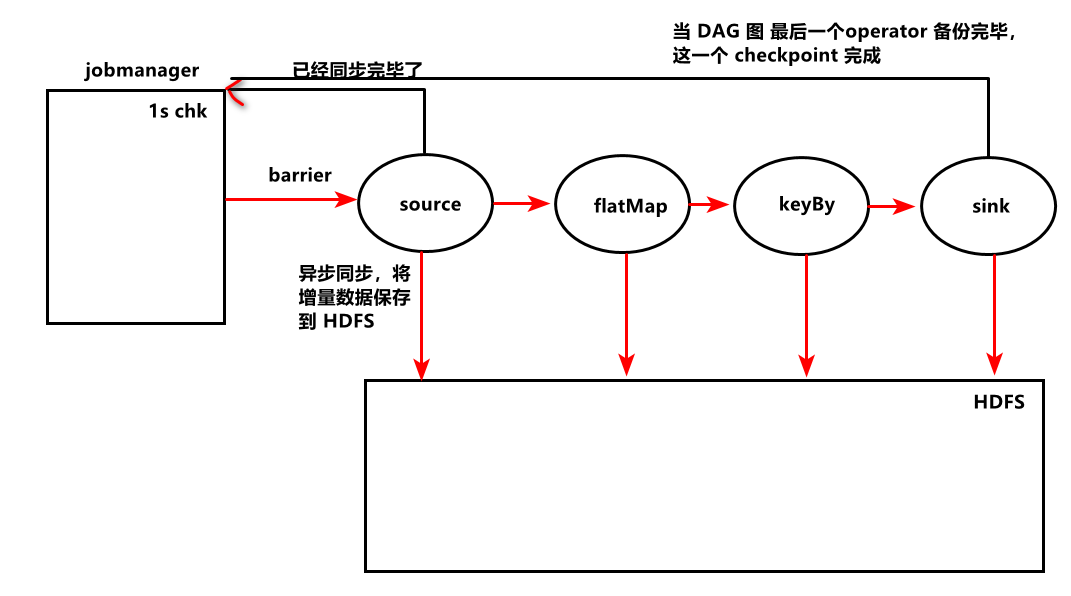
If you do not set one second to generate a record , Will not save state , Every time I still Start from scratch .
reason :checkpoint need 1s , But every 5 An exception occurred when generating a datagram Exception ,5 After the data is generated, no complete checkpoint State backup , Restart consumption after each restart .
Kafka tool Connect node1:9092 colony
- Use node1 node2 node3
# stay windows HOSTS file 192.168.88.161 node1 node1.itcast.cn192.168.88.162 node2 node2.itcast.cn192.168.88.163 node3 node3.itcast.cn- A firewall windows and Linux , Whether the anti-virus software is closed
- In the configuration file
advertised.listeners=192.168.88.161:9092
- restart zookeeper and kafka
FlinkSQL Need to have space segmentation , Otherwise, a semantic error will be reported
Table result = tEnv.sqlQuery("" + "select * from " + orderTableA + " where amount>2 " + "union all " + "select * from orderTableB where amount<2");FlinkTable & SQL ,Table.printSchema()
Print the current table structure , Field , Field type
ckpoint State backup , Restart consumption after each restart .
[ Outside the chain picture transfer in …(img-2s6cRETy-1624435933007)]
Kafka tool Connect node1:9092 colony
- Use node1 node2 node3
# stay windows HOSTS file 192.168.88.161 node1 node1.itcast.cn192.168.88.162 node2 node2.itcast.cn192.168.88.163 node3 node3.itcast.cn- A firewall windows and Linux , Whether the anti-virus software is closed
- In the configuration file
advertised.listeners=192.168.88.161:9092
- restart zookeeper and kafka
FlinkSQL Need to have space segmentation , Otherwise, a semantic error will be reported
Table result = tEnv.sqlQuery("" + "select * from " + orderTableA + " where amount>2 " + "union all " + "select * from orderTableB where amount<2");FlinkTable & SQL ,Table.printSchema()
Print the current table structure , Field , Field type
边栏推荐
- 数据修改修改
- Sringboot-plugin-framework 实现可插拔插件服务
- 网络安全——使用Exchange SSRF 漏洞结合NTLM中继进行渗透测试
- The scroll bar in unity ugui is not displayed from the top when launching the interface in the game
- Repair the problem of adding device groups and editing exceptions on easycvr platform
- Paper notes: swing UNET: UNET like pure transformer for medicalimage segmentation
- 在EXCEL表格中如何进行快速换行
- Chrome plug-in development tutorial
- 网络安全——文件上传内容检查绕过
- 如何在Ubuntu 18.04和Debian 9上安装PHP 5.6
猜你喜欢

网络安全——使用Exchange SSRF 漏洞结合NTLM中继进行渗透测试

基于群体熵的机器人群体智能汇聚度量

网络安全——WAR后门部署

Odoo+ test

开放环境下的群智决策:概念、挑战及引领性技术
![[acm/ two points] two points clear entry-level explanation](/img/87/e4d58b7530bfc381ec07d7c76e90a1.png)
[acm/ two points] two points clear entry-level explanation
Group intelligence decision-making in an open environment: concepts, challenges and leading technologies
网络安全——过滤绕过注入

Sringboot plugin framework implements pluggable plug-in services

How to quickly wrap lines in Excel table
随机推荐
Icml2022 | branch reinforcement learning
Network security - error injection
Easycvr platform security scanning prompt go pprof debugging information leakage solution
交换机链路聚合详解【华为eNSP】
网络安全——服务漏洞扫描与利用
Browser type judgment
WSDM 22 | graph recommendation based on hyperbolic geometry
游戏思考04总结:针对帧、状态、物理同步的总结(之前写的太长,现在简略下)
The KAP function of epidisplay package in R language calculates the value of kappa statistics (total consistency, expected consistency), analyzes the consistency of the results of multiple scoring obj
Kunyu installation details
Outdoor billboards cannot be hung up if you want! Guangzhou urban management department strengthens the safety management of outdoor advertising
Why are there "two abstract methods" in the functional interface comparator?
网络安全——函数绕过注入
使用activiti创建数据库表报错
使用Activiti创建数据库表报错,
基于社会媒体数据增强的交通态势感知研究及进展
Chapter VI bus
Chrome plug-in development tutorial
NOIP2021 T2 数列
Can communication protocol (I)