当前位置:网站首页>Xxl-sso enables SSO single sign on
Xxl-sso enables SSO single sign on
2022-06-23 06:54:00 【zetor_ major】
One 、 summary :
The purpose of this article is to use XXL-SSO Open source architecture Realize single sign on system .
XXL-SSO Is a distributed single sign on framework 、 You only need to log in once to access all mutually trusted application systems .
Have ” Lightweight 、 Distributed 、 Cross domain 、Cookie+Token support 、Web+APP support ” Other characteristics . Now open source , Open the box .
Official website address :https://www.xuxueli.com/xxl-sso/#/
Two 、 Get ready :
- download XXL-SSO
https://github.com/xuxueli/xxl-sso
https://gitee.com/xuxueli0323/xxl-sso
install xxl-sso-core-1.1.0.jar To maven Warehouse :
mvn install:install-file -Dfile=D:/yourpath/xxl-sso-core-1.1.0.jar -DgroupId=com.xuxueli -DartifactId=xxl-sso-core -Dversion=1.1.0 -Dpackaging=jar
- install redis、 And start the ...
- perform sql Script :mysql Create user tables and other related operations , Refer to the code at the end of the text for details
3、 ... and 、 Realize single sign on server :
1) Use architecture :
- springboot
- mybatisPlus for mysql
- swagger
- xxl-sso
2) The code reference is as follows :
- pom.xml
        <!-- sso core -->
        <dependency>
            <groupId>com.xuxueli</groupId>
            <artifactId>xxl-sso-core</artifactId>
            <version>1.1.0</version>
        </dependency>
        <!-- jedis -->
        <dependency>
            <groupId>redis.clients</groupId>
            <artifactId>jedis</artifactId>
            <version>2.9.0</version>
</dependency>XxlSsoConfig.java@Configuration public class XxlSsoConfig implements InitializingBean, DisposableBean { @Value("${xxl.sso.redis.address}") private String redisAddress; @Value("${xxl.sso.redis.expire.minite}") private int redisExpireMinite; @Override public void afterPropertiesSet() throws Exception { SsoLoginStore.setRedisExpireMinite(redisExpireMinite); SsoTokenLoginHelper.setRedisExpireMinite(redisExpireMinite); JedisUtil.init(redisAddress); } @Override public void destroy() throws Exception { JedisUtil.close(); } }- Login page initialization
    @RequestMapping(Conf.SSO_LOGIN)
    public String login(Model model, HttpServletRequest request, HttpServletResponse response) {

        // login check
        XxlSsoUser xxlUser = SsoWebLoginHelper.loginCheck(request, response);
        if (xxlUser != null) {
            // success redirect
            String redirectUrl = request.getParameter(Conf.REDIRECT_URL);
            if (redirectUrl != null && redirectUrl.trim().length() > 0) {

                String sessionId = SsoWebLoginHelper.getSessionIdByCookie(request);
                String redirectUrlFinal = redirectUrl + "?" + Conf.SSO_SESSIONID + "=" + sessionId;
                return "redirect:" + redirectUrlFinal;
            } else {
                return "redirect:/";
            }
        }
        //  Query a / C set ( Custom query )
        List<TSystemSob> sobs = sysUserService.qrySobLst();
        model.addAttribute("sobs", sobs);
        model.addAttribute("errorMsg", request.getParameter("errorMsg"));
        model.addAttribute(Conf.REDIRECT_URL, request.getParameter(Conf.REDIRECT_URL));
        return "login";
}- Login action
@RequestMapping("/doLogin")
    public String doLogin(HttpServletRequest request,
                          HttpServletResponse response,
                          RedirectAttributes redirectAttributes,
                          @RequestParam String username,
                          @RequestParam String password,
                          @RequestParam Integer sob,
                          String ifRemember) {

        boolean ifRem = (ifRemember != null && "on".equals(ifRemember)) ? true : false;
        redirectAttributes.addAttribute(Conf.REDIRECT_URL, request.getParameter(Conf.REDIRECT_URL));
        // valid login
        TSysUser usr = sysUserMapper.qryOne(username, sob);
        if (usr == null) {
            redirectAttributes.addAttribute("errorMsg", " The user doesn't exist !");
            return "redirect:/login";
        }
        if (!Md5Util.isMatchPassword(password.trim(), usr.getPassword())) {
            redirectAttributes.addAttribute("errorMsg", " Wrong user name or password !");
            return "redirect:/login";
        }
        // 1、make xxl-sso user
        XxlSsoUser xxlUser = new XxlSsoUser();
        xxlUser.setUserid(String.valueOf(usr.getAccount()));
        xxlUser.setUsername(usr.getRealName());
        xxlUser.setVersion(UUID.randomUUID().toString().replaceAll("-", ""));
        xxlUser.setExpireMinite(SsoLoginStore.getRedisExpireMinite());
        xxlUser.setExpireFreshTime(System.currentTimeMillis());

        // 2、make session id
        String sessionId = SsoSessionIdHelper.makeSessionId(xxlUser);
        // 3、login, store storeKey + cookie sessionId
        SsoWebLoginHelper.login(response, sessionId, xxlUser, ifRem, redisExpireMinite * 60);
        // 4、return, redirect sessionId
        String redirectUrl = request.getParameter(Conf.REDIRECT_URL);
        if (redirectUrl != null && redirectUrl.trim().length() > 0) {
            String redirectUrlFinal = redirectUrl + "?" + Conf.SSO_SESSIONID + "=" + sessionId;
            return "redirect:" + redirectUrlFinal;
        } else {
            return "redirect:/";
        }
}- Log out
    @RequestMapping(Conf.SSO_LOGOUT)
    public String logout(HttpServletRequest request, HttpServletResponse response, RedirectAttributes redirectAttributes) {
        // logout
        SsoWebLoginHelper.logout(request, response);
        // del sessionData
        removeStorageData(request);
        redirectAttributes.addAttribute(Conf.REDIRECT_URL, request.getParameter(Conf.REDIRECT_URL));
        return "redirect:/login";
}- The login page ( freemarker Template file )
<form action="${request.contextPath}/doLogin">
        <div class="login-box-body">
            <p class="login-box-msg"> Unified certification center </p>
            <div class="form-group has-feedback">
                <input type="text" name="username" class="form-control" placeholder="Please input username."
                       value="admin" maxlength="50">
                <span class="glyphicon glyphicon-envelope form-control-feedback"></span>
            </div>
            <div class="form-group has-feedback">
                <input type="password" name="password" class="form-control" placeholder="Please input password."
                       value="123456" maxlength="50">
                <span class="glyphicon glyphicon-lock form-control-feedback"></span>
            </div>
            <div class="form-group">
                <select class="form-control input-s-sm inline" name="sob">
                    <#list sobs as ss>
                    <option value="${ss.id}">${ss.sobName}</option>
                    </#list>
                </select>
            </div>
            <#if errorMsg?exists>
                <p style="color: red;">${errorMsg}</p>
            </#if>
            <div class="row">
                <div class="col-xs-8">
                    <div class="checkbox icheck">
                        <label>
                            <input type="checkbox" name="ifRemember"> Remember the password
                        </label>
                    </div>
                </div><!-- /.col -->
                <div class="col-xs-4">
                    <input type="hidden" name="redirect_url" value="${redirect_url!''}"/>
                    <button type="submit" class="btn btn-primary btn-block btn-flat">Login</button>
                </div>
            </div>
        </div>
    </form>
Four 、 Implement client :
- The configuration file
@Configuration
public class XxlSsoConfig implements DisposableBean {


    @Value("${xxl.sso.server}")
    private String xxlSsoServer;

    @Value("${xxl.sso.logout.path}")
    private String xxlSsoLogoutPath;

    @Value("${xxl.sso.excluded.paths}")
    private String xxlSsoExcludedPaths;

    @Value("${xxl.sso.redis.address}")
    private String xxlSsoRedisAddress;


    @Bean
    public FilterRegistrationBean xxlSsoFilterRegistration() {

        // xxl-sso, redis init
        JedisUtil.init(xxlSsoRedisAddress);

        // xxl-sso, filter init
        FilterRegistrationBean registration = new FilterRegistrationBean();

        registration.setName("XxlSsoWebFilter");
        registration.setOrder(1);
        registration.addUrlPatterns("/*");
        registration.setFilter(new XxlSsoWebFilter());
        registration.addInitParameter(Conf.SSO_SERVER, xxlSsoServer);
        registration.addInitParameter(Conf.SSO_LOGOUT_PATH, xxlSsoLogoutPath);
        registration.addInitParameter(Conf.SSO_EXCLUDED_PATHS, xxlSsoExcludedPaths);

        return registration;
    }

    @Override
    public void destroy() throws Exception {

        // xxl-sso, redis close
        JedisUtil.close();
    }

}- Home page Jump
    @RequestMapping("/")
    public String index(Model model, HttpServletRequest request) {

        XxlSsoUser xxlUser = (XxlSsoUser) request.getAttribute(Conf.SSO_USER);
        model.addAttribute("xxlUser", xxlUser);
        return "index";
    }
5、 ... and 、 Start the program
Startup sequence 1. SSOServerApp、2.ClientApp
client port:8088
Server side port:8086
Type in the browser address bar :http://127.0.0.1:8088/client
Complete jump , Pictured

notes : The A / C set defines the information for you , Delete as appropriate .
user name :admin 、 password :123456
Login successful :

6、 ... and 、 remarks :
The above realizes xxl-sso Architecture of single sign on system , Because the architecture is light , That is, the functionality is single , But it is more convenient to expand .
In this paper xxl-sso-core The core in the package , Several simple changes have been made , It aims to realize login and jump , Print log And so on , Friends who like expansion can modify it by themselves .

This article source address :
https://gitee.com/zetor2020/ym-paas-sso-xxl
Download code friends click star, Thank you for your support

Like this article , Thank you again for

边栏推荐
- 关于职业态度
- QT method of compiling projects using multithreading
- haas506 2.0开发教程-高级组件库-modem.net(仅支持2.2以上版本)
- 问题:访问组件中数据object(定义的数据)中属性也为object对象中的属性时,报错现象
- Centos7 MySQL records
- English语法_副词 - ever / once
- Media industry under the epidemic situation, small program ecology driven digital transformation exploration
- Linux Installation mysql8.0.25
- 【Qt】基础学习笔记
- 解决挖矿病毒 sshd2(redis未设密码、清除crontab定时任务)
猜你喜欢

了解学习 JSX 的工作方式
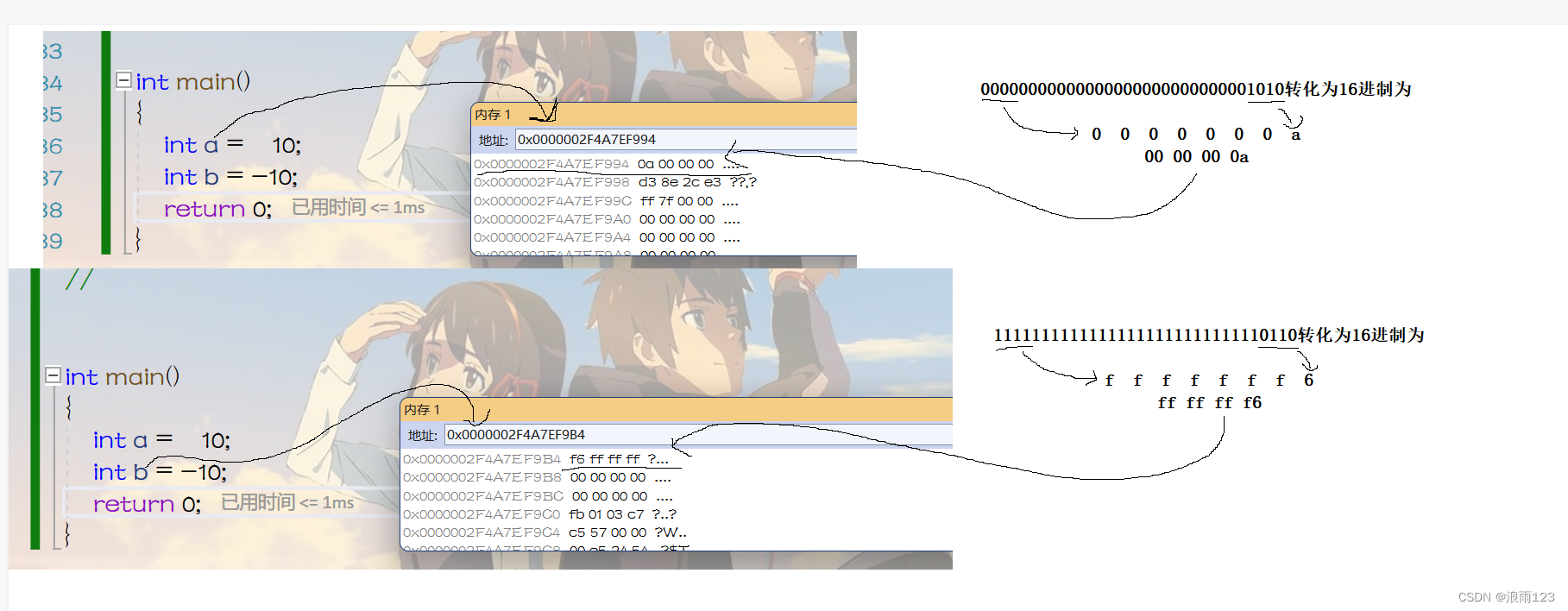
Storage mode of data in memory (C language)

Haas506 2.0 development tutorial - Advanced Component Library -modem SMS (only supports versions above 2.2)

leetcode - 572. A subtree of another tree

XML schema record

Explain csma/cd, token bus and token ring clearly

Data indicators and data analysis models that designers need to understand

C语言学习总结

JS to create an array (all elements are objects)
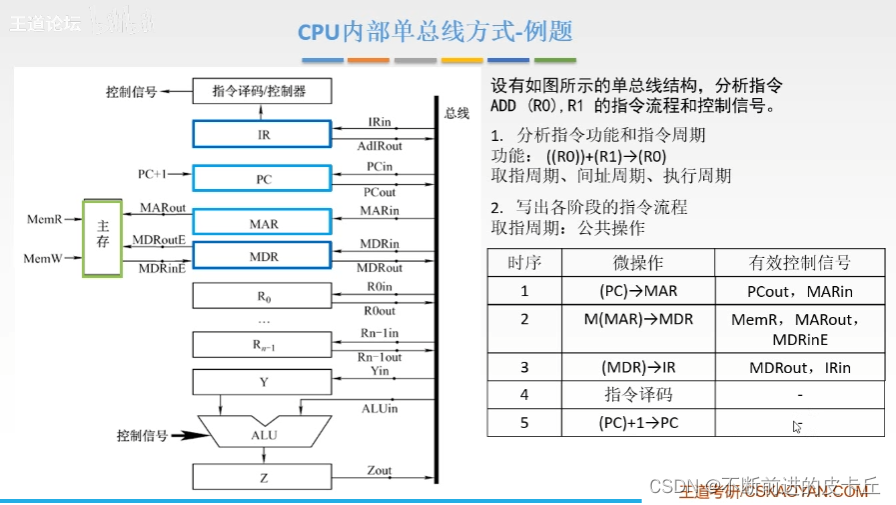
Functions and basic structure of CPU
随机推荐
DQL、DML、DDL、DCL的概念与区别
Test of ers function under the supplier consignment purchase mode of SAP mm
XXL-SSO 实现SSO单点登录
Machine learning artifact scikit learn minimalist tutorial
swagger3整合oauth2 认证token
Add IPAD control function into shairplay
Haas506 2.0 development tutorial - Advanced Component Library -modem Sim (only supports versions above 2.2)
Problem: when the attribute in the data object (defined data) in the access component is also the attribute in the object object, an error is reported
Kubesphere offline deployment without network environment
core.js是什么---kalrry
Mongodb record
Focusing on the smart city, Huawei cooperates with China Science and technology Xingtu to jointly develop a new digital blue ocean
常见设置模式(抽象工厂&责任链模式&观察者模式)
mingw-w64、msys和ffmpeg的配置与编译
haas506 2.0开发教程-高级组件库-modem.voiceCall(仅支持2.2以上版本)
【STL】pair用法总结
Numerical calculation method chapter7 Calculating eigenvalues and eigenvectors of matrices
Chrome删除重复书签
746. 使用最小花费爬楼梯-动态规划
Linux Installation mysql8.0.25