当前位置:网站首页>Software testing - Test Case Design & detailed explanation of test classification
Software testing - Test Case Design & detailed explanation of test classification
2022-06-22 20:44:00 【Blue and white porcelain secretly tapping code】
List of articles
- 1. The basic elements of test cases
- 2. Design method of test case
- 3. Test categories
1. The basic elements of test cases
Before you learn the basics of test cases , We first review Let's take a look at the previous knowledge :
What is a test case ?
A set of collections initiated to the system under test , contain , Test environment , testing procedure , Test data , Expected resultsWhy testers write test cases ?( The benefits to us )
1. Test cases are the basis of test execution 2. Test cases can be reused , You don't have to rewrite it when you do regression testing 3. Test cases can measure the coverage of requirements ! 4. Future generations can learn from 5. Manual test cases are the basis of automated testing !
2. Design method of test case
2.1 Design test cases based on requirements
We need to do the following
- Analyze requirements , Verify the correctness and rationality of the requirements , Self-consistent logic , No ambiguity
- Refine requirements , Extract test items , Extract test sites from each test project , Design test cases according to test points
When analyzing test requirements , Generally divided into
Functional test requirementsandNon functional test requirements
2.11 Functional requirements test analysis
Functional requirements include the following aspects :
InterfaceComprehensive functional testing ( The interface is from top to bottom , From right to right )Test the independent functions according to the business scenarios, such as : TaoBao APP Shopping scenarios in , We need toSearch for products —— Add to cart —— Settlement —— pay, This series is to test the related functions . Be careful : We can't just focus on an isolated functionTest the same function with different input data: for example ,QQ Login system test case , Enter a different account and password , Corresponding to different results , Login mode …Interaction and consistency between functions , There can be no conflict: Interaction between different roles in the same system . Take Taobao for example , The same system ( TaoBao ), Different roles ( Buyers and sellers )Abnormal data of the same function , Error operation test: Such as : The account number entered is empty , Enter the wrong phone number …Verification of function related algorithms( White box testing : Need to look at the code , Test the code directly )
for instance : How do we analyze this calendar page , Only in this way can the relevant functions be analyzed without reservation
Page analysis : From top to bottom , From left to right , Analyze each test point in turn

2.12 Non functional requirements test analysis
Non functional requirements include the following aspects
Non functional testing is to test some limitations on the functions of the software itself
Specific have : Reliability test , Fault tolerance test , performance , Security testing , Ease of use test , Compatibility test , Portability testing
Different applications have different requirements for the above non functions

2.2 Specific methods of designing test cases
Equivalence class ( It's very important )
According to input ( Output is considered only under special circumstances ), Divide the input into several equivalent classes , Select one from each equivalence class ( Multiple ) Test cases for testing , If this test case passes the test , Let's say that the equivalence class represented by this test case passes .
Equivalence classes are used to solve the problem of testing : An inexhaustible situation
Application scenarios :

Equivalence classes can be divided into :1. Effective equivalence class 2. Invalid equivalence class
- Effective equivalence class : A data set that meets the requirements data specification
- Invalid equivalence class : Data sets that do not meet the requirements specification
For example, it is easy to understand :
The boundary value
Design test cases for the boundaries of input and output , The boundary value should take the value on the boundary , And the values on the left and right sides of the boundary :6~15 position , The boundary value :5 6 15 16
tips:
Equivalence classes and boundary values combinedDesign test cases
Wrong guess
According to the experience of software testers , The accumulation of knowledge , intuition , Design special test cases for modules that you think have errors , Similar to exploratory testing , It is applicable to use case design , Supplement , Strengthen the design of test cases
Wrong guesses are more personal ( knowledge , Experience , intuition ),
It is suitable for test cases that have been designed , As a complementary method of designing use cases
Scene method
Many different scenarios of software , Is based on the triggering of different events , Triggering of different events , Lead the scene to different event flows . Connect different function points to form a scene . Different function points have different outputs , Different outputs lead to different test scenarios .
fantasy ATM ATM scene ( How to test ): Card insertion —— Input password —— Enter the withdrawal amount —— Pick up the card —— Withdraw card

Add tips:
Business: A transaction is a set of closely related operations , If all operations are successful , Let's say that the business was successful , If one of the operations fails , Let's say that the transaction failedThe withdrawal process here ——— Business
Cause and effect diagram
Regular examination !
Cause and effect diagram is a kind of Logic diagram , Identity , And , or , Not , Use cause and effect diagrams to design use cases , It's called cause and effect diagram .
Use scenarios : When we have a lot of input , Different inputs or different combinations of inputs for different outputs , At this time, we can use the cause and effect diagram method to design test cases
1) Identity 
2) And (^): Multiple different inputs are true at the same time , The output is true 
Take marriage for example : Get married later , For boys : You can only get married if you have a car and a house 
3) or (v): One of the multiple inputs is true , The output is true 
4) Not : Enter true , Output is false

5) Cause and effect diagram method to design test cases step :
- Analysis shows that
All inputs and outputs - find
The combined relationship between input and output - According to the relationship
Draw a cause and effect diagram - According to the cause and effect diagram
Draw a decision table - According to the judgment table
Write test cases
Through a small exercise to better understand the cause and effect diagram method :

Decision tables and test cases :
Orthogonal method
Design test cases according to orthogonality , From a large number of experimental data, the optimal combination of data is obtained according to the orthogonal principle , According to the results of the optimal data combination test , To analyze the results of the whole test
3. Test categories
3.1 According to the test object
It is divided into the following parts
1) Interface
The user interacts with the software through the interface , The quality of interface design , Directly affect the user's impression of the software
- Interface tests test
Whether the software interface function is complete , accuracy , Whether and UI The design is consistent- test
Whether the layout of the software is reasonable ( picture , written words )- test
The adaptability of the interface , The interface adapts to different page sizes( The text does not overlap , disappear , All the functions are , It can be used normally. , The picture is clear and the layout is reasonable ),The interface changes from small to large , Fully functional , The text is complete , The picture is complete , No superposition , disappear , When the function cannot be used- test
The control function of the interface is normal , Dialog scroll bar , The valid status and invalid status of the button can be distinguished( Effectively highlight , Invalid graying out cannot be clicked )- test
Interface design ( Color , Layout ) Consider current affairs ( For example, the Chinese New Year , Interface celebration, etc )
Common interface errors
- Inappropriate shortcut keys

- The loss of words

- truncation

4. Text not aligned 
5. Word wrap 
6. Overlap of words 
7. Inappropriate shortcut keys ( Duplicate shortcut keys )
2) reliability
Reliability refers to the ability of software to run normally , The percentage of time the software is running normally and the overall running time . reliability = Software Normal operation time /( Abnormal operation time + Normal operation time )
Factors affecting software reliability : The Internet , Software environment ( install ), Hardware environment , Whatever the environment , Exceptions in the environment will make the software run abnormally
Be careful :
Different software has different requirements for reliability, Non real time software reliability is generally 99.99% , Special software requires high reliability ,99.999% ( Military systems )
###000 How to test the reliability of software
Like a week , Write down the time of failure , Use the formula to calculate the percentage ( reliability = The time when the software runs normally / Abnormal operation time + Normal operation time )
3) Fault tolerance
Concept : System exception , Or because Wrong operation Cause errors in the software system , Software digests its own mistakes , Or make changes , Don't let customers perceive , It's called fault tolerance
1. Common fault tolerance processing :
- Data fault tolerance : The ATM input is less than 100 The amount of money , Time ,25 when 72 branch , Specific date , February 30 God Other months 32 God
- Verify fault tolerance : Space before and after ( Automated filtering ); Verify that upper and lower case letters are ignored ( Verification Code , Automatic case conversion ); Validation of information before and after the same form or document ( Id card , Student number , Automatic pre and post validation )
- Interface fault tolerance : Improvement of complex operation ; Warning tips for dangerous operations ; Shielding of dangerous buttons
- Environmental fault tolerance : The software is faulty in the environment , The software has a backup plan , It allows users to switch without perception ,( The Internet , electric , Hardware environment , Software deployment and software environment ),PlanB(B plan )
2. Disaster recovery testing :
- Artificial system failure , Look at the system itself , Whether the user data and reply are fast
4) Document the test
Testing of software development related documents
The focus of document testing : Whether the terminology of the document is professional , integrity , Uniformity , correctness , Ease of use ( Easy to understand )
5) Compatibility test
- Compatibility of the software version : Software forward and backward compatibility , New functions of software development
Do not affect the use of old functions,It cannot affect the development of subsequent functions - Software compatibility with data ( Especially user data ): When designing functions , Consider the data that the user already has
- Software compatibility with application platform ( Installed software environment , Hardware environment ,APP, browser ):
- APP : IOS Android Different brands of mobile phones Different models
- web : Different browsers , Different browsers on different computer devices
- Software compatibility with third-party software or third-party data ( Related software ): such as Taobao and Alipay are compatible
6) Ease of use test
Usability testing can also be called user experience testing
It is simply understood as Designed software It's easier to use , Ease of use , Test from the following points
User experience testing :
- Interface for installing software :
- identification :

Intuitiveness : The operation expected by the user is within the scope of the user courseware
flexibility : such as keyboard , There are nine palaces , Full keyboard , Handwriting , pinyin , For people with different habits , To design different Input mode
comfort : For example, download something , You give a progress bar , Let users know how long it will take to download , Or you download something , Users have no perception at all , It doesn't hurt ?
practical :
7) Install the uninstall
- Different ways to install and uninstall ( Installation mode ), The installation and uninstallation of software are normal : The installation diameter is generally :APPstore Installation package The third party ( The dandelion , Software assistant ) Command line
- Whether to pause or cancel during installation or uninstallation , Whether you can install and uninstall normally after pausing
- Insufficient space during installation , Prompt
- Uninstall the software normally , If the uninstall is cancelled , It does not affect the normal use of the software
- An exception occurred during installation , The software can handle ( power failure , Abnormal network connection, etc )
8) Security testing
Security means Information security , Software user data , privacy , And the security in the process of data transmission , Prevent virus intrusion and hacker attacks
Security testing is a very important aspect of non functional testing , Common security vulnerabilities and threats of the system are as follows :
- Input field : Can detect strings or files with viruses
- Prevent input injection :XSS/SQL Inject
- The authority distribution should be reasonable
- Transfer files / data , Prevent interception
- Prevent reptiles , Crawling information
- Prevent hackers from attacking
9) Performance testing
When we use the software, we sometimes encounter that the software web page opens more and more slowly , It takes a long time to display the list when querying data , The software runs more and more slowly , These problems are caused by system performance problems .
Performance problems of software products , Analyze the performance requirements of the product , Then based on the system performance requirements and system architecture , Complete the design and implementation of performance test , Finally, continuous performance tuning . Common performance problems are as follows :
- Resource leakage
- Resource bottleneck
- thread deadlock , Thread blocking
- Slow or inefficient query
- More and more affected by external factors
The key indicators to measure the performance of a system are ,
User ring time , Average transaction response time (TPS), Throughput rate , Hits per second , Memory and CPU Utilization rate, etc.
10) Memory leak test
Cause of memory leak :
- There is a problem with what is written in the program , Can't reclaim memory
- API Incorrect use of function , Can't recycle memory
- The allocated memory is not recycled in time , Memory leak
Check the code for resource leaks : Manual inspection , Tool check
3.2 By whether or not to view code
In the interview of software testing position , The concept often asked by interviewers is
Black box and white box test了 , Let's discuss it thoroughly .
What is a black box test
Don't careThe logical structure inside the code ,Don't checkCode ,Only care aboutWhether the external input and output of software functions meet the needs of users ,It is equivalent to shielding the internal implementation of the software
advantage :
Don't worry about the internal implementation of the software , Don't look at the code- Design test cases from the perspective of users ( User independent code , Only care about function , Whether to meet their own needs ), Easy to cultivate product thinking
- Designing test cases is
Designed according to software requirements,It is not easy to omit requirements
Black box test method
Equivalence class , The boundary value , Scene method , Cause and effect diagram , Wrong guess , Orthogonal method
What is a white box test
Analyze the logical structure of the code , Check whether the code is standard , Whether the style of the code is consistent with the company's design , Test the code , See if the code implements the requirements .
unit testing ( You can do it )——> White box testing
Test method of white box test
It mainly includes six test methods :
Statement override , Logical coverage , Logical coverage , Determine coverage , Conditional coverage , Determine the combination coverage , Decision and conditional coverage , Conditions and combinations of conditions
Add : Equivalence classes and boundary values Sometimes it's used in White box testing
Here's the picture : a > 1 adn b = 0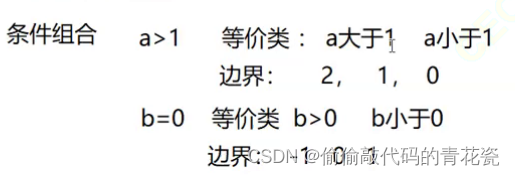

What is a grey box test
Grey box test is between white box and black box , Both the input and output of the program are concerned , Also concerned about the internal implementation of the program
3.3 According to the development stage

characteristic :
- Go to the bottom , The more efficient the test
- Go to the bottom , The easier it is to locate the problem
- Go to the bottom , The higher the test independence , Coupling becomes lower
It is divided into 4 Stages :
1. Unit test phase : It refers to testing a small unit composed of software to see whether the function of the test unit is normal
- The test phase is divided into : Before testing (TDD–》test Driven - Development), After testing
- The test method : White box testing
- Testers : White Box Test Engineer , Developer
- The test is based on the detailed design document
- Test content : The interface test , Local data structure test path test , Boundary test

2. Integration testing phase : Combine the unit modules according to certain logic and strategy , Form a large template with full functions .
- Testing phase : unit testing
- The test method : Grey box testing
- Test object : Black Box Test Engineer / White Box Test Engineer
- Test basis : Architecture Design
- Test content : Correctness of module function , Interface test between units constituting the module , Global data structure test , The impact of functional defects of a single module on the whole module
3. System test phase : Carry out comprehensive functional and non functional tests on the software system
- Testing phase : After the integration test
- Test object : The whole software system
- The test method : Black box testing
- Testers : Black Box Test Engineer
- Test basis : Requirements design document
- Test content : The function of the system , Interface , reliability , Fault tolerance , Ease of use , Portability , Compatibility , Security , performance , Install the uninstall ( New software )
- regression testing : When the system introduces new code , Testers often need to verify the impact of new code on old functional parameters , The tests you do are called regression tests ( When adding new functions and modifying BUG When , Will perform regression tests )
- Smoke testing : After software development , Test the basic functions and core processes of the software , After passing the test , Before entering the formal test environment , If the test fails , The tester has the right to call back , Let the development modify again until the smoke is successful ( The smoke test is performed by testing / Developers do the testing )
4. Acceptance test phase : The last test before the software goes online , Also known as delivery testing
- Testing phase : After the system test
- Test object : The whole software system
- Test basis : The user needs
- Testers : user
- The test method : Black box testing
- Test content : Same as system test ( Document the test )
3.4 According to the implementation organization
1.α test : stay β Before the test , Invite users or non test and development personnel to the development site for testing
- Test environment : Development site
- Testers : Non development and testing people
- Advantages and disadvantages : advantage : Problems can be directly fed back to developers shortcoming : Subject to developers
2.β test : Let the actual user test in the actual use environment , After the test, the problems will be summarized and fed back
α and β Test differences :
- The test environment is different
- The test time is different in Chengdu
- α Testing takes precedence over β test
3. Third party testing : It is the third-party evaluation organization of software , Test the software according to the standard specifications of the software industry ( Understanding can )
4. Whether to run according to the code
- The static test : Don't run code , By checking the style of the code , Whether the format conforms to the company's specifications and standards , Check whether the logical structure of the code meets the function to be realized
- Dynamic testing : Run code , Input to program response , See if you get the desired output
3.5 According to whether it is divided manually
1. Manual testing : According to the test case , Public to test the function of the system
shortcoming : A large amount is easy to make mistakes ; Low efficiency : Some extreme cases cannot be tested
advantage : Conduct exploratory testing , More flexible
2. automated testing : The machine operates according to the preset conditions that are considered to be set , These presets include normal and abnormal , Check whether the software system meets the set conditions ( Automated test cases transform manual test cases into script - run test cases )
3.6 By Region
Add :
Software internationalization : When designing and developing software , Using an engineering technique , Make the software translate into different national languages , There is no need to modify the source code , Adapt to different languages , The customs and habits of people in different countries
Software internationalization testing :
- From the appearance, the interface functions are not missing , Normal use
- Whether to adapt to the usage habits of people in this country , written words , date , social customs and habits , Unit of measure , currency , weight
- At different resolutions , Normal display and use of software
- Different hardware devices
Software localization : Specific to a certain country
边栏推荐
猜你喜欢
![[proteus simulation] 74LS138 decoder water lamp](/img/30/7dbdead9c18788cd946b5541e76443.png)
[proteus simulation] 74LS138 decoder water lamp

uniapp小程序商城开发thinkphp6积分商城、团购、秒杀 封装APP

阿里云视频点播播放出错,控制台访问出现code:4400

Simple integration of client go gin 11 delete

从感知机到Transformer,一文概述深度学习简史

怎样实现网页端im即时通讯中的@人功能

【已解决】--go_out: protoc-gen-go: Plugin failed with status code 1.

软件压力测试有哪些方法,如何选择软件压力测试机构?

三维天地助力实验室夯实完整质量体系管理
![[proteus simulation] 8x8LED dot matrix digital cyclic display](/img/a9/0107eb02c7a081fb466b1c7c12baef.png)
[proteus simulation] 8x8LED dot matrix digital cyclic display
随机推荐
AAAI 2022 | 传统GAN修改后可解释,并保证卷积核可解释性和生成图像真实性
Possible security vulnerabilities in NFT
一个支持IPFS的电子邮件——SKIFF
深度学习常用损失函数总览:基本形式、原理、特点
MYSQL 几个常用命令使用
【Proteus仿真】三极管组成的H桥驱动直流电机+按键正反转控制
6月第3周B站榜单丨飞瓜数据UP主成长排行榜(哔哩哔哩平台)发布!
[observation] innovation in the software industry has entered a "new cycle". How can we make a new start in the changing situation?
Lora technology -- Lora signal changes from data to Lora spread spectrum signal, and then from RF signal to data through demodulation
Introduction of neural network (BP) in Intelligent Computing
Random talk on redis source code 119
Containerd容器运行时(2):yum安装与二进制安装,哪个更适合你?
Recv function with timeout
Gossip about redis source code 121
mysql8.0忘记密码的详细解决方法
Classic interview question: a page from entering URL to rendering process
从感知机到Transformer,一文概述深度学习简史
【Proteus仿真】NE555延时电路
Scheduling with Testing
元宇宙中的云计算,提升你的数字体验