当前位置:网站首页>Quickly build a real-time face mask detection system in five minutes (opencv+paddlehub with source code)
Quickly build a real-time face mask detection system in five minutes (opencv+paddlehub with source code)
2022-06-25 08:14:00 【Color Space】
Reading guide
This article mainly introduces how to use OpenCV and PaddleHub Realize a real-time face mask detection system .( official account :OpenCV And AI Deep learning )
Background introduction
from 19 The epidemic broke out in and now , It is normal for everyone to wear masks . There are many related applications , Such as virus development prediction 、 Mask wearing detection and face recognition with mask .
The face mask wearing detection system introduced today mainly uses OpenCV And Baidu feijiang (PaddlePaddle) Of PaddleHub Detection model provided .PaddleHub It provides many practical models , Including image processing 、 word processing 、 Audio processing 、 Video processing and industrial applications .github Address :https://github.com/PaddlePaddle/PaddleHub

Face mask detection
The model of face detection part is as follows :

The two models in the red box support face mask detection , Choose here pyramidbox_lite_server_mask, Detailed implementation steps :
【1】 install PaddlePaddle、PaddleHub and OpenCV(opencv-python)
pip install paddlepaddle -i https://pypi.tuna.tsinghua.edu.cn/simple --trusted-host https://pypi.tuna.tsinghua.edu.cnpip install paddlehub -i https://pypi.tuna.tsinghua.edu.cn/simple --trusted-host https://pypi.tuna.tsinghua.edu.cnpip install opencv-python -i https://pypi.tuna.tsinghua.edu.cn/simple --trusted-host https://pypi.tuna.tsinghua.edu.cnVersion used in this article :
PaddlePaddle---2.3.0
PaddleHun---2.2.0
opencv-python---4.6.0.66
Be careful : install PaddlePaddle There may be some problems , Lead to import paddle Failure , You can search for solutions according to the error information .
【2】 Picture face mask detection
Prepare the map to be measured , Run the following code , Modify the image path :
import paddlehub as hub
import cv2

mask_detector = hub.Module(name="pyramidbox_lite_server_mask")
img_path = './imgs/A0.png'
img = cv2.imread(img_path)

input_dict = {"data": [img]}
result = mask_detector.face_detection(data=input_dict)

count = len(result[0]['data'])
if count < 1:
  print('There is no face detected!')
else:
  for i in range(0,count):

    #print(result[0]['data'][i])
    label = result[0]['data'][i].get('label')
    score = float(result[0]['data'][i].get('confidence'))
    x1 = int(result[0]['data'][i].get('left'))
    y1 = int(result[0]['data'][i].get('top'))
    x2 = int(result[0]['data'][i].get('right'))
    y2 = int(result[0]['data'][i].get('bottom'))
    cv2.rectangle(img,(x1,y1),(x2,y2),(255,200,0),2)
    if label == 'NO MASK':
      cv2.putText(img,label,(x1,y1),0,0.8,(0,0,255),2)
    else:
      cv2.putText(img,label,(x1,y1),0,0.8,(0,255,0),2)

cv2.imwrite('result.jpg',img)
cv2.imshow('mask-detection', img)
cv2.waitKey()
cv2.destroyAllWindows()
print('Done!')
The first time the code starts, the corresponding model will be downloaded to the following location :
C:\Users\xxx\.paddlehub\modules, No more downloads in the future

Test chart 1:

Running results :

Test chart 2:

Running results :
Test chart 3:

Running results :

Test chart 4:

Running results :

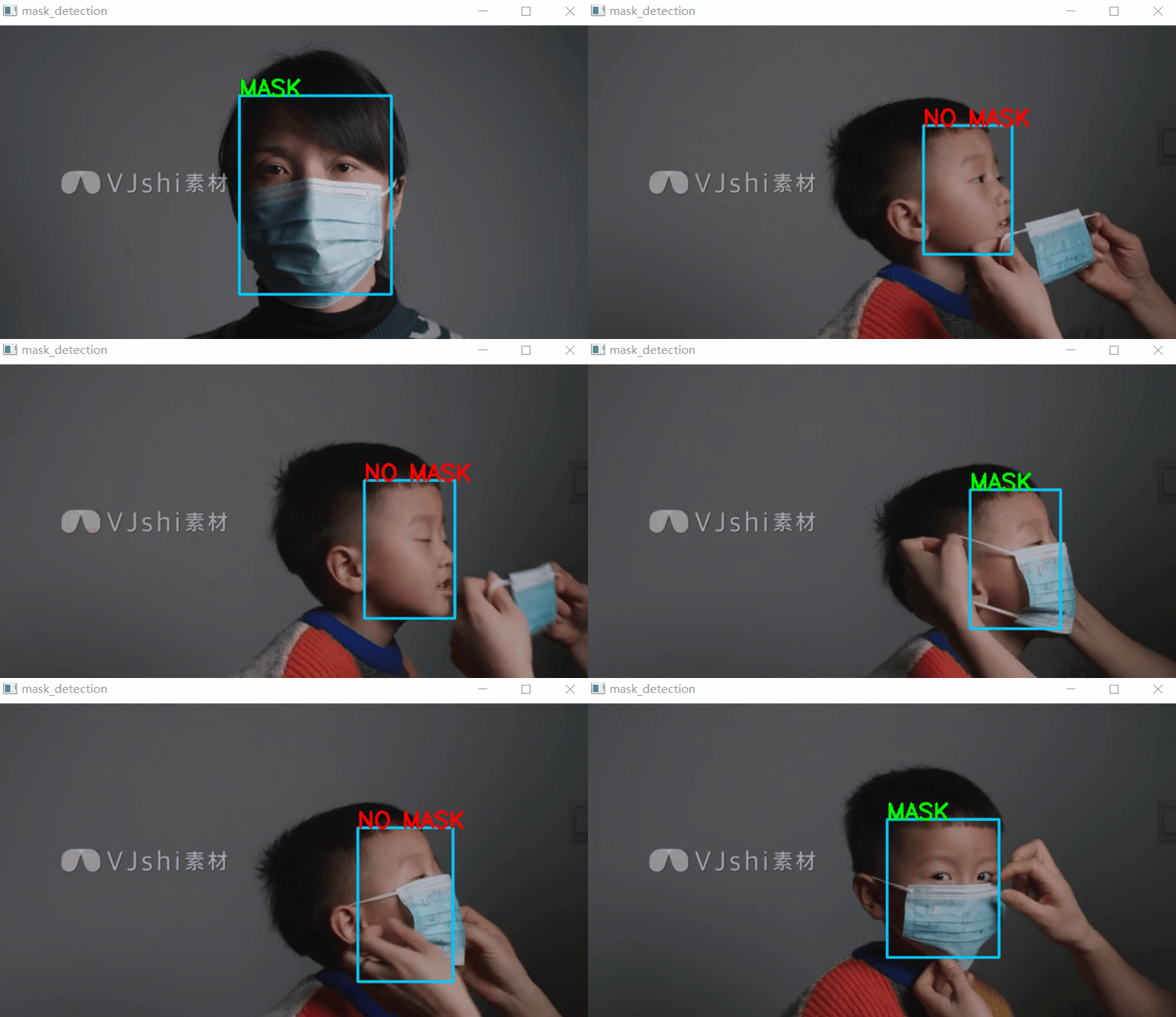
From the above test results , It's not bad !
【3】 Video or camera real-time face mask detection
Prepare to test the video or directly open the camera to detect , Select the corresponding code :
cap = cv2.VideoCapture('2.mp4') # Video file detection# cap = cv2.VideoCapture(0) # Camera detection
Complete code :
import paddlehub as hub
import cv2

mask_detector = hub.Module(name="pyramidbox_lite_server_mask")

def mask_detecion(img):
  input_dict = {"data": [img]}
  result = mask_detector.face_detection(data=input_dict)
  count = len(result[0]['data'])
  if count < 1:
    #print('There is no face detected!')
    pass
  else:
    for i in range(0,count):
      #print(result[0]['data'][i])
      label = result[0]['data'][i].get('label')
      score = float(result[0]['data'][i].get('confidence'))
      x1 = int(result[0]['data'][i].get('left'))
      y1 = int(result[0]['data'][i].get('top'))
      x2 = int(result[0]['data'][i].get('right'))
      y2 = int(result[0]['data'][i].get('bottom'))
      cv2.rectangle(img,(x1,y1),(x2,y2),(255,200,0),2)
      if label == 'NO MASK':
        cv2.putText(img,label,(x1,y1),0,0.8,(0,0,255),2)
      else:
        cv2.putText(img,label,(x1,y1),0,0.8,(0,255,0),2)
  return img


if __name__ == '__main__':
  cap = cv2.VideoCapture('2.mp4') # Video file detection
  #cap = cv2.VideoCapture(0) # Camera detection
  if(cap.isOpened()): # Video opened successfully
    while(True):
      ret,frame = cap.read()# Read a frame
      result = mask_detecion(frame)
      cv2.imshow('mask_detection',result)
      if cv2.waitKey(1)&0xFF ==27: # Press down Esc Key to exit
        break
  else:
    print ('open video/camera failed!')
  cap.release()
  cv2.destroyAllWindows()
test result :
download 1:Pytoch Common function manual
stay 「OpenCV And AI depth 」 Back office reply No :Pytorch Function manual , Can learn to download the first copy of the whole network Pytorch Function common manual , Include Tensors Introduce 、 Introduction to basic functions 、 Data processing functions 、 Optimization function 、CUDA Programming 、 Deal with more Wait for Chapter 14 .
download 2:145 individual OpenCV Example application code
stay 「OpenCV And AI thorough 」 Official account back office reply :OpenCV145, Can learn to download 145 individual OpenCV Example application code (Python and C++ Dual language implementation ).
边栏推荐
- c#ColorDialog更改文本颜色和FontDialog更改文本字体的使用示例
- FFT【模板】
- 数论模板啊
- Bat start NET Core
- 【红旗杯?】补题
- Luogu p5994 [pa2014]kuglarz (XOR thinking +mst)
- Set the textalign property of the label control in C to control the method of text centering
- Sword finger offer (medium level)
- 2021ICPC网络赛第一场
- Luogu p1073 [noip2009 improvement group] optimal trade (layered diagram + shortest path)
猜你喜欢

Electronics: Lesson 012 - Experiment 11: light and sound

Network model -- OSI model and tcp/ip model

DNS protocol and its complete DNS query process

Electronics: Lesson 009 - Experiment 7: study relays

图像超分综述:超长文一网打尽图像超分的前世今生 (附核心代码)

Log in to MySQL 5.7 under ubuntu18 and set the root password
FM信号、调制信号和载波
Matlab code format one click beautification artifact

Electronics: Lesson 011 - experiment 10: transistor switches

静态网页服务器
随机推荐
企业全面云化的时代——云数据库的未来
c#磁盘驱动器及文件夹还有文件类的操作
洛谷P2048 [NOI2010] 超级钢琴(RMQ+优先队列)
Is it safe to open an account through the haircut account opening link now?
想转行学软件测试担心哪些问题?
Allgero reports an error: program has encoded a problem and must exit The design will be saved as a . SAV file
数论模板啊
Looking for b-end product manager after years? I almost ruined myself
What is the difference between agreement and service?
TCP 加速小记
Luogu p6822 [pa2012]tax (shortest circuit + edge change point)
420 sequence traversal of binary tree 2 (429. sequence traversal of n-ary tree, 515. find the maximum value in each tree row, 116. fill in the next right node pointer of each node, 104. maximum depth
Network model -- OSI model and tcp/ip model
Pychart's wonderful setting: copy immediately after canceling the comment and bring #
socket问题记录
Websocket understanding and application scenarios
FM信号、调制信号和载波
Functions should not specify operation types through variables
电子学:第012课——实验 13:烧烤 LED
[Mobius inversion]