当前位置:网站首页>Mediapipe gestures (hands)
Mediapipe gestures (hands)
2022-06-26 13:22:00 【Eat bones without spitting out femoral head skin】
List of articles
1、Ubuntu Installation on MediaPipe
2、Ubuntu Build on Android Of MediaPipe
3、Ubuntu Build on MediaPipe Android Archive (AAR)
List of articles
Preface
Recently, there is a need for gesture recognition , So I saw MediaPipe Of Hands, Identify the node coordinates of each gesture , Then simply calculate the gesture .
This article mainly compiles the previous one aar Supplement to the library , Because the official use of our own compilation hands aar library .
One 、 Use steps
1. clone MediaPipe Source code
The order is as follows :
git clone git@github.com:google/mediapipe.git
 perhaps
git clone https://github.com/google/mediapipe.git
2.MediaPipe Of Hands Example
open Android studio, Import Android MediaPipe Example
route :mediapipe/mediapipe/examples/android/solutions,solutions This is Android Of Project, take solutions Import Android studio.
Results after run :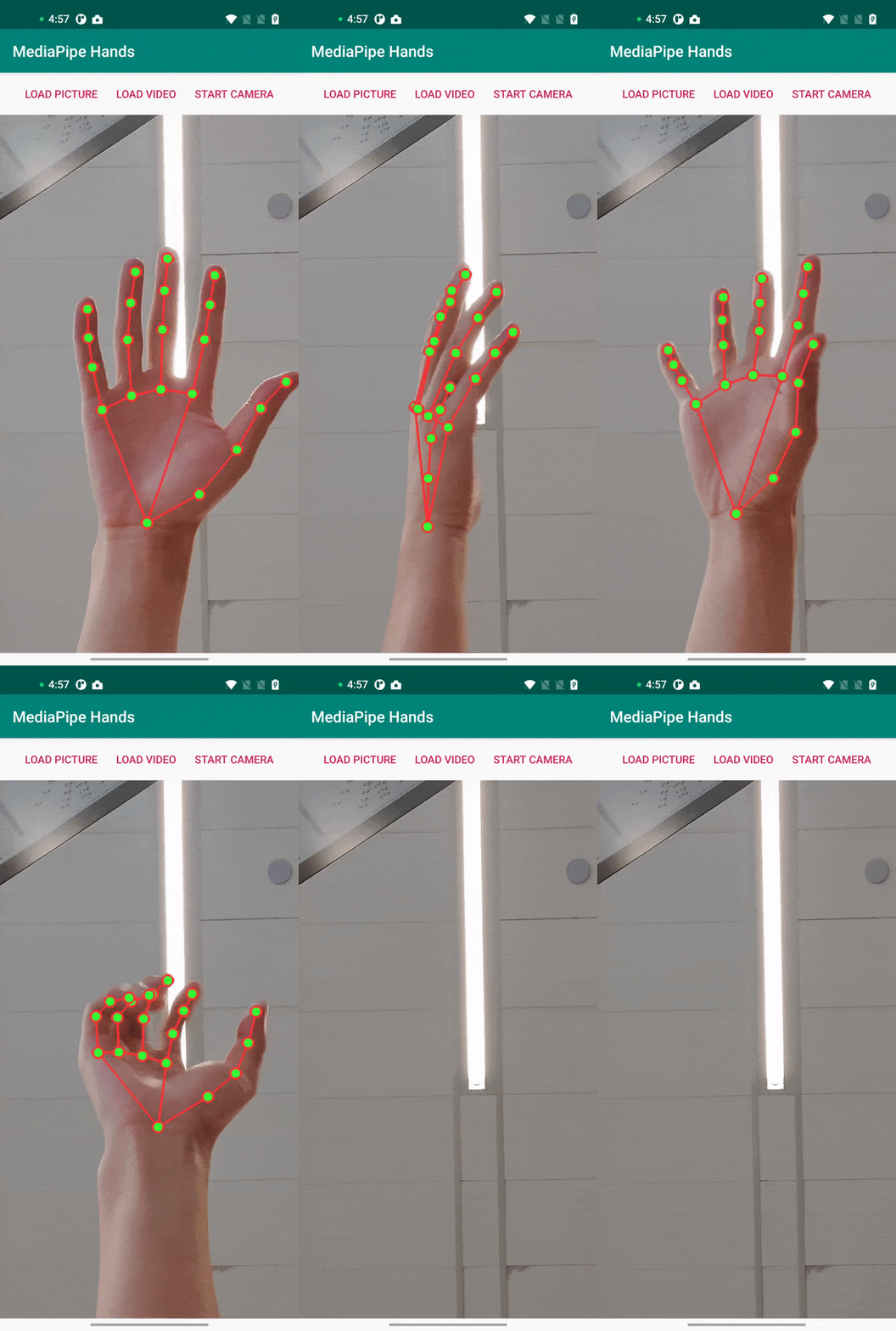
What we need to do next is simple , Is to put build.gradle in Google Maven In the library aar Replace with our own packaging aar.
Will be hands module The following two Maven Library aar Replace with our own packaging aar.
// MediaPipe Hands Solution.
implementation 'com.google.mediapipe:solution-core:latest.release'
implementation 'com.google.mediapipe:hands:latest.release'
structure solution_core.aar
bazel build -c opt --strip=ALWAYS \
    --host_crosstool_top=@bazel_tools//tools/cpp:toolchain \
    --fat_apk_cpu=arm64-v8a,armeabi-v7a \
    --legacy_whole_archive=0 \
    --features=-legacy_whole_archive \
    --copt=-fvisibility=hidden \
    --copt=-ffunction-sections \
    --copt=-fdata-sections \
    --copt=-fstack-protector \
    --copt=-Oz \
    --copt=-fomit-frame-pointer \
    --copt=-DABSL_MIN_LOG_LEVEL=2 \
    --linkopt=-Wl,--gc-sections,--strip-all \
	--verbose_failures \
	//mediapipe/java/com/google/mediapipe/solutioncore:solution_core.aar
structure hands.aar
bazel build -c opt --strip=ALWAYS \
    --host_crosstool_top=@bazel_tools//tools/cpp:toolchain \
    --fat_apk_cpu=arm64-v8a,armeabi-v7a \
    --legacy_whole_archive=0 \
    --features=-legacy_whole_archive \
    --copt=-fvisibility=hidden \
    --copt=-ffunction-sections \
    --copt=-fdata-sections \
    --copt=-fstack-protector \
    --copt=-Oz \
    --copt=-fomit-frame-pointer \
    --copt=-DABSL_MIN_LOG_LEVEL=2 \
    --linkopt=-Wl,--gc-sections,--strip-all \
	--verbose_failures \
	//mediapipe/java/com/google/mediapipe/solutions/hands:hands.aar
Will build a successful aar Import hands module Of libs in
take aar Import libs in , And comment out Google Official Maven library , Here's the picture 
Next, write the following command to hands module Of build.gradle
//  load libs Medium jar and aar
implementation fileTree(dir: 'libs', include: ['*.jar', '*.aar'])

// MediaPipe deps
implementation 'com.google.flogger:flogger:latest.release'
implementation 'com.google.flogger:flogger-system-backend:latest.release'
implementation 'com.google.code.findbugs:jsr305:latest.release'
implementation 'com.google.guava:guava:27.0.1-android'
implementation 'com.google.protobuf:protobuf-javalite:3.19.1'

// CameraX core library
def camerax_version = "1.0.0-beta10"
implementation "androidx.camera:camera-core:$camerax_version"
implementation "androidx.camera:camera-camera2:$camerax_version"
implementation "androidx.camera:camera-lifecycle:$camerax_version"

// AutoValue
def auto_value_version = "1.8.1"
implementation "com.google.auto.value:auto-value-annotations:$auto_value_version"
annotationProcessor "com.google.auto.value:auto-value:$auto_value_version"
To this step , We've done it , Just run it directly , Just put Maven Replace the library with our own aar 了 , In the future, we can compile our own code modifications aar.Google It is also recommended that we compile aar, Because they didn't come up with a unified... That met all their needs aar.
Be careful : Used at this time CameraX The version is "1.0.0-beta10", If you update the version to the latest “1.1.0-beta01”, Because the latest version is at least compatible with the current project minsdk There are requirements , The following error occurs .
Execution failed for task ':hands:checkDebugAarMetadata'.
> A failure occurred while executing com.android.build.gradle.internal.tasks.CheckAarMetadataWorkAction
   > The minCompileSdk (31) specified in a
     dependency's AAR metadata (META-INF/com/android/build/gradle/aar-metadata.properties)
     is greater than this module's compileSdkVersion (android-30).
     Dependency: androidx.camera:camera-camera2:1.1.0-beta01.
     AAR metadata file: C:\Users\LX\.gradle\caches\transforms-3\00310ff015e50555669b323da52d8e97\transformed\camera-camera2-1.1.0-beta01\META-INF\com\android\build\gradle\aar-metadata.properties.
It means the latest CameraX Minimum compiled version (android-31) More than my current Hands module Maximum compiled version of (android-30).
We can build.gradle See our targetSdkVersion and compileSdkVersion be equal to 30
Don't want to solve this problem , Don't update CameraX, ha-ha .
If you are really obsessive-compulsive disorder, you want to update , Then refer to the following solutions .
1、 modify compileSdkVersion and targetSdkVersion by 31
2、 After modification , I will tell you. android 12 Need to explicitly specify Activity Of export attribute
Manifest merger failed : Apps targeting Android 12 and higher are required to specify
an explicit value for `android:exported` when the corresponding component has an intent
filter defined. See https://developer.android.com/guide/topics/manifest/activity-element#exported for details.
Reference link : In the log is Google Links to foreign official websites , Unscientific Internet access is impossible , Please refer to android Link to the domestic official website
In the list file ,activity Node visibility assignment for export attribute 
Two 、 Reference resources
1、MediaPipe Hands Official document
2、MediaPipe Of GitHub Address
summary
This article is just to MediaPipe Hands Of demo Run up , And will Google Compilation of Maven Library is replaced by its own compiled aar, Because if you have some subsequent changes to your requirements , You can modify the code yourself and regenerate the special aar.
边栏推荐
- MySQL explanation (II)
- tauri vs electron
- Log in to the server using SSH key pair
- 8. [STM32] timer (TIM) -- interrupt, PWM, input capture experiment (proficient in timer)
- Arcpy——InsertLayer()函数的使用:掺入图层到地图文档里
- Basic configuration and test of Beifu twincat3 NCI in NC axis interface
- KITTI Tracking dataset whose format is letf_ top_ right_ bottom to JDE normalied xc_ yc_ w_ h
- Beifu cx5130 card replacement and transfer of existing authorization files
- Mysql database explanation (V)
- Generate JDE dot train
猜你喜欢

Es6: iterator

Chapter 01_ Installation and use of MySQL under Linux

Adapter mode

Beifu PLC based on NT_ Shutdown to realize automatic shutdown and restart of controller

Learn how to develop owl components by hand (7): practical use of owl projects

享元模式(Flyweight)
![[how to connect the network] Chapter 2 (next): receiving a network packet](/img/f5/33e1fd8636fcc80430b3860d069866.png)
[how to connect the network] Chapter 2 (next): receiving a network packet

Electron official docs series: Get Started

Update and download of Beifu EtherCAT XML description file

Processsing mouse interactive learning
随机推荐
外观模式(Facade)
Luogu p3426 [poi2005]sza-template solution
12 SQL optimization schemes summarized by old drivers (very practical)
sed编辑器
Composite mode
tauri vs electron
Use the script to crawl the beautiful sentences of the sentence fan website and store them locally (blessed are those who like to excerpt!)
Analysis of state transition diagram of Beifu NC axis
Mysql database explanation (IV)
LeetCode_ Stack_ Medium_ 150. evaluation of inverse Polish expression
J - Wooden Sticks poj 1065
Common creation and usage of singletons
Digital signal processing -- Design of linear phase type (Ⅰ, Ⅲ) FIR filter (1)
Generate JDE dot train
Mysql database explanation (6)
Hdu1724[Simpson formula for integral]ellipse
Prototype
SQL assigns the field value of data table B to a column in data table a
Basic methods for network diagnosis and hardware troubleshooting of Beifu EtherCAT module
Sinotech software outsourcing