当前位置:网站首页>【C語言】猜數字小遊戲+關機小程序
【C語言】猜數字小遊戲+關機小程序
2022-07-23 14:32:00 【腦瓜子翁嗡】
前言
今天寫猜數字遊戲和關機小程序,在學習的時候也可以娛樂,學習和娛樂兩不誤,一起來體驗一下寫遊戲的快樂吧!
1.猜數字小遊戲
讓電腦生成1~100的隨機數,然後猜數字,猜數字肯定有猜大了,猜小了。猜大了返回猜大了,猜小了就返回猜小了,直到猜對了,猜對了就結束遊戲。猜數字遊戲我們玩完一把覺得不過癮要再來一次,我們就的要用到循環。
(1)生成菜單
遊戲一開始我們就要打印菜單,所以我們這裏用do while 循環打印菜單,分裝一個簡單的menu 函數
void menu()
{

	printf("*******************************\n");
	printf("******** 1.play *******\n");//選1進入遊戲
	printf("******** 0.exit *******\n");//選0退出遊戲
	printf("*******************************\n");
}
(2)是否進入遊戲
根據菜單的提示,我們是否玩遊戲,都要輸入一個數字來判斷玩家是否進入遊戲,所以我們就來定義一個變量input,我們這裏用 switch 和 case 語句進行選擇,選擇1 就進入遊戲猜數字;選擇0則退出遊戲;選擇其他就提示選擇錯誤,重新選擇!
int main()
{

	int input = 0;
	do
	{

		menu();
		printf("請選擇:>");
		scanf("%d", &input);
		switch (input)
		{

		case 1:
			printf("猜數字\n");
			break;
		case 0:
			printf("退出遊戲\n");
			break;
		default:
			printf("選擇錯誤,重新選擇!\n");
			break;
		}
	} while (input);//我們這裏循環條件也是input,輸入0,就會直接退出循環
	return 0;
}
(3)猜數字game()
- 生成隨機數
玩家玩遊戲,我們就得讓電腦隨機生成一些數,讓玩家去猜,我們這裏用到了 rand 函數,我們看一下rand函數的使用:

在 rand 函數的使用裏面說到了,調用 rand 函數之前需要先調用 sand 函數來設置我們的隨機生成器,sand 函數的使用如下圖:

我們想要隨機數,電腦就要生成不一樣的隨機數,我們這裏需要傳一個值,這個值就是時間,時間每一分每一秒都在發生變化,這裏引入一個時間戳
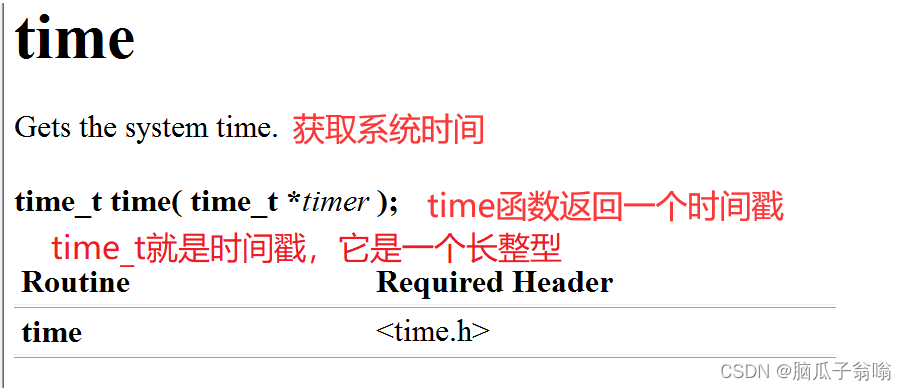
注意:我們生成隨機數並不一次遊戲只需生成一次所以我們將srand()函數放在我們的主函數裏面
void game()
{

	srand((unsigned int)time(NULL));
	//1.生成隨機數
	int ret = rand()%100+1;//生成0~100的隨機數
}
- 玩家猜數字
我們寫一個循環,猜大了返回猜大了,猜小了返回猜小了,直到猜對了
void game()
{

	int guess = 0;
	//1.生成隨機數
	int ret = rand()%100+1;//生成0~100的隨機數
	//2.猜數字
	while (1)
	{

		printf("請猜數字:>");
		scanf("%d", &guess);
		if (guess > ret)
		{

			printf("猜大了\n");
		}
		else if (guess < ret)
		{

			printf("猜小了\n");
		}
		else
		{

			printf("恭喜你,猜對了\n");
			break;
		}
	}
}
(4)整個遊戲完整代碼
#include <stdio.h>
#include <stdlib.h>
#include <time.h>
void menu()
{

	printf("*******************************\n");
	printf("******** 1.play *******\n");//選1進入遊戲
	printf("******** 0.exit *******\n");//選0退出遊戲
	printf("*******************************\n");
}
void game()
{

	int guess = 0;
	//1.生成隨機數
	int ret = rand()%100+1;//生成0~100的隨機數
	//2.猜數字
	while (1)
	{

		printf("請猜數字:>");
		scanf("%d", &guess);
		if (guess > ret)
		{

			printf("猜大了\n");
		}
		else if (guess < ret)
		{

			printf("猜小了\n");
		}
		else
		{

			printf("恭喜你,猜對了\n");
			break;
		}
	}
}

int main()
{

	srand((unsigned int)time(NULL));
	int input = 0;
	do
	{

		menu();
		printf("請選擇:>");
		scanf("%d", &input);
		switch (input)
		{

		case 1:
			game();//猜數字整個邏輯
			break;
		case 0:
			printf("退出遊戲\n");
			break;
		default:
			printf("選擇錯誤,重新選擇!\n");
			break;
		}
	} while (input);
	return 0;
}
淺玩一把遊戲吧!
2.關機小程序
這裏提示一下關機小程序純屬娛樂啦,也可以惡搞哦!
寫一個關機程序,只要運行起來,電腦在1分鐘內就關機,如果輸入:我是猪,才能取消關機。
我們這裏需要調用系統命令 shutdown -s -t 60 (-t錶示設置時間來關機,60錶示60秒),系統取消關機命令是shutdown -a
#include <stdio.h>
#include <string.h>
#include <stdlib.h>
int main()
{

	char input[20] = {
     0 };
	system("shutdown -s -t 60");
again:
	printf("請注意,你的電腦在1分鐘內關機,如果輸入我是猪,就取消關機\n");
	scanf("%s", input);
	if (strcmp(input, "我是猪") == 0)
	{

		system("shutdown -a");
		printf("關機取消\n");
	}
	else
	{

		goto again;
	}
	return 0;
}
本章到這裏就結束啦,如果有哪裏寫的不好的地方,請指正。
如果覺得不錯並且對你有幫助的話請給個三連支持一下吧!
Fighting!!!
边栏推荐
猜你喜欢

4. 寻找两个正序数组的中位数
![webstrom ERROR in [eslint] ESLint is not a constructor](/img/e9/b084512d6aa8c4116d7068fdc8fc05.png)
webstrom ERROR in [eslint] ESLint is not a constructor

手工测试如何转向自动化测试?字节5年自动化经验浅谈一下...

力扣142题:环形链表2

js软件卸载提示表情跟随鼠标变化js特效

R语言实战应用案例:绘图篇(三)-多种组合图型绘制
Pagehepler lost the pit of the original SQL order by condition

数据库连接池 & DBUtils

初识并查集

Aruba learning notes 05 configuration architecture WLAN configuration architecture
随机推荐
ArcGIS uses DEM data to delineate the specific steps and processes of catchment area
工作小记:一次抓包
Quanzhi f1c100s/f1c200s learning notes (13) -- lvgl transplantation
Surrounded Regions
完全背包!
买卖股票的最佳时机
FFmpeg 2 - ffplay、ffprobe、ffmpeg 命令使用
Consensys Quorum Benchmark Test
Consensys Quorum Benchmark Test
将我理解的web3.0讲给你听
npm warn config global `--global`, `--local` are deprecated. use `--location=global` instead.
2022河南萌新联赛第(二)场:河南理工大学 补题题解
初识并查集
股票炒股开户风险性大吗,安全吗?
Aruba learning notes 05 configuration architecture WLAN configuration architecture
Le shell a besoin de connaître les commandes
Ffmpeg 1 - Overview / installation
Day 5 experiment
Description of test platform and hardware design
JS software unloading prompt expression changes with the mouse JS special effect