当前位置:网站首页>微信小程序 28 热搜榜的完善①
微信小程序 28 热搜榜的完善①
2022-07-25 19:10:00 【牟泉禹[Dark Cat]】
28.1 热搜榜、placeholder 动态数据
接口 http://localhost:3000/search/default
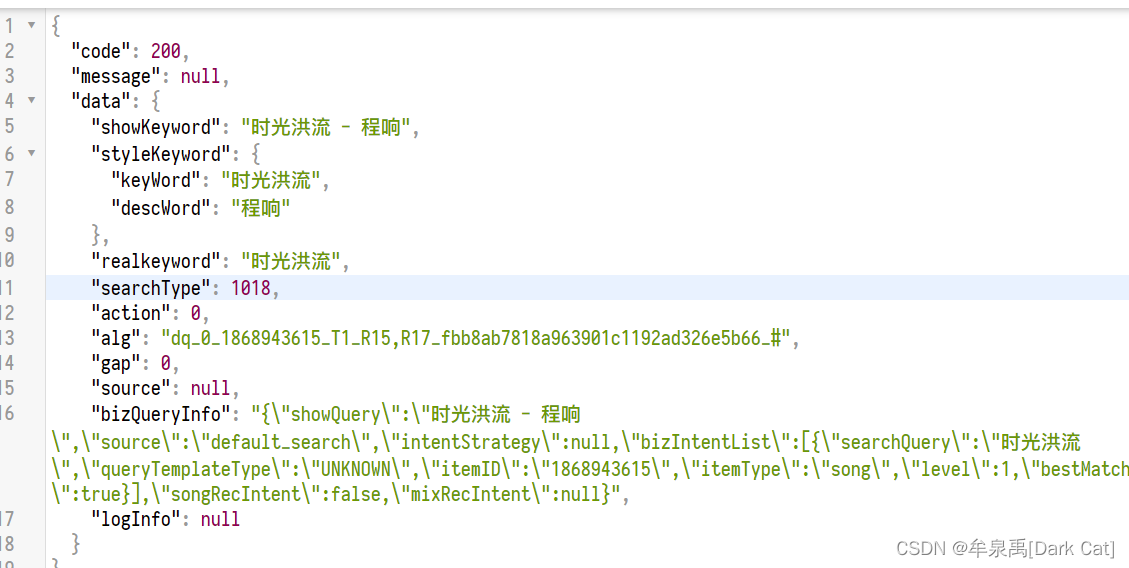
onLoad(options) {

        this.getInitData();
    },

    // 获取初始化的数据
    async getInitData() {

        let placeholderData = await request("search/default",{
    });
        this.setData({

            placeholderContent: placeholderData.data.showKeyword
        });
    },
<input type="text" placeholder="{
     {placeholderContent}}" placeholder-class="placeholder"></input>

接口 http://localhost:3000/search/hot/detail

    onLoad(options) {

        this.getInitData();
    },

    // 获取初始化的数据
    async getInitData() {

        let placeholderData = await request("search/default",{
    });
        let hotListData = await request("search/hot/detail");
        this.setData({

            placeholderContent: placeholderData.data.showKeyword,
            hotList: hotListData.data
        });
    },
<view class="searchContainer">
<!-- 头部-->
    <view class="header">
        <view class="searchInput">
            <text class="iconfont icon-search searchIcon"></text>
            <input type="text" placeholder="{
     {placeholderContent}}" placeholder-class="placeholder"></input>
        </view>
        <text class="cancel">取消</text>
    </view>
<!--热搜榜-->
    <view class="hotContainer">
        <view class="title">热搜榜</view>
<!-- 热搜列表-->
        <view class="hotList">
            <view class="hotItem" wx:for="{
     {hotList}}" wx:key="score">
                <text class="order">{
   {index + 1}}</text>
                <text>{
   {item.searchWord}}</text>
                <image class="iconImg" wx:if="{
     {item.iconUrl}}" src="{
     {item.iconUrl}}"></image>
            </view>
        </view>
    </view>

</view>

28.2 模糊匹配搜索数据
bindinput 事件:无论是否失去焦点,只要改变内容,都触发。
bindcheck 事件:要失去焦点才能触发这个事件。
接口 http://localhost:3000/search?keywords=fade&limit=10

<input bindinput="handelInputChange" type="text" input placeholder="{
     {placeholderContent}}" placeholder-class="placeholder"></input>
    data: {

        placeholderContent: '', // placeholder 内容
        hotList: [], // 热搜榜数据
        searchContent: '', // 用户输入的表单项数据
        searchList: [], // 关键字模糊匹配的数据
    },

// 获取 搜索数据的功能函数

    async getSearchList(){

        let searchListData = await request("search", {
    keywords: this.data.searchContent, limit: 10});
        this.setData({

            searchList: searchListData.result.songs
        })
    },

    // 表单内容发生改变的事件
    handelInputChange(event) {

        console.log(event);
        this.setData({

            searchContent: event.detail.value.trim()
        });

        // 函数节流
        if (isSend) {

            return;
        }
        isSend = true;

        setTimeout(() => {

            isSend = false;
            this.getSearchList();
        }, 1000);

    },

28.3 搜索内容展示
写它的 html 大体架构
<view class="searchContainer">
<!-- 头部-->
    <view class="header">
        <view class="searchInput">
            <text class="iconfont icon-search searchIcon"></text>
            <input bindinput="handelInputChange" type="text" input placeholder="{
     {placeholderContent}}" placeholder-class="placeholder"></input>
        </view>
        <text class="cancel">取消</text>
    </view>
    <block wx:if="{
     {searchList.length}}">
        <!-- 搜索内容展示-->
        <view class="showSearchContent">
            <view class="searchContent">搜索内容:{
   {searchContent}}</view>
            <view class="searchList">
                <view class="searchItem" wx:for="{
     {searchList}}" wx:key="id">
                    <text class="iconfont icon-search"></text>
                    <text>{
   {item.name}}</text>
                </view>
            </view>
        </view>
    </block>

    <block wx:else>
        <!--热搜榜-->
        <view class="hotContainer">
            <view class="title">热搜榜</view>
            <!-- 热搜列表-->
            <view class="hotList">
                <view class="hotItem" wx:for="{
     {hotList}}" wx:key="score">
                    <text class="order">{
   {index + 1}}</text>
                    <text>{
   {item.searchWord}}</text>
                    <image class="iconImg" wx:if="{
     {item.iconUrl}}" src="{
     {item.iconUrl}}"></image>
                </view>
            </view>
        </view>
    </block>

</view>
/* pages/search/search.wxss */

.searchContainer {

    padding: 0 20rpx;
}

.header {

    display: flex;
    height: 60rpx;
    line-height: 60rpx;
    padding: 10rpx 0;
}

.searchInput {

    position: relative;
    flex: 1;
    background: rgba(237,237,237,0.3);
    border-right: 30rpx;
}

.cancel {

    width: 100rpx;
    text-align: center;
}

.searchIcon {

    position: absolute;
    left: 15rpx;
}

.searchInput input{

    margin-left: 50rpx;
    height: 60rpx;
}

/*h5 新特性之一,可以将 placeholder 设置 class 和 样式*/
.placeholder {

    color: #d43c33;
    font-size: 28rpx;
}

/*热搜榜*/
.hotContainer .title {

    font-size: 28rpx;
    height: 80rpx;
    line-height: 80rpx;
    border-bottom: 1rpx solid #eee;
}

.hotList {

    display: flex;
    flex-wrap: wrap;
}

.hotItem {

    width: 50%;
    height: 80rpx;
    line-height: 80rpx;
    font-size: 26rpx;
}

.hotItem .order {

    margin: 0 10rpx;
}

.hotItem .iconImg {

    width: 35rpx;
    height: 20rpx;
    margin-left: 10rpx;
}

/*搜索内容展示*/

.searchContent {

    color: rgba(107, 100, 238, 0.96);
    height: 80rpx;
    line-height: 82rpx;
    font-size: 24rpx;
    border-bottom: 1rpx solid #d43c33;
}

.searchItem {

    height: 80rpx;
    line-height: 80rpx;
    display: flex;
}

.searchItem .content {

    flex: 1;
    margin-left: 20rpx;
    border-bottom: 1rpx solid #eee;
    font-size: 26rpx;
}
// pages/search/search.js
import request from "../../utils/request";
let isSend = false; // 用于 函数 节流使用
Page({


    /** * 页面的初始数据 */
    data: {

        placeholderContent: '', // placeholder 内容
        hotList: [], // 热搜榜数据
        searchContent: '', // 用户输入的表单项数据
        searchList: [], // 关键字模糊匹配的数据
    },

    /** * 生命周期函数--监听页面加载 */
    onLoad(options) {

        this.getInitData();
    },

    // 获取初始化的数据
    async getInitData() {

        let placeholderData = await request("search/default",{
    });
        let hotListData = await request("search/hot/detail");
        this.setData({

            placeholderContent: placeholderData.data.showKeyword,
            hotList: hotListData.data
        });
    },

    // 获取 搜索数据的功能函数

    async getSearchList(){

        if(!this.data.searchContent){

            this.setData({

                searchList: []
            });
            return;
        }
        let searchListData = await request("search", {
    keywords: this.data.searchContent, limit: 10});
        this.setData({

            searchList: searchListData.result.songs
        })
    },

    // 表单内容发生改变的事件
    handelInputChange(event) {

        console.log(event);
        this.setData({

            searchContent: event.detail.value.trim()
        });

        // 函数节流
        if (isSend) {

            return;
        }
        isSend = true;

        setTimeout(() => {

            isSend = false;
            this.getSearchList();
        }, 500);

    },

    /** * 生命周期函数--监听页面初次渲染完成 */
    onReady() {


    },

    /** * 生命周期函数--监听页面显示 */
    onShow() {


    },

    /** * 生命周期函数--监听页面隐藏 */
    onHide() {


    },

    /** * 生命周期函数--监听页面卸载 */
    onUnload() {


    },

    /** * 页面相关事件处理函数--监听用户下拉动作 */
    onPullDownRefresh() {


    },

    /** * 页面上拉触底事件的处理函数 */
    onReachBottom() {


    },

    /** * 用户点击右上角分享 */
    onShareAppMessage() {


    }
})


边栏推荐
- SQL Server 2019 installation tutorial
- 7/24 training log
- Pymoo学习 (6):终止条件
- Virtual machine VMware installation steps (how to install software in virtual machine)
- 接口自动化测试平台FasterRunner系列(一)- 简介、安装部署、启动服务、访问地址、配置补充
- Interface automation test platform fasterrunner series (III) - operation examples
- 阿里云技术专家秦隆:可靠性保障必备——云上如何进行混沌工程?
- Intouch高级报警(报警筛选)
- A free image download warehouse website
- Full scale and Xuan of C key
猜你喜欢

Everyone can participate in the official launch of open source activities. We sincerely invite you to experience!

浅析IM即时通讯开发出现上网卡顿?网络掉线?

SQL realizes 10 common functions of Excel, with original interview questions attached

小程序毕设作品之微信校园维修报修小程序毕业设计成品(5)任务书

Huawei recruited "talented teenagers" twice this year; 5.4 million twitter account information was leaked, with a selling price of $30000; Google fired engineers who believed in AI consciousness | gee

Have you ever seen this kind of dynamic programming -- the stock problem of state machine dynamic programming (Part 1)

Basic music theory -- configuring chords

Single arm routing experiment demonstration (Huawei router device configuration)
![[help center] provide your customers with the core options of self-service](/img/66/5a927e3bdcc165b78d4a9dee324871.png)
[help center] provide your customers with the core options of self-service

Actual combat of MySQL database design project of online mall system
随机推荐
Based on easycv to reproduce Detr and dab-detr, the correct opening method of object query
小程序毕设作品之微信校园维修报修小程序毕业设计成品(6)开题答辩PPT
srec_ Use of common cat parameters
kubernetes RBAC
Pyqt5 click qtableview vertical header to get row data and click cell to get row data
Pymoo learning (5): convergence analysis
7/24 training log
SQL Server 2019 安装教程
虚拟机vmware安装步骤(如何在虚拟机安装软件)
【加密周报】加密市场有所回温?寒冬仍未解冻!盘点上周加密市场发生的重大事件!
[help center] provide your customers with the core options of self-service
Youth, oh, youth
SQL 实现 Excel 的10个常用功能,附面试原题
Everyone can participate in the official launch of open source activities. We sincerely invite you to experience!
Wechat campus maintenance and repair application applet graduation design finished product of applet completion work (6) opening defense ppt
[applet development] common components and basic usage details
[cloud native kubernetes] management of secret storage objects under kubernetes cluster
Go code checking tool
阿里云免费SSL证书申请详细流程
APP测试点(思维导图)