当前位置:网站首页>RT thread project engineering construction and configuration - (Env kconfig)
RT thread project engineering construction and configuration - (Env kconfig)
2022-06-26 01:32:00 【L_ seventeen】
obtain rtt Source code
download - RT-Thread Internet of things operating system
Recommended here gitee, Download much faster , stay bsp In the table of contents , Relevant references demo engineering
git clone https://gitee.com/rtthread/rt-thread.git

The contents of the folder are as follows :
| name | describe |
|---|---|
| BSP | Board Support Package( Board level support package ) Migration based on various development boards , May refer to demo |
| components | RT-Thread Code of each component of , for example finsh,gui etc. . |
| documentation | The related documents , Such as coding specification, etc |
| examples | Related sample code |
| include | RT-Thread The header file of the kernel . |
| libcpu | Transplant codes of various chips . |
| src | RT-Thread Kernel source file . |
| tools | RT-Thread Command build tool script file . |
obtain RT-Thread Env Tools
RT-Thread Env Tools include configurator and package manager , Used to configure the functions of the kernel and components , Free clipping of components , Manage online software packages , Make the system build in the way of building blocks , Easy and convenient .
Refer to the official website for configuration links :Env User's Manual (rt-thread.org)
Kconfig file ( Same as linux)
Kconfig Specific introduction :Kconfig Language — The Linux Kernel documentation
rtt website :Kconfig (rt-thread.org)
rtt Kconfig similar Linux Kconfig The way of menuconfig
Kconfig The mechanism includes Kconfig Files and configurations UI Interface ( Such as menuconfig,pyconfig etc. ).Kconfig The mechanism has the following characteristics :
- Kconfig The configuration items in the file are mapped to rtconfig.h in
- Kconfig Files can be distributed to subdirectories at all levels along with the source code , Easy to modify flexibly .
We need to understand Kconfig The following basic syntax :
mainmenu sentence
menu/endmenu sentence
config sentence
source sentence
if/endif sentence
choice/endchoice sentence
comment sentence
use imxrt1060-nxp-evk Engineering examples , Enter the project and directory .Env Execute at root menuconfig After the command , Can recursively parse all levels Kconfig file , Then the following configuration interface is displayed :


Root menu Kconfig The content is generally as follows ,mainmenu “RT-Thread Configuration” It is also the window title , In that window , How are the five submenus displayed ? Here we need to observe ,source “xx” How does the road force in the recursion go on .
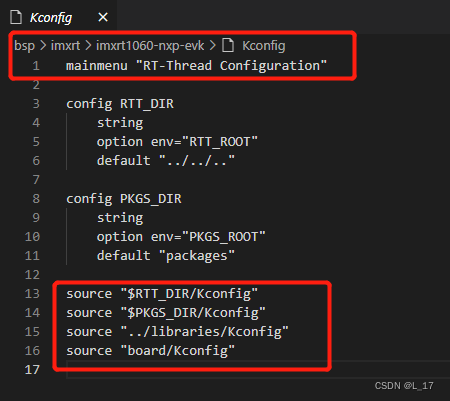
…/…/…/ Back to the third level directory , as follows Kconfig

src/kconfig The following :menu “RT-Thread Kernel” Find a submenu

According to the above method , recursive query source route , Relevant menus and specific configuration information can be found .
How to modify Kconfig( First of all, you need to know the grammar , And then we'll do the same , Understand the meaning slowly )
Here we say "modify" Kconfig file , Basically, it needs to be modified :Hardware Drivers Config( Others are related to the official kernel and components , We don't care ),Hardware Drivers Config The content is specific to the hardware of a project , If we add device drivers , You can also modify its Kconfig, Make the drive appear in menuconfig Window
RT-Thread Kernel
RT-Thread Components
RT-Thread Utestcases
RT-Thread online packages
Hardware Drivers Config
find Hardware Drivers Config Content Kconfig
menu "Hardware Drivers Config"

config SOC_MIMXRT1052DVL6B
    bool
    select SOC_MIMXRT1052_SERIES
    select BSP_USING_8MFLASH
    select RT_USING_COMPONENTS_INIT
    select RT_USING_USER_MAIN
    default y

menu "On-chip Peripheral Drivers"

    config BSP_USING_GPIO
        bool "Enable GPIO"
        select RT_USING_PIN
        default y

    menuconfig BSP_USING_LPUART
        bool "Enable UART"
        select RT_USING_SERIAL
        default y
        if BSP_USING_LPUART
            config BSP_USING_LPUART1
                bool "Enable LPUART1"
                default y
            config BSP_USING_LPUART2
                bool "Enable LPUART2"
                default n
            config BSP_USING_LPUART3
                bool "Enable LPUART3"
                default n
            config BSP_USING_LPUART4
                bool "Enable LPUART4"
                default n
            config BSP_USING_LPUART5
                bool "Enable LPUART5"
                default n
            config BSP_USING_LPUART6
                bool "Enable LPUART6"
                default n
            config BSP_USING_LPUART7
                bool "Enable LPUART7"
                default n
            config BSP_USING_LPUART8
                bool "Enable LPUART8"
                default n
        endif

    config BSP_USING_DMA
        bool "Enable DMA"
        default n

    config BSP_USING_WDT
        bool "Enable WDT"
        select RT_USING_WDOG
        default y
        if BSP_USING_WDT
            config BSP_USING_WDT1
                bool "Enable WDT1"
                default y
            config BSP_USING_WDT3
                bool "Enable WDT3"
                default n
        endif

    config BSP_USING_PXP
        bool "Enable PXP"
        default n

    config BSP_USING_CACHE
        bool "Enable CACHE"
        default n

    menuconfig BSP_USING_LCD
        bool "Enable LCD"
        default n
        if BSP_USING_LCD
            config LCD_WIDTH
                int "width"
                default 480

            config LCD_HEIGHT
                int "height"
                default 272

            config LCD_HFP
                int "HFP"
                default 4
            config LCD_VFP
                int "VFP"
                default 4
            config LCD_HBP
                int "HBP"
                default 8
            config LCD_VBP
                int "VBP"
                default 2
            config LCD_HSW
                int "HSW"
                default 40
            config LCD_VSW
                int "VSW"
                default 10
            config LCD_BL_PIN
                int "Backlight ctrl pin"
                default 63
            config LCD_RST_PIN
                int "Reset pin"
                default 2
        endif

endmenu

menu "Onboard Peripheral Drivers"

    config BSP_USING_SDRAM
        bool "Enable SDRAM"
        default n

    config BSP_USING_LVGL
        bool "Enable LVGL for LCD"
        select BSP_USING_LCD
        select PKG_USING_LVGL
        select PKG_USING_LV_MUSIC_DEMO
        select BSP_USING_PXP
        select BSP_USING_CACHE
        default n

endmenu

menu "Board extended module Drivers"

endmenu

endmenu

Cut and build your own project ( use nxp rt Series examples ):
The author is not used to making the project too bloated ( Too many invalid or unused files ), So I will do some cutting . The clipping result is as follows :
| name | describe |
|---|---|
| board | Board level support package , Based on specific projects , The chip is basically IO Clock and other configurations |
| libraries | Chip manufacturer sdk, Developed based on this chip hal library ( Apply to rtt) |
| packages | Online software package ( After configuration , Carry out orders :pkgs --update Update can ) |
| rt-thread | rtt kernel 、 Component source code, etc |

边栏推荐
- Web information collection, naked runners on the Internet
- 如何有效地推广产品
- A sharp tool for information collection, Google hacker syntax
- Technical introduction - detailed explanation of chip manufacturing process
- Solution to MySQL error code 2003
- 同花顺软件买股票进行交易安全吗?怎么开户买股票
- 使用Gin框架运行Demo时报错“ listen tcp :8080: bind: An attempt was made to access a socket in a way forbidden”
- 经纬度 多点 获取中心点 已解决
- DGUS新升级:全面支持数字视频播放功能
- 15 `bs object Node name Node name String` get nested node content
猜你喜欢

生信周刊第34期

在线小工具分享(不定时更新,当前数量:2)

“热帖”统计

图文大师印章简易制作

Mpu6050 reads the ID incorrectly and 0xd1 occurs (the correct ID should be 0x68 or 0x69). Solution.

智慧家——全家具功能

Redis strings command

Camera - 02 image sensor

100ask seven day IOT training camp learning notes - bare metal program framework design

Casually painted
随机推荐
Containerd client comparison
Radio boxes are mutually exclusive and can be deselected at the same time
Sqlserver is case sensitive
Technical foreword - metauniverse
生信周刊第33期
Cartoon shader
手机卡开户的流程是什么?网上开户是否安全么?
信息收集的利器,Google骇客语法
Black box test - decision table method of test cases
使用Gin框架运行Demo时报错“ listen tcp :8080: bind: An attempt was made to access a socket in a way forbidden”
Duck feeding data instant collection solution resources
2021-1-15 摸鱼做的笔记Ctrl+c /v来的
The kth largest element in the array
单选框互斥且可同时取消选中
Shengxin weekly issue 34
Shell regular expression
基金开户安全吗?有没有什么风险?
Oracle常用的基础命令
2021 - 1 - 15 notes de pêche Ctrl + C / V
Redis strings command