当前位置:网站首页>Day_ 02 smart communication health project - appointment management - inspection item management
Day_ 02 smart communication health project - appointment management - inspection item management
2022-06-23 06:21:00 【fat ۣۖ tiger ۣۖ】
The first 2 Chapter Booking Management - Check item management
1. Demand analysis
Chuanzhi health management system is a business system applied to health management institutions , Realize the visualization of the work content of the health management organization 、 Patient management specialization 、 Digital health assessment 、 Health intervention process 、 Knowledge base integration , So as to improve the work efficiency of health managers , Strengthen interaction with patients , Enhance managers' understanding of the operation of health management institutions .
The system is divided into two parts: intelligent health background management system and mobile application . The background system is provided to the internal personnel of the health management organization ( Including system administrators 、 Health manager, etc ) Use , Wechat applications are provided to users of health management institutions ( Physical examination user ) Use .
Functional architecture diagram of the project :

You can see from the functional architecture diagram above , Chuanzhi health background management system has member management 、 Booking Management 、 Health assessment 、 Health intervention and other functions . The mobile terminal has member management 、 Appointment for physical examination 、 Physical examination report and other functions . The background system and mobile applications will pass Dubbo Call the service published by the service layer to complete the specific operation . This project is a typical SOA Architecture form .
The function development completed in this chapter is the reservation management function , Including inspection item management 、 Inspection team management 、 Physical examination package management 、 Appointment settings, etc ( See product prototype ). Reservation management is the basic function of the system , It mainly manages some basic data of physical examination .
2. Basic environment construction
2.1 Import the reservation management module data table
Operation steps :
(1) According to the information provided in itcasthealth.pdm File export SQL Script 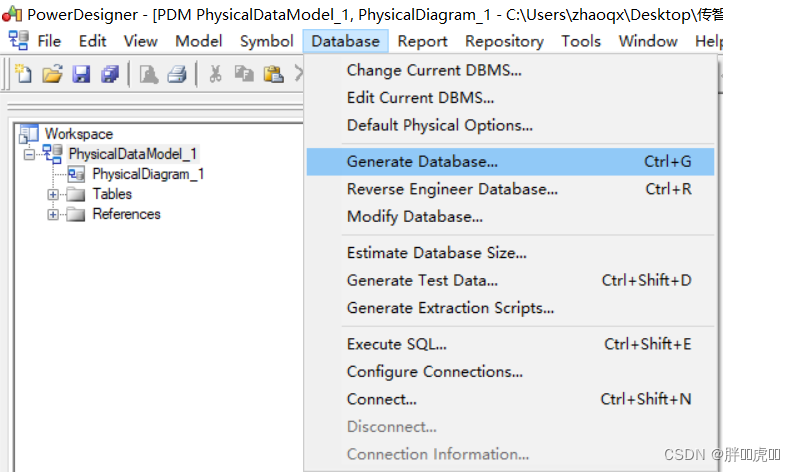
(2) Create the database used in this project itcast_health

(3) take PowerDesigner Derived SQL Script import itcast_health Database for table building 
2.2 Import the reservation management module entity class
Send the information provided in the information to POJO Copy entity classes to health_common In Engineering .
2.3 Import public resources required for the project
Some public resources are generally provided during project development , For use by multiple modules or systems .
The public resources we import in this chapter are :
(1) Return message constant class MessageConstant, Put it in health_common In Engineering
package com.itheima.constant;

/** *  Const Message  */
public class MessageConstant {

    public static final String DELETE_CHECKITEM_FAIL = " Failed to delete check item ";
    public static final String DELETE_CHECKITEM_SUCCESS = " Delete check item succeeded ";
    public static final String ADD_CHECKITEM_SUCCESS = " Successfully added check item ";
    public static final String ADD_CHECKITEM_FAIL = " Failed to add check item ";
    public static final String EDIT_CHECKITEM_FAIL = " Failed to edit check item ";
    public static final String EDIT_CHECKITEM_SUCCESS = " Edit check item succeeded ";
    public static final String QUERY_CHECKITEM_SUCCESS = " Query check item succeeded ";
    public static final String QUERY_CHECKITEM_FAIL = " Query check item failed ";
    public static final String UPLOAD_SUCCESS = " Upload successful ";
    public static final String ADD_CHECKGROUP_FAIL = " Failed to add inspection group ";
    public static final String ADD_CHECKGROUP_SUCCESS = " Successfully added inspection group ";
    public static final String DELETE_CHECKGROUP_FAIL = " Failed to delete check group ";
    public static final String DELETE_CHECKGROUP_SUCCESS = " Delete inspection group succeeded ";
    public static final String QUERY_CHECKGROUP_SUCCESS = " Query check group succeeded ";
    public static final String QUERY_CHECKGROUP_FAIL = " Query check group failed ";
    public static final String EDIT_CHECKGROUP_FAIL = " Failed to edit check group ";
    public static final String EDIT_CHECKGROUP_SUCCESS = " Edit check group succeeded ";
    public static final String PIC_UPLOAD_SUCCESS = " Image upload succeeded ";
    public static final String PIC_UPLOAD_FAIL = " Picture upload failed ";
    public static final String ADD_SETMEAL_FAIL = " Failed to add package ";
    public static final String ADD_SETMEAL_SUCCESS = " Successfully added package ";
    public static final String IMPORT_ORDERSETTING_FAIL = " Failed to import reservation setting data in batch ";
    public static final String IMPORT_ORDERSETTING_SUCCESS = " Batch import of reservation setting data succeeded ";
    public static final String GET_ORDERSETTING_SUCCESS = " Get reservation setting data successfully ";
    public static final String GET_ORDERSETTING_FAIL = " Failed to get reservation setting data ";
    public static final String ORDERSETTING_SUCCESS = " Reservation setting succeeded ";
    public static final String ORDERSETTING_FAIL = " Reservation setting failed ";
    public static final String ADD_MEMBER_FAIL = " Failed to add new members ";
    public static final String ADD_MEMBER_SUCCESS = " New member successfully ";
    public static final String DELETE_MEMBER_FAIL = " Failed to delete member ";
    public static final String DELETE_MEMBER_SUCCESS = " Delete member successfully ";
    public static final String EDIT_MEMBER_FAIL = " Failed to edit member ";
    public static final String EDIT_MEMBER_SUCCESS = " Edit member successfully ";
    public static final String TELEPHONE_VALIDATECODE_NOTNULL = " Mobile number and verification code cannot be empty ";
    public static final String LOGIN_SUCCESS = " Login successful ";
    public static final String VALIDATECODE_ERROR = " Error in captcha input ";
    public static final String QUERY_ORDER_SUCCESS = " Reservation information query succeeded ";
    public static final String QUERY_ORDER_FAIL = " Failed to query reservation information ";
    public static final String QUERY_SETMEALLIST_SUCCESS = " Query package list data successfully ";
    public static final String QUERY_SETMEALLIST_FAIL = " Failed to query package list data ";
    public static final String QUERY_SETMEAL_SUCCESS = " Query package data succeeded ";
    public static final String QUERY_SETMEAL_FAIL = " Failed to query package data ";
    public static final String SEND_VALIDATECODE_FAIL = " Verification code sending failed ";
    public static final String SEND_VALIDATECODE_SUCCESS = " Verification code sent successfully ";
    public static final String SELECTED_DATE_CANNOT_ORDER = " Physical examination appointment cannot be made on the selected date ";
    public static final String ORDER_FULL = " The reservation is full ";
    public static final String HAS_ORDERED = " The appointment has been completed , No repeat appointments ";
    public static final String ORDER_SUCCESS = " The appointment was successful ";
    public static final String GET_USERNAME_SUCCESS = " Get the current login user name successfully ";
    public static final String GET_USERNAME_FAIL = " Failed to get the current login user name ";
    public static final String GET_MENU_SUCCESS = " Get the current login user menu successfully ";
    public static final String GET_MENU_FAIL = " Failed to get the current login user menu ";
    public static final String GET_MEMBER_NUMBER_REPORT_SUCCESS = " Get member statistics successfully ";
    public static final String GET_MEMBER_NUMBER_REPORT_FAIL = " Failed to get member Statistics ";
    public static final String GET_SETMEAL_COUNT_REPORT_SUCCESS = " Get package statistics successfully ";
    public static final String GET_SETMEAL_COUNT_REPORT_FAIL = " Failed to get package statistics ";
    public static final String GET_BUSINESS_REPORT_SUCCESS = " Obtain operation statistics successfully ";
    public static final String GET_BUSINESS_REPORT_FAIL = " Failed to obtain operation statistics ";
    public static final String GET_SETMEAL_LIST_SUCCESS = " Query package list data successfully ";
    public static final String GET_SETMEAL_LIST_FAIL = " Failed to query package list data ";
}
(2) Return results Result and PageResult class , Put it in health_common In Engineering
package com.itheima.entity;
import java.io.Serializable;
/** *  Encapsulation return result  */
public class Result implements Serializable{

    private boolean flag;// Execution results ,true Successful execution for  false Failed to execute for
    private String message;// Return to the prompt message , Mainly used for page prompt information
    private Object data;// Return the data
    public Result(boolean flag, String message) {

        super();
        this.flag = flag;
        this.message = message;
    }
    public Result(boolean flag, String message, Object data) {

        this.flag = flag;
        this.message = message;
        this.data = data;
    }
    public boolean isFlag() {

        return flag;
    }
    public void setFlag(boolean flag) {

        this.flag = flag;
    }
    public String getMessage() {

        return message;
    }
    public void setMessage(String message) {

        this.message = message;
    }
    public Object getData() {

        return data;
    }
    public void setData(Object data) {

        this.data = data;
    }
}
package com.itheima.entity;
import java.io.Serializable;
import java.util.List;
/** *  The paging result encapsulates the object  */
public class PageResult implements Serializable{

    private Long total;// Total number of records
    private List rows;// Current page results
    public PageResult(Long total, List rows) {

        super();
        this.total = total;
        this.rows = rows;
    }
    public Long getTotal() {

        return total;
    }
    public void setTotal(Long total) {

        this.total = total;
    }
    public List getRows() {

        return rows;
    }
    public void setRows(List rows) {

        this.rows = rows;
    }
}
(3) Encapsulating query criteria QueryPageBean class , Put it in health_common In Engineering
package com.itheima.entity;
import java.io.Serializable;
/** *  Encapsulate query criteria  */
public class QueryPageBean implements Serializable{

    private Integer currentPage;// Page number
    private Integer pageSize;// Records per page
    private String queryString;// Query criteria
    public Integer getCurrentPage() {

        return currentPage;
    }
    public void setCurrentPage(Integer currentPage) {

        this.currentPage = currentPage;
    }
    public Integer getPageSize() {

        return pageSize;
    }
    public void setPageSize(Integer pageSize) {

        this.pageSize = pageSize;
    }
    public String getQueryString() {

        return queryString;
    }
    public void setQueryString(String queryString) {

        this.queryString = queryString;
    }
}
(4)html、js、css、 Static resources such as pictures , Put it in health_backend In Engineering
Be careful : Other public resources will be introduced in the future with the project development .
3. New check items
3.1 Perfect the page
The check item management page corresponds to checkitem.html page , According to the prototype of product design, the basic structure of the page has been written , Now we need to improve the dynamic effect of the page .
3.1.1 A new window will pop up
A new window has been provided in the page , Just hidden . Just put the attributes that control the presentation state dialogFormVisible Change it to true You can display the new window .
The method of creating a new button binding is handleCreate, So in handleCreate Modified in method dialogFormVisible The value of the property is true that will do . At the same time, in order to increase the user experience , You need to clear the form entry every time you click the new button .
//  Reset form
resetForm() {

	this.formData = {
    };
},
//  Pop up add window
handleCreate() {

	this.resetForm();
	this.dialogFormVisible = true;
}
3.1.2 Input verification
rules: {
    // Validation rules
	code: [{
     required: true, message: ' Item code is required ', trigger: 'blur' }],
	name: [{
     required: true, message: ' Item name is required ', trigger: 'blur' }]
}
3.1.3 Submit form data
Click the OK button in the new window , Trigger handleAdd Method , So you need to be in handleAdd Improve in the method .
handleAdd () {

  // Verify whether the form entry is legal
  this.$refs['dataAddForm'].validate((valid) => {

    if (valid) {

      // Form data verification passed , send out ajax Request to submit the form data to the background
      axios.post("/checkitem/add.do",this.formData).then((response)=> {

        // Hide new window
        this.dialogFormVisible = false;
        // Judge the returned from the background flag value ,true Indicates that the add operation was successful ,false Add operation for failed
        if(response.data.flag){

          this.$message({

            message: response.data.message,
            type: 'success'
          });
        }else{

          this.$message.error(response.data.message);
        }
      }).finally(()=> {

        this.findPage();
      });
    } else {

      this.$message.error(" Form data verification failed ");
      return false;
    }
  });
}
3.2 Background code
3.2.1 Controller
stay health_backend Create in project CheckItemController
package com.itheima.controller;
import com.alibaba.dubbo.config.annotation.Reference;
import com.itheima.constant.MessageConstant;
import com.itheima.entity.PageResult;
import com.itheima.entity.QueryPageBean;
import com.itheima.entity.Result;
import com.itheima.pojo.CheckItem;
import com.itheima.service.CheckItemService;
import org.springframework.web.bind.annotation.RequestBody;
import org.springframework.web.bind.annotation.RequestMapping;
import org.springframework.web.bind.annotation.RequestParam;
import org.springframework.web.bind.annotation.RestController;
import java.util.List;
/** *  Management of physical examination items  */
@RestController
@RequestMapping("/checkitem")
public class CheckItemController {

    @Reference
    private CheckItemService checkItemService;

    // newly added
    @RequestMapping("/add")
    public Result add(@RequestBody CheckItem checkItem){

        try {

            checkItemService.add(checkItem);
        }catch (Exception e){

            return new Result(false,MessageConstant.ADD_CHECKITEM_FAIL);
        }
        return new Result(true,MessageConstant.ADD_CHECKITEM_SUCCESS);
    }
}
3.2.2 Service interface
stay health_interface Create in project CheckItemService Interface
package com.itheima.service;
import com.itheima.pojo.CheckItem;
import java.util.List;
/** *  Check the service interface  */
public interface CheckItemService {

    public void add(CheckItem checkItem);
}
3.2.3 Service implementation class
stay health_service_provider Create in project CheckItemServiceImpl Implementation class
package com.itheima.service;
import com.alibaba.dubbo.config.annotation.Service;
import com.itheima.dao.CheckItemDao;
import com.itheima.pojo.CheckItem;
import org.springframework.beans.factory.annotation.Autowired;
import org.springframework.transaction.annotation.Transactional;
/** *  Check this service  */
@Service(interfaceClass = CheckItemService.class)
@Transactional
public class CheckItemServiceImpl implements CheckItemService {

    @Autowired
    private CheckItemDao checkItemDao;
  	// newly added
    public void add(CheckItem checkItem) {

        checkItemDao.add(checkItem);
    }
}
3.2.4 Dao Interface
stay health_service_provider Create in project CheckItemDao Interface , This project is based on Mybatis Of Mapper Agent technology realizes persistent layer operation , Therefore, it is only necessary to provide interfaces and Mapper The mapping file , There is no need to provide implementation classes
package com.itheima.dao;
import com.itheima.pojo.CheckItem;
/** *  Persistence layer Dao Interface  */
public interface CheckItemDao {

    public void add(CheckItem checkItem);
}
3.2.5 Mapper The mapping file
stay health_service_provider Create in project CheckItemDao.xml The mapping file , Need and CheckItemDao The interface is in the same directory
<?xml version="1.0" encoding="UTF-8" ?>
<!DOCTYPE mapper PUBLIC "-//mybatis.org//DTD Mapper 3.0//EN" "http://mybatis.org/dtd/mybatis-3-mapper.dtd" >
<mapper namespace="com.itheima.dao.CheckItemDao">
    <!-- newly added -->
    <insert id="add" parameterType="com.itheima.pojo.CheckItem">
        insert into t_checkitem(code,name,sex,age,price,type,remark,attention)
                      values
        (#{code},#{name},#{sex},#{age},#{price},#{type},#{remark},#{attention})
    </insert>
</mapper>
4. Check item pagination
All paging functions in this project are based on ajax Asynchronous request to complete , Both request parameters and background response data formats use json data format .
Request parameters include page numbers 、 Each page shows the number of records 、 Query criteria .
Request parameter json The format is :{currentPage:1,pageSize:10,queryString:‘‘itcast’’}
The background response data includes the total number of records 、 The data set to be displayed on the current page .
Response data json The format is :{total:1000,rows:[]}
Here's the picture :
4.1 Perfect the page
4.1.1 Define paging related model data
pagination: {
    // Paging related model data
  currentPage: 1,// The current page number
  pageSize:10,// Number of records per page
  total:0,// Total number of records
  queryString:null// Query criteria
},
dataList: [],// Page list data to be displayed on the current page
4.1.2 Define paging methods
Provided in the page findPage Method is used for paging queries , In order to be able to checkitem.html After the page is loaded, the paging data can be displayed directly , Can be in VUE The hook function provided created Call in findPage Method
// Hook function ,VUE Automatically execute after object initialization
created() {

  this.findPage();
}
// Paging query
findPage() {

  // Paging parameters
  var param = {

    currentPage:this.pagination.currentPage,// Page number
    pageSize:this.pagination.pageSize,// Number of records per page
    queryString:this.pagination.queryString// Query criteria
  };
  // Request backstage
  axios.post("/checkitem/findPage.do",param).then((response)=> {

    // Assign values to model data , be based on VUE The two-way binding is displayed to the page
    this.dataList = response.data.rows;
    this.pagination.total = response.data.total;
  });
}
4.1.3 Improve the execution time of paging method
In addition to the created Call in hook function findPage Method to query paging data , When users click the query button or click the page number in the page bar, they also need to call findPage Method to reissue the query request .
Bind the click event for the query button , call findPage Method
<el-button @click="findPage()" class="dalfBut"> Inquire about </el-button>
Bind... To the paging bar component current-change event , This event is defined by the paging bar component itself , Trigger when the page number changes , The corresponding processing function is handleCurrentChange
<el-pagination class="pagiantion" @current-change="handleCurrentChange" :current-page="pagination.currentPage" :page-size="pagination.pageSize" layout="total, prev, pager, next, jumper" :total="pagination.total">
</el-pagination>
Definition handleCurrentChange Method
// Switch page numbers
handleCurrentChange(currentPage) {

  //currentPage Is the page number after switching
  this.pagination.currentPage = currentPage;
  this.findPage();
}
4.2 Background code
4.2.1 Controller
stay CheckItemController Add paging query method in
// Paging query
@RequestMapping("/findPage")
public PageResult findPage(@RequestBody QueryPageBean queryPageBean){

    PageResult pageResult = checkItemService.pageQuery(
    queryPageBean.getCurrentPage(),
    queryPageBean.getPageSize(),
    queryPageBean.getQueryString());
    return pageResult;
}
4.2.2 Service interface
stay CheckItemService Expand paging query method in service interface
public PageResult pageQuery(Integer currentPage, Integer pageSize, String queryString);
4.2.3 Service implementation class
stay CheckItemServiceImpl Implement paging query method in service implementation class , be based on Mybatis The paging assistant plug-in implements paging
public PageResult pageQuery(Integer currentPage, Integer pageSize, String queryString) {

  PageHelper.startPage(currentPage,pageSize);
  Page<CheckItem> page = checkItemDao.selectByCondition(queryString);
  return new PageResult(page.getTotal(),page.getResult());
}
4.2.4 Dao Interface
stay CheckItemDao Expand paging query method in interface
public Page<CheckItem> selectByCondition(String queryString);
4.2.5 Mapper The mapping file
stay CheckItemDao.xml Add to file SQL Definition
<select id="selectByCondition" parameterType="string" resultType="com.itheima.pojo.CheckItem">
  select * from t_checkitem
  <if test="value != null and value.length > 0">
    where code = #{value} or name = #{value}
  </if>
</select>
5. Delete check item
5.1 Perfect the page
In order to prevent users from misoperation , When you click the delete button, you need to pop up a prompt to confirm the deletion , If the user clicks cancel, nothing will be done , The user clicks the OK button to submit the deletion request .
5.1.1 Bind click event
You need to bind a click event for the delete button , And pass the current row data as a parameter to the processing function
<el-button size="mini" type="danger" @click="handleDelete(scope.row)"> Delete </el-button>
//  Delete
handleDelete(row) {

  alert(row.id);
}
5.1.2 Pop up the confirmation prompt
The user clicks the delete button to execute handleDelete Method , It needs to be improved here handleDelete Method , Pop up a confirmation message .ElementUI Provides $confirm Method to realize the pop-up effect of confirmation prompt information
//  Delete
handleDelete(row) {

  //alert(row.id);
  this.$confirm(" Are you sure to delete the currently selected record ?"," Tips ",{
    type:'warning'}).then(()=>{

    // When you click the OK button, you only need the code here
    alert(' The user clicks the OK button ');
  });
}
5.1.3 Send a request
If the user clicks the OK button, it needs to send ajax request , And the of the current check item id Submit as a parameter to the background for deletion
//  Delete
handleDelete(row) {

  //alert(row.id);
  this.$confirm(" Are you sure to delete ?"," Tips ",{
    type:'warning'}).then(()=>{

    // When you click the OK button, you only need the code here
    //alert(' The user clicks the OK button ');
    axios.get("/checkitem/delete.do?id=" + row.id).then((res)=> {

      if(!res.data.flag){

        // Delete failed
        this.$message.error(res.data.message);
      }else{

        // Delete successful
        this.$message({

          message: res.data.message,
          type: 'success'
        });
        // Call paging , Get the latest paging data
        this.findPage();
      }
    });
  });
}
5.2 Background code
5.2.1 Controller
stay CheckItemController Add delete method in
// Delete
@RequestMapping("/delete")
public Result delete(Integer id){

  try {

    checkItemService.delete(id);
  }catch (RuntimeException e){

    return new Result(false,e.getMessage());
  }catch (Exception e){

    return new Result(false, MessageConstant.DELETE_CHECKITEM_FAIL);
  }
  return new Result(true,MessageConstant.DELETE_CHECKITEM_SUCCESS);
}
5.2.2 Service interface
stay CheckItemService Extension deletion method in service interface
public void delete(Integer id);
5.2.3 Service implementation class
Be careful : Cannot delete directly , You need to determine whether the current check item is associated with the check group , If it has been associated with the inspection group, it is not allowed to delete
// Delete
public void delete(Integer id) throws RuntimeException{

  // Query whether the current check item is associated with the check group
  long count = checkItemDao.findCountByCheckItemId(id);
  if(count > 0){

    // The current check item is referenced , Can't delete
    throw new RuntimeException(" The current check item is referenced , Can't delete ");
  }
  checkItemDao.deleteById(id);
}
5.2.4 Dao Interface
stay CheckItemDao Extension method in interface findCountByCheckItemId and deleteById
public void deleteById(Integer id);
public long findCountByCheckItemId(Integer checkItemId);
5.2.5 Mapper The mapping file
stay CheckItemDao.xml In the extended SQL sentence
<!-- Delete -->
<delete id="deleteById" parameterType="int">
  delete from t_checkitem where id = #{id}
</delete>
<!-- According to the inspection items id Query intermediate relation table -->
<select id="findCountByCheckItemId" resultType="long" parameterType="int">
  select count(*) from t_checkgroup_checkitem where checkitem_id = #{checkitem_id}
</select>
6. Edit check item
6.1 Perfect the page
When the user clicks the Edit button , You need to pop up the editing window and echo the currently recorded data , After the user completes the modification, click the OK button to submit the modified data to the background for database operation .
6.1.1 Bind click event
You need to bind a click event for the Edit button , And pass the current row data as a parameter to the processing function
<el-button type="primary" size="mini" @click="handleUpdate(scope.row)"> edit </el-button>
handleUpdate(row) {

  alert(row);
}
6.1.2 Pop up the edit window to echo the data
The editing window in the current page has been provided , It is hidden by default . stay handleUpdate The edit window needs to be displayed in the method , And need to send ajax Request to query the current inspection item data for echo
//  The edit window pops up
handleUpdate(row) {

  // Send a request to get the check item information
  axios.get("/checkitem/findById.do?id=" + row.id).then((res)=>{

    if(res.data.flag){

      // Set edit window properties ,dialogFormVisible4Edit by true Presentation display
      this.dialogFormVisible4Edit = true;
      // Set values for model data , be based on VUE Two way data binding echo to page
      this.formData = res.data.data;
    }else{

      this.$message.error(" Failed to get data , Please refresh the current page ");
    }
  });
}
6.1.3 Send a request
After modification in the edit window , Click the OK button to submit the request , Therefore, you need to bind events to determine the button and provide a handler handleEdit
<el-button type="primary" @click="handleEdit()"> determine </el-button>
// edit
handleEdit() {

  // Form verification
  this.$refs['dataEditForm'].validate((valid)=>{

    if(valid){

      // Form verification passed , Send a request
      axios.post("/checkitem/edit.do",this.formData).then((response)=> {

        // Hide the edit window
        this.dialogFormVisible4Edit = false;
        if(response.data.flag){

          // Edit success , Pop up the success prompt message
          this.$message({

            message: response.data.message,
            type: 'success'
          });
        }else{

          // Edit failed , Pop up error message
          this.$message.error(response.data.message);
        }
      }).finally(()=> {

        // Resend the request to query the paging data
        this.findPage();
      });
    }else{

      // Form verification failed
      this.$message.error(" Form data verification failed ");
      return false;
    }
  });
}
6.2 Background code
6.2.1 Controller
stay CheckItemController Add editing method
// edit
@RequestMapping("/edit")
public Result edit(@RequestBody CheckItem checkItem){

  try {

    checkItemService.edit(checkItem);
  }catch (Exception e){

    return new Result(false,MessageConstant.EDIT_CHECKITEM_FAIL);
  }
  return new Result(true,MessageConstant.EDIT_CHECKITEM_SUCCESS);
}

@RequestMapping("/findById")
public Result findById(Integer id){

    try{

        CheckItem checkItem = checkItemService.findById(id);
        return  new Result(true, MessageConstant.QUERY_CHECKITEM_SUCCESS,checkItem);
    }catch (Exception e){

        e.printStackTrace();
        // Service invocation failed
        return new Result(false, MessageConstant.QUERY_CHECKITEM_FAIL);
    }
}
6.2.2 Service interface
stay CheckItemService Extend the editing method in the service interface
public void edit(CheckItem checkItem);
public CheckItem findById(Integer id);
6.2.3 Service implementation class
stay CheckItemServiceImpl Implement the editing method in the implementation class
// edit
public void edit(CheckItem checkItem) {

  checkItemDao.edit(checkItem);
}

public CheckItem findById(Integer id) {

    return checkItemDao.findById(id);
}
6.2.4 Dao Interface
stay CheckItemDao Interface edit Method
public void edit(CheckItem checkItem);
public CheckItem findById(Integer id);
6.2.5 Mapper The mapping file
stay CheckItemDao.xml In the extended SQL sentence
<!-- edit -->
<update id="edit" parameterType="com.itheima.pojo.CheckItem">
  update t_checkitem
  <set>
    <if test="name != null">
      name = #{name},
    </if>
    <if test="sex != null">
      sex = #{sex},
    </if>
    <if test="code != null">
      code = #{code},
    </if>
    <if test="age != null">
      age = #{age},
    </if>
    <if test="price != null">
      price = #{price},
    </if>
    <if test="type != null">
      type = #{type},
    </if>
    <if test="attention != null">
      attention = #{attention},
    </if>
    <if test="remark != null">
      remark = #{remark},
    </if>
  </set>
  where id = #{id}
</update>

<select id="findById" parameterType="int" resultType="com.itheima.pojo.CheckItem">
    select * from t_checkitem where id = #{id}
</select>

sql
/* Navicat MySQL Data Transfer Source Server : aliyun_mysql Source Server Version : 50173 Source Host : bdm266490277.my3w.com:3306 Source Database : bdm266490277_db Target Server Type : MYSQL Target Server Version : 50173 File Encoding : 65001 Date: 2019-04-28 09:06:54 */

SET FOREIGN_KEY_CHECKS=0;
-- ----------------------------
-- Table structure for `t_checkgroup`
-- ----------------------------
DROP TABLE IF EXISTS `t_checkgroup`;
CREATE TABLE `t_checkgroup` (
  `id` int(11) NOT NULL AUTO_INCREMENT,
  `code` varchar(32) DEFAULT NULL,
  `name` varchar(32) DEFAULT NULL,
  `helpCode` varchar(32) DEFAULT NULL,
  `sex` char(1) DEFAULT NULL,
  `remark` varchar(128) DEFAULT NULL,
  `attention` varchar(128) DEFAULT NULL,
  PRIMARY KEY (`id`)
) ENGINE=InnoDB AUTO_INCREMENT=16 DEFAULT CHARSET=utf8;

-- ----------------------------
-- Records of t_checkgroup
-- ----------------------------
INSERT INTO `t_checkgroup` VALUES ('5', '0001', ' General inspection ', 'YBJC', '0', ' General inspection ', ' nothing ');
INSERT INTO `t_checkgroup` VALUES ('6', '0002', ' Vision color vision ', 'SLSJ', '0', ' Vision color vision ', null);
INSERT INTO `t_checkgroup` VALUES ('7', '0003', ' routine blood test ', 'XCG', '0', ' routine blood test ', null);
INSERT INTO `t_checkgroup` VALUES ('8', '0004', ' Urine routine ', 'NCG', '0', ' Urine routine ', null);
INSERT INTO `t_checkgroup` VALUES ('9', '0005', ' Three liver functions ', 'GGSX', '0', ' Three liver functions ', null);
INSERT INTO `t_checkgroup` VALUES ('10', '0006', ' Three items of kidney function ', 'NGSX', '0', ' Three items of kidney function ', null);
INSERT INTO `t_checkgroup` VALUES ('11', '0007', ' Four items of blood fat ', 'XZSX', '0', ' Four items of blood fat ', null);
INSERT INTO `t_checkgroup` VALUES ('12', '0008', ' Three items of myocardial enzymes ', 'XJMSX', '0', ' Three items of myocardial enzymes ', null);
INSERT INTO `t_checkgroup` VALUES ('13', '0009', ' A skill has three items ', 'JGSX', '0', ' A skill has three items ', null);
INSERT INTO `t_checkgroup` VALUES ('14', '0010', ' Color Doppler ultrasound of uterine appendage ', 'ZGFJCC', '2', ' Color Doppler ultrasound of uterine appendage ', null);
INSERT INTO `t_checkgroup` VALUES ('15', '0011', ' Bilirubin three ', 'DHSSX', '0', ' Bilirubin three ', null);

-- ----------------------------
-- Table structure for `t_checkgroup_checkitem`
-- ----------------------------
DROP TABLE IF EXISTS `t_checkgroup_checkitem`;
CREATE TABLE `t_checkgroup_checkitem` (
  `checkgroup_id` int(11) NOT NULL DEFAULT '0',
  `checkitem_id` int(11) NOT NULL DEFAULT '0',
  PRIMARY KEY (`checkgroup_id`,`checkitem_id`),
  KEY `item_id` (`checkitem_id`),
  CONSTRAINT `group_id` FOREIGN KEY (`checkgroup_id`) REFERENCES `t_checkgroup` (`id`),
  CONSTRAINT `item_id` FOREIGN KEY (`checkitem_id`) REFERENCES `t_checkitem` (`id`)
) ENGINE=InnoDB DEFAULT CHARSET=utf8;

-- ----------------------------
-- Records of t_checkgroup_checkitem
-- ----------------------------
INSERT INTO `t_checkgroup_checkitem` VALUES ('5', '28');
INSERT INTO `t_checkgroup_checkitem` VALUES ('5', '29');
INSERT INTO `t_checkgroup_checkitem` VALUES ('5', '30');
INSERT INTO `t_checkgroup_checkitem` VALUES ('5', '31');
INSERT INTO `t_checkgroup_checkitem` VALUES ('5', '32');
INSERT INTO `t_checkgroup_checkitem` VALUES ('6', '33');
INSERT INTO `t_checkgroup_checkitem` VALUES ('6', '34');
INSERT INTO `t_checkgroup_checkitem` VALUES ('6', '35');
INSERT INTO `t_checkgroup_checkitem` VALUES ('6', '36');
INSERT INTO `t_checkgroup_checkitem` VALUES ('6', '37');
INSERT INTO `t_checkgroup_checkitem` VALUES ('7', '38');
INSERT INTO `t_checkgroup_checkitem` VALUES ('7', '39');
INSERT INTO `t_checkgroup_checkitem` VALUES ('7', '40');
INSERT INTO `t_checkgroup_checkitem` VALUES ('7', '41');
INSERT INTO `t_checkgroup_checkitem` VALUES ('7', '42');
INSERT INTO `t_checkgroup_checkitem` VALUES ('7', '43');
INSERT INTO `t_checkgroup_checkitem` VALUES ('7', '44');
INSERT INTO `t_checkgroup_checkitem` VALUES ('7', '45');
INSERT INTO `t_checkgroup_checkitem` VALUES ('7', '46');
INSERT INTO `t_checkgroup_checkitem` VALUES ('7', '47');
INSERT INTO `t_checkgroup_checkitem` VALUES ('7', '48');
INSERT INTO `t_checkgroup_checkitem` VALUES ('7', '49');
INSERT INTO `t_checkgroup_checkitem` VALUES ('7', '50');
INSERT INTO `t_checkgroup_checkitem` VALUES ('7', '51');
INSERT INTO `t_checkgroup_checkitem` VALUES ('7', '52');
INSERT INTO `t_checkgroup_checkitem` VALUES ('7', '53');
INSERT INTO `t_checkgroup_checkitem` VALUES ('7', '54');
INSERT INTO `t_checkgroup_checkitem` VALUES ('7', '55');
INSERT INTO `t_checkgroup_checkitem` VALUES ('7', '56');
INSERT INTO `t_checkgroup_checkitem` VALUES ('8', '57');
INSERT INTO `t_checkgroup_checkitem` VALUES ('8', '58');
INSERT INTO `t_checkgroup_checkitem` VALUES ('8', '59');
INSERT INTO `t_checkgroup_checkitem` VALUES ('8', '60');
INSERT INTO `t_checkgroup_checkitem` VALUES ('8', '61');
INSERT INTO `t_checkgroup_checkitem` VALUES ('8', '62');
INSERT INTO `t_checkgroup_checkitem` VALUES ('8', '63');
INSERT INTO `t_checkgroup_checkitem` VALUES ('8', '64');
INSERT INTO `t_checkgroup_checkitem` VALUES ('8', '65');
INSERT INTO `t_checkgroup_checkitem` VALUES ('8', '66');
INSERT INTO `t_checkgroup_checkitem` VALUES ('8', '67');
INSERT INTO `t_checkgroup_checkitem` VALUES ('8', '68');
INSERT INTO `t_checkgroup_checkitem` VALUES ('8', '69');
INSERT INTO `t_checkgroup_checkitem` VALUES ('8', '70');
INSERT INTO `t_checkgroup_checkitem` VALUES ('8', '71');
INSERT INTO `t_checkgroup_checkitem` VALUES ('9', '72');
INSERT INTO `t_checkgroup_checkitem` VALUES ('9', '73');
INSERT INTO `t_checkgroup_checkitem` VALUES ('9', '74');
INSERT INTO `t_checkgroup_checkitem` VALUES ('10', '75');
INSERT INTO `t_checkgroup_checkitem` VALUES ('10', '76');
INSERT INTO `t_checkgroup_checkitem` VALUES ('10', '77');
INSERT INTO `t_checkgroup_checkitem` VALUES ('11', '78');
INSERT INTO `t_checkgroup_checkitem` VALUES ('11', '79');
INSERT INTO `t_checkgroup_checkitem` VALUES ('11', '80');
INSERT INTO `t_checkgroup_checkitem` VALUES ('11', '81');
INSERT INTO `t_checkgroup_checkitem` VALUES ('12', '82');
INSERT INTO `t_checkgroup_checkitem` VALUES ('12', '83');
INSERT INTO `t_checkgroup_checkitem` VALUES ('12', '84');
INSERT INTO `t_checkgroup_checkitem` VALUES ('13', '85');
INSERT INTO `t_checkgroup_checkitem` VALUES ('13', '86');
INSERT INTO `t_checkgroup_checkitem` VALUES ('13', '87');
INSERT INTO `t_checkgroup_checkitem` VALUES ('14', '88');
INSERT INTO `t_checkgroup_checkitem` VALUES ('14', '89');
INSERT INTO `t_checkgroup_checkitem` VALUES ('15', '90');
INSERT INTO `t_checkgroup_checkitem` VALUES ('15', '91');
INSERT INTO `t_checkgroup_checkitem` VALUES ('15', '92');

-- ----------------------------
-- Table structure for `t_checkitem`
-- ----------------------------
DROP TABLE IF EXISTS `t_checkitem`;
CREATE TABLE `t_checkitem` (
  `id` int(11) NOT NULL AUTO_INCREMENT,
  `code` varchar(16) DEFAULT NULL,
  `name` varchar(32) DEFAULT NULL,
  `sex` char(1) DEFAULT NULL,
  `age` varchar(32) DEFAULT NULL,
  `price` float DEFAULT NULL,
  `type` char(1) DEFAULT NULL COMMENT ' Inspection item type , It can be divided into inspection and inspection ',
  `attention` varchar(128) DEFAULT NULL,
  `remark` varchar(128) DEFAULT NULL,
  PRIMARY KEY (`id`)
) ENGINE=InnoDB AUTO_INCREMENT=98 DEFAULT CHARSET=utf8;

-- ----------------------------
-- Records of t_checkitem
-- ----------------------------
INSERT INTO `t_checkitem` VALUES ('28', '0001', ' height ', '0', '0-100', '5', '1', ' nothing ', ' height ');
INSERT INTO `t_checkitem` VALUES ('29', '0002', ' weight ', '0', '0-100', '5', '1', ' nothing ', ' weight ');
INSERT INTO `t_checkitem` VALUES ('30', '0003', ' Body mass index ', '0', '0-100', '5', '1', ' nothing ', ' Body mass index ');
INSERT INTO `t_checkitem` VALUES ('31', '0004', ' systolic pressure ', '0', '0-100', '5', '1', ' nothing ', ' systolic pressure ');
INSERT INTO `t_checkitem` VALUES ('32', '0005', ' diastolic pressure ', '0', '0-100', '5', '1', ' nothing ', ' diastolic pressure ');
INSERT INTO `t_checkitem` VALUES ('33', '0006', ' Naked vision ( Right )', '0', '0-100', '5', '1', ' nothing ', ' Naked vision ( Right )');
INSERT INTO `t_checkitem` VALUES ('34', '0007', ' Naked vision ( Left )', '0', '0-100', '5', '1', ' nothing ', ' Naked vision ( Left )');
INSERT INTO `t_checkitem` VALUES ('35', '0008', ' Corrected vision ( Right )', '0', '0-100', '5', '1', ' nothing ', ' Corrected vision ( Right )');
INSERT INTO `t_checkitem` VALUES ('36', '0009', ' Corrected vision ( Left )', '0', '0-100', '5', '1', ' nothing ', ' Corrected vision ( Left )');
INSERT INTO `t_checkitem` VALUES ('37', '0010', ' Color sense ', '0', '0-100', '5', '1', ' nothing ', ' Color sense ');
INSERT INTO `t_checkitem` VALUES ('38', '0011', ' White blood cell count ', '0', '0-100', '10', '2', ' nothing ', ' White blood cell count ');
INSERT INTO `t_checkitem` VALUES ('39', '0012', ' Red blood cell count ', '0', '0-100', '10', '2', null, ' Red blood cell count ');
INSERT INTO `t_checkitem` VALUES ('40', '0013', ' Hemoglobin ', '0', '0-100', '10', '2', null, ' Hemoglobin ');
INSERT INTO `t_checkitem` VALUES ('41', '0014', ' Hematocrit ', '0', '0-100', '10', '2', null, ' Hematocrit ');
INSERT INTO `t_checkitem` VALUES ('42', '0015', ' Mean corpuscular volume ', '0', '0-100', '10', '2', null, ' Mean corpuscular volume ');
INSERT INTO `t_checkitem` VALUES ('43', '0016', ' Mean corpuscular hemoglobin content ', '0', '0-100', '10', '2', null, ' Mean corpuscular hemoglobin content ');
INSERT INTO `t_checkitem` VALUES ('44', '0017', ' Mean corpuscular hemoglobin concentration ', '0', '0-100', '10', '2', null, ' Mean corpuscular hemoglobin concentration ');
INSERT INTO `t_checkitem` VALUES ('45', '0018', ' Red blood cell distribution width - Coefficient of variation ', '0', '0-100', '10', '2', null, ' Red blood cell distribution width - Coefficient of variation ');
INSERT INTO `t_checkitem` VALUES ('46', '0019', ' Platelet count ', '0', '0-100', '10', '2', null, ' Platelet count ');
INSERT INTO `t_checkitem` VALUES ('47', '0020', ' Mean platelet volume ', '0', '0-100', '10', '2', null, ' Mean platelet volume ');
INSERT INTO `t_checkitem` VALUES ('48', '0021', ' Platelet distribution width ', '0', '0-100', '10', '2', null, ' Platelet distribution width ');
INSERT INTO `t_checkitem` VALUES ('49', '0022', ' Percentage of lymphocytes ', '0', '0-100', '10', '2', null, ' Percentage of lymphocytes ');
INSERT INTO `t_checkitem` VALUES ('50', '0023', ' Percentage of intermediate cells ', '0', '0-100', '10', '2', null, ' Percentage of intermediate cells ');
INSERT INTO `t_checkitem` VALUES ('51', '0024', ' Percentage of neutrophils ', '0', '0-100', '10', '2', null, ' Percentage of neutrophils ');
INSERT INTO `t_checkitem` VALUES ('52', '0025', ' Absolute value of lymphocyte ', '0', '0-100', '10', '2', null, ' Absolute value of lymphocyte ');
INSERT INTO `t_checkitem` VALUES ('53', '0026', ' Intermediate cell absolute value ', '0', '0-100', '10', '2', null, ' Intermediate cell absolute value ');
INSERT INTO `t_checkitem` VALUES ('54', '0027', ' Absolute neutrophil count ', '0', '0-100', '10', '2', null, ' Absolute neutrophil count ');
INSERT INTO `t_checkitem` VALUES ('55', '0028', ' Red blood cell distribution width - Standard deviation ', '0', '0-100', '10', '2', null, ' Red blood cell distribution width - Standard deviation ');
INSERT INTO `t_checkitem` VALUES ('56', '0029', ' Hematocrit ', '0', '0-100', '10', '2', null, ' Hematocrit ');
INSERT INTO `t_checkitem` VALUES ('57', '0030', ' Specific gravity of urine ', '0', '0-100', '10', '2', null, ' Specific gravity of urine ');
INSERT INTO `t_checkitem` VALUES ('58', '0031', ' Urine pH ', '0', '0-100', '10', '2', null, ' Urine pH ');
INSERT INTO `t_checkitem` VALUES ('59', '0032', ' Urine white blood cells ', '0', '0-100', '10', '2', null, ' Urine white blood cells ');
INSERT INTO `t_checkitem` VALUES ('60', '0033', ' Urine nitrite ', '0', '0-100', '10', '2', null, ' Urine nitrite ');
INSERT INTO `t_checkitem` VALUES ('61', '0034', ' Urine protein ', '0', '0-100', '10', '2', null, ' Urine protein ');
INSERT INTO `t_checkitem` VALUES ('62', '0035', ' Urine sugar ', '0', '0-100', '10', '2', null, ' Urine sugar ');
INSERT INTO `t_checkitem` VALUES ('63', '0036', ' Uroketone body ', '0', '0-100', '10', '2', null, ' Uroketone body ');
INSERT INTO `t_checkitem` VALUES ('64', '0037', ' Urobilinogen ', '0', '0-100', '10', '2', null, ' Urobilinogen ');
INSERT INTO `t_checkitem` VALUES ('65', '0038', ' Urinary bilirubin ', '0', '0-100', '10', '2', null, ' Urinary bilirubin ');
INSERT INTO `t_checkitem` VALUES ('66', '0039', ' Urine occult blood ', '0', '0-100', '10', '2', null, ' Urine occult blood ');
INSERT INTO `t_checkitem` VALUES ('67', '0040', ' Urine microscopic examination of red blood cells ', '0', '0-100', '10', '2', null, ' Urine microscopic examination of red blood cells ');
INSERT INTO `t_checkitem` VALUES ('68', '0041', ' Urine microscopic examination of white blood cells ', '0', '0-100', '10', '2', null, ' Urine microscopic examination of white blood cells ');
INSERT INTO `t_checkitem` VALUES ('69', '0042', ' epithelial cells ', '0', '0-100', '10', '2', null, ' epithelial cells ');
INSERT INTO `t_checkitem` VALUES ('70', '0043', ' Inorganic salts ', '0', '0-100', '10', '2', null, ' Inorganic salts ');
INSERT INTO `t_checkitem` VALUES ('71', '0044', ' Urine microscopic examination protein qualitative ', '0', '0-100', '10', '2', null, ' Urine microscopic examination protein qualitative ');
INSERT INTO `t_checkitem` VALUES ('72', '0045', ' Alanine aminotransferase ', '0', '0-100', '10', '2', null, ' Alanine aminotransferase ');
INSERT INTO `t_checkitem` VALUES ('73', '0046', ' Aspartate aminotransferase ', '0', '0-100', '10', '2', null, ' Aspartate aminotransferase ');
INSERT INTO `t_checkitem` VALUES ('74', '0047', 'Y- Glutamyltransferase ', '0', '0-100', '10', '2', null, 'Y- Glutamyltransferase ');
INSERT INTO `t_checkitem` VALUES ('75', '0048', ' urea ', '0', '0-100', '10', '2', null, ' urea ');
INSERT INTO `t_checkitem` VALUES ('76', '0049', ' creatinine ', '0', '0-100', '10', '2', null, ' creatinine ');
INSERT INTO `t_checkitem` VALUES ('77', '0050', ' uric acid ', '0', '0-100', '10', '2', null, ' uric acid ');
INSERT INTO `t_checkitem` VALUES ('78', '0051', ' Total cholesterol ', '0', '0-100', '10', '2', null, ' Total cholesterol ');
INSERT INTO `t_checkitem` VALUES ('79', '0052', ' triglycerides ', '0', '0-100', '10', '2', null, ' triglycerides ');
INSERT INTO `t_checkitem` VALUES ('80', '0053', ' HDL cholesterol ', '0', '0-100', '10', '2', null, ' HDL cholesterol ');
INSERT INTO `t_checkitem` VALUES ('81', '0054', ' LDL cholesterol ', '0', '0-100', '10', '2', null, ' LDL cholesterol ');
INSERT INTO `t_checkitem` VALUES ('82', '0055', ' Phosphocreatine kinase ', '0', '0-100', '10', '2', null, ' Phosphocreatine kinase ');
INSERT INTO `t_checkitem` VALUES ('83', '0056', ' Phosphocreatine kinase isoenzyme ', '0', '0-100', '10', '2', null, ' Phosphocreatine kinase isoenzyme ');
INSERT INTO `t_checkitem` VALUES ('84', '0057', ' Lactate dehydrogenase ', '0', '0-100', '10', '2', null, ' Lactate dehydrogenase ');
INSERT INTO `t_checkitem` VALUES ('85', '0058', ' Triiodothyronine ', '0', '0-100', '10', '2', null, ' Triiodothyronine ');
INSERT INTO `t_checkitem` VALUES ('86', '0059', ' Thyroxine ', '0', '0-100', '10', '2', null, ' Thyroxine ');
INSERT INTO `t_checkitem` VALUES ('87', '0060', ' Thyrotropin ', '0', '0-100', '10', '2', null, ' Thyrotropin ');
INSERT INTO `t_checkitem` VALUES ('88', '0061', ' uterus ', '2', '0-100', '10', '2', null, ' uterus ');
INSERT INTO `t_checkitem` VALUES ('89', '0062', ' The attachment ', '2', '0-100', '10', '2', null, ' The attachment ');
INSERT INTO `t_checkitem` VALUES ('90', '0063', ' Total bilirubin ', '0', '0-100', '10', '2', null, ' Total bilirubin ');
INSERT INTO `t_checkitem` VALUES ('91', '0064', ' Direct bilirubin ', '0', '0-100', '10', '2', null, ' Direct bilirubin ');
INSERT INTO `t_checkitem` VALUES ('92', '0065', ' Indirect bilirubin ', '0', '0-100', '10', '2', null, ' Indirect bilirubin ');

-- ----------------------------
-- Table structure for `t_member`
-- ----------------------------
DROP TABLE IF EXISTS `t_member`;
CREATE TABLE `t_member` (
  `id` int(11) NOT NULL AUTO_INCREMENT,
  `fileNumber` varchar(32) DEFAULT NULL,
  `name` varchar(32) DEFAULT NULL,
  `sex` varchar(8) DEFAULT NULL,
  `idCard` varchar(18) DEFAULT NULL,
  `phoneNumber` varchar(11) DEFAULT NULL,
  `regTime` date DEFAULT NULL,
  `password` varchar(32) DEFAULT NULL,
  `email` varchar(32) DEFAULT NULL,
  `birthday` date DEFAULT NULL,
  `remark` varchar(128) DEFAULT NULL,
  PRIMARY KEY (`id`)
) ENGINE=InnoDB AUTO_INCREMENT=93 DEFAULT CHARSET=utf8;

-- ----------------------------
-- Records of t_member
-- ----------------------------
INSERT INTO `t_member` VALUES ('82', null, ' Xiao Ming ', '1', '123456789000999999', '18511279942', '2019-03-08', null, null, null, null);
INSERT INTO `t_member` VALUES ('83', null, ' Wang Meili ', '1', '132333333333333', '13412345678', '2019-03-11', null, null, null, null);
INSERT INTO `t_member` VALUES ('84', null, 'test', null, null, '18511279942', '2019-03-13', null, null, null, null);
INSERT INTO `t_member` VALUES ('85', null, null, null, null, null, '2019-03-06', null, null, null, null);
INSERT INTO `t_member` VALUES ('86', null, null, null, null, null, '2019-04-04', null, null, null, null);
INSERT INTO `t_member` VALUES ('87', null, null, null, null, null, '2019-02-06', null, null, null, null);
INSERT INTO `t_member` VALUES ('88', null, null, null, null, null, '2019-04-10', null, null, null, null);
INSERT INTO `t_member` VALUES ('89', null, null, null, null, null, '2018-12-01', null, null, null, null);
INSERT INTO `t_member` VALUES ('90', null, null, null, null, null, '2018-12-02', null, null, null, null);
INSERT INTO `t_member` VALUES ('91', null, null, null, null, null, '2018-02-01', null, null, null, null);
INSERT INTO `t_member` VALUES ('92', null, '333', '2', '234234145432121345', '18019286521', '2019-04-19', null, null, null, null);

-- ----------------------------
-- Table structure for `t_menu`
-- ----------------------------
DROP TABLE IF EXISTS `t_menu`;
CREATE TABLE `t_menu` (
  `id` int(11) NOT NULL AUTO_INCREMENT,
  `name` varchar(128) DEFAULT NULL,
  `linkUrl` varchar(128) DEFAULT NULL,
  `path` varchar(128) DEFAULT NULL,
  `priority` int(11) DEFAULT NULL,
  `icon` varchar(64) DEFAULT NULL,
  `description` varchar(128) DEFAULT NULL,
  `parentMenuId` int(11) DEFAULT NULL,
  `level` int(11) DEFAULT NULL,
  PRIMARY KEY (`id`),
  KEY `FK_Reference_13` (`parentMenuId`),
  CONSTRAINT `FK_Reference_13` FOREIGN KEY (`parentMenuId`) REFERENCES `t_menu` (`id`)
) ENGINE=InnoDB AUTO_INCREMENT=22 DEFAULT CHARSET=utf8;

-- ----------------------------
-- Records of t_menu
-- ----------------------------
INSERT INTO `t_menu` VALUES ('1', ' Member management ', null, '2', '1', 'fa-user-md', null, null, '1');
INSERT INTO `t_menu` VALUES ('2', ' Member profile ', 'member.html', '/2-1', '1', null, null, '1', '2');
INSERT INTO `t_menu` VALUES ('3', ' Physical examination upload ', null, '/2-2', '2', null, null, '1', '2');
INSERT INTO `t_menu` VALUES ('4', ' Membership Statistics ', null, '/2-3', '3', null, null, '1', '2');
INSERT INTO `t_menu` VALUES ('5', ' Booking Management ', null, '3', '2', 'fa-tty', null, null, '1');
INSERT INTO `t_menu` VALUES ('6', ' Appointment list ', 'ordersettinglist.html', '/3-1', '1', null, null, '5', '2');
INSERT INTO `t_menu` VALUES ('7', ' Appointment settings ', 'ordersetting.html', '/3-2', '2', null, null, '5', '2');
INSERT INTO `t_menu` VALUES ('8', ' Package management ', 'setmeal.html', '/3-3', '3', null, null, '5', '2');
INSERT INTO `t_menu` VALUES ('9', ' Inspection team management ', 'checkgroup.html', '/3-4', '4', null, null, '5', '2');
INSERT INTO `t_menu` VALUES ('10', ' Check item management ', 'checkitem.html', '/3-5', '5', null, null, '5', '2');
INSERT INTO `t_menu` VALUES ('11', ' Health assessment ', null, '4', '3', 'fa-stethoscope', null, null, '1');
INSERT INTO `t_menu` VALUES ('12', ' TCM Constitution identification ', null, '/4-1', '1', null, null, '11', '2');
INSERT INTO `t_menu` VALUES ('13', ' Statistical analysis ', null, '5', '4', 'fa-heartbeat', null, null, '1');
INSERT INTO `t_menu` VALUES ('14', ' Number of members ', 'report_member.html', '/5-1', '1', null, null, '13', '2');
INSERT INTO `t_menu` VALUES ('15', ' System settings ', null, '6', '5', 'fa-users', null, null, '1');
INSERT INTO `t_menu` VALUES ('16', ' Menu management ', 'menu.html', '/6-1', '1', null, null, '15', '2');
INSERT INTO `t_menu` VALUES ('17', ' Rights management ', 'permission.html', '/6-2', '2', null, null, '15', '2');
INSERT INTO `t_menu` VALUES ('18', ' Role management ', 'role.html', '/6-3', '3', null, null, '15', '2');
INSERT INTO `t_menu` VALUES ('19', ' User management ', 'user.html', '/6-4', '4', null, null, '15', '2');
INSERT INTO `t_menu` VALUES ('20', ' Proportion of set meal ', 'report_setmeal.html', '/5-2', '2', null, null, '13', '2');
INSERT INTO `t_menu` VALUES ('21', ' Operational data ', 'report_business.html', '/5-3', '3', null, null, '13', '2');

-- ----------------------------
-- Table structure for `t_order`
-- ----------------------------
DROP TABLE IF EXISTS `t_order`;
CREATE TABLE `t_order` (
  `id` int(11) NOT NULL AUTO_INCREMENT,
  `member_id` int(11) DEFAULT NULL COMMENT ' The staff will id',
  `orderDate` date DEFAULT NULL COMMENT ' Estimated date ',
  `orderType` varchar(8) DEFAULT NULL COMMENT ' About pre type   Telephone reservation / Wechat appointment ',
  `orderStatus` varchar(8) DEFAULT NULL COMMENT ' Appointment status ( Whether there is a doctor )',
  `setmeal_id` int(11) DEFAULT NULL COMMENT ' Meal cover id',
  PRIMARY KEY (`id`),
  KEY `key_member_id` (`member_id`),
  KEY `key_setmeal_id` (`setmeal_id`),
  CONSTRAINT `key_member_id` FOREIGN KEY (`member_id`) REFERENCES `t_member` (`id`),
  CONSTRAINT `key_setmeal_id` FOREIGN KEY (`setmeal_id`) REFERENCES `t_setmeal` (`id`)
) ENGINE=InnoDB AUTO_INCREMENT=18 DEFAULT CHARSET=utf8;

-- ----------------------------
-- Records of t_order
-- ----------------------------
INSERT INTO `t_order` VALUES ('17', '84', '2019-04-28', ' Wechat appointment ', ' No visit ', '12');

-- ----------------------------
-- Table structure for `t_ordersetting`
-- ----------------------------
DROP TABLE IF EXISTS `t_ordersetting`;
CREATE TABLE `t_ordersetting` (
  `id` int(11) NOT NULL AUTO_INCREMENT,
  `orderDate` date DEFAULT NULL COMMENT ' Estimated date ',
  `number` int(11) DEFAULT NULL COMMENT ' Number of people who can make an appointment ',
  `reservations` int(11) DEFAULT NULL COMMENT ' Number of people booked ',
  PRIMARY KEY (`id`)
) ENGINE=InnoDB AUTO_INCREMENT=69 DEFAULT CHARSET=utf8;

-- ----------------------------
-- Records of t_ordersetting
-- ----------------------------
INSERT INTO `t_ordersetting` VALUES ('13', '2019-03-04', '100', '100');
INSERT INTO `t_ordersetting` VALUES ('14', '2019-03-05', '200', '0');
INSERT INTO `t_ordersetting` VALUES ('15', '2019-03-06', '300', '0');
INSERT INTO `t_ordersetting` VALUES ('16', '2019-03-07', '200', '0');
INSERT INTO `t_ordersetting` VALUES ('17', '2019-03-08', '200', '1');
INSERT INTO `t_ordersetting` VALUES ('18', '2019-03-09', '200', '0');
INSERT INTO `t_ordersetting` VALUES ('19', '2019-03-10', '200', '0');
INSERT INTO `t_ordersetting` VALUES ('20', '2019-03-11', '200', '3');
INSERT INTO `t_ordersetting` VALUES ('21', '2019-03-13', '300', '1');
INSERT INTO `t_ordersetting` VALUES ('22', '2019-03-14', '600', '0');
INSERT INTO `t_ordersetting` VALUES ('23', '2019-03-15', '500', '1');
INSERT INTO `t_ordersetting` VALUES ('24', '2019-03-16', '500', '0');
INSERT INTO `t_ordersetting` VALUES ('25', '2019-03-17', '400', '0');
INSERT INTO `t_ordersetting` VALUES ('26', '2019-03-19', '300', '1');
INSERT INTO `t_ordersetting` VALUES ('27', '2019-04-01', '300', '0');
INSERT INTO `t_ordersetting` VALUES ('28', '2019-04-02', '300', '0');
INSERT INTO `t_ordersetting` VALUES ('29', '2019-04-19', '300', '0');
INSERT INTO `t_ordersetting` VALUES ('30', '2019-03-20', '200', '1');
INSERT INTO `t_ordersetting` VALUES ('31', '2019-05-01', '300', '0');
INSERT INTO `t_ordersetting` VALUES ('32', '2019-03-28', '200', '1');
INSERT INTO `t_ordersetting` VALUES ('33', '2019-04-03', '400', '0');
INSERT INTO `t_ordersetting` VALUES ('34', '2019-09-30', '800', '0');
INSERT INTO `t_ordersetting` VALUES ('35', '2019-04-04', '400', '0');
INSERT INTO `t_ordersetting` VALUES ('36', '2019-04-05', '300', '0');
INSERT INTO `t_ordersetting` VALUES ('37', '2019-04-14', '200', '1');
INSERT INTO `t_ordersetting` VALUES ('38', '2019-04-13', '200', '0');
INSERT INTO `t_ordersetting` VALUES ('39', '2019-04-17', '400', '0');
INSERT INTO `t_ordersetting` VALUES ('40', '2019-04-18', '1', '1');
INSERT INTO `t_ordersetting` VALUES ('41', '2019-04-20', '300', '1');
INSERT INTO `t_ordersetting` VALUES ('42', '2019-04-21', '300', '1');
INSERT INTO `t_ordersetting` VALUES ('43', '2019-04-22', '300', '1');
INSERT INTO `t_ordersetting` VALUES ('44', '2019-04-23', '300', '0');
INSERT INTO `t_ordersetting` VALUES ('45', '2019-04-24', '300', '0');
INSERT INTO `t_ordersetting` VALUES ('46', '2019-04-25', '400', '0');
INSERT INTO `t_ordersetting` VALUES ('47', '2019-04-26', '300', '0');
INSERT INTO `t_ordersetting` VALUES ('48', '2019-04-27', '300', '0');
INSERT INTO `t_ordersetting` VALUES ('49', '2019-04-28', '300', '2');
INSERT INTO `t_ordersetting` VALUES ('50', '2019-04-29', '300', '0');
INSERT INTO `t_ordersetting` VALUES ('51', '2019-04-30', '300', '0');
INSERT INTO `t_ordersetting` VALUES ('52', '2019-05-02', '300', '0');
INSERT INTO `t_ordersetting` VALUES ('53', '2019-05-03', '300', '0');
INSERT INTO `t_ordersetting` VALUES ('54', '2019-05-04', '300', '0');
INSERT INTO `t_ordersetting` VALUES ('55', '2019-05-05', '300', '0');
INSERT INTO `t_ordersetting` VALUES ('56', '2019-05-06', '300', '0');
INSERT INTO `t_ordersetting` VALUES ('57', '2019-05-07', '300', '0');
INSERT INTO `t_ordersetting` VALUES ('58', '2019-05-08', '300', '0');
INSERT INTO `t_ordersetting` VALUES ('59', '2019-05-09', '300', '0');
INSERT INTO `t_ordersetting` VALUES ('60', '2019-05-10', '300', '0');
INSERT INTO `t_ordersetting` VALUES ('61', '2019-05-11', '300', '0');

-- ----------------------------
-- Table structure for `t_permission`
-- ----------------------------
DROP TABLE IF EXISTS `t_permission`;
CREATE TABLE `t_permission` (
  `id` int(11) NOT NULL AUTO_INCREMENT,
  `name` varchar(32) DEFAULT NULL,
  `keyword` varchar(64) DEFAULT NULL,
  `description` varchar(128) DEFAULT NULL,
  PRIMARY KEY (`id`)
) ENGINE=InnoDB AUTO_INCREMENT=27 DEFAULT CHARSET=utf8;

-- ----------------------------
-- Records of t_permission
-- ----------------------------
INSERT INTO `t_permission` VALUES ('1', ' New check items ', 'CHECKITEM_ADD', null);
INSERT INTO `t_permission` VALUES ('2', ' Delete check item ', 'CHECKITEM_DELETE', null);
INSERT INTO `t_permission` VALUES ('3', ' Edit check item ', 'CHECKITEM_EDIT', null);
INSERT INTO `t_permission` VALUES ('4', ' Query check items ', 'CHECKITEM_QUERY', null);
INSERT INTO `t_permission` VALUES ('5', ' New inspection group ', 'CHECKGROUP_ADD', null);
INSERT INTO `t_permission` VALUES ('6', ' Delete inspection group ', 'CHECKGROUP_DELETE', null);
INSERT INTO `t_permission` VALUES ('7', ' Edit inspection group ', 'CHECKGROUP_EDIT', null);
INSERT INTO `t_permission` VALUES ('8', ' Query check group ', 'CHECKGROUP_QUERY', null);
INSERT INTO `t_permission` VALUES ('9', ' New package ', 'SETMEAL_ADD', null);
INSERT INTO `t_permission` VALUES ('10', ' Delete package ', 'SETMEAL_DELETE', null);
INSERT INTO `t_permission` VALUES ('11', ' Edit Package ', 'SETMEAL_EDIT', null);
INSERT INTO `t_permission` VALUES ('12', ' Query package ', 'SETMEAL_QUERY', null);
INSERT INTO `t_permission` VALUES ('13', ' Appointment settings ', 'ORDERSETTING', null);
INSERT INTO `t_permission` VALUES ('14', ' View statistics report ', 'REPORT_VIEW', null);
INSERT INTO `t_permission` VALUES ('15', ' New menu ', 'MENU_ADD', null);
INSERT INTO `t_permission` VALUES ('16', ' Delete menu ', 'MENU_DELETE', null);
INSERT INTO `t_permission` VALUES ('17', ' Edit menu ', 'MENU_EDIT', null);
INSERT INTO `t_permission` VALUES ('18', ' Query menu ', 'MENU_QUERY', null);
INSERT INTO `t_permission` VALUES ('19', ' New role ', 'ROLE_ADD', null);
INSERT INTO `t_permission` VALUES ('20', ' Delete the role ', 'ROLE_DELETE', null);
INSERT INTO `t_permission` VALUES ('21', ' Edit role ', 'ROLE_EDIT', null);
INSERT INTO `t_permission` VALUES ('22', ' Query roles ', 'ROLE_QUERY', null);
INSERT INTO `t_permission` VALUES ('23', ' New users ', 'USER_ADD', null);
INSERT INTO `t_permission` VALUES ('24', ' Delete user ', 'USER_DELETE', null);
INSERT INTO `t_permission` VALUES ('25', ' Edit user ', 'USER_EDIT', null);
INSERT INTO `t_permission` VALUES ('26', ' Query the user ', 'USER_QUERY', null);

-- ----------------------------
-- Table structure for `t_role`
-- ----------------------------
DROP TABLE IF EXISTS `t_role`;
CREATE TABLE `t_role` (
  `id` int(11) NOT NULL AUTO_INCREMENT,
  `name` varchar(32) DEFAULT NULL,
  `keyword` varchar(64) DEFAULT NULL,
  `description` varchar(128) DEFAULT NULL,
  PRIMARY KEY (`id`)
) ENGINE=InnoDB AUTO_INCREMENT=3 DEFAULT CHARSET=utf8;

-- ----------------------------
-- Records of t_role
-- ----------------------------
INSERT INTO `t_role` VALUES ('1', ' System administrator ', 'ROLE_ADMIN', null);
INSERT INTO `t_role` VALUES ('2', ' Health managers ', 'ROLE_HEALTH_MANAGER', null);

-- ----------------------------
-- Table structure for `t_role_menu`
-- ----------------------------
DROP TABLE IF EXISTS `t_role_menu`;
CREATE TABLE `t_role_menu` (
  `role_id` int(11) NOT NULL,
  `menu_id` int(11) NOT NULL,
  PRIMARY KEY (`role_id`,`menu_id`),
  KEY `FK_Reference_10` (`menu_id`),
  CONSTRAINT `FK_Reference_10` FOREIGN KEY (`menu_id`) REFERENCES `t_menu` (`id`),
  CONSTRAINT `FK_Reference_9` FOREIGN KEY (`role_id`) REFERENCES `t_role` (`id`)
) ENGINE=InnoDB DEFAULT CHARSET=utf8;

-- ----------------------------
-- Records of t_role_menu
-- ----------------------------
INSERT INTO `t_role_menu` VALUES ('1', '1');
INSERT INTO `t_role_menu` VALUES ('2', '1');
INSERT INTO `t_role_menu` VALUES ('1', '2');
INSERT INTO `t_role_menu` VALUES ('2', '2');
INSERT INTO `t_role_menu` VALUES ('1', '3');
INSERT INTO `t_role_menu` VALUES ('2', '3');
INSERT INTO `t_role_menu` VALUES ('1', '4');
INSERT INTO `t_role_menu` VALUES ('2', '4');
INSERT INTO `t_role_menu` VALUES ('1', '5');
INSERT INTO `t_role_menu` VALUES ('1', '6');
INSERT INTO `t_role_menu` VALUES ('1', '7');
INSERT INTO `t_role_menu` VALUES ('1', '8');
INSERT INTO `t_role_menu` VALUES ('1', '9');
INSERT INTO `t_role_menu` VALUES ('1', '10');
INSERT INTO `t_role_menu` VALUES ('1', '11');
INSERT INTO `t_role_menu` VALUES ('1', '12');
INSERT INTO `t_role_menu` VALUES ('1', '13');
INSERT INTO `t_role_menu` VALUES ('1', '14');
INSERT INTO `t_role_menu` VALUES ('1', '15');
INSERT INTO `t_role_menu` VALUES ('1', '16');
INSERT INTO `t_role_menu` VALUES ('1', '17');
INSERT INTO `t_role_menu` VALUES ('1', '18');
INSERT INTO `t_role_menu` VALUES ('1', '19');
INSERT INTO `t_role_menu` VALUES ('1', '20');
INSERT INTO `t_role_menu` VALUES ('1', '21');

-- ----------------------------
-- Table structure for `t_role_permission`
-- ----------------------------
DROP TABLE IF EXISTS `t_role_permission`;
CREATE TABLE `t_role_permission` (
  `role_id` int(11) NOT NULL,
  `permission_id` int(11) NOT NULL,
  PRIMARY KEY (`role_id`,`permission_id`),
  KEY `FK_Reference_12` (`permission_id`),
  CONSTRAINT `FK_Reference_11` FOREIGN KEY (`role_id`) REFERENCES `t_role` (`id`),
  CONSTRAINT `FK_Reference_12` FOREIGN KEY (`permission_id`) REFERENCES `t_permission` (`id`)
) ENGINE=InnoDB DEFAULT CHARSET=utf8;

-- ----------------------------
-- Records of t_role_permission
-- ----------------------------
INSERT INTO `t_role_permission` VALUES ('1', '1');
INSERT INTO `t_role_permission` VALUES ('2', '1');
INSERT INTO `t_role_permission` VALUES ('1', '2');
INSERT INTO `t_role_permission` VALUES ('2', '2');
INSERT INTO `t_role_permission` VALUES ('1', '3');
INSERT INTO `t_role_permission` VALUES ('2', '3');
INSERT INTO `t_role_permission` VALUES ('1', '4');
INSERT INTO `t_role_permission` VALUES ('2', '4');
INSERT INTO `t_role_permission` VALUES ('1', '5');
INSERT INTO `t_role_permission` VALUES ('2', '5');
INSERT INTO `t_role_permission` VALUES ('1', '6');
INSERT INTO `t_role_permission` VALUES ('2', '6');
INSERT INTO `t_role_permission` VALUES ('1', '7');
INSERT INTO `t_role_permission` VALUES ('2', '7');
INSERT INTO `t_role_permission` VALUES ('1', '8');
INSERT INTO `t_role_permission` VALUES ('2', '8');
INSERT INTO `t_role_permission` VALUES ('1', '9');
INSERT INTO `t_role_permission` VALUES ('2', '9');
INSERT INTO `t_role_permission` VALUES ('1', '10');
INSERT INTO `t_role_permission` VALUES ('2', '10');
INSERT INTO `t_role_permission` VALUES ('1', '11');
INSERT INTO `t_role_permission` VALUES ('2', '11');
INSERT INTO `t_role_permission` VALUES ('1', '12');
INSERT INTO `t_role_permission` VALUES ('2', '12');
INSERT INTO `t_role_permission` VALUES ('1', '13');
INSERT INTO `t_role_permission` VALUES ('2', '13');
INSERT INTO `t_role_permission` VALUES ('1', '14');
INSERT INTO `t_role_permission` VALUES ('2', '14');
INSERT INTO `t_role_permission` VALUES ('1', '15');
INSERT INTO `t_role_permission` VALUES ('1', '16');
INSERT INTO `t_role_permission` VALUES ('1', '17');
INSERT INTO `t_role_permission` VALUES ('1', '18');
INSERT INTO `t_role_permission` VALUES ('1', '19');
INSERT INTO `t_role_permission` VALUES ('1', '20');
INSERT INTO `t_role_permission` VALUES ('1', '21');
INSERT INTO `t_role_permission` VALUES ('1', '22');
INSERT INTO `t_role_permission` VALUES ('1', '23');
INSERT INTO `t_role_permission` VALUES ('1', '24');
INSERT INTO `t_role_permission` VALUES ('1', '25');
INSERT INTO `t_role_permission` VALUES ('1', '26');

-- ----------------------------
-- Table structure for `t_setmeal`
-- ----------------------------
DROP TABLE IF EXISTS `t_setmeal`;
CREATE TABLE `t_setmeal` (
  `id` int(11) NOT NULL AUTO_INCREMENT,
  `name` varchar(128) DEFAULT NULL,
  `code` varchar(8) DEFAULT NULL,
  `helpCode` varchar(16) DEFAULT NULL,
  `sex` char(1) DEFAULT NULL,
  `age` varchar(32) DEFAULT NULL,
  `price` float DEFAULT NULL,
  `remark` varchar(128) DEFAULT NULL,
  `attention` varchar(128) DEFAULT NULL,
  `img` varchar(128) DEFAULT NULL,
  PRIMARY KEY (`id`)
) ENGINE=InnoDB AUTO_INCREMENT=16 DEFAULT CHARSET=utf8;

-- ----------------------------
-- Records of t_setmeal
-- ----------------------------
INSERT INTO `t_setmeal` VALUES ('12', ' Worry free physical examination package ( For men and women )', '0001', 'RZTJ', '0', '18-60', '300', ' Induction medical package ', null, 'a5e8e729-74ce-4939-bf36-9cdc02fb2ae51.jpg');
INSERT INTO `t_setmeal` VALUES ('13', ' Pink treasure ( Woman ) upgrade TM12 Screening and physical examination package ', '0002', 'FHZA', '2', '18-60', '1200', ' This package is for cervix (TCT Check 、HPV HPV screening )、 Breast ( Color ultrasound , Cancer resistance 125), thyroid ( Color ultrasound , A blood test ) And chest X-ray , Blood routine examination, liver function and other comprehensive examinations , It is very suitable for women's comprehensive disease screening .', null, 'd7114f3d-35bd-4e52-b0b5-9dfc83d54af72.jpg');
INSERT INTO `t_setmeal` VALUES ('14', ' Sunshine parents upgrade tumor 12 Item screening ( Single men and women ) Medical package ', '0003', 'YGBM', '0', '55-100', '1400', ' This package is mainly for common tumor screening , Liver and kidney 、 Carotid artery 、 cerebral thrombosis 、 Intracranial blood flow screening , And rheumatism 、 Cervical spine 、 Bone mineral density test ', null, '1291b1fb-40c2-4558-b102-02e05c4cff6c3.jpg');
INSERT INTO `t_setmeal` VALUES ('15', ' Cherish high-end upgraded tumors 12 Item screening ( Single men and women )', '0004', 'ZAGD', '0', '14-20', '2400', ' This package is aimed at five biochemical tests , heart , liver , gallbladder , The stomach , thyroid , Cervical spine , Lung function , Brain examination ( Transcranial Doppler ) And cancer screening , A package suitable for physical examination of the general public ', null, '68c7c13f-8fc2-46c3-b5d6-f7ec7992dc6e1.jpg');

-- ----------------------------
-- Table structure for `t_setmeal_checkgroup`
-- ----------------------------
DROP TABLE IF EXISTS `t_setmeal_checkgroup`;
CREATE TABLE `t_setmeal_checkgroup` (
  `setmeal_id` int(11) NOT NULL DEFAULT '0',
  `checkgroup_id` int(11) NOT NULL DEFAULT '0',
  PRIMARY KEY (`setmeal_id`,`checkgroup_id`),
  KEY `checkgroup_key` (`checkgroup_id`),
  CONSTRAINT `checkgroup_key` FOREIGN KEY (`checkgroup_id`) REFERENCES `t_checkgroup` (`id`),
  CONSTRAINT `setmeal_key` FOREIGN KEY (`setmeal_id`) REFERENCES `t_setmeal` (`id`)
) ENGINE=InnoDB DEFAULT CHARSET=utf8;

-- ----------------------------
-- Records of t_setmeal_checkgroup
-- ----------------------------
INSERT INTO `t_setmeal_checkgroup` VALUES ('12', '5');
INSERT INTO `t_setmeal_checkgroup` VALUES ('12', '6');
INSERT INTO `t_setmeal_checkgroup` VALUES ('12', '7');
INSERT INTO `t_setmeal_checkgroup` VALUES ('12', '8');
INSERT INTO `t_setmeal_checkgroup` VALUES ('12', '9');
INSERT INTO `t_setmeal_checkgroup` VALUES ('12', '10');
INSERT INTO `t_setmeal_checkgroup` VALUES ('14', '10');
INSERT INTO `t_setmeal_checkgroup` VALUES ('15', '10');
INSERT INTO `t_setmeal_checkgroup` VALUES ('12', '11');
INSERT INTO `t_setmeal_checkgroup` VALUES ('14', '11');
INSERT INTO `t_setmeal_checkgroup` VALUES ('15', '11');
INSERT INTO `t_setmeal_checkgroup` VALUES ('14', '12');
INSERT INTO `t_setmeal_checkgroup` VALUES ('14', '13');
INSERT INTO `t_setmeal_checkgroup` VALUES ('15', '13');
INSERT INTO `t_setmeal_checkgroup` VALUES ('13', '14');
INSERT INTO `t_setmeal_checkgroup` VALUES ('15', '14');
INSERT INTO `t_setmeal_checkgroup` VALUES ('13', '15');

-- ----------------------------
-- Table structure for `t_user`
-- ----------------------------
DROP TABLE IF EXISTS `t_user`;
CREATE TABLE `t_user` (
  `id` int(11) NOT NULL AUTO_INCREMENT,
  `birthday` date DEFAULT NULL,
  `gender` varchar(1) DEFAULT NULL,
  `username` varchar(32) DEFAULT NULL,
  `password` varchar(256) DEFAULT NULL,
  `remark` varchar(32) DEFAULT NULL,
  `station` varchar(1) DEFAULT NULL,
  `telephone` varchar(11) DEFAULT NULL,
  PRIMARY KEY (`id`)
) ENGINE=InnoDB AUTO_INCREMENT=4 DEFAULT CHARSET=utf8;

-- ----------------------------
-- Records of t_user
-- ----------------------------
INSERT INTO `t_user` VALUES ('1', null, null, 'admin', '$2a$10$u/BcsUUqZNWUxdmDhbnoeeobJy6IBsL1Gn/S0dMxI2RbSgnMKJ.4a', null, null, null);
INSERT INTO `t_user` VALUES ('2', null, null, 'xiaoming', '$2a$10$3xW2nBjwBM3rx1LoYprVsemNri5bvxeOd/QfmO7UDFQhW2HRHLi.C', null, null, null);
INSERT INTO `t_user` VALUES ('3', null, null, 'test', '$2a$10$zYJRscVUgHX1wqwu90WereuTmIg6h/JGirGG4SWBsZ60wVPCgtF8W', null, null, null);

-- ----------------------------
-- Table structure for `t_user_role`
-- ----------------------------
DROP TABLE IF EXISTS `t_user_role`;
CREATE TABLE `t_user_role` (
  `user_id` int(11) NOT NULL,
  `role_id` int(11) NOT NULL,
  PRIMARY KEY (`user_id`,`role_id`),
  KEY `FK_Reference_8` (`role_id`),
  CONSTRAINT `FK_Reference_7` FOREIGN KEY (`user_id`) REFERENCES `t_user` (`id`),
  CONSTRAINT `FK_Reference_8` FOREIGN KEY (`role_id`) REFERENCES `t_role` (`id`)
) ENGINE=InnoDB DEFAULT CHARSET=utf8;

-- ----------------------------
-- Records of t_user_role
-- ----------------------------
INSERT INTO `t_user_role` VALUES ('1', '1');
INSERT INTO `t_user_role` VALUES ('2', '2');
边栏推荐
- Explicability of counter attack based on optimal transmission theory
- [cocos2d-x] erasable layer:erasablelayer
- How to batch produce QR codes that can be read online after scanning
- Day_13 傳智健康項目-第13章
- Pat class B 1014 C language
- 十一、纺织面料下架功能的实现
- Matplotlib savefig multiple picture overlay
- Pat class B 1013 C language
- jvm-06. Garbage collector
- Visual studio debugging tips
猜你喜欢

ant使用总结(一):使用ant自动打包apk

Efficient office of fintech (I): automatic generation of trust plan specification

Microsoft interview question: creases in origami printing

mysql读已提交和可重复度区别

Day_12 传智健康项目-JasperReports

How to query fields separated by commas in MySQL as query criteria - find_ in_ Set() function

(1)基础学习——vim编辑器常用快捷操作命令

mongodb 4. X binding multiple IP startup errors
Summary of ant usage (I): using ant to automatically package apk

【Leetcode】431. Encode N-ary Tree to Binary Tree(困难)
随机推荐
Leetcode topic resolution integer to Roman
Tencent security 2021 report white paper collection (download attached)
Fraction to recursing decimal
Day_03 传智健康项目-预约管理-检查组管理
Gplearn appears assignment destination is read only
Long substring without repeating characters for leetcode topic resolution
Global attribute lang attribute
Day_01 传智健康项目-项目概述和环境搭建
又到半年总结时,IT人只想躺平
Redis sentry
Day_09 传智健康项目-移动端开发-手机快速登录、权限控制
Kotlin interface
ant使用总结(二):相关命令说明
Add and multiply two polynomials using linked list
Efficient office of fintech (I): automatic generation of trust plan specification
Extend your kubernetes API using the aggregation API
Pyinstaller package exe setting icon is not displayed
jvm-03. JVM memory model
Pat class B 1024 scientific notation C language
Leetcode topic resolution single number II