当前位置:网站首页>十一、纺织面料下架功能的实现
十一、纺织面料下架功能的实现
2022-06-23 04:29:00 【beyond谚语】
一、数据库
数据库仍用yy_textile表,前几篇博文都叙述过这里就不再叙述
在fiber_yy数据库下创建yy_textile表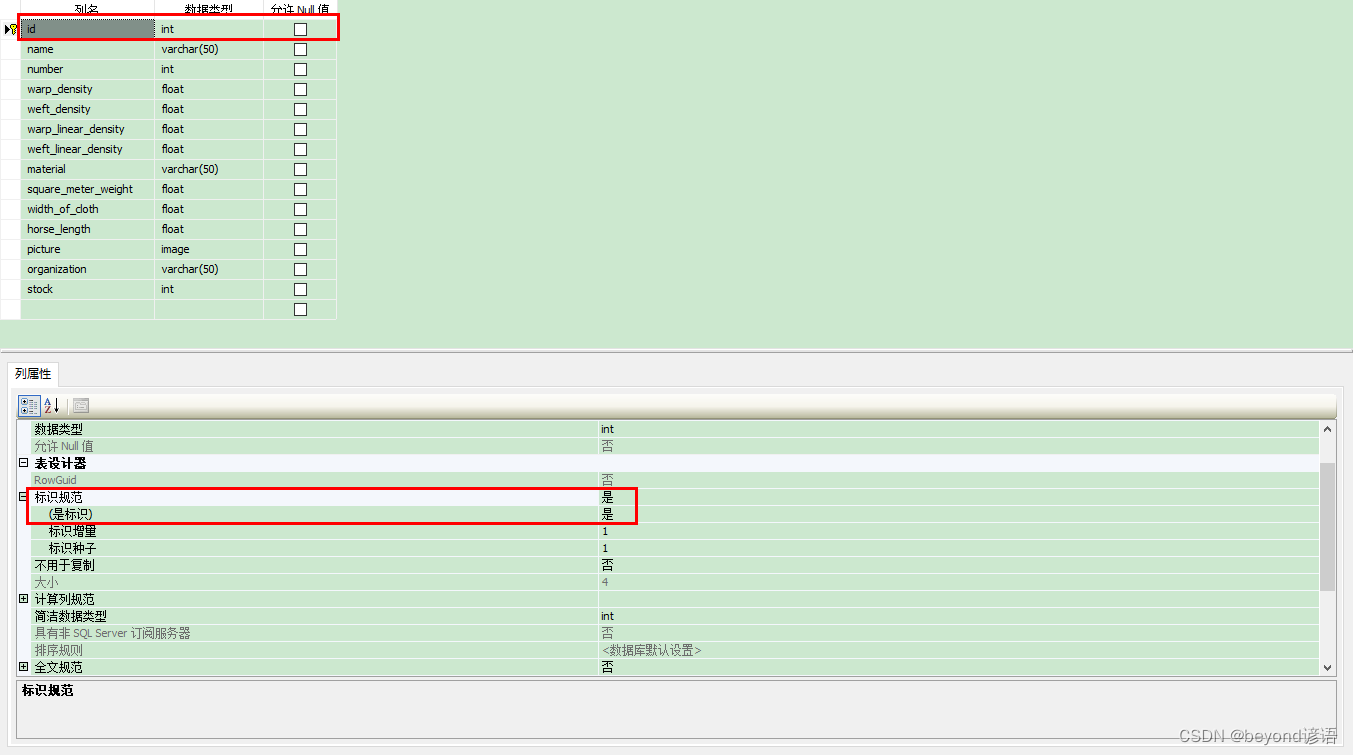

初始数据库信息
二、页面
admin_undercarriage
三、代码实现
admin_undercarriage
using System;
using System.IO;
using System.Data;
using System.Drawing;
using System.Windows.Forms;
using System.Data.SqlClient;

namespace yy_Textile_fabric_inventory_management_system
{

    public partial class admin_undercarriage : Form
    {

        string str_conn = "server=CY-20190824RMES;Initial Catalog=fiber_yy;User ID=sa;pwd=beyond";

        //string str_conn = "";
        DataSet dsall;
        SqlDataAdapter mDataAdapter;

        public admin_undercarriage()
        {

            InitializeComponent();
            /*connect yy = new connect(); string str = yy.str_conn(); str_conn = str;*/
           // MessageBox.Show(str_conn);
        }

        private void button1_Click(object sender, EventArgs e)
        {

            try
            {

                SqlConnection conn = new SqlConnection(str_conn);
                conn = new SqlConnection(str_conn);
                conn.Open();
                mDataAdapter = new SqlDataAdapter("SELECT name AS '面料名称',number AS '面料品号',warp_density AS '经密度' ,weft_density AS '纬密度',warp_linear_density AS '经纱线密度',weft_linear_density AS '纬纱线密度',material AS '原料成分',square_meter_weight AS '平方米重量',width_of_cloth AS '幅宽',horse_length AS '匹长',organization AS '所用组织',stock AS '库存量' FROM yy_textile", conn);
                dsall = new DataSet();
                mDataAdapter.Fill(dsall, "all_fiber");
                dataGridView1.DataSource = dsall.Tables["all_fiber"];
                conn.Close();
            }
            catch (Exception ex)
            {

                MessageBox.Show(ex.Message);
            }
        }

        private void button2_Click(object sender, EventArgs e)
        {

            try
            {

                string number = textBox1.Text;

                if (number.Length == 0)
                {

                    MessageBox.Show("请输入纺织面料品号");
                }
                else
                {

                    byte[] MyData = new byte[0];
                    string sql = "SELECT stock FROM yy_textile WHERE number='" + number + "'";

                    SqlConnection conn = new SqlConnection(str_conn);
                    SqlCommand cmd = new SqlCommand(sql, conn);
                    conn.Open();
                    string account = cmd.ExecuteScalar().ToString();

                    //MessageBox.Show(account);
                    //int a = int.Parse(account);


                    SqlConnection conn2 = new SqlConnection(str_conn);
                    conn2 = new SqlConnection(str_conn);
                    mDataAdapter = new SqlDataAdapter("SELECT name AS '面料名称',number AS '面料编号',warp_density AS '经密度' ,weft_density AS '纬密度',warp_linear_density AS '经纱线密度',weft_linear_density AS '纬纱线密度',material AS '原料成分',square_meter_weight AS '平方米重量',width_of_cloth AS '幅宽',horse_length AS '匹长',organization AS '所用组织',stock AS '库存量' FROM yy_textile where number='" + number + "'", conn);
                    dsall = new DataSet();
                    mDataAdapter.Fill(dsall, "fiber");
                    dataGridView1.DataSource = dsall.Tables["fiber"];


                    SqlConnection conn1 = new SqlConnection(str_conn);
                    conn1.Open();
                    SqlCommand cmd1 = new SqlCommand();
                    cmd1.Connection = conn1;
                    cmd1.CommandText = "select * from yy_textile where number='" + number + "'";
                    SqlDataReader sdr = cmd1.ExecuteReader();
                    sdr.Read();
                    object o = sdr["picture"];
                    MyData = (byte[])sdr["picture"];//读取第一个图片的位流
                    MemoryStream memoryStream = null;
                    memoryStream = new MemoryStream(MyData);
                    pictureBox1.Image = Image.FromStream(memoryStream);//将图片赋给pictureBox1控件
                    MessageBox.Show("读取成功");
                }

            }
            catch
            {

                MessageBox.Show("读取失败 over");
            }
        }

        private void button3_Click(object sender, EventArgs e)
        {

            string number = textBox1.Text;

            string sql = "delete from yy_textile WHERE number='" + number + "'";
            SqlConnection conn = new SqlConnection(str_conn);
            SqlCommand cmd = new SqlCommand(sql, conn);
            conn.Open();
            int count = cmd.ExecuteNonQuery();
            //MessageBox.Show(count.ToString());

            if (count != 0)
            {

                MessageBox.Show("下架成功");
                textBox1.Text="";
            }
            else
            {

                MessageBox.Show("下架失败");

            }

        }

        private void button4_Click(object sender, EventArgs e)
        {

            new user_mainpage().Show();
            this.Close();
        }
    }
}
四、运行效果
检索功能
根据纺织面料品号查询详细信息
下架
重新检索
1014品号纺织面料已被下架
边栏推荐
- True MySQL interview question (XXII) -- condition screening and grouping screening after table connection
- JS面试题----防抖函数
- Pat class B 1014 C language
- The performance of nonstandard sprintf code in different platforms
- Ant Usage Summary (III): batch packaging apk
- Pyinstaller 打包pyttsx3 出错
- 如何指定pig-register项目日志的输出路径
- Add and multiply two polynomials using linked list
- Pat class B 1019 C language
- Pat class B 1012 C language
猜你喜欢

MDM data cleaning function development description

雷达图canvas

jvm-01.指令重排

Analysis on the problems and causes of digital transformation of manufacturing industry

Skill self check | do you know these 6 skills if you want to be a test leader?

Advanced Mathematics (Seventh Edition) Tongji University exercises 1-8 personal solutions

The hierarchyviewer tool cannot find the hierarchyviewer location

iNFTnews | 加密之家从宇宙寄来的明信片,你会收到哪一张?

Real MySQL interview question (23) -- pinduoduo ball game analysis

jvm-06.垃圾回收器
随机推荐
Ant Usage Summary (II): description of related commands
Pyinstaller 打包pyttsx3 出错
Pat class B 1012 C language
Kotlin Android simple activity jump, simple combination of handler and thread
Pat class B 1026 program running time
pyinstaller 打包exe设置图标不显示
How to specify the output path of pig register Project Log
matplotlib savefig多个图片叠加问题
jvm-05.垃圾回收
Pat class B 1024 scientific notation C language
Radar canvas
The difference between SaaS software and traditional software delivery mode
PAT 乙等 1021 个位数统计
Pyqt5 设置窗口左上角图标
Redis cache penetration solution - bloom filter
Advanced Mathematics (Seventh Edition) Tongji University exercises 1-8 personal solutions
The construction of digital factory can be divided into three aspects
[Stanford Jiwang cs144 project] lab2: tcpreceiver
The official artifact of station B has cracked itself!
[open source project] excel export Lua configuration table tool