当前位置:网站首页>Visual studio debugging tips
Visual studio debugging tips
2022-06-23 06:00:00 【linchaolong】
VAssistX
VAssistX Download address :http://pan.baidu.com/s/1eQJ9Ud8
Common shortcut key
Find project files :alt+shift+o
Find all references to a class or variable :alt+shift+f
Display a list of methods / To find the way :alt+m

Skip to method implementation / Method statement :alt+g
Switch to .h file /.cpp file :alt+o
Batch change / Method / Class name :alt+shift+r
Breakpoint debugging
Common shortcut key
F10: Process by process
F11: Sentence by sentence
Conditional breakpoint debugging
At run time, if there are many Layout object , But I just want to interrupt _tag by 76888 A method of an object . At this time, you can set the breakpoint condition to achieve .

Right click the breakpoint and select the condition , Add judgment conditions .


Breakpoint setting hits
If a method is called many times , And I just want to interrupt the n Time or >=n perhaps 2n Time operation . This can be achieved by setting the hit times .

Look at the memory
Open the memory window ( Must break a point ):ctrl+alt+m+1
such as , I'll check one here int Values in the type array , Enter the address , The right choice 4 Byte integer ( because int Occupy 4 Bytes ), A signed display indicates a sign , Columns you can select the number of columns to display .

monitor
Select an expression or a variable , Right click to add monitoring , You can get the execution result of the expression or monitor the change of variables .

You can directly click on the name column , Enter the expression directly , Press enter to see the execution result . You can change the value of a variable or execute a function at run time .
Quick monitoring
Shortcut key :shift + f9
In the Quick Monitor window , You can execute expressions at run time .
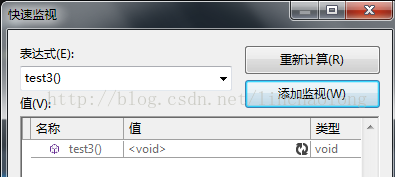
Recalculate : Re execution
Add monitoring : Add to monitoring window , Because it is temporary monitoring in the quick monitoring window , When the window is closed, it is gone .
call Stack
Shortcut key :ctrl + alt +c
In the call stack window, you can see the call hierarchy of the method .
local variable
Shortcut key :ctrl + alt +l
You can see all the current local variables in the local variables window .
Look at assembly code
Shortcut key :ctrl + alt + d
In the Disassembly window, you can see the assembly code corresponding to the source code .
register
ctrl + alt + g
macro
$(RemoteMachine)
Set to “ debugging ” On the property page “ Remote computer ” The value of the property . For more information , See change for C/C++ Debug the project settings of the configuration .
$(References)
A semicolon separated list of references is added to the project .
$(ConfigurationName)
The name of the current project configuration ( for example “Debug”).
$(PlatformName)
The name of the current project platform ( for example “Win32”).
$(Inherit)
Specify in the command line written by the project generation system , The order in which inherited properties appear . By default , The inherited property appears at the end of the current property .
$(NoInherit)
Make any property that will be inherited not inherited . If you want to avoid calculation at the same level , Please use $(StopEvaluating). Use $(NoInherit) This will result in ignoring any occurrences of... For the same attribute $(Inherit).
$(StopEvaluating)
Immediately stop the calculation of macros in the calculation chain . Appear in the $(StopEvaluating) Any subsequent value will not appear in the calculated value of the macro . If $(StopEvaluating) stay $(Inherit) Before , The inherited value of the current position in the calculation chain will not be connected to the macro value .$(StopEvaluating) yes $(NoInherit) Feature superset .
$(ParentName)
The name of the item that contains this item . The name will be the parent folder name or the project name .
$(RootNameSpace)
Contains the namespace of the application ( If there is ).
$(IntDir)
The directory path specified for the intermediate file relative to the project directory . It translates into “ Intermediate Directory ” The value of the property .
$(OutDir)
The path to the output file directory , Relative to the project directory . This resolves to “ The output directory ” The value of the property .
$(DevEnvDir)
Visual Studio .NET Installation directory ( Definition form : Driver + route ); Including backslashes at the end “\”.
$(InputDir)
Enter the directory of the file ( Definition form : Driver + route ); Including backslashes at the end “\”. If the item is input , Then this macro is equivalent to $(ProjectDir).
$(InputPath)
Enter the absolute pathname of the file ( Definition form : Driver + route + Basic name + File extension ). If the item is input , Then this macro is equivalent to $(ProjectPath).
$(InputName)
Enter the basic name of the file . If the item is input , Then this macro is equivalent to $(ProjectName).
$(InputFileName)
Enter the file name of the file ( Defined as the base name + File extension ). If the item is input , Then this macro is equivalent to $(ProjectFileName).
$(InputExt)
Enter the file extension of the file . It includes... Before the file extension “.”. If the item is input , Then this macro is equivalent to $(ProjectExt).
$(ProjectDir)
Project directory ( Definition form : Driver + route ); Including backslashes at the end “\”.
$(ProjectPath)
The absolute pathname of the project ( Definition form : Driver + route + Basic name + File extension ).
$(ProjectName)
The basic name of the project .
$(ProjectFileName)
The file name of the project ( Defined as the base name + File extension ).
$(ProjectExt)
The file extension of the project . It includes... Before the file extension “.”.
$(SolutionDir)
Directory of solutions ( Definition form : Driver + route ); Including backslashes at the end “\”.
$(SolutionPath)
The absolute pathname of the solution ( Definition form : Driver + route + Basic name + File extension ).
$(SolutionName)
The basic name of the solution .
$(SolutionFileName)
File name of the solution ( Defined as the base name + File extension ).
$(SolutionExt)
File extension of the solution . It includes... Before the file extension “.”.
$(TargetDir)
The directory of the generated main output file ( Definition form : Driver + route ); Including backslashes at the end “\”.
$(TargetPath)
Absolute pathname of the generated main output file ( Definition form : Driver + route + Basic name + File extension ).
$(TargetName)
The base name of the generated main output file .
$(TargetFileName)
The file name of the generated main output file ( Defined as the base name + File extension ).
$(TargetExt)
The file extension of the generated main output file . It includes... Before the file extension “.”.
$(VSInstallDir)
install Visual Studio .NET The catalog of .
$(VCInstallDir)
install Visual C++ .NET The catalog of .
$(FrameworkDir)
install .NET Framework The catalog of .
$(FrameworkVersion)
Visual Studio The use of .NET Framework edition . And $(FrameworkDir) Combination , Namely Visual Studio The use of .NET Framework The full path of the version .
$(FrameworkSDKDir)
install .NET Framework SDK The catalog of ..NET Framework SDK Can be used as Visual Studio .NET Part of the installation , It can also be installed separately .
$(WebDeployPath)
from Web The relative path from the deployment root to where the project output belongs . Return and RelativePath The same value .
$(WebDeployRoot)
Point to <localhost> Absolute path of location . for example ,c:\inetpub\wwwroot.
$(SafeParentName)
The name of the immediate parent of a valid name format . for example , Form is .resx The parent of the file .
$(SafeInputName)
The name of the file as a valid class name , But not including the file extension .
$(SafeRootNamespace)
The project wizard will add the namespace name of the code . This namespace name will only be included in valid C++ Characters allowed in identifier .
$(FxCopDir)
fxcop.cmd Path to file .fxcop.cmd The file is not all Visual C++ Version installed with .
source :http://www.cnblogs.com/lidabo/archive/2012/05/29/2524170.html
边栏推荐
- True MySQL interview question (24) -- row column exchange
- Oracle exception
- Pat class B 1020 Moon Cake
- PAT 乙等 1019 C语言
- True MySQL interview question (21) - Finance - overdue loan
- exe闪退的原因查找方法
- Excel sheet column number for leetcode topic resolution
- 数字藏品市场才刚刚开始
- 数字藏品到底有什么魔力?目前有哪些靠谱的团队在开发
- Redis cache penetration solution - bloom filter
猜你喜欢

Three most advanced certifications, two innovative technologies and two outstanding cases, Alibaba cloud appeared at the cloud native industry conference
Wireshark TS | video app cannot play
Arctime makes Chinese and English subtitle video

jvm-01. Instruction rearrangement

Data migration from dolphin scheduler 1.2.1 to dolphin scheduler 2.0.5 and data test records after migration

Centos7部署radius服务-freeradius-3.0.13-15.el7集成mysql

技能自检 | 想当测试Leader,这6项技能你会吗?

数字藏品市场才刚刚开始

Opportunities and challenges of digital collections from the perspective of technology development team
Visual Studio调试技巧
随机推荐
TCP/IP 详解(第 2 版) 笔记 / 3 链路层 / 3.4 网桥与交换机
Dolphin scheduler dolphin scheduling upgrade code transformation -upgradedolphin scheduler
matplotlib savefig多个图片叠加问题
Pat class B 1014 C language
[OWT] OWT client native P2P E2E test vs2017 build 6: modify script automatic generation vs Project
Behind the hot digital collections, a strong technical team is needed to support the northern technical team
The difference between SaaS software and traditional software delivery mode
iNFTnews | 加密之家从宇宙寄来的明信片,你会收到哪一张?
金融科技之高效办公(一):自动生成信托计划说明书
PAT 乙等 1012 C语言
APP SHA1获取程序 百度地图 高德地图获取SHA1值的简单程序
密码学系列之:PKI的证书格式表示X.509
Excel sheet column title for leetcode Title Resolution
The construction of digital factory can be divided into three aspects
A bit of knowledge - folding forging and Damascus steel
Pat class B 1015 C language
Analysis on the problems and causes of digital transformation of manufacturing industry
node中操作mongoDB
技术开发团队视角看到的数字藏品机遇与挑战
PAT 乙等 1009 C语言