当前位置:网站首页>Custom tags - JSP tag enhancements
Custom tags - JSP tag enhancements
2022-06-23 08:57:00 【An Li Jiu Ge】
Catalog
Two 、 Custom drop-down box labels
3、 ... and 、 Custom check box labels
Preface
Last time we shared custom tags --jsp Label Foundation , Today's sharing is about custom tags ——jsp Label enhancements .
One 、 Customize foreach label
1、 Define helper classes ForeachTag
analysis foreach Attributes required for the tag :1. items 2.var
package com.zhw.tag;

import java.util.Iterator;
import java.util.List;

import javax.servlet.jsp.JspException;
import javax.servlet.jsp.tagext.BodyTagSupport;

public class ForeachTag extends BodyTagSupport{
	private List<Object> items;
	private String var;
	public List<Object> getItems() {
		return items;
	}
	public void setItems(List<Object> items) {
		this.items = items;
	}
	public String getVar() {
		return var;
	}
	public void setVar(String var) {
		this.var = var;
	}

	@Override
	public int doStartTag() throws JspException {
		Iterator<Object> it = items.iterator();
		pageContext.setAttribute(var, it.next());
		pageContext.setAttribute("it", it);
		return EVAL_BODY_INCLUDE;
	}

	@Override
	public int doAfterBody() throws JspException {
		Iterator<Object> it = (Iterator<Object>) pageContext.getAttribute("it");
		if(it.hasNext()) {
			pageContext.setAttribute(var, it.next());
			pageContext.setAttribute("it", it);
			return EVAL_BODY_AGAIN;
		}else {
			return EVAL_PAGE;
		}
	}
}
doStartTag():
@Override
	public int doStartTag() throws JspException {
		Iterator<Object> it = items.iterator();
		pageContext.setAttribute(var, it.next());
		pageContext.setAttribute("it", it);
		return EVAL_BODY_INCLUDE;
	}
Because we are going to traverse the data , So we need to output the values in the set one by one , Then assign values one by one . Here we use iterator() That is, iterators . If there is a value in the iterator , Let's assign the value to var, That is, the value of traversal output defined by me . Be careful : Here we can not directly in dostartTag Method to assign the current set , because dostartTag The method is just the beginning , It cannot directly handle the label body . So next we need to use the value of the iterator pageContext Store it , stay doAfterBody Method to be used
doAfterBody():
@Override
	public int doAfterBody() throws JspException {
		Iterator<Object> it = (Iterator<Object>) pageContext.getAttribute("it");
		if(it.hasNext()) {
			pageContext.setAttribute(var, it.next());
			pageContext.setAttribute("it", it);
			return EVAL_BODY_AGAIN;
		}else {
			return EVAL_PAGE;
		}
	}
stay doAfterBody Method, we first need to get our stored iterator , Then you can start to determine whether there is still data in the iterator . If there's data , Just assign the data to var in , If not, end
Next into tld Compilation of documents .
2、 Definition tld file
<?xml version="1.0" encoding="UTF-8"?>
<taglib xmlns="http://java.sun.com/xml/ns/j2ee"
    xmlns:xsi="http://www.w3.org/2001/XMLSchema-instance"
    xsi:schemaLocation="http://java.sun.com/xml/ns/j2ee http://java.sun.com/xml/ns/j2ee/web-jsptaglibrary_2_0.xsd"
    version="2.0">

  <description>JSTL 1.1 core library</description>
  <display-name>JSTL core</display-name>
  <tlib-version>1.1</tlib-version>
  <short-name>z</short-name>
  <uri>http://jsp.zhwLouis</uri>

  <validator>
    <validator-class>
        org.apache.taglibs.standard.tlv.JstlCoreTLV
    </validator-class>
  </validator>

 <tag>
        <name>foreach1</name>
        <tag-class>com.zhw.tag.ForeachTag</tag-class>
        <body-content>JSP</body-content>
        <attribute>
            <!-- Identifies where the collection traversal is the pointer , Point to the current traversal object -->
            <name>items</name>
            <required>true</required>
            <rtexprvalue>true</rtexprvalue>
        </attribute>
        <attribute>
            <!-- Identifies where the collection traversal is the pointer , Point to the current traversal object -->
            <name>var</name>
            <required>true</required>
            <rtexprvalue>false</rtexprvalue>
        </attribute>
    </tag>


</taglib>
3、 Use custom foreach label
<%@page import="com.zhw.tag.Teacher"%>
<%@page import="java.util.ArrayList"%>
<%@page import="java.util.List"%>
<%@ page language="java" contentType="text/html; charset=UTF-8"
    pageEncoding="UTF-8"%>
    <%@taglib prefix="z" uri="http://jsp.zhwLouis" %>
    <%@ taglib prefix="c" uri="http://java.sun.com/jsp/jstl/core"%>
<!DOCTYPE html PUBLIC "-//W3C//DTD HTML 4.01 Transitional//EN" "http://www.w3.org/TR/html4/loose.dtd">
<html>
<head>
<meta http-equiv="Content-Type" content="text/html; charset=UTF-8">
<title>Insert title here</title>
</head>
<body>
	<%
		List<Teacher> t = new ArrayList<>();
		t.add(new Teacher(1," Zhang San "));
		t.add(new Teacher(2," Li Si "));
		t.add(new Teacher(3," Wang Wu "));
		t.add(new Teacher(4," Zhao Liu "));
		request.setAttribute("t", t);
	%>
	<z:foreach1 items="${t }" var="t">
		 Hello, I am  ${t.tname }
	</z:foreach1>
</body>
</html>
The operation results are as follows :

Two 、 Custom drop-down box labels
1、 Define helper classes SelectTag
analysis : Use select The tag is definitely a drop-down button , In the down button, we can set the style , You can set id, You can set name attribute , You can also set the default selected value . So these are our definitions select What needs to be considered in the label .
1、 Background to traverse -------- data source --------items
2、 An object attribute is required to represent the display content corresponding to the drop-down box ---------textVal
3、 An object attribute is required to represent the corresponding... Of the drop-down box Value value ---------textKey
4、 Default header options --------headerTextVal
5、 Default header value ---------headerTextKey
6、 Values stored in data , It is convenient for data echo -----------selectedVal
7、id
8、name
9、cssStyle
package com.zhw.tag;

import java.lang.reflect.Field;
import java.util.ArrayList;
import java.util.List;

import javax.servlet.jsp.JspException;
import javax.servlet.jsp.JspWriter;
import javax.servlet.jsp.tagext.BodyTagSupport;

import org.apache.commons.beanutils.PropertyUtils;

public class SelectTag extends BodyTagSupport{
	private String id;
	private String name;
	private List<Object> items = new ArrayList<>();
	private String textKey;
	private String textVal;
	private String headerTextKey;
	private String headerTextVal;
	private String selectedVal;

	@Override
	public int doStartTag() throws JspException {
		JspWriter out = pageContext.getOut();
		try {
			out.print(toHTML());
		} catch (Exception e) {
			e.printStackTrace();
		}
		return SKIP_BODY;
	}

	private String toHTML() throws Exception {
		StringBuffer sb = new StringBuffer();
		sb.append("<select id='"+id+"' name='"+name+"'>");
		if(headerTextVal != null && !"".equals(headerTextVal)) {
			sb.append("<option value='"+headerTextKey+"'>"+headerTextVal+"</option>");
		}
		if (items.size() > 0) {
			for (Object obj : items) {
				Field f = obj.getClass().getDeclaredField(textKey);
				f.setAccessible(true);
				if(selectedVal != null && !"".equals(selectedVal) && selectedVal.equals(f.get(obj))) {
					sb.append("<option selected value='"+f.get(obj)+"'>"+PropertyUtils.getProperty(obj, textVal)+"</option>");
				}else {
					sb.append("<option value='"+f.get(obj)+"'>"+PropertyUtils.getProperty(obj, textVal)+"</option>");

				}

			}
		}
		sb.append("</select>");
		return sb.toString();
	}

	public String getId() {
		return id;
	}
	public void setId(String id) {
		this.id = id;
	}
	public String getName() {
		return name;
	}
	public void setName(String name) {
		this.name = name;
	}
	public List<Object> getItems() {
		return items;
	}
	public void setItems(List<Object> items) {
		this.items = items;
	}
	public String getTextKey() {
		return textKey;
	}
	public void setTextKey(String textKey) {
		this.textKey = textKey;
	}
	public String getTextVal() {
		return textVal;
	}
	public void setTextVal(String textVal) {
		this.textVal = textVal;
	}
	public String getHeaderTextKey() {
		return headerTextKey;
	}
	public void setHeaderTextKey(String headerTextKey) {
		this.headerTextKey = headerTextKey;
	}
	public String getHeaderTextVal() {
		return headerTextVal;
	}
	public void setHeaderTextVal(String headerTextVal) {
		this.headerTextVal = headerTextVal;
	}
	public String getSelectedVal() {
		return selectedVal;
	}
	public void setSelectedVal(String selectedVal) {
		this.selectedVal = selectedVal;
	}


}
2、 Definition tld file
<?xml version="1.0" encoding="UTF-8"?>
<taglib xmlns="http://java.sun.com/xml/ns/j2ee"
    xmlns:xsi="http://www.w3.org/2001/XMLSchema-instance"
    xsi:schemaLocation="http://java.sun.com/xml/ns/j2ee http://java.sun.com/xml/ns/j2ee/web-jsptaglibrary_2_0.xsd"
    version="2.0">

  <description>JSTL 1.1 core library</description>
  <display-name>JSTL core</display-name>
  <tlib-version>1.1</tlib-version>
  <short-name>z</short-name>
  <uri>http://jsp.zhwLouis</uri>

  <validator>
    <validator-class>
        org.apache.taglibs.standard.tlv.JstlCoreTLV
    </validator-class>
  </validator>

 <tag>
        <name>foreach1</name>
        <tag-class>com.zhw.tag.ForeachTag</tag-class>
        <body-content>JSP</body-content>
        <attribute>
            <!-- Identifies where the collection traversal is the pointer , Point to the current traversal object -->
            <name>items</name>
            <required>true</required>
            <rtexprvalue>true</rtexprvalue>
        </attribute>
        <attribute>
            <!-- Identifies where the collection traversal is the pointer , Point to the current traversal object -->
            <name>var</name>
            <required>true</required>
            <rtexprvalue>false</rtexprvalue>
        </attribute>
    </tag>


 <tag>
        <name>select</name>
        <tag-class>com.zhw.tag.SelectTag</tag-class>
        <body-content>JSP</body-content>
        <attribute>
            <name>id</name>
            <required>false</required>
            <rtexprvalue>true</rtexprvalue>
        </attribute>
        <attribute>
            <name>name</name>
            <required>false</required>
            <rtexprvalue>false</rtexprvalue>
        </attribute>
        <!-- data source -->
        <attribute>
            <name>items</name>
            <required>true</required>
            <rtexprvalue>true</rtexprvalue>
        </attribute>
        <attribute>
            <name>textKey</name>
            <required>true</required>
            <rtexprvalue>false</rtexprvalue>
        </attribute>
        <attribute>
            <name>textVal</name>
            <required>true</required>
            <rtexprvalue>false</rtexprvalue>
        </attribute>
        <!-- Not data loaded from the database , The first option of the drop-down box value value -->
        <attribute>
            <name>headerTextKey</name>
            <required>false</required>
            <rtexprvalue>false</rtexprvalue>
        </attribute>
        <!-- Not data loaded from the database , The display value of the first option in the drop-down box -->
        <attribute>
            <name>headerTextVal</name>
            <required>false</required>
            <rtexprvalue>false</rtexprvalue>
        </attribute>
        <attribute>
            <name>selectedVal</name>
            <required>false</required>
            <rtexprvalue>true</rtexprvalue>
        </attribute>
    </tag>
</taglib>
3、 Use
<%@page import="java.util.List"%>
<%@page import="com.zhw.tag.Teacher"%>
<%@page import="java.util.ArrayList"%>
<%@ page language="java" contentType="text/html; charset=UTF-8"
    pageEncoding="UTF-8"%>
    <%@taglib prefix="z" uri="http://jsp.zhwLouis" %>
    <%@ taglib prefix="c" uri="http://java.sun.com/jsp/jstl/core"%>
<!DOCTYPE html PUBLIC "-//W3C//DTD HTML 4.01 Transitional//EN" "http://www.w3.org/TR/html4/loose.dtd">
<html>
<head>
<meta http-equiv="Content-Type" content="text/html; charset=UTF-8">
<title>Insert title here</title>
</head>
<body>
	<%
		List<Teacher> list = new ArrayList<>();
		list.add(new Teacher("t1"," Zhang San "));
		list.add(new Teacher("t2"," Li Si "));
		list.add(new Teacher("t3"," Wang Wu "));

		request.setAttribute("list", list);
	%>
	<z:foreach1 items="${list}" var="t">
		 Hello, I am  ${t.tname }<br>
	</z:foreach1>
	<z:select selectedVal="t1" id="mySel" headerTextKey="-1" headerTextVal="=== Please select ===" items="${list }" textKey="tid" textVal="tname"></z:select>
</body>
</html>
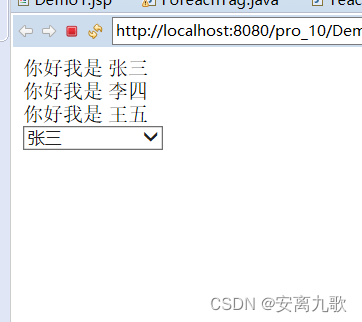
The operation results are as follows :

3、 ... and 、 Custom check box labels
1、 Define helper classes
Ideas and select It's about the same
package com.zhw.tag;

import java.lang.reflect.Field;
import java.util.List;

import javax.servlet.jsp.JspException;
import javax.servlet.jsp.JspWriter;
import javax.servlet.jsp.tagext.BodyTagSupport;

import org.apache.commons.beanutils.PropertyUtils;

public class CheckTag extends BodyTagSupport{
//	<input type="checkbox" value="">
	private String id;
	private String name;
	private String textKey;
	private String textVal;
	private List<Object> items;
	private String selectedVal;

	@Override
	public int doStartTag() throws JspException {
		JspWriter out = pageContext.getOut();
		try {
			out.print(toHTML());
		} catch (Exception e) {
			e.printStackTrace();
		}
		return SKIP_BODY;
	}


	private String toHTML() throws Exception {
		StringBuffer sb = new StringBuffer();
		if (items.size() > 0) {
			for (Object obj : items) {
				Field f = obj.getClass().getDeclaredField(textKey);
				f.setAccessible(true);
				if(selectedVal != null && !"".equals(selectedVal) && selectedVal.contains((CharSequence) f.get(obj))) {
					sb.append("<input type='checkbox' checked value='"+f.get(obj)+"'>"+PropertyUtils.getProperty(obj, textVal)+"");
				}else {
					sb.append("<input type='checkbox' value='"+f.get(obj)+"'>"+PropertyUtils.getProperty(obj, textVal)+"");
				}

			}
		}
		return sb.toString();
	}


	public String getTextKey() {
		return textKey;
	}


	public void setTextKey(String textKey) {
		this.textKey = textKey;
	}


	public String getTextVal() {
		return textVal;
	}


	public void setTextVal(String textVal) {
		this.textVal = textVal;
	}


	public String getId() {
		return id;
	}
	public void setId(String id) {
		this.id = id;
	}
	public String getName() {
		return name;
	}
	public void setName(String name) {
		this.name = name;
	}
	public List<Object> getItems() {
		return items;
	}
	public void setItems(List<Object> items) {
		this.items = items;
	}
	public String getSelectedVal() {
		return selectedVal;
	}
	public void setSelectedVal(String selectedVal) {
		this.selectedVal = selectedVal;
	}


}
2、 Definition tld file
<?xml version="1.0" encoding="UTF-8"?>
<taglib xmlns="http://java.sun.com/xml/ns/j2ee"
    xmlns:xsi="http://www.w3.org/2001/XMLSchema-instance"
    xsi:schemaLocation="http://java.sun.com/xml/ns/j2ee http://java.sun.com/xml/ns/j2ee/web-jsptaglibrary_2_0.xsd"
    version="2.0">

  <description>JSTL 1.1 core library</description>
  <display-name>JSTL core</display-name>
  <tlib-version>1.1</tlib-version>
  <short-name>z</short-name>
  <uri>http://jsp.zhwLouis</uri>

  <validator>
    <validator-class>
        org.apache.taglibs.standard.tlv.JstlCoreTLV
    </validator-class>
  </validator>

 <tag>
        <name>foreach1</name>
        <tag-class>com.zhw.tag.ForeachTag</tag-class>
        <body-content>JSP</body-content>
        <attribute>
            <!-- Identifies where the collection traversal is the pointer , Point to the current traversal object -->
            <name>items</name>
            <required>true</required>
            <rtexprvalue>true</rtexprvalue>
        </attribute>
        <attribute>
            <!-- Identifies where the collection traversal is the pointer , Point to the current traversal object -->
            <name>var</name>
            <required>true</required>
            <rtexprvalue>false</rtexprvalue>
        </attribute>
    </tag>


 <tag>
        <name>select</name>
        <tag-class>com.zhw.tag.SelectTag</tag-class>
        <body-content>JSP</body-content>
        <attribute>
            <name>id</name>
            <required>false</required>
            <rtexprvalue>true</rtexprvalue>
        </attribute>
        <attribute>
            <name>name</name>
            <required>false</required>
            <rtexprvalue>false</rtexprvalue>
        </attribute>
        <!-- data source -->
        <attribute>
            <name>items</name>
            <required>true</required>
            <rtexprvalue>true</rtexprvalue>
        </attribute>
        <attribute>
            <name>textKey</name>
            <required>true</required>
            <rtexprvalue>false</rtexprvalue>
        </attribute>
        <attribute>
            <name>textVal</name>
            <required>true</required>
            <rtexprvalue>false</rtexprvalue>
        </attribute>
        <!-- Not data loaded from the database , The first option of the drop-down box value value -->
        <attribute>
            <name>headerTextKey</name>
            <required>false</required>
            <rtexprvalue>false</rtexprvalue>
        </attribute>
        <!-- Not data loaded from the database , The display value of the first option in the drop-down box -->
        <attribute>
            <name>headerTextVal</name>
            <required>false</required>
            <rtexprvalue>false</rtexprvalue>
        </attribute>
        <attribute>
            <name>selectedVal</name>
            <required>false</required>
            <rtexprvalue>true</rtexprvalue>
        </attribute>
    </tag>


    <tag>
    	<name>check</name>
        <tag-class>com.zhw.tag.CheckTag</tag-class>
        <body-content>JSP</body-content>
        <attribute>
            <name>id</name>
            <required>false</required>
            <rtexprvalue>true</rtexprvalue>
        </attribute>
        <attribute>
            <name>name</name>
            <required>false</required>
            <rtexprvalue>false</rtexprvalue>
        </attribute>
        <attribute>
            <name>items</name>
            <required>true</required>
            <rtexprvalue>true</rtexprvalue>
        </attribute>
        <attribute>
            <name>textKey</name>
            <required>true</required>
            <rtexprvalue>false</rtexprvalue>
        </attribute>
        <attribute>
            <name>textVal</name>
            <required>true</required>
            <rtexprvalue>false</rtexprvalue>
        </attribute>
        <attribute>
       		<name>selectedVal</name>
            <required>false</required>
            <rtexprvalue>true</rtexprvalue>
        </attribute>
    </tag>
</taglib>
3、 Use
<%@page import="com.zhw.tag.Hobby"%>
<%@page import="java.util.List"%>
<%@page import="com.zhw.tag.Teacher"%>
<%@page import="java.util.ArrayList"%>
<%@ page language="java" contentType="text/html; charset=UTF-8"
    pageEncoding="UTF-8"%>
    <%@taglib prefix="z" uri="http://jsp.zhwLouis" %>
    <%@ taglib prefix="c" uri="http://java.sun.com/jsp/jstl/core"%>
<!DOCTYPE html PUBLIC "-//W3C//DTD HTML 4.01 Transitional//EN" "http://www.w3.org/TR/html4/loose.dtd">
<html>
<head>
<meta http-equiv="Content-Type" content="text/html; charset=UTF-8">
<title>Insert title here</title>
</head>
<body>
	<%
		List<Teacher> list = new ArrayList<>();
		list.add(new Teacher("t1"," Zhang San "));
		list.add(new Teacher("t2"," Li Si "));
		list.add(new Teacher("t3"," Wang Wu "));

		List<Hobby> ls = new ArrayList<>();
		ls.add(new Hobby("lq"," Basketball "));
		ls.add(new Hobby("zq"," football "));
		ls.add(new Hobby("ppq"," Table Tennis "));

		request.setAttribute("list", list);
		request.setAttribute("ls", ls);
	%>
	<input type="checkbox" value="">
	<z:foreach1 items="${list}" var="t">
		 Hello, I am  ${t.tname }<br>
	</z:foreach1>
	<z:select selectedVal="t1" id="mySel" headerTextKey="-1" headerTextVal="=== Please select ===" items="${list }" textKey="tid" textVal="tname"></z:select>
	<z:check selectedVal="lq" textVal="hname" items="${ls }" textKey="hid"></z:check>
</body>
</html>
The operation results are as follows :

summary
The content shared this time is the custom tag library enhancement , I hope it can help you , General page for next issue preview .
I'm nine songs , A programmer who likes programming .
If there is any mistake, please correct it , Thank you very much! .
边栏推荐
- 523. Continuous Subarray Sum
- The results of CDN node and source station are inconsistent
- Monitor the cache update of Eureka client
- Only 187 bytes of desktop dream code
- In June, China database industry analysis report was released! Smart wind, train storage and regeneration
- 3. Caller 服务调用 - dapr
- Third party payment in the second half: scuffle to symbiosis
- Lighthouse cloud desktop experience
- 自定义标签——jsp标签基础
- Unique paths for leetcode topic resolution
猜你喜欢

'coach, I want to play basketball!'—— AI Learning Series booklet for system students

Keng dad's "dedication blessing": red packet technology explosion in Alipay Spring Festival Gala

173. Binary Search Tree Iterator

Flink error --caused by: org apache. calcite. sql. parser. SqlParseException: Encountered “time“

297. Serialize and Deserialize Binary Tree
Monitor the cache update of Eureka client

Le rapport d'analyse de l'industrie chinoise des bases de données a été publié en juin. Le vent intelligent se lève, les colonnes se régénèrent

【学习资源】理解数学和热爱数学

Point cloud library PCL from introduction to mastery Chapter 10

Install a WGet for your win10
随机推荐
Vue3表单页面利用keep-alive缓存数据的一种思路
Assembly (receive several n-digit decimal values (0~65535) from the keyboard and display their sum in different base numbers.)
Mqtt+flink to subscribe and publish real-time messages
Unity grid programming 08
Can portals be the next decentraland?
Why use growth neural gas network (GNG)?
Spirit matrix for leetcode topic analysis
Geoserver添加mongoDB数据源
如何在 FlowUs、Notion 等笔记软件中使用「番茄工作法」?
TDesign update weekly report (the first week of January 2022)
通用分页(1)
6、 Web Architecture Design
Paper reading [quovadis, action recognition? A new model and the dynamics dataset]
523. Continuous Subarray Sum
【活动报名】SOFAStack × CSDN 联合举办开源系列 Meetup ,6 月 24 日火热开启
Balls and cows of leetcode topic analysis
6-shining laser application of calayer
"Coach, I want to play basketball" -- AI Learning Series booklet for students who are making systems
Dongyuhui, the "square face teacher", responded that the popularity was declining: do a good job of live broadcasting of agricultural products to benefit farmers and consider supporting education
[cloud computing] GFS ideological advantages and architecture