当前位置:网站首页>在kubernetes中部署kubersphere
在kubernetes中部署kubersphere
2022-06-23 06:54:00 【江湖有缘】
活动地址:毕业季·进击的技术er
在kubernetes中部署kubersphere
一、检查本地kubernetes环境
[[email protected]-master ~]# kubectl get nodes -owide
NAME         STATUS   ROLES                  AGE   VERSION   INTERNAL-IP     EXTERNAL-IP   OS-IMAGE                KERNEL-VERSION          CONTAINER-RUNTIME
k8s-master   Ready    control-plane,master   16h   v1.23.1   192.168.3.201   <none>        CentOS Linux 7 (Core)   3.10.0-957.el7.x86_64   containerd://1.6.6
k8s-node01   Ready    <none>                 16h   v1.23.1   192.168.3.202   <none>        CentOS Linux 7 (Core)   3.10.0-957.el7.x86_64   containerd://1.6.6
k8s-node02   Ready    <none>                 16h   v1.23.1   192.168.3.203   <none>        CentOS Linux 7 (Core)   3.10.0-957.el7.x86_64   containerd://1.6.6
二、安装nfs
1.安装nfs包
yum install -y nfs-utils
2.创建共享目录
mkdir -p /nfs/data
3.配置共享目录
echo "/nfs/data/ *(insecure,rw,sync,no_root_squash)" > /etc/exports
4.启动相关服务
systemctl enable rpcbind
systemctl enable nfs-server
systemctl start rpcbind
5.使配置生效
exportfs -r
6.查看nfs
[[email protected]-master nfs]# exportfs
/nfs/data     	<world>
7.两台从节点挂载nfs
①从节点检查nfs
[[email protected]-node01 ~]# showmount -e 192.168.3.201
Export list for 192.168.3.201:
/nfs/data *
②创建挂载目录
mkdir -p /nfs/data
③挂载nfs
mount 192.168.3.201:/nfs/data /nfs/data
④检查nfs挂载情况
[[email protected]-node01 ~]# df -hT |grep nfs
192.168.3.201:/nfs/data nfs4       18G   12G  6.3G  65% /nfs/data
8.showmount命令错误故障处理
service rpcbind stop
service nfs stop
service rpcbind start
service nfs start
三、配置默认存储
1.编辑sc.yaml文件
[[email protected]-master kubersphere]# cat sc.yaml
apiVersion: storage.k8s.io/v1
kind: StorageClass
metadata:
 name: nfs-storage
 annotations:
   storageclass.kubernetes.io/is-default-class: "true"
provisioner: k8s-sigs.io/nfs-subdir-external-provisioner
parameters:
 archiveOnDelete: "true"  ## 删除pv的时候,pv的内容是否要备份

---
apiVersion: apps/v1
kind: Deployment
metadata:
 name: nfs-client-provisioner
 labels:
   app: nfs-client-provisioner
 # replace with namespace where provisioner is deployed
 namespace: default
spec:
 replicas: 1
 strategy:
   type: Recreate
 selector:
   matchLabels:
     app: nfs-client-provisioner
 template:
   metadata:
     labels:
       app: nfs-client-provisioner
   spec:
     serviceAccountName: nfs-client-provisioner
     containers:
       - name: nfs-client-provisioner
         image: registry.cn-hangzhou.aliyuncs.com/lfy_k8s_images/nfs-subdir-external-provisioner:v4.0.2
         # resources:
         # limits:
         # cpu: 10m
         # requests:
         # cpu: 10m
         volumeMounts:
           - name: nfs-client-root
             mountPath: /persistentvolumes
         env:
           - name: PROVISIONER_NAME
             value: k8s-sigs.io/nfs-subdir-external-provisioner
           - name: NFS_SERVER
             value: 192.168.3.201 ## 指定自己nfs服务器地址
           - name: NFS_PATH
             value: /nfs/data  ## nfs服务器共享的目录
     volumes:
       - name: nfs-client-root
         nfs:
           server: 192.168.3.201
           path: /nfs/data
---
apiVersion: v1
kind: ServiceAccount
metadata:
 name: nfs-client-provisioner
 # replace with namespace where provisioner is deployed
 namespace: default
---
kind: ClusterRole
apiVersion: rbac.authorization.k8s.io/v1
metadata:
 name: nfs-client-provisioner-runner
rules:
 - apiGroups: [""]
   resources: ["nodes"]
   verbs: ["get", "list", "watch"]
 - apiGroups: [""]
   resources: ["persistentvolumes"]
   verbs: ["get", "list", "watch", "create", "delete"]
 - apiGroups: [""]
   resources: ["persistentvolumeclaims"]
   verbs: ["get", "list", "watch", "update"]
 - apiGroups: ["storage.k8s.io"]
   resources: ["storageclasses"]
   verbs: ["get", "list", "watch"]
 - apiGroups: [""]
   resources: ["events"]
   verbs: ["create", "update", "patch"]
---
kind: ClusterRoleBinding
apiVersion: rbac.authorization.k8s.io/v1
metadata:
 name: run-nfs-client-provisioner
subjects:
 - kind: ServiceAccount
   name: nfs-client-provisioner
   # replace with namespace where provisioner is deployed
   namespace: default
roleRef:
 kind: ClusterRole
 name: nfs-client-provisioner-runner
 apiGroup: rbac.authorization.k8s.io
---
kind: Role
apiVersion: rbac.authorization.k8s.io/v1
metadata:
 name: leader-locking-nfs-client-provisioner
 # replace with namespace where provisioner is deployed
 namespace: default
rules:
 - apiGroups: [""]
   resources: ["endpoints"]
   verbs: ["get", "list", "watch", "create", "update", "patch"]
---
kind: RoleBinding
apiVersion: rbac.authorization.k8s.io/v1
metadata:
 name: leader-locking-nfs-client-provisioner
 # replace with namespace where provisioner is deployed
 namespace: default
subjects:
 - kind: ServiceAccount
   name: nfs-client-provisioner
   # replace with namespace where provisioner is deployed
   namespace: default
roleRef:
 kind: Role
 name: leader-locking-nfs-client-provisioner
 apiGroup: rbac.authorization.k8s.io
2.应用sc.yaml
[[email protected]-master kubersphere]# kubectl apply -f sc.yaml
storageclass.storage.k8s.io/nfs-storage created
deployment.apps/nfs-client-provisioner created
serviceaccount/nfs-client-provisioner created
clusterrole.rbac.authorization.k8s.io/nfs-client-provisioner-runner created
clusterrolebinding.rbac.authorization.k8s.io/run-nfs-client-provisioner created
role.rbac.authorization.k8s.io/leader-locking-nfs-client-provisioner created
rolebinding.rbac.authorization.k8s.io/leader-locking-nfs-client-provisioner created
3.查看sc
[[email protected]-master kubersphere]# kubectl get sc
NAME                    PROVISIONER                                   RECLAIMPOLICY   VOLUMEBINDINGMODE   ALLOWVOLUMEEXPANSION   AGE
nfs-storage (default)   k8s-sigs.io/nfs-subdir-external-provisioner   Delete          Immediate           false                  43s
4.测试安装pv
①编写pv.yaml
[[email protected]-master kubersphere]# cat pv.ymal
kind: PersistentVolumeClaim
apiVersion: v1
metadata:
 name: nginx-pvc
spec:
 accessModes:
   - ReadWriteMany
 resources:
   requests:
     storage: 200Mi
②运行pv
[[email protected]-master kubersphere]# kubectl apply -f pv.ymal
persistentvolumeclaim/nginx-pvc created
③查看pvc和pv
[[email protected]-master kubersphere]# kubectl get pv
NAME                                       CAPACITY   ACCESS MODES   RECLAIM POLICY   STATUS   CLAIM               STORAGECLASS   REASON   AGE
pvc-92610d7d-9d70-4a57-bddb-7fffab9a5ee4   200Mi      RWX            Delete           Bound    default/nginx-pvc   nfs-storage             73s
[[email protected]-master kubersphere]# kubectl get pvc
NAME        STATUS   VOLUME                                     CAPACITY   ACCESS MODES   STORAGECLASS   AGE
nginx-pvc   Bound    pvc-92610d7d-9d70-4a57-bddb-7fffab9a5ee4   200Mi      RWX            nfs-storage    78s
四、安装metrics-server组件
1.编辑metrics.yaml文件
apiVersion: v1
kind: ServiceAccount
metadata:
  labels:
    k8s-app: metrics-server
  name: metrics-server
  namespace: kube-system
---
apiVersion: rbac.authorization.k8s.io/v1
kind: ClusterRole
metadata:
  labels:
    k8s-app: metrics-server
    rbac.authorization.k8s.io/aggregate-to-admin: "true"
    rbac.authorization.k8s.io/aggregate-to-edit: "true"
    rbac.authorization.k8s.io/aggregate-to-view: "true"
  name: system:aggregated-metrics-reader
rules:
- apiGroups:
  - metrics.k8s.io
  resources:
  - pods
  - nodes
  verbs:
  - get
  - list
  - watch
---
apiVersion: rbac.authorization.k8s.io/v1
kind: ClusterRole
metadata:
  labels:
    k8s-app: metrics-server
  name: system:metrics-server
rules:
- apiGroups:
  - ""
  resources:
  - pods
  - nodes
  - nodes/stats
  - namespaces
  - configmaps
  verbs:
  - get
  - list
  - watch
---
apiVersion: rbac.authorization.k8s.io/v1
kind: RoleBinding
metadata:
  labels:
    k8s-app: metrics-server
  name: metrics-server-auth-reader
  namespace: kube-system
roleRef:
  apiGroup: rbac.authorization.k8s.io
  kind: Role
  name: extension-apiserver-authentication-reader
subjects:
- kind: ServiceAccount
  name: metrics-server
  namespace: kube-system
---
apiVersion: rbac.authorization.k8s.io/v1
kind: ClusterRoleBinding
metadata:
  labels:
    k8s-app: metrics-server
  name: metrics-server:system:auth-delegator
roleRef:
  apiGroup: rbac.authorization.k8s.io
  kind: ClusterRole
  name: system:auth-delegator
subjects:
- kind: ServiceAccount
  name: metrics-server
  namespace: kube-system
---
apiVersion: rbac.authorization.k8s.io/v1
kind: ClusterRoleBinding
metadata:
  labels:
    k8s-app: metrics-server
  name: system:metrics-server
roleRef:
  apiGroup: rbac.authorization.k8s.io
  kind: ClusterRole
  name: system:metrics-server
subjects:
- kind: ServiceAccount
  name: metrics-server
  namespace: kube-system
---
apiVersion: v1
kind: Service
metadata:
  labels:
    k8s-app: metrics-server
  name: metrics-server
  namespace: kube-system
spec:
  ports:
  - name: https
    port: 443
    protocol: TCP
    targetPort: https
  selector:
    k8s-app: metrics-server
---
apiVersion: apps/v1
kind: Deployment
metadata:
  labels:
    k8s-app: metrics-server
  name: metrics-server
  namespace: kube-system
spec:
  selector:
    matchLabels:
      k8s-app: metrics-server
  strategy:
    rollingUpdate:
      maxUnavailable: 0
  template:
    metadata:
      name: metrics-server
      labels:
        k8s-app: metrics-server
    spec:
      containers:
      - args:
        - --cert-dir=/tmp
        - --secure-port=4443
        - --kubelet-preferred-address-types=InternalIP,ExternalIP,Hostname
        - --kubelet-use-node-status-port
        # 跳过TLS证书验证
        - --kubelet-insecure-tls
        image: jjzz/metrics-server:v0.4.1
        imagePullPolicy: IfNotPresent
        livenessProbe:
          failureThreshold: 3
          httpGet:
            path: /livez
            port: https
            scheme: HTTPS
          periodSeconds: 10
        name: metrics-server
        ports:
        - containerPort: 4443
          name: https
          protocol: TCP
        readinessProbe:
          failureThreshold: 3
          httpGet:
            path: /readyz
            port: https
            scheme: HTTPS
          periodSeconds: 10
        securityContext:
          readOnlyRootFilesystem: true
          runAsNonRoot: true
          runAsUser: 1000
        volumeMounts:
        - mountPath: /tmp
          name: tmp-dir
      nodeSelector:
        kubernetes.io/os: linux
      priorityClassName: system-cluster-critical
      serviceAccountName: metrics-server
      volumes:
      - emptyDir: {
    }
        name: tmp-dir
---
apiVersion: apiregistration.k8s.io/v1
kind: APIService
metadata:
  labels:
    k8s-app: metrics-server
  name: v1beta1.metrics.k8s.io
spec:
  group: metrics.k8s.io
  groupPriorityMinimum: 100
  insecureSkipTLSVerify: true
  service:
    name: metrics-server
    namespace: kube-system
  version: v1beta1
  versionPriority: 100
2.应用metrics.ymal文件
[[email protected]-master kubersphere]# kubectl apply -f metrics.yaml
serviceaccount/metrics-server created
clusterrole.rbac.authorization.k8s.io/system:aggregated-metrics-reader created
clusterrole.rbac.authorization.k8s.io/system:metrics-server created
rolebinding.rbac.authorization.k8s.io/metrics-server-auth-reader created
clusterrolebinding.rbac.authorization.k8s.io/metrics-server:system:auth-delegator created
clusterrolebinding.rbac.authorization.k8s.io/system:metrics-server created
service/metrics-server created
deployment.apps/metrics-server created
apiservice.apiregistration.k8s.io/v1beta1.metrics.k8s.io created
3.查看安装后pod
[[email protected]-master kubersphere]# kubectl get pod -A |grep metric
kube-system   metrics-server-6988f7c646-rt6bz           1/1     Running   0              86s
4.检查安装后效果
[[email protected]-master kubersphere]# kubectl top nodes
NAME         CPU(cores)   CPU%   MEMORY(bytes)   MEMORY%
k8s-master   221m         5%     1360Mi          17%
k8s-node01   72m          1%     767Mi           9%
k8s-node02   66m          1%     778Mi           9%
五、安装KubeSphere
1.下载kubesphere组件
wget https://github.com/kubesphere/ks-installer/releases/download/v3.2.1/kubesphere-installer.yaml

wget https://github.com/kubesphere/ks-installer/releases/download/v3.2.1/cluster-configuration.yaml
2.执行安装——最小化安装
[[email protected]-master kubersphere]# kubectl top nodes^C
[[email protected]-master kubersphere]# kubectl apply -f kubesphere-installer.yaml
customresourcedefinition.apiextensions.k8s.io/clusterconfigurations.installer.kubesphere.io created
namespace/kubesphere-system created
serviceaccount/ks-installer created
clusterrole.rbac.authorization.k8s.io/ks-installer created
clusterrolebinding.rbac.authorization.k8s.io/ks-installer created
deployment.apps/ks-installer created
[[email protected]-master kubersphere]# kubectl apply -f cluster-configuration.yaml
clusterconfiguration.installer.kubesphere.io/ks-installer created
3.查看pod
[[email protected]-master kubersphere]# kubectl get pods -A |grep ks
kubesphere-system   ks-installer-5cd4648bcb-vxrqf             1/1     Running   0             37s
5.查看安装进度
kubectl logs -n kubesphere-system $(kubectl get pod -n kubesphere-system -l app=ks-install -o jsonpath=‘{.items[0].metadata.name}’) -f
**************************************************
Collecting installation results ...
#####################################################
###              Welcome to KubeSphere!           ###
#####################################################

Console: http://192.168.3.201:30880
Account: admin
Password: [email protected]88w0rd

NOTES:
  1. After you log into the console, please check the
     monitoring status of service components in
     "Cluster Management". If any service is not
     ready, please wait patiently until all components
     are up and running.
  2. Please change the default password after login.

#####################################################
https://kubesphere.io 2022-06-22 22:48:32
#####################################################
6.查看全部pod
[[email protected]-master ~]# kubectl get pods -A
NAMESPACE                      NAME                                               READY   STATUS    RESTARTS        AGE
default                        nfs-client-provisioner-779b7f4dfd-nj2fg            1/1     Running   0               9m41s
kube-system                    calico-kube-controllers-6b77fff45-xvnzm            1/1     Running   2 (37m ago)     46h
kube-system                    calico-node-dq9nr                                  1/1     Running   1 (37m ago)     46h
kube-system                    calico-node-fkzh9                                  1/1     Running   2 (37m ago)     46h
kube-system                    calico-node-frd8m                                  1/1     Running   1 (37m ago)     46h
kube-system                    coredns-6d8c4cb4d-f9c28                            1/1     Running   2 (37m ago)     47h
kube-system                    coredns-6d8c4cb4d-xb2qf                            1/1     Running   2 (37m ago)     47h
kube-system                    etcd-k8s-master                                    1/1     Running   2 (37m ago)     47h
kube-system                    kube-apiserver-k8s-master                          1/1     Running   2 (37m ago)     47h
kube-system                    kube-controller-manager-k8s-master                 1/1     Running   2 (37m ago)     47h
kube-system                    kube-proxy-9nkbf                                   1/1     Running   1 (37m ago)     46h
kube-system                    kube-proxy-9wxvr                                   1/1     Running   2 (37m ago)     47h
kube-system                    kube-proxy-nswwv                                   1/1     Running   1 (37m ago)     46h
kube-system                    kube-scheduler-k8s-master                          1/1     Running   2 (37m ago)     47h
kube-system                    metrics-server-6988f7c646-2lxn4                    1/1     Running   0               8m51s
kube-system                    snapshot-controller-0                              1/1     Running   0               6m38s
kubesphere-controls-system     default-http-backend-696d6bf54f-mhdwh              1/1     Running   0               5m42s
kubesphere-controls-system     kubectl-admin-b49cf5585-lg4gw                      1/1     Running   0               2m41s
kubesphere-monitoring-system   alertmanager-main-0                                2/2     Running   0               4m6s
kubesphere-monitoring-system   alertmanager-main-1                                2/2     Running   0               4m5s
kubesphere-monitoring-system   alertmanager-main-2                                2/2     Running   0               4m4s
kubesphere-monitoring-system   kube-state-metrics-796b885647-xhx9t                3/3     Running   0               4m13s
kubesphere-monitoring-system   node-exporter-hlp9k                                2/2     Running   0               4m16s
kubesphere-monitoring-system   node-exporter-w4rg6                                2/2     Running   0               4m16s
kubesphere-monitoring-system   node-exporter-wpqdj                                2/2     Running   0               4m17s
kubesphere-monitoring-system   notification-manager-deployment-7dd45b5b7d-qnd46   2/2     Running   0               74s
kubesphere-monitoring-system   notification-manager-deployment-7dd45b5b7d-w82nf   2/2     Running   0               73s
kubesphere-monitoring-system   notification-manager-operator-8598775b-wgnfg       2/2     Running   0               3m48s
kubesphere-monitoring-system   prometheus-k8s-0                                   2/2     Running   1 (3m11s ago)   4m9s
kubesphere-monitoring-system   prometheus-k8s-1                                   2/2     Running   1 (3m32s ago)   4m8s
kubesphere-monitoring-system   prometheus-operator-756fbd6cb-68pzs                2/2     Running   0               4m18s
kubesphere-system              ks-apiserver-6649dd8546-cklcr                      1/1     Running   0               3m25s
kubesphere-system              ks-console-75b6799bf9-t8t99                        1/1     Running   0               5m42s
kubesphere-system              ks-controller-manager-65b94b5779-7j7cb             1/1     Running   0               3m25s
kubesphere-system              ks-installer-5cd4648bcb-vxrqf                      1/1     Running   0               7m42s
[[email protected]-master ~]#
7.修改cluster-configuration.yaml文件(可选安装组件)
①开启etcd监控
  local_registry: ""        # Add your private registry address if it is needed.
  etcd:
    monitoring: true       # Enable or disable etcd monitoring dashboard installation. You have to create a Secret for etcd before you enable it.
    endpointIps: 192.168.3.201  # etcd cluster EndpointIps. It can be a bunch of IPs here.
    port: 2379              # etcd port.
    tlsEnable: true
②开启redis
下列false改为true
 etcd:
    monitoring: true       # Enable or disable etcd monitoring dashboard installation. You have to create a Secret for etcd before you enable it.
    endpointIps: 192.168.3.201  # etcd cluster EndpointIps. It can be a bunch of IPs here.
    port: 2379              # etcd port.
    tlsEnable: true
  common:
    redis:
      enabled: true
    openldap:
      enabled: true
③开启系统告警、审计、devops、事件、日志功能
下列false改为true
  alerting:                # (CPU: 0.1 Core, Memory: 100 MiB) It enables users to customize alerting policies to send messages to receivers in time with different time intervals and alerting levels to choose from.
    enabled: true         # Enable or disable the KubeSphere Alerting System.
    # thanosruler:
    # replicas: 1
    # resources: {
      }
  auditing:                # Provide a security-relevant chronological set of records,recording the sequence of activities happening on the platform, initiated by different tenants.
    enabled: true         # Enable or disable the KubeSphere Auditing Log System.
  devops:                  # (CPU: 0.47 Core, Memory: 8.6 G) Provide an out-of-the-box CI/CD system based on Jenkins, and automated workflow tools including Source-to-Image & Binary-to-Image.
    enabled: true             # Enable or disable the KubeSphere DevOps System.
    jenkinsMemoryLim: 2Gi      # Jenkins memory limit.
    jenkinsMemoryReq: 1500Mi   # Jenkins memory request.
    jenkinsVolumeSize: 8Gi     # Jenkins volume size.
    jenkinsJavaOpts_Xms: 512m  # The following three fields are JVM parameters.
    jenkinsJavaOpts_Xmx: 512m
    jenkinsJavaOpts_MaxRAM: 2g
  events:                  # Provide a graphical web console for Kubernetes Events exporting, filtering and alerting in multi-tenant Kubernetes clusters.
    enabled: true         # Enable or disable the KubeSphere Events System.
    ruler:
      enabled: true
      replicas: 2
  logging:                 # (CPU: 57 m, Memory: 2.76 G) Flexible logging functions are provided for log query, collection and management in a unified console. Additional log collectors can be added, such as Elasticsearch, Kafka and Fluentd.
    enabled: true
④打开网络、指定calico、打开应用商店、打开servicemesh、kubeedge
  network:
    networkpolicy: # Network policies allow network isolation within the same cluster, which means firewalls can be set up between certain instances (Pods).
      # Make sure that the CNI network plugin used by the cluster supports NetworkPolicy. There are a number of CNI network plugins that support NetworkPolicy, including Calico, Cilium, Kube-router, Romana and Weave Net.
      enabled: true  # Enable or disable network policies.
    ippool: # Use Pod IP Pools to manage the Pod network address space. Pods to be created can be assigned IP addresses from a Pod IP Pool.
      type: calico # Specify "calico" for this field if Calico is used as your CNI plugin. "none" means that Pod IP Pools are disabled.
    topology: # Use Service Topology to view Service-to-Service communication based on Weave Scope.
      type: none # Specify "weave-scope" for this field to enable Service Topology. "none" means that Service Topology is disabled.
  openpitrix: # An App Store that is accessible to all platform tenants. You can use it to manage apps across their entire lifecycle.
    store:
      enabled: true # Enable or disable the KubeSphere App Store.
  servicemesh:         # (0.3 Core, 300 MiB) Provide fine-grained traffic management, observability and tracing, and visualized traffic topology.
    enabled: true     # Base component (pilot). Enable or disable KubeSphere Service Mesh (Istio-based).
  kubeedge:          # Add edge nodes to your cluster and deploy workloads on edge nodes.
    enabled: true   # Enable or disable KubeEdge.
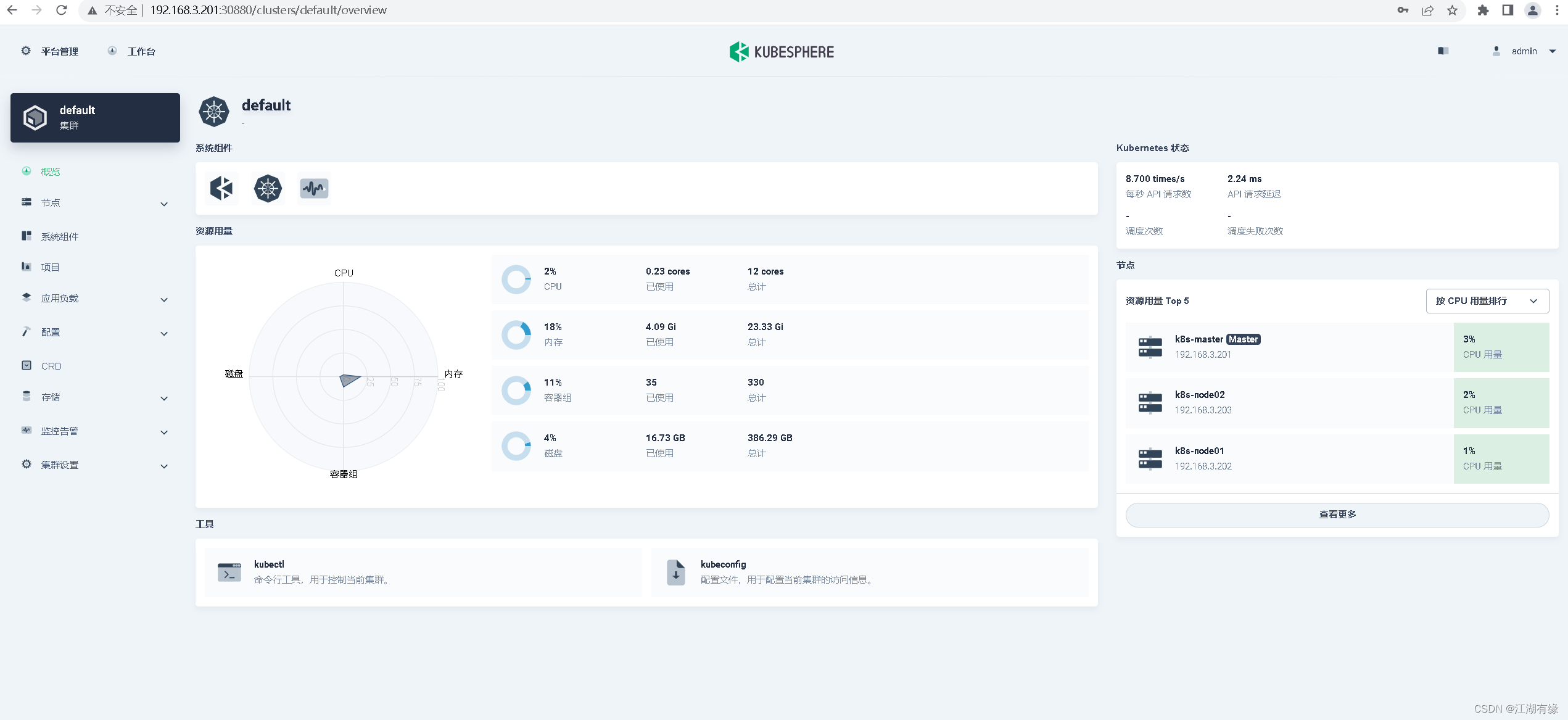
六、访问kubersphere的web
1.web地址
Console: http://192.168.3.201:30880
Account: admin
Password: [email protected]
2.登录web
七、注意事项
1.解决etcd监控证书找不到问题
kubectl -n kubesphere-monitoring-system create secret generic kube-etcd-client-certs --from-file=etcd-client-ca.crt=/etc/kubernetes/pki/etcd/ca.crt --from-file=etcd-client.crt=/etc/kubernetes/pki/apiserver-etcd-client.crt --from-file=etcd-client.key=/etc/kubernetes/pki/apiserver-etcd-client.key
2.集群卡慢崩溃问题
由于组件很多,全部组件安装时,最好给足够的资源,建议:
master——4核8G及以上
node节点——8核16G及以上
3.清除kubersphere环境
官方卸载脚本
https://github.com/kubesphere/ks-installer/blob/release-3.1/scripts/kubesphere-delete.sh
活动地址:毕业季·进击的技术er
边栏推荐
- MySQL (11) - sorting out MySQL interview questions
- How to tag and label naming before the project release
- In depth learning series 46: face image super score gfp-gan
- MySQL(四) — MySQL存储引擎
- Mysql数据库的几个特点
- [Laoke] how should ordinary people learn technology?
- How MySQL converts a date to a number
- Yan's DP analysis
- yolov5检测小目标(附源码)
- 【AI实战】机器学习数据处理之数据归一化、标准化
猜你喜欢

The Sandbox 与《足球小将》达成合作,将流行的足球漫画及动画带入元宇宙

MySQL (IV) - MySQL storage engine
MySQL(四) — MySQL存储引擎

【云计算赛项】职业技能竞赛--容器开发部分例题Pig快速开发框架

Wechat multiplayer chat and Roulette Games (websocket Implementation)

3dmax插件开发环境配置及FileExport和Utilities模板测试

Deeplab V3 code structure diagram

在线文本过滤小于指定长度工具

在线JSON转CSharp(C#)Class工具

Live broadcast review | how can the container transformation of traditional applications be fast and stable?
随机推荐
Arthas-thread命令定位线程死锁
Elaborate on the operation of idea
Use of Lombok
WPS for thesis writing installs MathType plug-in to write mathematical formulas
Technical article writing guide
JS to determine the added and decreased elements of two arrays
G++ compilation command use
How to quickly and gracefully download large files from Google cloud disk (II)
unity转微信小程序小游戏
MySQL (VIII) - explain
Operation on a bit of binary
Initialization layer implementation
【唠嗑篇】普通人到底该怎么学技术啊?
How bootstrap clears floating styles
How to solve CSRF attack in laravel
Make a record of glib2.14 upgrading glib2.18 and the principle of the steps
20BN-Jester完整数据集下载
Deep learning series 47: Super sub model real esrgan
Focusing on the industry, enabling customers | release of solutions for the five industries of the cloud container cloud product family
Left multiply right multiply matrix problem