当前位置:网站首页>Make a record of glib2.14 upgrading glib2.18 and the principle of the steps
Make a record of glib2.14 upgrading glib2.18 and the principle of the steps
2022-06-23 07:32:00 【Stoblie】
Be careful : As for what is GLIB This article will not elaborate on it . Everyone is upgrading GLIB Remember to take a snapshot first , In order to prevent some programs from running normally after upgrading . This article is applicable to multiple versions , It only records 2.18.
background : Because of some kind of production demand , The environment of virtual machine is centos6.9,gllib2.12, And program dependence glib2.18, So this article came into being .
Environmental Science : centos6.9,GLIB2.12
The goal is : take centos6.9,GLIB2.12 Upgrade to GLIB2.18
ldd --version View local GLIB edition

Steps are as follows :
One 、 download GLIB package
curl -O http://ftp.gnu.org/gnu/glibc/glibc-2.18.tar.gzIf there are students who can't connect to the Internet , It can be in a machine that can be networked ( No system requirements ) Pre download installation package , And then again SCP To need to upgrade GLIB The virtual machine of .
If you need to upgrade to other versions of the students can also go to http://ftp.gnu.org/gnu/glibc/ Download other versions , And then again SCP To need to upgrade GLIB The virtual machine of .
Two 、 Unzip the installation package
tar xf glibc-2.18.tar.gz3、 ... and 、 Get into GLIB Installation package folder
cd glibc-2.18Four 、 Start upgrading
mkdir build && cd build

../configure --prefix=/usr # Pay attention , Don't change the path

make -j2

make install
explain : establish build Folder and enter . perform configure file , And specify make install Of The installation directory by /usr.
configure: Check for file compilation interdependencies , And generate makefile.
--prefix: Appoint The installation directory .
- First check some configuration and environment of the machine , System dependencies . If there is no dependency , The script will stop executing , Software installation failed
- Based on the results of previous checks of environment and dependencies , production Makefile file (main job)
configure After successful execution, you can see the following files generated in the current directory :
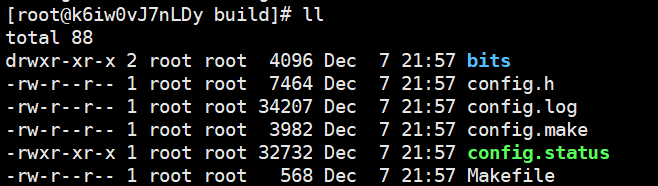
When you see Makefile That means the environment is OK , You can start installing . Here are some explanations of the commands .
make: Compile the source code and generate the executable file .
-j2 ( -jn): use make -j With one parameter , You can compile projects in parallel , For example, on a dual core machine , It can be used make -j4, Give Way make Most allow 4 Compile commands are executed at the same time , This can make more effective use of CPU resources .
explain :
- make yes Unix A package under the system . perform make Command required Makefile file .make Will be based on Makefile File to install the software
- Makefile There are many labels in the document , To express a different section. General ,make Will compile the source code and generate the executable , Actually Makefile It mainly describes the interdependence of file compilation
make install: take make The executable file of stage production is copied to Corresponding place .
Corresponding place :configure Generate makefile A designated place when (--prefix The address referred to ).
explain :
- When executed make The command takes no arguments , The procedure will follow Makefile The instructions are in the corresponding section Jump between and execute the corresponding command
- add install Parameters are executed make install when , The program will only execute install section The order of .install section The order of will make Copy the stage production executable to the appropriate place .
5、 ... and 、 Check to see if the upgrade is successful
ldd --version
notice ldd (GNU libc) 2.18 Indicates that the upgrade has been successful .
If this article is useful to you , Please like the collection and forward a wave ~ thank you ~~
边栏推荐
猜你喜欢

Operation on a bit of binary

Initialization layer implementation
![[pyqt5 series] modify the counter to realize control](/img/de/c997a19ad72619b0fd2fcd0124ee1a.png)
[pyqt5 series] modify the counter to realize control
跳跃表原理

用户态和内核态
SSTable详解

微信多人聊天及轮盘小游戏(websocket实现)

基于51单片机的温度检测监测报警系统设计

RFID data security experiment: C # visual realization of parity check, CRC redundancy check and Hamming code check

Yolov5 detecting small targets (with source code)
随机推荐
User mode and kernel mode
在线文本过滤小于指定长度工具
303. region and retrieval - array immutable
TensorFlow中的数据类型
Ntu-rgbd data set download and data format analysis
Mysql事务隔离级别
GINet
对二进制的某一位操作
OSI分层模型对工作的具体帮助
什么是分布式?
Spock约束-调用频率/目标/方法参数
How to verify date format in PHP (regular)
300. longest increasing subsequence
Ldconfig command
Wechat multiplayer chat and Roulette Games (websocket Implementation)
The original cloud landed in deep water, and the cloud product family of Boyun container released four values
[AI practice] xgb Xgbregression multioutputregressor parameter 2 (GPU training model)
Sstable details
How to quickly and gracefully download large files from Google cloud disk (II)
Tp6 installation expansion