当前位置:网站首页>一篇看懂:IDEA 使用scala 编写wordcount程序 并生成jar包 实测
一篇看懂:IDEA 使用scala 编写wordcount程序 并生成jar包 实测
2022-07-25 10:27:00 【fatfatmomo】
准备工作:
此时在你的PC上,你的JDK应该已经安装配置好JDK1.8版本。
①首先官网下载IDEA(建议Ultimate版) https://www.jetbrains.com/idea/download/#section=windows
②从 http://idea.lanyus.com/ 获得注册码或其他各种方式破解(个人用学生版,未测试过这些网站)
③打开IDEA,安装sbt和scala插件,file-settings-Plugins直接搜scala和sbt安装即可。


④新建工程,选择scala->sbt;

选择适合的JDK和Scala版本;这里的版本一定要对应,JDK最好是1.8版,Scala最好不要是2.12.x以上,目前2.12及以上应该是到了spark2.4版本才支持(跟你要提交作业的spark集群的版本对应)。

到此建立工程完毕。
写程序并打包:
①编写scala程序,src->main->scala右键,new->scala class;

选择Kind为Object;
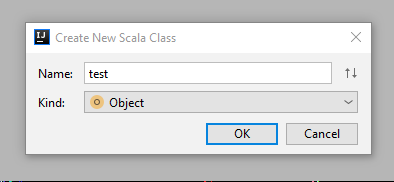
然后输入你的程序。
package com.hq
import org.apache.spark.SparkConf
import org.apache.spark.SparkContext
import org.apache.spark.SparkContext._

object wordcount {
  def main(args: Array[String]){
        if (args.length < 1) {
          System.err.println("Usage:")
          System.exit(1)
        }

    val conf = new SparkConf()
    // sc是Spark Context,指的是“上下文”,也就是我们运行的环境,需要把conf当参数传进去;
    val sc = new SparkContext(conf)
    //通过sc获取一个(hdfs上的)文本文件,args(0)就是我们控制台上传入的参数,local运行的话就是传入本地一个文本的path
    val input = sc.textFile(args(0))

    //下面就是wordcount具体的执行代码
    val lines=input.flatMap(_.split(" ")).map((_, 1)).reduceByKey(_+_)

    lines.saveAsTextFile(args(1))

    sc.stop()
  }
}
②设置build.sbt文件
name:="Wordcount"
version:="0.1"
scalaVersion:="2.11.0"
libraryDependencies+="org.apache.spark"%%"spark-core"%"2.3.0"
③打包,File->Project Structure->Artifacts,点“+”->JAR->From……;

选择module和mainclass,JAR files from libraries选择第二项(网上都让选第一项,然而选第一项我挂了);

勾选include in project build,点ok;

然后Build-Build Artifacts生成jar包,如果已有META-INF生成了,必须删除后再build。

至此打包完成。
边栏推荐
猜你喜欢







随机推荐
【高并发】通过源码深度分析线程池中Worker线程的执行流程
Probe into Druid query timeout configuration → who is the querytimeout of datasource and jdbctemplate effective?
Learning Weekly - total issue 63 - an open source local code snippet management tool
Hcip experiment (01)
HCIA experiment (07) comprehensive experiment
Signal integrity (SI) power integrity (PI) learning notes (XXXIV) 100 rules of thumb for estimating signal integrity effects
HCIA experiment (09)
JS bidirectional linked list 02
Learn NLP with Transformer (Chapter 2)
Learn NLP with Transformer (Chapter 8)
PostgreSQL踩坑 | ERROR: operator does not exist: uuid = character varying
HCIP(12)
数字孪生万物可视 | 联接现实世界与数字空间
HCIP实验(01)
【flask高级】结合源码详解flask的运行机制(出入栈)
Nb-iot control LCD (date setting and reading)
API supplement of JDBC
[递归] 938. 二叉搜索树的范围和
Learn NLP with Transformer (Chapter 4)
MySQL | GROUP_CONCAT函数,将某一列的值用逗号拼接