当前位置:网站首页>HCIA experiment (07) comprehensive experiment
HCIA experiment (07) comprehensive experiment
2022-07-25 11:07:00 【Rainy days_】

【1】 The first stage : Basic configuration
1. Carry out topology design and address planning
192.168.1.0/24 ( Divided into three subnets , A backbone ,R1 and R2 Two subnets are required )
192.168.1.0/26 ( The backbone )
192.168.1.0/30
192.168.1.4/30 192.168.1.8/30 ...... 192.168.1.60/30
192.168.1.64/26 R1 192.168.1.64/27 192.168.1.96/27
192.168.1.128/26 R2 192.168.1.128/27 192.168.1.160/27
192.168.1.192/26
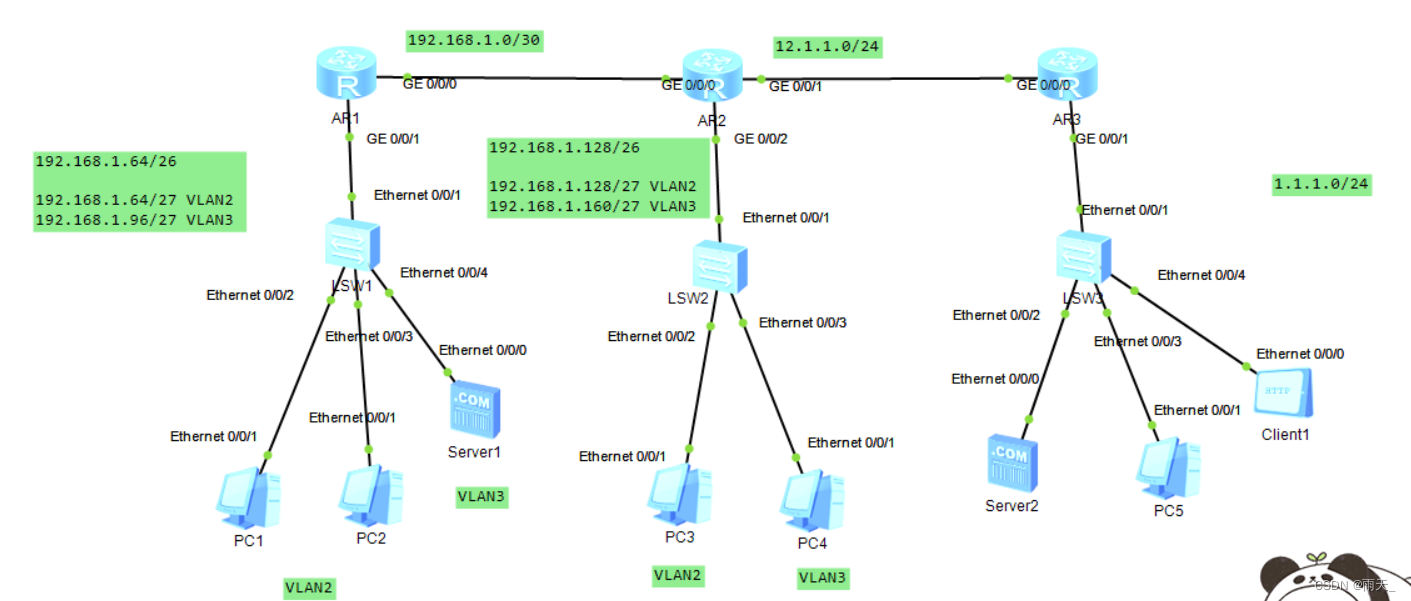
2. Configuring the router interface IP Address and sub interface
[r1]int g0/0/0
[r1-GigabitEthernet0/0/0]ip add 192.168.1.1 30
[r1]int g0/0/1.1
[r1-GigabitEthernet0/0/1.1]dot1q termination vid 2
[r1-GigabitEthernet0/0/1.1]arp broadcast enable
[r1-GigabitEthernet0/0/1.1]ip add 192.168.1.65 27
[r1]int g0/0/1.2
[r1-GigabitEthernet0/0/1.2]dot1q termination vid 3
[r1-GigabitEthernet0/0/1.2]arp broadcast enable
[r1-GigabitEthernet0/0/1.2]ip add 192.168.1.97 27
[r2]int g0/0/0
[r2-GigabitEthernet0/0/0]ip add 192.168.1.2 30
[r2]int g0/0/1
[r2-GigabitEthernet0/0/1]ip add 12.1.1.1 24
[r2]int g0/0/2.1
[r2-GigabitEthernet0/0/2.1]dot1q termination vid 2
[r2-GigabitEthernet0/0/2.1]arp broadcast enable
[r2-GigabitEthernet0/0/2.1]ip add 192.168.1.129 27
[r2]int g0/0/2.2
[r2-GigabitEthernet0/0/2.2]dot1q termination vid 3
[r2-GigabitEthernet0/0/2.2]arp broadcast enable
[r2-GigabitEthernet0/0/2.2]ip add 192.168.1.161 27
[r3]int g0/0/0
[r3-GigabitEthernet0/0/0]ip add 12.1.1.2 24
[r3]int g0/0/1
[r3-GigabitEthernet0/0/1]ip add 1.1.1.1 24
3. To configure DHCP service , Create a pond
[r1]ip pool v2
[r1-ip-pool-v2]network 192.168.1.64 mask 255.255.255.224
[r1-ip-pool-v2]gateway-list 192.168.1.65
[r1-ip-pool-v2]dns-list 114.114.114.114 8.8.8.8
[r1]ip pool v3
[r1-ip-pool-v3]network 192.168.1.96 mask 255.255.255.224
[r1-ip-pool-v3]gateway-list 192.168.1.97
[r1-ip-pool-v3]dns-list 114.114.114.114 8.8.8.8
[r1]int g0/0/1.1
[r1-GigabitEthernet0/0/1.1]dhcp select global
[r1]int g0/0/1.2
[r1-GigabitEthernet0/0/1.2]dhcp select global
[r2]ip pool v2
[r2-ip-pool-v2]network 192.168.1.128 mask 255.255.255.224
[r2-ip-pool-v2]gateway-list 192.168.1.129
[r2-ip-pool-v2]dns-list 114.114.114.114 8.8.8.8
[r2]ip pool v3
[r2-ip-pool-v3]network 192.168.1.160 mask 255.255.255.224
[r2-ip-pool-v3]gateway-list 192.168.1.161
[r2-ip-pool-v3]dns-list 114.114.114.114
[r2]int g0/0/2.1
[r2-GigabitEthernet0/0/2.1]dhcp select global
[r2]int g0/0/2.2
[r2-GigabitEthernet0/0/2.2]dhcp select global
4. Divide the interfaces on the switch into corresponding interfaces VLAN in
[sw1]vlan batch 2 to 3
[sw1]port-group group-member e0/0/2 to e0/0/3
[sw1-port-group]port link-type access
[sw1-port-group]port default vlan 2
[sw1]int e0/0/4
[sw1-Ethernet0/0/4]port link-type access
[sw1-Ethernet0/0/4]port default vlan 3
[sw2]vlan batch 2 to 3
[sw2]int e0/0/2
[sw2-Ethernet0/0/2]port link-type access
[sw2-Ethernet0/0/2]port default vlan 2
[sw2]int e0/0/3
[sw2-Ethernet0/0/3]port link-type access
[sw2-Ethernet0/0/3]port default vlan 3
5. To configure trunk main rd
[sw1]int e0/0/1
[sw1-Ethernet0/0/1]port link-type trunk
[sw1-Ethernet0/0/1]port trunk allow-pass vlan all
[sw2]int e0/0/1
[sw2-Ethernet0/0/1]port link-type trunk
[sw2-Ethernet0/0/1]port trunk allow-pass vlan all
6. Write for the server IP Address

7. test
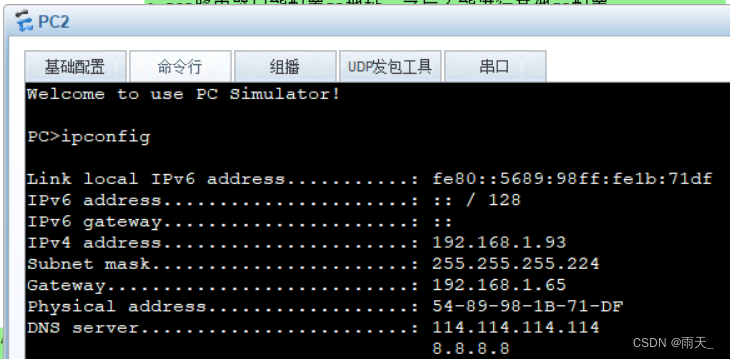

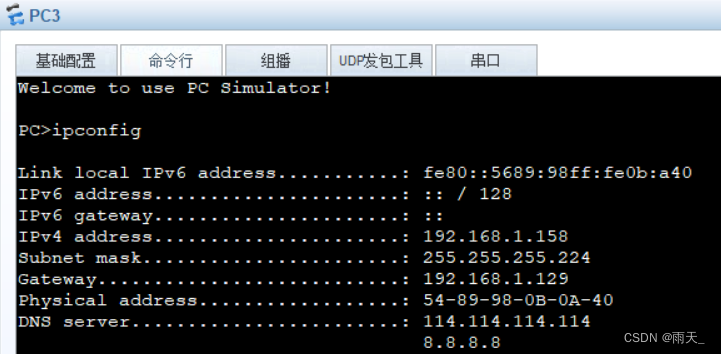

【2】 The second stage : Divide the area
1. Declare
[r1]ospf 1 router-id 1.1.1.1
[r1-ospf-1]area 0
[r1-ospf-1-area-0.0.0.0]network 192.168.1.1 0.0.0.0
[r1-ospf-1]area 1
[r1-ospf-1-area-0.0.0.1]network 192.168.1.65 0.0.0.0
[r1-ospf-1-area-0.0.0.1]network 192.168.1.97 0.0.0.0
[r2]ospf 1 router-id 2.2.2.2
[r2-ospf-1]area 0
[r2-ospf-1-area-0.0.0.0]network 192.168.1.2 0.0.0.0
[r2-ospf-1]area 2
[r2-ospf-1-area-0.0.0.2]network 192.168.1.129 0.0.0.0
[r2-ospf-1-area-0.0.0.2]network 192.168.1.161 0.0.0.0
2. see


(R1 and R2 Established adjacency relationship between )
3. Optimize
[r1]ospf 1
[r1-ospf-1]area 1
[r1-ospf-1-area-0.0.0.1]abr-summary 192.168.1.64 255.255.255.192
[r2]ospf 1
[r2-ospf-1]area 2
[r2-ospf-1-area-0.0.0.2]abr-summary 192.168.1.128 255.255.255.192


( Interregional summary , Summarize the two loops into one loop )
4. Further optimization ( Block its hair Hello package )
Set silent interface
[r1]ospf 1
[r1-ospf-1]silent-interface g0/0/1.1
[r1-ospf-1]silent-interface g0/0/1.2
[r2]ospf 1
[r2-ospf-1]silent-interface g0/0/2.1
[r2-ospf-1]silent-interface g0/0/2.2
5. Perform encryption authentication
[r1]int g0/0/0
[r1-GigabitEthernet0/0/0]ospf authentication-mode md5 1 cipher 123456
[r2]int g0/0/0
[r2-GigabitEthernet0/0/0]ospf authentication-mode md5 1 cipher 123456
6. Turn on telnet function
[r1]aaa
[r1-aaa]local-user wang password cipher 123456
[r1-aaa]local-user wang service-type telnet
[r1-aaa]local-user wang privilege level 15
[r1-aaa]q
[r1]user-interface vty 0 4
[r1-ui-vty0-4]authentication-mode aaa
adopt DHCP obtain IP, There is a default route automatically

verification :
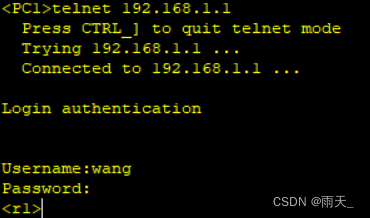
7. Refuse PC1 To three IP Of telnet Behavior

[r1] acl 3000
[r1-acl-adv-3000]
[r1-acl-adv-3000]rule deny tcp source 192.168.1.92 0 destination 192.168.1.1 0 destination-port eq 23
[r1-acl-adv-3000]rule deny tcp source 192.168.1.92 0 destination 192.168.1.65 0 destination-port eq 23
[r1-acl-adv-3000]rule deny tcp source 192.168.1.92 0 destination 192.168.1.97 0 destination-port eq 23
[r1]int g0/0/1.1
[r1-GigabitEthernet0/0/1.1]traffic-filter inbound acl 3000
verification :

【3】 The third stage : LAN access Wan

1. Build default routes
[r2]ospf 1
[r2-ospf-1]default-route-advertise always 
( by R1 Send the default route )
[r2]ip route-static 0.0.0.0 0 12.1.1.2( For the border router R2 Handwritten default route )
2. structure EASY NAT
[r2]acl 2000
[r2-acl-basic-2000]rule permit source 192.168.1.0 0.0.0.255
[r2-acl-basic-2000]q
[r2]int g0/0/1
[r2-GigabitEthernet0/0/1]nat outbound 2000
verification :

【4】 The fourth stage : Access through domain name HTTP

1. Set up servers and client


2. Port mapping
[r2]interface g0/0/1
[r2-GigabitEthernet0/0/1]nat server protocol tcp global current-interface 80 inside 192.168.1.100 80
Warning:The port 80 is well-known port. If you continue it may cause function failure.
Are you sure to continue?[Y/N]:y
3. verification

4. Set up port mapping

[r2]int g0/0/1
[r2-GigabitEthernet0/0/1]nat server protocol tcp global current-interface 23 inside 192.168.1.1 23
Warning:The port 23 is well-known port. If you continue it may cause function failure.
Are you sure to continue?[Y/N]:y
Successfully logged in :

5. Guard ring
[r1]ip route-static 192.168.1.0 26 NULL 0
[r2]ip route-static 192.168.1.128 26 null 0
边栏推荐
- Flask framework - Message flash
- Learning Weekly - total issue 63 - an open source local code snippet management tool
- JS hash table 01
- C# 类库的生成,使用类库对象对DataGridView 进行数据绑定
- Reinforcement Learning 强化学习(四)
- Electromagnetic field and electromagnetic wave experiment I familiar with the application of MATLAB software in the field of electromagnetic field
- 【策略模式】就像诸葛亮的锦囊
- Acquisition and compilation of UE4 source code
- Understand the life cycle and route jump of small programs
- Analysis of event channel principle in Kraken
猜你喜欢

The practice of asynchronous servlet in image service

美国机场围棋风格可视化专题图:ArcGIS Pro版本
Qt | 鼠标事件和滚轮事件 QMouseEvent、QWheelEvent

企业实践开源的动机

ONNX(Open Neural Network Exchange)介绍

Flask framework - flask WTF form: data validation, CSRF protection

HCIA实验(09)

mysql高级语句(一)(总有一个人的出现,让你的生活不再继续糟糕)
Introduction to onnx (open neural network exchange)

HCIA实验(10)NAT

随机推荐
HCIP实验(02)
性能测试中TPS的计算【杭州多测师】【杭州多测师_王sir】
6. PXE combines kickstart principle and configuration to realize unattended automatic installation
Reinforcement Learning 强化学习(四)
Probe into Druid query timeout configuration → who is the querytimeout of datasource and jdbctemplate effective?
HCIA experiment (10) nat
Microwave technology homework course design - Discrete capacitance and inductance + microstrip single stub + microstrip double stub
一个 DirectShow 播放问题的排查记录
Flask框架——消息闪现
What is the meaning of ordinary people's life?
树形动态规划
The University of Gottingen proposed clipseg: a model that can perform three segmentation tasks simultaneously using text and image prompts
湖仓一体电商项目(二):项目使用技术及版本和基础环境准备
mysql高级语句(一)(总有一个人的出现,让你的生活不再继续糟糕)
一文读懂小程序的生命周期和路由跳转
redis 哨兵,高可用的执行者
[strategic mode] like Zhugeliang's brocade bag
【flask高级】结合源码详解flask的运行机制(出入栈)
AI technology stack is too huge! Wu Enda gives career planning: lifelong learning
API supplement of JDBC