当前位置:网站首页>HCIA实验(10)NAT
HCIA实验(10)NAT
2022-07-25 09:48:00 【雨天_】
【1】第一阶段
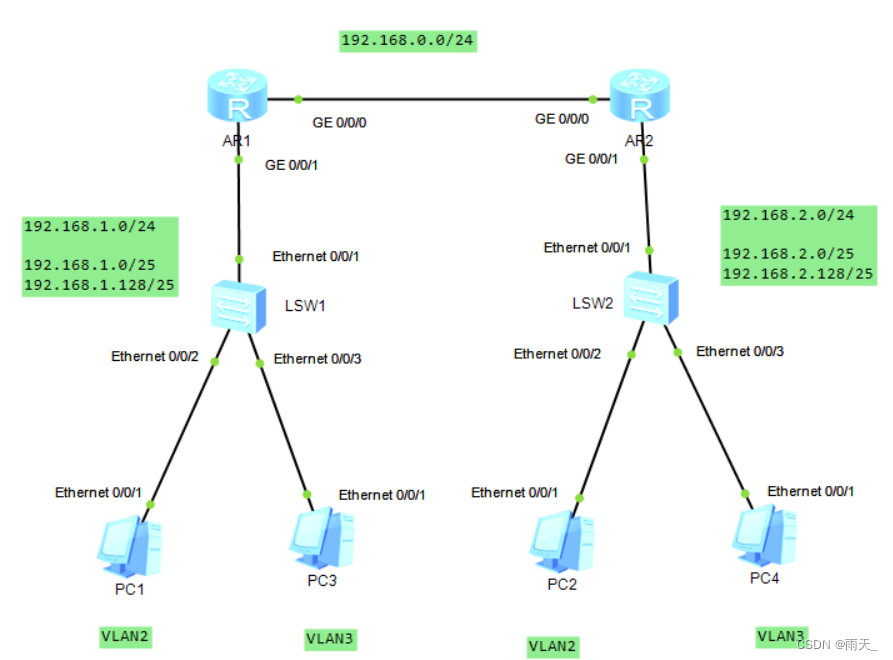
1.在交换机上创建VLAN
[sw1]int e0/0/2
[sw1-Ethernet0/0/2]port link-type access
[sw1-Ethernet0/0/2]port default vlan 2
[sw1]int e0/0/3
[sw1-Ethernet0/0/3]port link-type access
[sw1-Ethernet0/0/3]port default vlan 3
[sw1]int e0/0/1
[sw1-Ethernet0/0/1]port link-type trunk
[sw1-Ethernet0/0/1]port trunk allow-pass vlan all
[sw2]int e0/0/2
[sw2-Ethernet0/0/2]port link-type access
[sw2-Ethernet0/0/2]port default vlan 2
[sw2]int e0/0/3
[sw2-Ethernet0/0/2]port link-type access
[sw2-Ethernet0/0/2]port default vlan 3
[sw2]int e0/0/1
[sw2-Ethernet0/0/1]port link-type trunk
[sw2-Ethernet0/0/1]port trunk allow-pass vlan all
2.配置路由器,开启ARP功能
[r1]int g0/0/1.1
[r1-GigabitEthernet0/0/1.1]dot1q termination vid 2
[r1-GigabitEthernet0/0/1.1]ip add 192.168.1.1 25
[r1-GigabitEthernet0/0/1.1]arp broadcast enable
[r1]int g0/0/1.2
[r1-GigabitEthernet0/0/1.2]dot1q termination vid 3
[r1-GigabitEthernet0/0/1.2]ip add 192.168.1.129 25
[r1-GigabitEthernet0/0/1.2]arp broadcast enable
[r1]int g0/0/0
[r1-GigabitEthernet0/0/0]ip add 192.168.0.1 30
[r2]int g0/0/1.1
[r2-GigabitEthernet0/0/1.1]dot1q termination vid 2
[r2-GigabitEthernet0/0/1.1]ip add 192.168.2.1 25
[r2-GigabitEthernet0/0/1.1]arp broadcast enable
[r2]int g0/0/1.2
[r2-GigabitEthernet0/0/1.2]dot1q termination vid 3
[r2-GigabitEthernet0/0/1.2]ip add 192.168.2.129 25
[r2-GigabitEthernet0/0/1.2]arp broadcast enable
[r2]int g0/0/0
[r2-GigabitEthernet0/0/0]ip add 192.168.0.2 30
3.开启DHCP服务
[r1]dhcp enable
[r1]ip pool 01
[r1-ip-pool-01]network 192.168.1.0 mask 25
[r1-ip-pool-01]gateway-list 192.168.1.1
[r1-ip-pool-01]dns-list 114.114.114.114
[r1]ip pool 02
[r1-ip-pool-02]network 192.168.1.128 mask 25
[r1-ip-pool-02]gateway-list 192.168.1.129
[r1-ip-pool-02]dns-list 114.114.114.114
[r1]int g0/0/1.1
[r1-GigabitEthernet0/0/1.1]dhcp select global
[r1]int g0/0/1.2
[r1-GigabitEthernet0/0/1.2]dhcp select global
[r2]dhcp enable
[r2]ip pool 01
[r2-ip-pool-01]network 192.168.2.0 mask 25
[r2-ip-pool-01]gateway-list 192.168.2.1
[r2-ip-pool-01]dns-list 114.114.114.114
[r2]ip pool 02
[r2-ip-pool-02]network 192.168.2.128 mask 25
[r2-ip-pool-02]gateway-list 192.168.2.129
[r2-ip-pool-02]dns-list 114.114.114.114
[r2]int g0/0/1.1
[r2-GigabitEthernet0/0/1.1]dhcp select global
[r2]int g0/0/1.2
[r2-GigabitEthernet0/0/1.2]dhcp select global
4.在PC端开启DHCP服务


验证
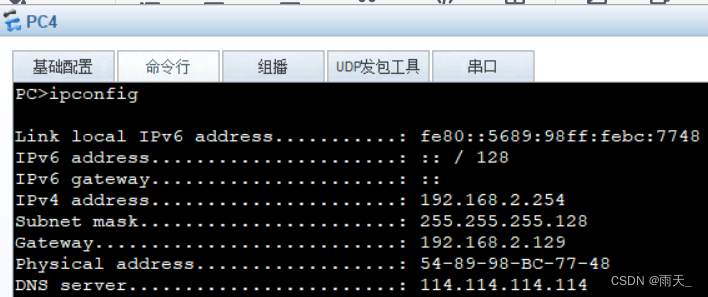
5.宣告
[r1]rip 1
[r1-rip-1]ver 2
[r1-rip-1]network 192.168.1.0
[r1-rip-1]network 192.168.0.0
[r2]rip 1
[r2-rip-1]ver 2
[r2-rip-1]network 192.168.2.0
[r2-rip-1]network 192.168.0.0
查看
(进行路由汇总)
[r1]int g0/0/0
[r1-GigabitEthernet0/0/0]rip summary-address 192.168.1.0 255.255.255.0
[r2]int g0/0/0
[r2-GigabitEthernet0/0/0]rip summary-address 192.168.2.0 255.255.255.0
检测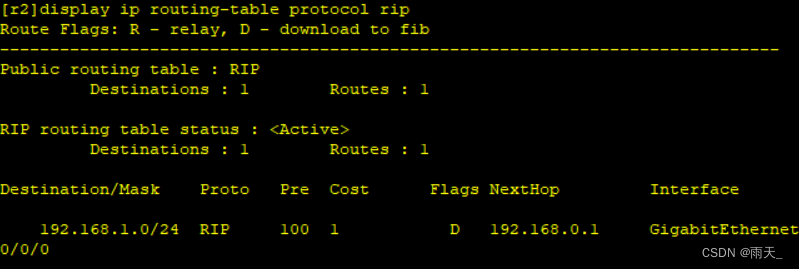

6.沉默接口
[r1]rip 1
[r1-rip-1]silent-interface g0/0/1.1
[r1-rip-1]silent-interface g0/0/1.2
[r2]rip 2
[r2-rip-2]silent-interface g0/0/1.1
[r2-rip-2]silent-interface g0/0/1.2
7.测试


【2】第二阶段(局域网访问广域网)
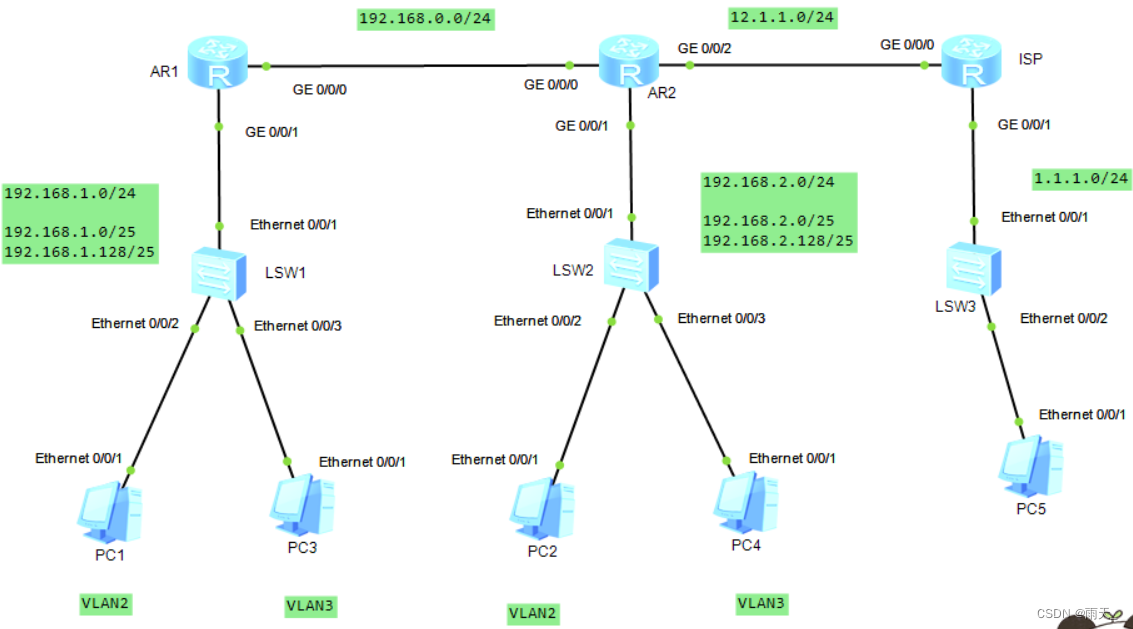
1.补充配置路由器接口
[r2]int g0/0/2
[r2-GigabitEthernet0/0/2]ip add 12.1.1.1 24
[isp]int g0/0/0
[isp-GigabitEthernet0/0/0]ip add 12.1.1.2 24
[isp]int g0/0/1
[isp-GigabitEthernet0/0/1]ip add 1.1.1.1 24
2.访问ISP,配置缺省路由
[r1]rip 1
[r1-rip-1]default-route originate
[r2]ip route-static 0.0.0.0 0 12.1.1.2
3.定义可被转换的私有IP地址范围
[r2]acl 2000
[r2-acl-basic-2000]rule permit source 192.168.0.0 0.0.255.255
(公网所在接口,源IP地址修改为该接口公有IP)
[r2]int g0/0/2
[r2-GigabitEthernet0/0/2]nat outbound 2000
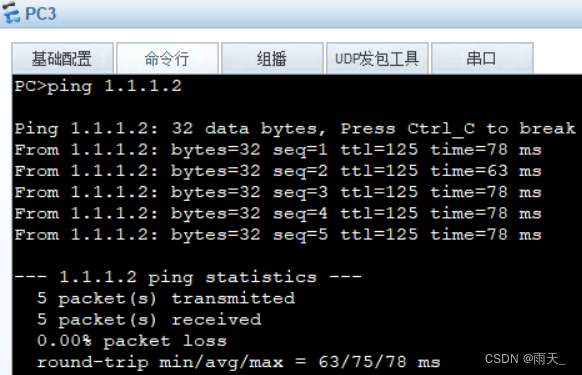
4.测试


边栏推荐
- Fastdfs offline deployment (Graphic)
- 微波技术基础实验一 滤波器的设计
- Using px2rem does not take effect
- 5. This simple "echo" usage, can the child next door!
- Bug classification and grading
- 思路再次完美验证!加息临近,趋势明了,好好把握这波行情!
- Pytorch code template (CNN)
- Supervisor部署(离线部署需要提前下载部署包)
- 10. Expect interaction free
- Qt | 鼠标事件和滚轮事件 QMouseEvent、QWheelEvent
猜你喜欢

【策略模式】就像诸葛亮的锦囊

使用px2rem不生效

6. PXE combines kickstart principle and configuration to realize unattended automatic installation

2. Conditional statements of shell script
电磁场与电磁波实验一 熟悉Matlab软件在电磁场领域的应用
1. Shell programming specifications and variables

Keras deep learning practice (16) -- detailed explanation of self encoder

UE4 window control (maximize minimize)

Supervisor部署(离线部署需要提前下载部署包)

Kraken中事件通道原理分析
随机推荐
VLAN configuration and application (take Huawei ENSP as an example)
HCIP实验(03)
平凡人的一生的意义是什么?
After switching the shell command line terminal (bash/zsh), CONDA cannot be used: command not found
Differences between redis and mongodb
3. Like you, DNS domain name resolution service!!!
ONNX Runtime介绍
Research summary of voice self-monitoring pre training model CNN encoder
信号完整性(SI)电源完整性(PI)学习笔记(三十三)102条使信号完整性问题最小化的通用设计规则
2021 Niuke written examination summary 02
Attention is all you need paper intensive reading notes transformer
Add CONDA virtual environment env to the Jupiter kernel
shortest-unsorted-continuous-subarray
6.shell之正则表达式
Notes on building dompteur container
10.expect免交互
The most comprehensive UE4 file operation in history, including opening, reading, writing, adding, deleting, modifying and checking
Introduction to onnx runtime
Number theory --- the greatest common divisor and the least common multiple
2021 致景笔试总结