当前位置:网站首页>The most comprehensive UE4 file operation in history, including opening, reading, writing, adding, deleting, modifying and checking
The most comprehensive UE4 file operation in history, including opening, reading, writing, adding, deleting, modifying and checking
2022-07-25 10:37:00 【Flying Pig】
One 、 Pre operation
Create a C++ project , And create a C++ Blue library function , And add header file
#include "HAL/PlatformFilemanager.h"
#include "Misc/FileHelper.h"
#include "Misc/Paths.h"
#include "Developer/DesktopPlatform/Public/DesktopPlatformModule.h"
#include "Developer/DesktopPlatform/Public/IDesktopPlatform.h"
#include "Runtime/Core/Public/HAL/FileManagerGeneric.h"

Two 、 Open file
UFUNCTION(BlueprintCallable, DisplayName = "OpenFile", Category = "File")
	   static TArray<FString> OpenFile();
TArray<FString> UGenericArrayLibrary::OpenFile()
{
TArray<FString> FilePath; // Choose the file path
FString fileType = TEXT("*.*"); // Filter file types
FString defaultPath = FPaths::ConvertRelativePathToFull(FPaths::ProjectDir()); // The default opening path of the file selection window
IDesktopPlatform* DesktopPlatform = FDesktopPlatformModule::Get();
bool bSuccess = DesktopPlatform->OpenFileDialog(nullptr, TEXT(" Open file "), defaultPath, TEXT(""), *fileType, EFileDialogFlags::None, FilePath);
for (auto& name : FilePath)
{
UE_LOG(LogTemp, Warning,
TEXT("%s"), *name);
}
if (bSuccess)
{
// File selection succeeded , File path path
UE_LOG(LogTemp,Warning,TEXT("Success"));
}
return FilePath;
}
3、 ... and 、 Read and write files ( character string )
// Read the file ( character string )
	UFUNCTION(BlueprintCallable, DisplayName = "ReadFile", Category = "File")
		static FString ReadFile(FString path);
// write file ( character string )
	UFUNCTION(BlueprintCallable, DisplayName = "WriteFile", Category = "File")
		static bool WriteFile(FString saveFile,FString path);
FString UGenericArrayLibrary::ReadFile(FString path)
{
FString resultString;
FFileHelper::LoadFileToString(resultString,*path);
return resultString;
}
///
bool UGenericArrayLibrary::WriteFile(FString saveFile,FString path)
{
bool success;
success = FFileHelper::SaveStringToFile(saveFile,*path);
return success;
}
Four 、 Read and write character arrays
/ Read the file ( A character array )
	UFUNCTION(BlueprintCallable, DisplayName = "ReadFileArray", Category = "File")
		static TArray<FString> ReadFileArray(FString path);
	// write file ( A character array )
	UFUNCTION(BlueprintCallable, DisplayName = "WriteFileArray", Category = "File")
		static bool WriteFileArray(TArray<FString> saveFile,FString path);
TArray<FString> UGenericArrayLibrary::ReadFileArray(FString path)
{
TArray<FString> results;
FFileHelper::LoadFileToStringArray(results, *path);
return results;
}
bool UGenericArrayLibrary::WriteFileArray(TArray<FString> saveFile, FString path)
{
return FFileHelper::SaveStringArrayToFile(saveFile,*path);
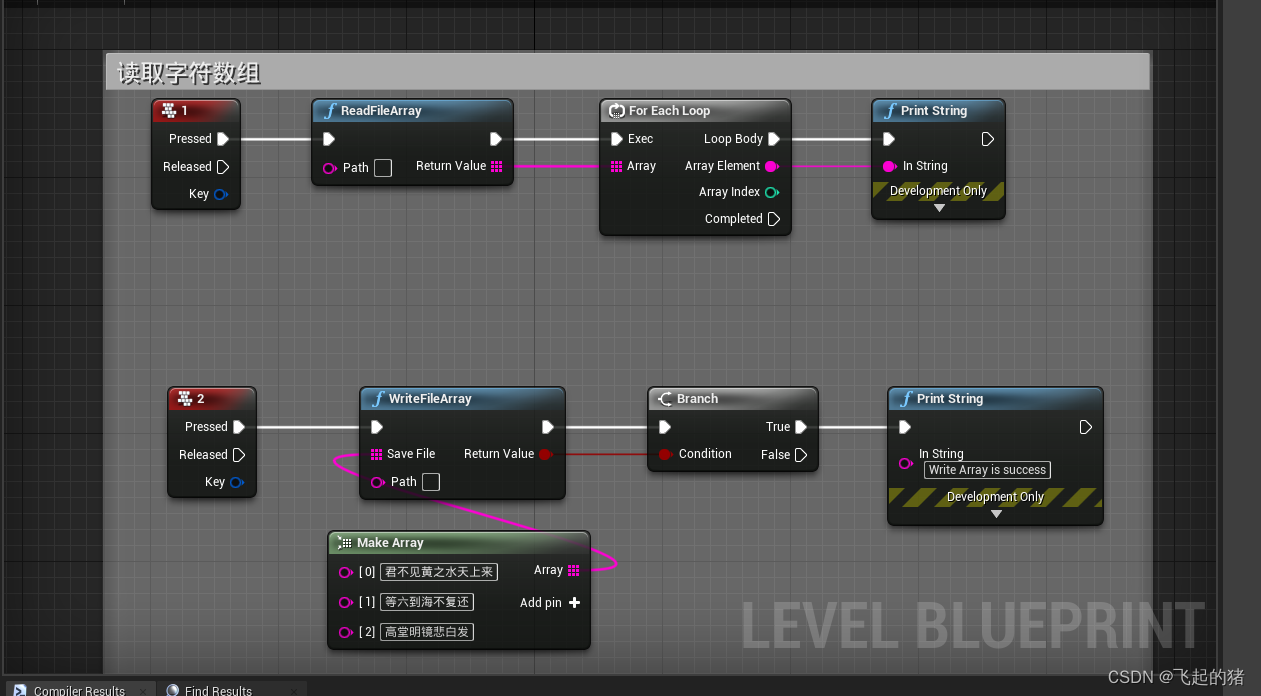
}
5、 ... and 、 Get file path , Get the file name , Get file suffix
	// Get the path of the file
	UFUNCTION(BlueprintCallable, DisplayName = "Get FilePath", Category = "File")
		static FString GetFilePath(FString path);
	// Get the file name , Without the suffix
	UFUNCTION(BlueprintCallable, DisplayName = "GetFileName", Category = "File")
		static FString GetFileName(FString InPath, bool bRemovePath);
	// Get file suffix
	UFUNCTION(BlueprintCallable, DisplayName = "GetFileExtension", Category = "File")
		static FString GetFileExtension(FString InPath, bool bIncludeDot);
FString UGenericArrayLibrary::GetFilePath(FString path)
{
FString Result;
Result = FPaths::GetPath(*path);
return Result;
}
FString UGenericArrayLibrary::GetFileName(FString InPath, bool bRemovePath)
{
return FPaths::GetBaseFilename(*InPath,bRemovePath);
}
FString UGenericArrayLibrary::GetFileExtension(FString InPath, bool bIncludeDot)
{
return FPaths::GetExtension(*InPath,bIncludeDot);
}
6、 ... and 、 Add a folder And delete a folder
// Create a folder
	UFUNCTION(BlueprintCallable, DisplayName = "CreateFolder", Category = "File")
		static void CreatFolder(FString FolderName);
// Delete a folder
	UFUNCTION(BlueprintCallable, DisplayName = "DeleteFolder", Category = "File")
		static void DeleteFolder(FString FolderName);
void UGenericArrayLibrary::CreatFolder(FString FolderName)
{
FString Path = FPaths::ProjectDir()/ *FolderName;
Path = FPaths::ConvertRelativePathToFull(*Path);
FPlatformFileManager::Get().GetPlatformFile().CreateDirectoryTree(*Path);
}
void UGenericArrayLibrary::DeleteFolder(FString FolderName)
{
FString Path = FPaths::ProjectDir() / *FolderName;
Path = FPaths::ConvertRelativePathToFull(*Path);
FPlatformFileManager::Get().Get().GetPlatformFile().DeleteDirectoryRecursively(*Path);
}
7、 ... and 、 Move folder
// Moving files
	UFUNCTION(BlueprintCallable, Category = "MoveFileTo")
		static bool MoveFileTo(FString To, FString From);
bool UGenericArrayLibrary::MoveFileTo(FString To, FString From)
{
return IFileManager::Get().Move(*To, *From);
}
8、 ... and 、 Find the folder
// Find all the files in the file directory
	UFUNCTION(BlueprintCallable, DisplayName = "FindFolder", Category = "File")
		static TArray<FString> FindFolder(FString Path, FString Filter, bool Files, bool Directory);
	// Find all the files in the file directory. You can't delete and search
	UFUNCTION(BlueprintCallable, DisplayName = "GetFolderFiles", Category = "File")
		static TArray<FString> GetFolderFiles(FString Path);
TArray<FString> UGenericArrayLibrary::FindFolder(FString Path, FString Filter, bool Files, bool Directory)
{
TArray<FString> FilePathList;
FilePathList.Empty();
FFileManagerGeneric::Get().FindFilesRecursive(FilePathList, *Path, *Filter, Files, Directory);
return FilePathList;
}
//
TArray<FString> UGenericArrayLibrary::GetFolderFiles(FString Path)
{
TArray<FString> Files;
FPaths::NormalizeDirectoryName(Path);
IFileManager& FileManager = IFileManager::Get();
FString FinalPath = Path / TEXT("*");
FileManager.FindFiles(Files, *FinalPath, true, true);
return Files;
}
边栏推荐
猜你喜欢
Erlang(离线部署)

2021 致景笔试总结

UE4 quickly find the reason for packaging failure

JS encryption parameter positioning

ONNX(Open Neural Network Exchange)介绍

Mysql5.7主从数据库部署(离线部署)
1.Shell编程规范与变量

Fastdfs离线部署(图文)

After switching the shell command line terminal (bash/zsh), CONDA cannot be used: command not found

5. NFS shared services and SSH Remote Control Services
随机推荐
Configuration of OSPF protocol (take Huawei ENSP as an example)
2、 What does the unittest framework do
Reproduce asvspoof 2021 baseline rawnet2
Supervisor部署(离线部署需要提前下载部署包)
Set up lnmp+discuz Forum
8. SHELL file processing Three Musketeers sed
Virtual private line network deployment
2. Introduce the deployment of lamp platform +discuz Forum
Angr (IV) -- angr_ ctf
2021 去哪儿网笔试总结
Bug elements
ONNX(Open Neural Network Exchange)介绍
Deadlock event of thread pool
推荐系统-协同过滤在Spark中的实现
Strut2 form label
4、 Testfixture test fixture, or test firmware
MySQL solves the problem of not supporting Chinese
四、TestFixture测试夹具,或者测试固件
2.介绍部署LAMP平台+DISCUZ论坛
Trojang attack on neural networks paper reading notes