当前位置:网站首页>2. Introduce the deployment of lamp platform +discuz Forum
2. Introduce the deployment of lamp platform +discuz Forum
2022-07-25 10:30:00 【Is a stupid child】
List of articles
- Preface
- What is? Apache
- One 、LAMP Introduction and Overview
- Two , Deploy LAMP
- 1. Compilation and installation Apache httpd
- 1.1 Turn off firewall , Will deploy LAMP All required software packages are transferred to /opt Under the table of contents
- 1.2 Install environment dependency package
- 1.3 Configuration software module
- 1.4 Compile and install
- 1.5 Optimize the configuration file path , And put httpd The executable program file of the service is put into the directory of the path environment variable to facilitate system identification
- 1.6 add to httpd system service
- 1.7 modify httpd Service profile
- 1.8 Browser access verification
- 2. Compilation and installation mysql service
- 2.1 Will install mysql The required software package is transferred to /opt Under the table of contents
- 2.2 Install environment dependency package
- 2.3 Configuration software module
- 2.4 Compile and install
- 2.5 establish mysql user
- 2.6 modify mysql The configuration file
- 2.7 change mysql The primary group of the installation directory and configuration files
- 2.8 Set the environment variable , Affirming / Declare mysql The command is easy for the system to recognize
- 2.9 Initialize database
- 2.10 add to mysqld system service
- 2.11 to root Account setup password
- 2.12 Grant remote login
- 3. Compilation and installation PHP
- 3.1 Will install PHP The required software package is transferred to /opt Directory and extract
- 3.2 install GD Kuhe GD Library correlator , Used to process and generate images
- 3.3 Configuration software module
- 3.4 Compile and install
- 3.5 Copy the template file as PHP Primary profile for , And make changes
- 3.6 Optimize PHP The executable program file of is put into the directory of path environment variable to facilitate system identification
- 3.7 modify httpd The configuration file for the service , Give Way apache Support PHP
- 3.8 verification PHP Test page creation 、 edit php pagefile
- 3.9 Browser access
- 4. install DIscuz Forum
- 5. Use Navicat Sign in
Preface
LAMP yes linux Apache MySQL PHP Abbreviation , Namely the Apache MySQL PHP Installed in the linux On the system , Form an environment to run PHP Website . there Apache yes httpd service . These can be installed on one machine , It can also be installed on multiple machines , however httpd and PHP Installed on a machine (php As httpd There is a module of . They have to be together , In order to achieve the effect )
What is? Apache
Apache HTTPD Server abbreviation Apache, yes Apache An open source web server of the software foundation , Can be in
Most computer operating systems run , Because of its multi platform and security is widely used , It's the most popular Web One of the server-side software .
It's fast 、 Reliable and accessible through simple API Expand , take Perl/Python Wait for the interpreter to compile Translate to the server !Apache HTTP clothing
Server is a modular server , Each function uses modularization to plug and unplug ! At present, we support Windows,Linux,Unix Such as platform !
Apache Software foundation ( That is to say Apache Software Foundation, Referred to as ASF), It's designed to operate a car
Source software project Apache Groups that provide support to non-profit organizations , This open source software project is Apache project ! Then I
Their HTTPD Also only Apache One of the open source projects !
Major open source projects :HTTP Server,Ant,DB,iBATIS,Jakarta,Logging,Maven,Struts,Tomcat,
Tapestry,Hadoop wait . But the most famous is HTTP Server, So what we're talking about now is Apache Already
yes HTTPD Server It's the code number of ! What we see more is Tomcat,Hadoop Projects such as
Official website :http://www.apache.org/httpd:http://httpd.apache.org/
One 、LAMP Introduction and Overview
1.1LAMP Platform Overview

LAMP Architecture is one of the mature enterprise website application modes , It refers to a whole system and related software working together , Can provide dynamic web Site service and its application development environment
LAMP It's an abbreviation , Specific include Linux operating system ,Apache Web server ,MySQL database server ,PHP( or perl,Python) Web programming language
2.2 structure LAMP Platform sequence
In the build LAMP Platform time , The installation sequence of each component is Linux,Apache,MySQL,PHP
among Apache and MySQL There is no strict sequence requirement for the installation of , and PHP The installation of the environment is usually at the end of the day , Responsible for communication web Servers and database systems to work together
2.3 Advantages of compiling and installing
1、 With a large degree of freedom , Features can be customized
2、 Timely access to the latest software version
3、 Generally applicable to most Linux edition , Easy to use all the time
2.4 The main function of each component
1.( platform )Linux: As LAMP The foundation of Architecture , Provide for support Web The operating system of the site , Can provide better stability with the other three components , Compatibility (AMP Components also support Windows、UNIX Such as platform ) .
2.( The front desk )Apache: As LAMP The front end of the architecture , It's a powerful , Stable Web Server program , The server provides website access directly to users , Send web page , Pictures, etc .
3.( backstage )MySQL: As LAMP The back end of the architecture , Is a popular open source relational database system . On the corporate website 、 Business systems and other applications , All kinds of account information 、 Product information , Customer information 、 Business data can be stored in MySQL database , Other programs can be done through SQL Statement to query , Change this information .
4.( The middle link )PHP/Perl/Python: As three programming languages for developing dynamic web pages , Responsible for interpreting dynamic web files , Responsible for communication Web Servers and database systems to work together , And provide Web Application development and running environment . among PHP Is a widely used open source multi-purpose scripting language , It can be embedded in HTML in , Especially suitable for Web application development
2.5LAMP Architecture description
- working process :
1. When the client requests static resources ,web The server will return the static resources directly to the client
2. When the client requests a dynamic resource ,httpd Of php The module performs the corresponding dynamic resource operation , If this process also needs the data of the database as the operation parameters ,php Will connect mysql Calculate after obtaining data , The result of the operation is converted to static resources web The server returns to the client
notes : Static resources are drawn for better understanding , Normal is in apache Running in

Two , Deploy LAMP
1. Compilation and installation Apache httpd
1.1 Turn off firewall , Will deploy LAMP All required software packages are transferred to /opt Under the table of contents
systemctl stop firewalld
systemctl disable firewalld
setenforce 0

[[email protected] ~]# cd /opt
[[email protected] opt]# ls
apr-1.6.2.tar.gz       Discuz_X3.4_SC_UTF8.zip  php-7.1.24.tar.gz
apr-util-1.6.0.tar.gz  httpd-2.4.29.tar.bz2
boost_1_59_0.tar.gz    mysql-5.7.17.tar.gz
#apr Component packages are used to support Apache The upper application is cross platform , Provide the underlying interface library , Can effectively reduce the number of concurrent connections 、 Reduce process and access congestion

1.2 Install environment dependency package
yum -y install \
gcc \							#C Compiler of language
gcc-c++ \						#C++ The compiler
make \							# Source code compiler ( Convert source code to binary file )
pcre \							#pcre It's a Perl function library , Include perl  Compatible regular expression library
pcre-devel \                    #perl Interface development package for
expat-devel \                   # Used to support website parsing HTML、XML file
perl                            #perl Language compiler
notes : Previously installed httpd Service suggestions: delete the software package first , To avoid port conflicts 、 Procedure conflict and so on
yum -y install \
gcc \
gcc-c++ \
make \
pcre-devel \
expat-devel \
perl
1.3 Configuration software module
cd /opt/
tar zxvf apr-1.6.2.tar.gz
tar zxvf apr-util-1.6.0.tar.gz
tar jxvf httpd-2.4.29.tar.bz2

mv apr-1.6.2 /opt/httpd-2.4.29/srclib/apr
mv apr-util-1.6.0 /opt/httpd-2.4.29/srclib/apr-util

cd /opt/httpd-2.4.29/
./configure \
--prefix=/usr/local/httpd \		# Specify the  httpd  The installation path of the service program
--enable-so \					# Enable dynamic load module support , send  httpd  With the ability to further expand functions
--enable-rewrite \				# Enable Web address rewriting , For website optimization 、 Security chain and directory migration maintenance
--enable-charset-lite \			# Start character set support , To support pages encoded with various character sets
--enable-cgi					# Enable CGI( Universal gateway interface ) Scripting support , It is convenient for the external expansion of the website and the application access ability
cd /opt/httpd-2.4.29/
./configure \
--prefix=/usr/local/httpd \
--enable-so \
--enable-rewrite \
--enable-charset-lite \
--enable-cgi
1.4 Compile and install
make && make install
1.5 Optimize the configuration file path , And put httpd The executable program file of the service is put into the directory of the path environment variable to facilitate system identification
ln -s /usr/local/httpd/conf/httpd.conf /etc/  ## Master profile
ln -s /usr/local/httpd/bin/* /usr/local/bin/   ## Startup file
1.6 add to httpd system service
- Method 1 : Apply to centos6、7; But it's less efficient
# Easy service management
cp /usr/local/httpd/bin/apachectl /etc/init.d/httpd
vim /etc/init.d/httpd

# chkconfig: 35 85 21  //35 Level auto run    The first 85 Start up   The first 21 Closed
# description: Apache is a World Wide Web server
---》wq

chkconfig --add httpd // take httpd Add to system manager

[[email protected] httpd-2.4.29]# systemctl start httpd
# You can use service perhaps systemctl Conduct management
- Method 2 : Used in centos7 More efficient
vim /lib/systemd/system/httpd.service

[Unit]
Description=The Apache HTTP Server                              # describe
After=network.target                                            # Describe the service category
[Service]
Type=forking                                                    # Background operation mode
PIDFile=/usr/local/httpd/logs/httpd.pid                         #PID file location
ExecStart=/usr/local/bin/apachectl $OPTIONS                     # Start the service
ExecReload=/bin/kill -HUP $MAINPID                              # according to PID Overload configuration
[Install]
WantedBy=multi-user.target


systemctl start httpd.service
systemctl enable httpd.service
1.7 modify httpd Service profile
vim /etc/httpd.conf
--52 That's ok -- modify
Listen 192.198.113.128:80
--197 That's ok -- uncomment , modify
ServerName 192.168.113.128:80

--221 That's ok -- Default home page storage path
DocumentRoot "/usr/local/httpd/htdocs"
--255 That's ok -- Default home page file name setting
DirectoryIndex index.html

httpd -t   or  apachectl -t			# Check if the configuration item in the configuration file is wrong
Syntax OK

cat /usr/local/httpd/htdocs/index.html
<html><body><h1>It works!</h1></body></html>

systemctl restart httpd.service
1.8 Browser access verification
netstat -anpt | grep 80

echo "192.168.113.128 www.benet.com" >> /usr/local/httpd/htdocs/index.html

2. Compilation and installation mysql service
2.1 Will install mysql The required software package is transferred to /opt Under the table of contents
mysql-5.7.17.tar.gz
boost_1_59_0.tar.gz		# Support c++ The runtime
2.2 Install environment dependency package
yum -y install \
gcc \
gcc-c++ \
ncurses \				# Dynamic library of graphic interaction function under character terminal
ncurses-devel \			#ncurses Development kit
bison \					# parsers
cmake					#mysql Need to use cmake Compilation and installation

yum -y install gcc gcc-c++ ncurses ncurses-devel bison cmake
2.3 Configuration software module
cd /opt

tar zxvf mysql-5.7.17.tar.gz
tar zxvf boost_1_59_0.tar.gz -C /usr/local/

# rename
mv boost_1_59_0 /usr/local/boost
cd /opt/mysql-5.7.17/
cmake \
-DCMAKE_INSTALL_PREFIX=/usr/local/mysql \		# Appoint mysql Installation path for
-DMYSQL_UNIX_ADDR=/usr/local/mysql/mysql.sock \ # Appoint mysql The process listens to socket files ( Database connection file ) Storage path for
-DSYSCONFDIR=/etc \                             # Specify the storage path of the configuration file
-DSYSTEMD_PID_DIR=/usr/local/mysql \            # Specifies the storage path of the process file
-DDEFAULT_CHARSET=utf8  \                       # Specifies the default character set encoding , Such as  utf8
-DDEFAULT_COLLATION=utf8_general_ci \			# Specifies the character set collation rules to be used by default
-DWITH_EXTRA_CHARSETS=all \						# Specify support for other character set encoding
-DWITH_INNOBASE_STORAGE_ENGINE=1 \              # install INNOBASE Storage engine
-DWITH_ARCHIVE_STORAGE_ENGINE=1 \               # install ARCHIVE Storage engine
-DWITH_BLACKHOLE_STORAGE_ENGINE=1 \             # install BLACKHOLE Storage engine
-DWITH_PERFSCHEMA_STORAGE_ENGINE=1 \        	# install FEDERATED Storage engine
-DMYSQL_DATADIR=/usr/local/mysql/data \     	# Specify the storage path of the database file
-DWITH_BOOST=/usr/local/boost \          		# Appoint boost The path of , If you use mysql-boost Integration package installation is -DWITH_BOOST=boost
-DWITH_SYSTEMD=1								# Generation facilitates systemctl Administrative document

 Storage engine options :
MYISAM,MERGE,MEMORY, and CSV The engine is compiled to the server by default , There is no need to explicitly install .
 Statically compile a storage engine to the server , Use -DWITH_engine_STORAGE_ENGINE= 1
 The available storage engine values are :ARCHIVE, BLACKHOLE, EXAMPLE, FEDERATED, INNOBASE (InnoDB), PARTITION (partitioning support),  and PERFSCHEMA (Performance Schema)
cmake \
-DCMAKE_INSTALL_PREFIX=/usr/local/mysql \
-DMYSQL_UNIX_ADDR=/usr/local/mysql/mysql.sock \
-DSYSCONFDIR=/etc \
-DSYSTEMD_PID_DIR=/usr/local/mysql \
-DDEFAULT_CHARSET=utf8  \
-DDEFAULT_COLLATION=utf8_general_ci \
-DWITH_EXTRA_CHARSETS=all \
-DWITH_INNOBASE_STORAGE_ENGINE=1 \
-DWITH_ARCHIVE_STORAGE_ENGINE=1 \
-DWITH_BLACKHOLE_STORAGE_ENGINE=1 \
-DWITH_PERFSCHEMA_STORAGE_ENGINE=1 \
-DMYSQL_DATADIR=/usr/local/mysql/data \
-DWITH_BOOST=/usr/local/boost \
-DWITH_SYSTEMD=1

 Be careful : If in CMAKE There are errors in the process of , When the error is resolved , Need to put the source directory of CMakeCache.txt File deletion , And then... Again CMAKE, Otherwise, the mistake remains
2.4 Compile and install
make -j 4 && make install
2.5 establish mysql user
useradd -M -s /sbin/nologin mysql
2.6 modify mysql The configuration file
vim /etc/my.cnf								# Delete the original configuration item , Add the following again
[client]									# Client side Settings
port = 3306
socket=/usr/local/mysql/mysql.sock

[mysqld]									# Service global settings
user = mysql       							# Set up administrative users
basedir=/usr/local/mysql					# Specify the installation directory of the database
datadir=/usr/local/mysql/data				# Specify the storage path of the database file
port = 3306									# Designated port
character-set-server=utf8					# Set the server character set encoding format to utf8
pid-file = /usr/local/mysql/mysqld.pid		# Appoint pid  Process file path
socket=/usr/local/mysql/mysql.sock			# Specify the database connection file
bind-address = 0.0.0.0						# Set listening address ,0.0.0.0 The representative allows all , If multiple IP It needs to be separated by spaces
skip-name-resolve							# Ban DNS analysis
max_connections=2048						# Set up mysql Is the maximum number of connections
default-storage-engine=INNODB				# Specify the default storage engine
max_allowed_packet=16M						# Set the maximum packet size received by the database
server-id = 1								# Designated Services ID Number

sql_mode=NO_ENGINE_SUBSTITUTION,STRICT_TRANS_TABLES,NO_AUTO_CREATE_USER,NO_AUTO_VALUE_ON_ZERO,NO_ZERO_IN_DATE,NO_ZERO_DATE,ERROR_FOR_DIVISION_BY_ZERO,PIPES_AS_CONCAT,ANSI_QUOTES

[client]
port = 3306
default-character-set=utf8
socket=/usr/local/mysql/mysql.sock

[mysql]
port = 3306
default-character-set=utf8
socket=/usr/local/mysql/mysql.sock
auto-rehash

[mysqld]
user = mysql
basedir=/usr/local/mysql
datadir=/usr/local/mysql/data
port = 3306
character-set-server=utf8
pid-file = /usr/local/mysql/mysqld.pid
socket=/usr/local/mysql/mysql.sock
bind-address = 0.0.0.0
skip-name-resolve
max_connections=2048
default-storage-engine=INNODB
max_allowed_packet=16M
server-id = 1
sql_mode=NO_ENGINE_SUBSTITUTION,STRICT_TRANS_TABLES,NO_AUTO_CREATE_USER,NO_AUTO_VALUE_ON_ZERO,NO_ZERO_IN_DATE,NO_ZERO_DATE,ERROR_FOR_DIVISION_BY_ZERO,PIPES_AS_CONCAT,ANSI_QUOTES
Words explain :
sql_mode Common values are as follows :
NO_ENGINE_SUBSTITUTION
If the required storage engine is disabled or not compiled , Then throw an error . When this value is not set , Replace... With the default storage engine , And throw an exception
STRICT_TRANS_TABLES
In this mode , If a value cannot be inserted into a transaction table , Then interrupt the current operation , No restrictions on non transaction tables
NO_AUTO_CREATE_USER
prohibit GRANT Create a user with a blank password
NO_AUTO_VALUE_ON_ZERO
mysql The self growing columns in can be derived from 0 Start . By default, self growing columns are generated from 1 At the beginning , If you insert a value of 0 The data will report an error
NO_ZERO_IN_DATE
Zero days and months are not allowed
NO_ZERO_DATE
mysql Database is not allowed to insert zero date , Inserting a zero date throws an error instead of a warning
ERROR_FOR_DIVISION_BY_ZERO
stay INSERT or UPDATE In the process , If the data is divided by zero , It's a mistake, not a warning . By default, when data is divided by zero MySQL return NULL
PIPES_AS_CONCAT
take "||" Treat as the concatenation operator of a string, not as the or operator , This sum Oracle The database is the same , And string concatenation function Concat Similar
ANSI_QUOTES
Enable ANSI_QUOTES after , You can't use double quotes to refer to strings , Because it's interpreted as an identifier
2.7 change mysql The primary group of the installation directory and configuration files
chown -R mysql.mysql /usr/local/mysql/
chown mysql.mysql /etc/my.cnf
2.8 Set the environment variable , Affirming / Declare mysql The command is easy for the system to recognize
echo "PATH=$PATH:/usr/local/mysql/bin" >> /etc/profile
source /etc/profile
2.9 Initialize database
cd /usr/local/mysql/bin/
./mysqld \
--initialize-insecure \				# Generate initialization password is empty
--user=mysql \                      # Specify the administrative user
--basedir=/usr/local/mysql \        # Specify the installation directory of the database
--datadir=/usr/local/mysql/data		# Specify the storage path of the database file

cd /usr/local/mysql/bin/
./mysqld \
--initialize-insecure \
--user=mysql \
--basedir=/usr/local/mysql \
--datadir=/usr/local/mysql/data
2.10 add to mysqld system service
cp /usr/local/mysql/usr/lib/systemd/system/mysqld.service /usr/lib/systemd/system/	# be used for systemctl Service management
systemctl daemon-reload			  # Refresh recognition
systemctl start mysqld.service    # Opening service
systemctl enable mysqld           # Boot up
netstat -anpt | grep 3306         # Check the port
2.11 to root Account setup password
mysqladmin -u root -p password "000000"
————》 Directly enter
2.12 Grant remote login
mysql -u root -p

grant all privileges on *.* to 'root'@'%' identified by '123123';
# grant root Users can log in remotely at all terminals , The password used is 123123, And all databases and all tables have operation permissions

show databases;
# View the existing database
3. Compilation and installation PHP
3.1 Will install PHP The required software package is transferred to /opt Directory and extract
php-7.1.10.tar.bz2
3.2 install GD Kuhe GD Library correlator , Used to process and generate images
yum -y install \
gd \
libjpeg libjpeg-devel \
libpng libpng-devel \
freetype freetype-devel \
libxml2 libxml2-devel \
zlib zlib-devel \
curl curl-devel \
openssl openssl-devel
3.3 Configuration software module
cd /opt
tar jxvf php-7.1.10.tar.bz2

cd /opt/php-7.1.10/
./configure \
--prefix=/usr/local/php7 \							# Specify the  PHP  The installation path of the program
--with-apxs2=/usr/local/httpd/bin/apxs \			# Appoint Apache httpd service-provided apxs  The file location of the module support program
--with-mysql-sock=/usr/local/mysql/mysql.sock \		# Appoint mysql  The storage path of the database connection file
--with-config-file-path=/usr/local/php7				# Set up  PHP  Configuration file for  php.ini  Where will it be stored
--with-mysqli \										# add to  MySQL  Extended support  #mysqli Extension technology can not only call MySQL Stored procedure 、 Handle MySQL Business , It can also make the work of accessing database more stable
--with-zlib \										# Support zlib function , Provides data compression
--with-curl \										# Turn on curl Extend the functionality , Realization HTTP Of Get To download and Post Requested method
--with-gd \											# Activate gd  Library support
--with-jpeg-dir \									# Activate jpeg  Support for
--with-png-dir \									# Activate png  Support for
--with-freetype-dir \
--with-openssl \
--enable-mbstring \									# Enable multi byte string function , In order to support Chinese and other codes
--enable-xml \										# Open the extensible markup language module
--enable-session \									# conversation
--enable-ftp \										# Text transfer protocol
--enable-pdo \										# function library
--enable-tokenizer \								# Token interpreter
--enable-zip										#ZIP Compressed format

./configure \
--prefix=/usr/local/php7 \
--with-apxs2=/usr/local/httpd/bin/apxs \
--with-mysql-sock=/usr/local/mysql/mysql.sock \
--with-config-file-path=/usr/local/php7 \
--with-mysqli \
--with-zlib \
--with-curl \
--with-gd \
--with-jpeg-dir \
--with-png-dir \
--with-freetype-dir \
--with-openssl \
--enable-mbstring \
--enable-xml \
--enable-session \
--enable-ftp \
--enable-pdo \
--enable-tokenizer \
--enable-zip
3.4 Compile and install
make -j 4 && make install
3.5 Copy the template file as PHP Primary profile for , And make changes
# Use... In the test environment php.ini-development file , In the production environment, we use php.ini-production file
cp /opt/php-7.1.10/php.ini-development /usr/local/php7/php.ini


vim /usr/local/php7/php.ini
# The first  1170  Line modification
mysqli.default_socket = /usr/local/mysql/mysql.sock
# The first  939 That's ok   uncomment , And make changes
date.timezone = Asia/Shanghai
3.6 Optimize PHP The executable program file of is put into the directory of path environment variable to facilitate system identification
ln -s /usr/local/php/bin/* /usr/local/bin/

# see PHP  Which modules are loaded
php -m
3.7 modify httpd The configuration file for the service , Give Way apache Support PHP
vim /etc/httpd.conf
 The first 393 Insert the following line
AddType application/x-httpd-php .php
AddType application/x-httpd-php-source .phps

 The first 255 That's ok , Modify the first page file name settings
DirectoryIndex index.html index.php

## Check 156 Line default support php7 Is there a module for
LoadModule php7_module        modules/libphp7.so
3.8 verification PHP Test page creation 、 edit php pagefile
rm -rf /usr/local/httpd/htdocs/index.html

vim /usr/local/httpd/htdocs/index.php
<?php
phpinfo();
?>

systemctl restart httpd.service
3.9 Browser access
##192.168.113.128

4. install DIscuz Forum
4.1 Create database , And authorize
notes : Before installing the forum, you must have LAMP or LNMP framework
[[email protected] opt]# mysql -u root -p000000

CREATE DATABASE bbs;
# Create a database

GRANT all ON bbs.* TO 'bbsuser'@'%' IDENTIFIED BY 'admin123';
# hold bbs The permissions of all tables in the database are granted to bbsuser, And set the password admin123

flush privileges;
# Refresh database

show databases;
4.2 Unzip the forum package
unzip /opt/Discuz_X3.4_SC_UTF8.zip -d /opt/dis
cd /opt/dis/dir_SC_UTF8/

# Upload site update package
cp -r upload/ /usr/local/httpd/htdocs/bbs
4.3 Change the owner of the forum Directory
cd /usr/local/httpd/htdocs/bbs

chown -R daemon ./config
chown -R daemon ./data
chown -R daemon ./uc_client
chown -R daemon ./uc_server/data
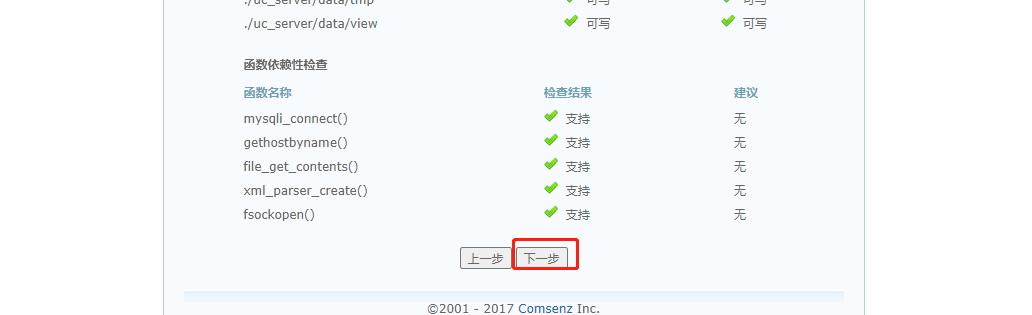
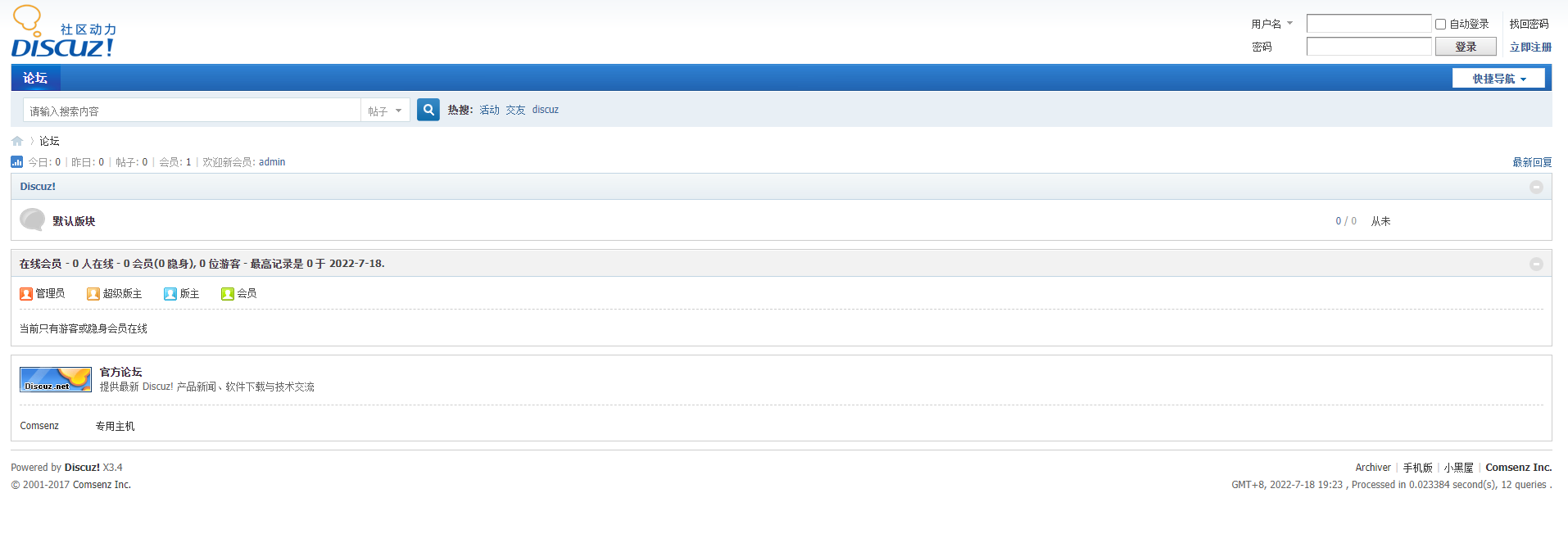
4.4 Browser access verification
# Forum page access
http://192.168.113.128/bbs

 database server :localhost
### It's built locally localhost, How not to fill in on this machine IP Address and port number
 Database name :bbs
 Database user name :bbsuser
 Database password :admin123
 Administrator account :admin
 Administrator password :admin123

 Forum background administrator page
http://192.168.113.128/bbs/admin.php



5. Use Navicat Sign in


边栏推荐
- Yiwen society, three necessary packet capturing tools for hackers
- Principle of struct2
- Selenium waits for the occurrence of elements and the conditions under which the waiting operation can be performed
- 10.expect免交互
- PyTorch 代码模板 (CNN)
- When installing mysql, string the service installation failure > mysql80 startup failure
- 简易加法计算器
- Angr(六)——angr_ctf
- Storage, computing, distributed storage (collection and sorting is suitable for Xiaobai)
- The ultimate summary of jsonobject parsing JSON format
猜你喜欢




随机推荐
三、unittest测试用例五种运行方式
Basic knapsack problem
Simple addition calculator
Angr(十)——官方文档(Part1)
多线程——Callable接口,lambda
Angr (I) - Installation
Angr (IV) -- angr_ ctf
软件测试笔记,测试用例设计
4. FTP service configuration and principle
复现 ASVspoof 2021 baseline RawNet2
The ultimate summary of jsonobject parsing JSON format
7.shell实用的小工具cut等
Multithreading - runnable interface, tortoise and rabbit race
Open virtual private line network load balancing
Set creation and common methods
MySQL offline deployment
搭建LNMP+DISCUZ论坛
配置FTP虚拟用户及访问控制
Angr (x) - official document (Part1)
Strut2 form label