当前位置:网站首页>Vs Code connects to the remote jupyter server
Vs Code connects to the remote jupyter server
2022-07-25 10:22:00 【Haulyn5】
Preface
Reminder before reading : As of the issue of , If you use VS Code Connect remote Jupyter The server , Only code files can be stored locally (ipynb), The code is executed on the remote server . If you want to operate the directories and files of the remote server , Want to achieve like Jupyter Lab The web page of UI The same feeling , Not yet . If there is any change or other scheme, please leave a message .
to update : Although it can't pass Jupyter The server edits the file on the server , Browse the files and directories on the server , But if you have a server ssh Connection permissions , Can pass VS Code Self contained ssh Connect to the control server , Then edit and execute the code on the server . This article only introduces not to use ssh, Upload the local code to the remote jupyter The process executed by the environment .
The following is about VS Code Add related functions GitHub Issue.
 https://github.com/microsoft/vscode-jupyter/issues/1601
Text
First make sure that your VS Code already installed Python and Jupyter expand .
Ctrl+Shift+X Open the expansion sidebar . Search for the above extensions and install , No more details here .
Next, create or open a new one in the code directory of the local computer ipynb file .( Here is the point , I searched for instructions for half a day without opening any files, but I couldn't find the instructions for setting up the remote server , To create or open a ipynb file , Relevant instructions can be searched )
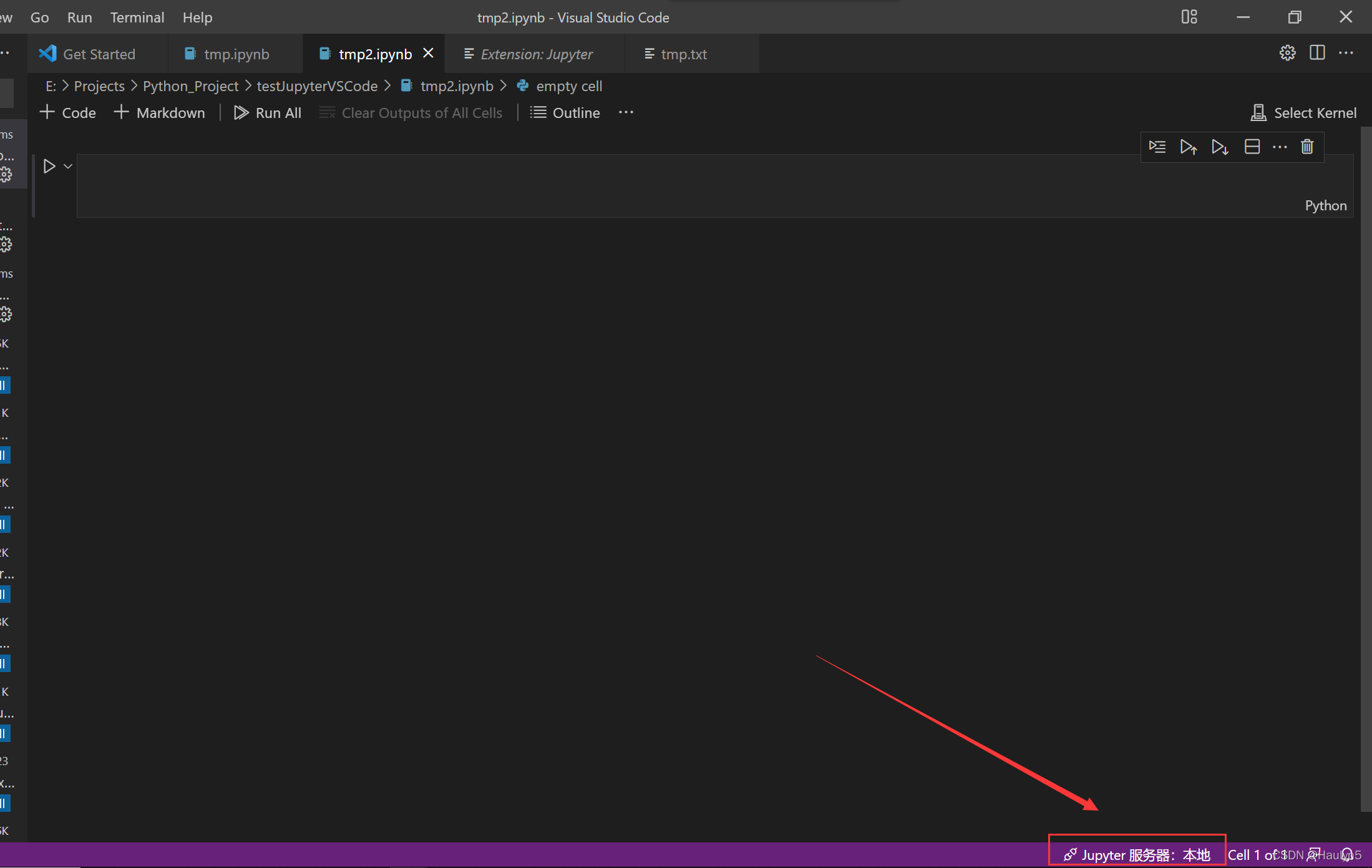
Then click... In the lower right corner Jupyter The server .

Pictured , And then in URI Enter your browser access Jupyter Of URI that will do .( Don't forget the port number )
remarks
Actually, I want to go through VS Code Connect Jupyter Probably just like me , because Jupyter Lab/ Notebook The self-contained code completion is too difficult to use .( Actually, I tried Kite, It took a long time to find it cool ) And in want to VS Code Is there a plug-in here that can achieve the function of a browser interface , Can finish Web UI All functions of . As a result, there seems to be no , It's still under development . The current idea is , adopt ssh Manage the above files and data , Then edit it locally ipynb Connect to the server after the file , Using the server's GPU Environment .
In addition, I also did relevant tests , Because the execution environment is on the server , So the data set should also be placed on the server , Direct execution `!ls` And what you get is Jupyter Lab Root directory .
Reference documents :
边栏推荐
- 数组静态初始化,遍历,最值
- Angr(五)——angr_ctf
- About the jar package of slf4j log4j log4j2 used together
- 一、unittest框架和pytest框架的区别
- 修改mysql的分组报错Expression #1 of SELECT list is not in GROUP
- Number theory -- Research on divisor
- NPM details
- [untitled]
- JS encryption parameter positioning
- Detailed explanation of chrome developer tools
猜你喜欢


随机推荐
JS encryption parameter positioning
Angr (III) - angr_ ctf
Dataset 和 Dataloader数据加载
Angr (V) - angr_ ctf
Small knowledge of common classes
修改mysql的分组报错Expression #1 of SELECT list is not in GROUP
Swing component Icon
Angr(八)——angr_ctf
message from server: “Host ‘xxx.xxx.xxx.xxx‘ is not allowed to connect to this MySQL server“
The ultimate summary of jsonobject parsing JSON format
UE4 窗口控制(最大化 最小化)
PyTorch 对 Batch 中每个样本计算损失 Loss for each sample
Angr(十)——官方文档(Part1)
虚拟专线网络部署
构建 Dompteur 容器问题小记
Multithreading - runnable interface, tortoise and rabbit race
Use of dictionary tree
存储、计算、分布式虚拟化篇(收集整理适合小白)
ES6 detailed explanation
Erlang(离线部署)