当前位置:网站首页>Set up lnmp+discuz Forum
Set up lnmp+discuz Forum
2022-07-25 10:30:00 【Is a stupid child】
List of articles
- One , Compilation and installation Nginx service
- Two , Compilation and installation MySQL service
- 2.1 Will install mysql The required software package is transferred to /opt Under the table of contents
- 2.2 Install environment dependency package
- 2.3 Configuration software module
- 2.4 Compile and install
- 2.5 establish mysql user
- 2.6 modify mysql The configuration file
- 2.7 change mysql The primary group of the installation directory and configuration files
- 2.8 Set the environment variable , Affirming / Declare mysql The command is easy for the system to recognize
- 2.9 Initialize database
- 2.10 add to mysqld system service
- 2.11 to root Account setup password
- 2.12 Grant remote login
- 3、 ... and . Compilation and installation PHP
- Four , start-up php.fpm
- 5、 ... and 、 To configure Nginx Support PHP analysis
- 6、 ... and , verification PHP Test page
- 7、 ... and 、 Verify that the database is working properly
- 8、 ... and , Deploy Discuz! Community BBS Web application
- Nine ,fpm Parameter optimization
One , Compilation and installation Nginx service
1. Configuration environment
Turn off firewall , Will install nginx The required software package is transferred to /opt Under the table of contents
systemctl stop firewalld
systemctl disable firewalld
setenforce 0
2. Install dependency packages
nginx The configuration and operation of pcre、zlib And so on , Therefore, you need to install the development package of these software , In order to provide the corresponding library and header file
yum -y install pcre-devel zlib-devel gcc gcc-c++ make
3. Create a running user 、 Group
(Nginx The service program defaults to nobody Identity running , It is recommended to create a special user account for it , In order to more accurately control its access rights )
useradd -M -s /sbin/nologin nginx
4. Compilation and installation Nginx
tar zxvf nginx-1.12.2.tar.gz -C /opt

cd /opt/nginx-1.12.2/
./configure \
--prefix=/usr/local/nginx \
--user=nginx \
--group=nginx \
--with-http_stub_status_module
# Appoint nginx The installation path
# Specify user name
# Specify the group name
# Enable  httpd_stub_status_module  Module to support State Statistics


make -j 4 && make install

ln -s /usr/local/nginx/sbin/nginx /usr/local/sbin/
# Optimize the path , Let the system recognize nginx Operation command of
5. add to Nginx system service
vim /etc/init.d/nginx
#!/bin/bash
# chkconfig: - 99 20 #chkcofig - “-”  Indicates that boot management is not enabled  ( meanwhile   If not add “#”, chkconfig add nginx  The configuration will not be loaded )
# description: Nginx Service Control Script # Startup information
COM="/usr/local/nginx/sbin/nginx"				# Command program file location (nginx)
PID="/usr/local/nginx/logs/nginx.pid"			#pid file
case "$1" in   									#$1 refer to nginx Of stop and start
start)
   $COM
   ;;
stop)
   kill -s QUIT $(cat $PID)
   ;;
restart)
   $0 stop    				# use $0 perform stop
   $0 start   				# use $0 call start
   ;;
reload)
   kill -s HUP $(cat $PID)
   ;;
*)
       echo "Usage: $0 {start|stop|restart|reload}"
       exit 1
esac
exit 0

chmod +x /etc/init.d/nginx
chkconfig --add nginx   		# Add as system service
service nginx start		 	 	# Opening service
# Can be found in /etc/rc.d/init.d You can see nginx service


############################################################################################################
vim /etc/init.d/nginx

#!/bin/bash
# chkconfig: - 99 20
# description: Nginx Service Control Script

COM="/usr/local/nginx/sbin/nginx"
PID="/usr/local/nginx/logs/nginx.pid"

case "$1" in
start)
        $COM
        ;;
stop)
        kill -s QUIT $(cat $PID)
        ;;
restart)
        $0 stop
        $0 start
        ;;
reload)
        kill -s HUP $(cat $PID)
        ;;
*)
        echo "Usage: $0 {start|stop|restart|reload}"
        exit 1
esac
exit 0
Two , Compilation and installation MySQL service
2.1 Will install mysql The required software package is transferred to /opt Under the table of contents
mysql-5.7.17.tar.gz
boost_1_59_0.tar.gz		# Support c++ The runtime
2.2 Install environment dependency package
yum -y install \
gcc \
gcc-c++ \
ncurses \				# Dynamic library of graphic interaction function under character terminal
ncurses-devel \			#ncurses Development kit
bison \					# parsers
cmake					#mysql Need to use cmake Compilation and installation

yum -y install gcc gcc-c++ ncurses ncurses-devel bison cmake
2.3 Configuration software module
cd /opt

tar zxvf mysql-5.7.17.tar.gz
tar zxvf boost_1_59_0.tar.gz -C /usr/local/

# rename
mv /usr/local/boost_1_59_0 /usr/local/boost
cd /opt/mysql-5.7.17/
cmake \
-DCMAKE_INSTALL_PREFIX=/usr/local/mysql \		# Appoint mysql Installation path for
-DMYSQL_UNIX_ADDR=/usr/local/mysql/mysql.sock \ # Appoint mysql The process listens to socket files ( Database connection file ) Storage path for
-DSYSCONFDIR=/etc \                             # Specify the storage path of the configuration file
-DSYSTEMD_PID_DIR=/usr/local/mysql \            # Specifies the storage path of the process file
-DDEFAULT_CHARSET=utf8  \                       # Specifies the default character set encoding , Such as  utf8
-DDEFAULT_COLLATION=utf8_general_ci \			# Specifies the character set collation rules to be used by default
-DWITH_EXTRA_CHARSETS=all \						# Specify support for other character set encoding
-DWITH_INNOBASE_STORAGE_ENGINE=1 \              # install INNOBASE Storage engine
-DWITH_ARCHIVE_STORAGE_ENGINE=1 \               # install ARCHIVE Storage engine
-DWITH_BLACKHOLE_STORAGE_ENGINE=1 \             # install BLACKHOLE Storage engine
-DWITH_PERFSCHEMA_STORAGE_ENGINE=1 \        	# install FEDERATED Storage engine
-DMYSQL_DATADIR=/usr/local/mysql/data \     	# Specify the storage path of the database file
-DWITH_BOOST=/usr/local/boost \          		# Appoint boost The path of , If you use mysql-boost Integration package installation is -DWITH_BOOST=boost
-DWITH_SYSTEMD=1								# Generation facilitates systemctl Administrative document

 Storage engine options :
MYISAM,MERGE,MEMORY, and CSV The engine is compiled to the server by default , There is no need to explicitly install .
 Statically compile a storage engine to the server , Use -DWITH_engine_STORAGE_ENGINE= 1
 The available storage engine values are :ARCHIVE, BLACKHOLE, EXAMPLE, FEDERATED, INNOBASE (InnoDB), PARTITION (partitioning support),  and PERFSCHEMA (Performance Schema)

##############################################
cmake \
-DCMAKE_INSTALL_PREFIX=/usr/local/mysql \
-DMYSQL_UNIX_ADDR=/usr/local/mysql/mysql.sock \
-DSYSCONFDIR=/etc \
-DSYSTEMD_PID_DIR=/usr/local/mysql \
-DDEFAULT_CHARSET=utf8  \
-DDEFAULT_COLLATION=utf8_general_ci \
-DWITH_EXTRA_CHARSETS=all \
-DWITH_INNOBASE_STORAGE_ENGINE=1 \
-DWITH_ARCHIVE_STORAGE_ENGINE=1 \
-DWITH_BLACKHOLE_STORAGE_ENGINE=1 \
-DWITH_PERFSCHEMA_STORAGE_ENGINE=1 \
-DMYSQL_DATADIR=/usr/local/mysql/data \
-DWITH_BOOST=/usr/local/boost \
-DWITH_SYSTEMD=1

 Be careful : If in CMAKE There are errors in the process of , When the error is resolved , Need to put the source directory of CMakeCache.txt File deletion , And then... Again CMAKE, Otherwise, the mistake remains
2.4 Compile and install
make -j 4 && make install
2.5 establish mysql user
useradd -M -s /sbin/nologin mysql
2.6 modify mysql The configuration file
vim /etc/my.cnf								# Delete the original configuration item , Add the following again
[client]									# Client side Settings
port = 3306
socket=/usr/local/mysql/mysql.sock

[mysqld]									# Service global settings
user = mysql       							# Set up administrative users
basedir=/usr/local/mysql					# Specify the installation directory of the database
datadir=/usr/local/mysql/data				# Specify the storage path of the database file
port = 3306									# Designated port
character-set-server=utf8					# Set the server character set encoding format to utf8
pid-file = /usr/local/mysql/mysqld.pid		# Appoint pid  Process file path
socket=/usr/local/mysql/mysql.sock			# Specify the database connection file
bind-address = 0.0.0.0						# Set listening address ,0.0.0.0 The representative allows all , If multiple IP It needs to be separated by spaces
skip-name-resolve							# Ban DNS analysis
max_connections=2048						# Set up mysql Is the maximum number of connections
default-storage-engine=INNODB				# Specify the default storage engine
max_allowed_packet=16M						# Set the maximum packet size received by the database
server-id = 1								# Designated Services ID Number

sql_mode=NO_ENGINE_SUBSTITUTION,STRICT_TRANS_TABLES,NO_AUTO_CREATE_USER,NO_AUTO_VALUE_ON_ZERO,NO_ZERO_IN_DATE,NO_ZERO_DATE,ERROR_FOR_DIVISION_BY_ZERO,PIPES_AS_CONCAT,ANSI_QUOTES

[client]
port = 3306
default-character-set=utf8
socket=/usr/local/mysql/mysql.sock

[mysql]
port = 3306
default-character-set=utf8
socket=/usr/local/mysql/mysql.sock
auto-rehash

[mysqld]
user = mysql
basedir=/usr/local/mysql
datadir=/usr/local/mysql/data
port = 3306
character-set-server=utf8
pid-file = /usr/local/mysql/mysqld.pid
socket=/usr/local/mysql/mysql.sock
bind-address = 0.0.0.0
skip-name-resolve
max_connections=2048
default-storage-engine=INNODB
max_allowed_packet=16M
server-id = 1
sql_mode=NO_ENGINE_SUBSTITUTION,STRICT_TRANS_TABLES,NO_AUTO_CREATE_USER,NO_AUTO_VALUE_ON_ZERO,NO_ZERO_IN_DATE,NO_ZERO_DATE,ERROR_FOR_DIVISION_BY_ZERO,PIPES_AS_CONCAT,ANSI_QUOTES
2.7 change mysql The primary group of the installation directory and configuration files
chown -R mysql.mysql /usr/local/mysql/
chown mysql.mysql /etc/my.cnf
2.8 Set the environment variable , Affirming / Declare mysql The command is easy for the system to recognize
echo "PATH=$PATH:/usr/local/mysql/bin" >> /etc/profile
source /etc/profile
2.9 Initialize database
cd /usr/local/mysql/bin/
./mysqld \
--initialize-insecure \				# Generate initialization password is empty
--user=mysql \                      # Specify the administrative user
--basedir=/usr/local/mysql \        # Specify the installation directory of the database
--datadir=/usr/local/mysql/data		# Specify the storage path of the database file

cd /usr/local/mysql/bin/
./mysqld \
--initialize-insecure \
--user=mysql \
--basedir=/usr/local/mysql \
--datadir=/usr/local/mysql/data
2.10 add to mysqld system service
cp /usr/local/mysql/usr/lib/systemd/system/mysqld.service /usr/lib/systemd/system/	# be used for systemctl Service management
systemctl daemon-reload			  # Refresh recognition
systemctl start mysqld.service    # Opening service
systemctl enable mysqld           # Boot up
netstat -anpt | grep 3306         # Check the port
2.11 to root Account setup password
mysqladmin -u root -p password "000000"
————》 Directly enter
2.12 Grant remote login
mysql -u root -p

grant all privileges on *.* to 'root'@'%' identified by '123123';
# grant root Users can log in remotely at all terminals , The password used is 123123, And all databases and all tables have operation permissions

show databases;
# View the existing database
3、 ... and . Compilation and installation PHP
3.1 Will install PHP The required software package is transferred to /opt Directory and extract
php-7.1.10.tar.bz2
3.2 install GD Kuhe GD Library correlator , Used to process and generate images
yum -y install \
gd \
libjpeg libjpeg-devel \
libpng libpng-devel \
freetype freetype-devel \
libxml2 libxml2-devel \
zlib zlib-devel \
curl curl-devel \
openssl openssl-devel
3.3 Configuration software module
cd /opt
 tar zxvf php-7.1.24.tar.gz

cd /opt/php-7.1.24/
./configure \
--prefix=/usr/local/php \
--with-mysql-sock=/usr/local/mysql/mysql.sock \
--with-mysqli \
--with-zlib \
--with-curl \
--with-gd \
--with-jpeg-dir \
--with-png-dir \
--with-freetype-dir \
--with-openssl \
--enable-fpm \
--enable-mbstring \
--enable-xml \
--enable-session \
--enable-ftp \
--enable-pdo \
--enable-tokenizer \
--enable-zip
3.4 Compile and install
make -j 4 && make install
3.5 Path optimization
ln -s /usr/local/php/bin/* /usr/local/bin/
ln -s /usr/local/php/sbin/* /usr/local/sbin/
3.6 adjustment PHP The configuration file
php There are three profiles :
php.ini # Master profile
php-fpm.conf # Process profile
www.conf # Extended profile
1. Adjust the main profile :
cp /opt/php-7.1.24/php.ini-development /usr/local/php/lib/php.ini
vim /usr/local/php/lib/php.ini
--1170 That's ok -- modify
mysqli.default_socket = /usr/local/mysql/mysql.sock
--939 That's ok -- uncomment , modify
date.timezone = Asia/Shanghai


2. Adjust the process service profile
cd /usr/local/php/etc/
cp  php-fpm.conf.default php-fpm.conf
vim php-fpm.conf
--17 That's ok -- Get rid of ";" notes
pid = run/php-fpm.pid

3. Adjust the extended profile :
cd /usr/local/php/etc/php-fpm.d/
cp www.conf.default www.conf
Four , start-up php.fpm
/usr/local/php/sbin/php-fpm -c /usr/local/php/lib/php.ini
netstat -anpt | grep 9000

 Or directly add it to the system startup

#PHP-FPM(FastCGI Process Manager:FastCGI  Process Manager ) It's a  PHPFastCGI  Manager ,  because Nginx The server can't handle dynamic pages , Need by  Nginx  Give the dynamic request to  php-fpm  Process .
4.1 Add service to system service
cd /opt/php-7.1.24/sapi/fpm
cp php-fpm.service /usr/lib/systemd/system/php-fpm.service
systemctl restart php-fpm.service

netstat -anpt | grep 9000
# Check the port
5、 ... and 、 To configure Nginx Support PHP analysis
vim /usr/local/nginx/conf/nginx.conf
--45 That's ok , add to index.php
location / {
              root   html;
              index  index.html index.htm index.php;
          }
--65 That's ok -- uncomment , modify
location ~ \.php$ {
	root           html;
	fastcgi_pass   127.0.0.1:9000;
	fastcgi_index  index.php;
	fastcgi_param  SCRIPT_FILENAME  /usr/local/nginx/html$fastcgi_script_name;	# take  /scripts  It is amended as follows nginx Working directory of
   #fastcgi_param  SCRIPT_FILENAME $document_root$fastcgi_script_name;  #$document_root  On behalf of the current request root The value specified in the instruction
	include        fastcgi_params;
}

Restart the service
systemctl restart nginx.service
6、 ... and , verification PHP Test page
vim /usr/local/nginx/html/index.php
<?php
phpinfo();
?>
6.1 Browser access

7、 ... and 、 Verify that the database is working properly
mysql -u root -p
mysql> CREATE DATABASE bbs;

# hold bbs The permissions of all tables in the database are granted to bbsuser, And set the password
mysql> GRANT all ON bbs.* TO 'bbsuser'@'%' IDENTIFIED BY '123456';

# Refresh database
mysql>flush privileges;

mysql> show databases;  # Check the existing database

mysql> grant all privileges on *.* to 'root'@'%' identified by '123456';  # to grant authorization root Users can log in remotely at all terminals , The password for 123456, And all databases and all tables have operation permissions

8、 ... and , Deploy Discuz! Community BBS Web application
8.1 Unzip the package of the Forum
cd /opt
unzip Discuz_X3.4_SC_UTF8.zip  -d /opt/dis
8.2 Upload site update package
cd dis/dir_SC_UTF8/
cp -r upload/ /usr/local/nginx/html/bbs
8.3 Adjust the permissions of forum Directory
cd /usr/local/nginx/html/bbs/
chown -R nginx ./config/
chown -R nginx ./data/
chown -R nginx ./uc_client/
chown -R nginx ./uc_server/
 And
chmod -R 777 ./config/
chmod -R 777 ./data/
chmod -R 777 ./uc_client/
chmod -R 777 ./uc_server/
8.4 Forum page access
http://192.168.113.128/bbs/install/index.php

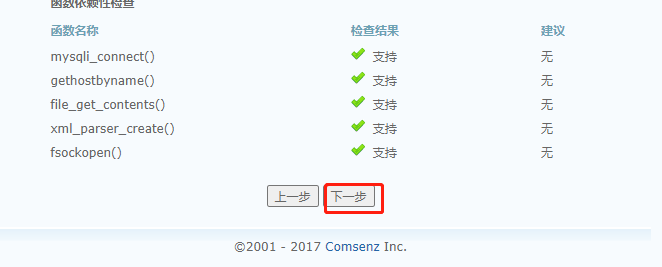
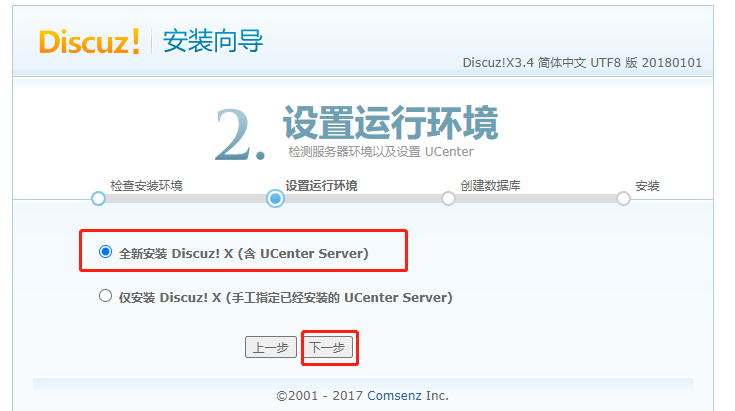
 database server :localhost     ### It's built locally localhost, How not to fill in on this machine IP Address and port number
 Database name :bbs
 Database user name :bbsuser
 Database password :123456
 Administrator account :admin
 Administrator password :123123

Nine ,fpm Parameter optimization
vim /usr/local/php/etc/php-fpm.conf
pid = run/php-fpm.pid
vim /usr/local/php/etc/php-fpm.d/www.conf
--96 That's ok --
pm = dynamic				#fpm Process startup mode , Dynamic
--107 That's ok --
pm.max_children=20			#fpm The maximum number of processes started by a process
--112 That's ok --
pm.start_servers = 5		# The number of processes started by default when starting in dynamic mode , Between the smallest and the largest
--117 That's ok --
pm.min_spare_servers = 2	# Minimum number of idle processes in dynamic mode
--122 That's ok --
pm.max_spare_servers = 8	# The maximum number of idle processes in dynamic mode
kill -USR2 `cat /usr/local/php/var/run/php-fpm.pid`			# restart php-fpm
netstat -anpt | grep 9000
ps -elf | grep php-fpm
:admin
Administrator password :123123
[ Outside the chain picture transfer in ...(img-gnO3Cwa5-1658415340709)]

#  Nine ,fpm Parameter optimization
vim /usr/local/php/etc/php-fpm.conf
pid = run/php-fpm.pid
vim /usr/local/php/etc/php-fpm.d/www.conf
–96 That's ok –
pm = dynamic #fpm Process startup mode , Dynamic
–107 That's ok –
pm.max_children=20 #fpm The maximum number of processes started by a process
–112 That's ok –
pm.start_servers = 5 # The number of processes started by default when starting in dynamic mode , Between the smallest and the largest
–117 That's ok –
pm.min_spare_servers = 2 # Minimum number of idle processes in dynamic mode
–122 That's ok –
pm.max_spare_servers = 8 # The maximum number of idle processes in dynamic mode
kill -USR2 `cat /usr/local/php/var/run/php-fpm.pid`			# restart php-fpm
netstat -anpt | grep 9000
ps -elf | grep php-fpm
边栏推荐
- Set creation and common methods
- Multithreading - five states
- Trojang attack on neural networks paper reading notes
- 升级 GLIBC 2.29 checking LD_LIBRARY_PATH variable... contains current directory error 解决方案
- 将 conda 虚拟环境 env 加入 jupyter kernel
- 一、unittest框架和pytest框架的区别
- 5.这简单的 “echo” 用法隔壁小孩能不会吗!
- Salt FAQs
- Usage of string slicing
- JS encryption parameter positioning
猜你喜欢

Supervisor deployment (offline deployment requires downloading the deployment package in advance)

2.shell脚本之条件语句

Angr(四)——angr_ctf
Use of mongodb

Duplicate SSL_ Anti spoofing, spoofing attacks and deep forgery detection using wav2vec 2.0 and data enhanced automatic speaker authentication

Attention is all you need paper intensive reading notes transformer

Angr(九)——angr_ctf

Vscode latex workshop set xelatex compilation

Angr (VI) -- angr_ ctf

升级 GLIBC 2.29 checking LD_LIBRARY_PATH variable... contains current directory error 解决方案
随机推荐
Mysql离线部署
Bug分类和定级
Array static initialization, traversal, maximum value
TCP传输
Salt FAQs
鼠标监听,画笔
Angr(八)——angr_ctf
2.介绍部署LAMP平台+DISCUZ论坛
Yiwen society, three necessary packet capturing tools for hackers
JS encryption parameter positioning
软件测试笔记,测试用例设计
PyTorch 对 Batch 中每个样本计算损失 Loss for each sample
Swing组件之单选与多选按钮
Attention is all you need paper intensive reading notes transformer
Frp反向代理部署
关于slf4j log4j log4j2的jar包配合使用的那些事
Angr (VI) -- angr_ ctf
5. NFS shared services and SSH Remote Control Services
GUI窗口
Angr(二)——angr_ctf