当前位置:网站首页>HCIP实验(01)
HCIP实验(01)
2022-07-25 09:47:00 【雨天_】

1.拓扑设计和地址规划

2.配置IP地址和环回
[r1]int lo0
[r1-LoopBack0]ip add 192.168.0.65 28
[r1]int lo1
[r1-LoopBack1]ip add 192.168.0.81 28
[r1]int lo2
[r1-LoopBack2]ip add 192.168.0.97 28
[r1]int g0/0/0
[r1-GigabitEthernet0/0/0]ip add 192.168.0.1 30
[r1]int g0/0/1
[r1-GigabitEthernet0/0/1]ip add 192.168.0.5 30
[r2]int g0/0/0
[r2-GigabitEthernet0/0/0]ip add 192.168.0.2 30
[r2]int g0/0/1
[r2-GigabitEthernet0/0/1]ip add 192.168.0.9 30
[r3]int g0/0/0
[r3-GigabitEthernet0/0/0]ip add 192.168.0.6 30
[r3]int g0/0/1
[r3-GigabitEthernet0/0/1]ip add 192.168.0.13 30
[r4]int g0/0/0
[r4-GigabitEthernet0/0/0]ip add 192.168.0.10 30
[r4]int g0/0/1
[r4-GigabitEthernet0/0/1]ip add 192.168.0.14 30
[r4]int g0/0/2
[r4-GigabitEthernet0/0/2]ip add 192.168.0.21 30
[r4]int g4/0/0
[r4-GigabitEthernet4/0/0]ip add 192.168.0.17 30
[r5]int g0/0/0
[r5-GigabitEthernet0/0/0]ip add 192.168.0.22 30
[r5]int g0/0/1
[r5-GigabitEthernet0/0/1]ip add 192.168.0.18 30
[r5]int g0/0/2
[r5-GigabitEthernet0/0/2]ip add 100.1.1.1 24
[isp]int g0/0/0
[isp-GigabitEthernet0/0/0]ip add 100.1.1.2 24
(测试)


3.配置交换机,划分虚拟子网
[sw1]vlan batch 2 to 3
[sw1]interface Ethernet0/0/2
[sw1-Ethernet0/0/2]port link-type access
[sw1-Ethernet0/0/2]port default vlan 2
[sw1-Ethernet0/0/2]q
[sw1]interface Ethernet0/0/3
[sw1-Ethernet0/0/3]port link-type access
[sw1-Ethernet0/0/3]port default
[sw1-Ethernet0/0/3]port default vlan 3
[sw1-Ethernet0/0/3]q
[sw1]interface Ethernet0/0/1
[sw1-Ethernet0/0/1]port link-type trunk
[sw1-Ethernet0/0/1]port trunk allow-pass vlan all
[sw1-Ethernet0/0/1]q
[sw1]interface Ethernet0/0/4
[sw1-Ethernet0/0/4]port link-type trunk
[sw1-Ethernet0/0/4]port trunk allow-pass vlan all
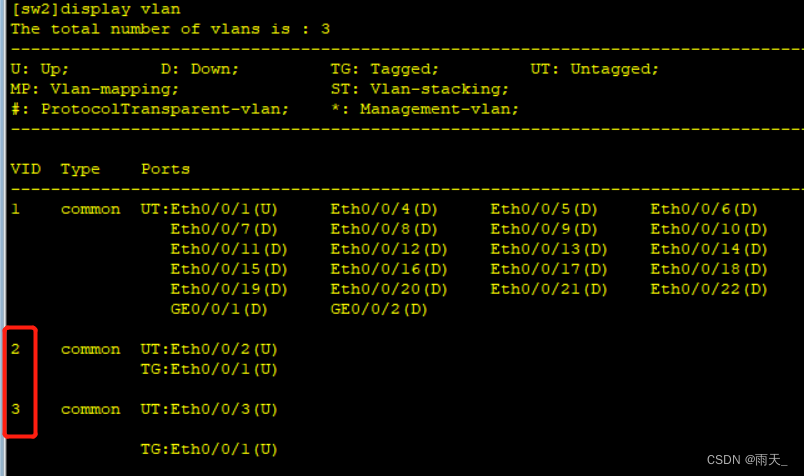
[sw2]vlan batch 2 to 3
[sw2]interface Eth0/0/1
[sw2-Ethernet0/0/1]port link-type trunk
[sw2-Ethernet0/0/1]port trunk allow-pass vlan all
[sw2-Ethernet0/0/1]q
[sw2]interface Ethernet0/0/2
[sw2-Ethernet0/0/2]port link-type access
[sw2-Ethernet0/0/2]port default vlan 2
[sw2-Ethernet0/0/2]q
[sw2]
[sw2]interface Ethernet0/0/3
[sw2-Ethernet0/0/3]port link-type access
[sw2-Ethernet0/0/3]port default vlan 3

4.配置路由器R3的子接口和DHCP服务
[r3]dhcp enable
[r3]int g0/0/2.1
[r3-GigabitEthernet0/0/2.1]dot1q termination vid 2
[r3-GigabitEthernet0/0/2.1]arp broadcast enable
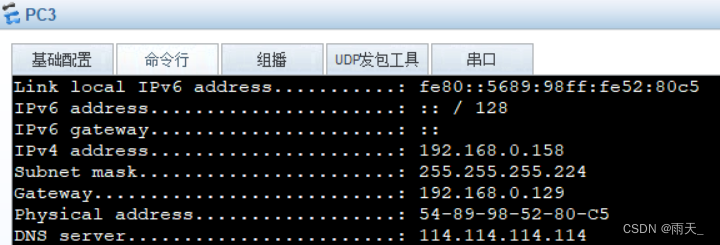
[r3-GigabitEthernet0/0/2.1]ip add 192.168.0.129 27
[r3]int g0/0/2.2
[r3-GigabitEthernet0/0/2.2]dot1q termination vid 3
[r3-GigabitEthernet0/0/2.2]arp broadcast enable
[r3-GigabitEthernet0/0/2.2]ip add 192.168.0.161 27
[r3]ip pool v2
[r3-ip-pool-v2]network 192.168.0.128 mask 27
[r3-ip-pool-v2]gateway-list 192.168.0.129
[r3-ip-pool-v2]dns-list 114.114.114.114
[r3]ip pool v3
[r3-ip-pool-v3]network 192.168.0.160 mask 27
[r3-ip-pool-v3]gateway-list 192.168.0.161
[r3-ip-pool-v3]dns-list 114.114.114.114
[r3]int g0/0/2.1
[r3-GigabitEthernet0/0/2.1]dhcp select global
[r3]int g0/0/2.2
[r3-GigabitEthernet0/0/2.2]dhcp select global
(测试)

(ping)

5.配置静态路由
[r1]ip route-static 192.168.0.8 30 192.168.0.2
[r1]ip route-static 192.168.0.16 30 192.168.0.2
[r1]ip route-static 192.168.0.20 30 192.168.0.2
[r1]ip route-static 192.168.0.128 26 192.168.0.6
[r1]ip route-static 192.168.0.12 30 192.168.0.6
[r1]ip route-static 192.168.0.20 30 192.168.0.6
[r1]ip route-static 192.168.0.16 30 192.168.0.6
[r1]ip route-static 192.168.0.0 27 192.168.0.2
[r1]ip route-static 192.168.0.0 24 192.168.0.6
[r2]ip route-static 192.168.0.64 26 192.168.0.1
[r2]ip route-static 192.168.0.4 30 192.168.0.1
[r2]ip route-static 192.168.0.12 30 192.168.0.10
[r2]ip route-static 192.168.0.16 30 192.168.0.10
[r2]ip route-static 192.168.0.20 30 192.168.0.10
[r2]ip route-static 192.168.0.128 26 192.168.0.10
[r2]ip route-static 192.168.0.128 26 192.168.0.1
[r2]ip route-static 192.168.0.0 24 192.168.0.1
[r2]ip route-static 192.168.0.0 24 192.168.0.10
[r3]ip route-static 192.168.0.0 30 192.168.0.5
[r3]ip route-static 192.168.0.64 26 192.168.0.5
[r3]ip route-static 192.168.0.8 30 192.168.0.14
[r3]ip route-static 192.168.0.16 30 192.168.0.14
[r3]ip route-static 192.168.0.20 30 192.168.0.14
[r3]ip route-static 192.168.0.0 25 192.168.0.5
[r3]ip route-static 192.168.0.0 27 192.168.0.14
[r4]ip route-static 192.168.0.0 30 192.168.0.9
[r4]ip route-static 192.168.0.64 26 192.168.0.9
[r4]ip route-static 192.168.0.64 26 192.168.0.13
[r4]ip route-static 192.168.0.4 30 192.168.0.13
[r4]ip route-static 192.168.0.0 25 192.168.0.13
[r4]ip route-static 192.168.0.0 25 192.168.0.9
(为保证通路,修改R5优先级,G4/0/0为备用骨干)
[r5]ip route-static 192.168.0.64 26 192.168.0.21
[r5]ip route-static 192.168.0.8 30 192.168.0.21
[r5]ip route-static 192.168.0.0 30 192.168.0.21
[r5]ip route-static 192.168.0.12 30 192.168.0.21
[r5]ip route-static 192.168.0.4 30 192.168.0.21
[r5]ip route-static 192.168.0.0 25 192.168.0.21
[r5]ip route-static 192.168.0.12 30 192.168.0.17 preference 100
[r5]ip route-static 192.168.0.0 25 192.168.0.17 preference 100
[r5]ip route-static 192.168.0.64 26 192.168.0.17 preference 100
[r5]ip route-static 192.168.0.0 30 192.168.0.17 preference 100
[r5]ip route-static 192.168.0.8 30 192.168.0.17 preference 100
[r5]ip route-static 192.168.0.4 30 192.168.0.17 preference 100
[r5]ip route-static 192.168.0.128 26 192.168.0.21
[r5]ip route-static 192.168.0.128 26 192.168.0.17 preference 100
6.配置缺省路由
(缺省路由是整个内网每个设备都要写)
[r1]ip route-static 0.0.0.0 0 192.168.0.2
[r1]ip route-static 0.0.0.0 0 192.168.0.6
[r2]ip route-static 0.0.0.0 0 192.168.0.10
[r3]ip route-static 0.0.0.0 0 192.168.0.14
[r4]ip route-static 0.0.0.0 0 192.168.0.18 preference 100 (修改优先级)
[r4]ip route-static 0.0.0.0 0 192.168.0.22
7.为R1进行汇总,防止环路
[r1]ip route-static 192.168.0.64 26 null 0
8.进行ACL
[r5]acl 2000
[r5-acl-basic-2000]rule permit source 192.168.0.0 0.0.0.255
[r5]int g0/0/2
[r5-GigabitEthernet0/0/2]nat outbound 2000
边栏推荐
- 一个 DirectShow 播放问题的排查记录
- 3、 Five operation modes of unittest test cases
- Using px2rem does not take effect
- Pow(x,n)
- Add CONDA virtual environment env to the Jupiter kernel
- Deadlock event of thread pool
- Virtual private line network deployment
- 2021 written examination summary of niuke.com 01
- 平凡人的一生的意义是什么?
- 5.NFS共享服务和ssh远程控制服务
猜你喜欢

Introduction to onnx runtime

Number theory -- negative Radix conversion

Idea overall font size modification

【蓝桥杯集训100题】scratch太极图 蓝桥杯scratch比赛专项预测编程题 集训模拟练习题第22题

UE4 external open EXE file

HCIP实验(03)
Notes on building dompteur container

思路再次完美验证!加息临近,趋势明了,好好把握这波行情!

异步Servlet在转转图片服务的实践

Storage, computing, distributed storage (collection and sorting is suitable for Xiaobai)

随机推荐
使用Three.js实现炫酷的赛博朋克风格3D数字地球大屏
Mysql5.7 master-slave database deployment (offline deployment)
9.shell文本处理三剑客之awk
User preferences
Several common network diagnostic commands
Vs Code connects to the remote jupyter server
Angr (III) - angr_ ctf
10.expect免交互
Idea overall font size modification
微波技术大作业课设-分立电容电感+微带单枝短截线+微带双枝短截线
Number theory -- negative Radix conversion
Angr (IV) -- angr_ ctf
5. NFS shared services and SSH Remote Control Services
C class library generation, use class library objects to data bind DataGridView
6. Regular expression of shell
Mysql5.7主从数据库部署(离线部署)
存储、计算、分布式计算篇(收集整理适合小白)
1、 The difference between unittest framework and pytest framework
Deadlock event of thread pool
Trojang attack on neural networks paper reading notes