当前位置:网站首页>[in depth understanding of tcapulusdb technology] how to realize single machine installation of tmonitor
[in depth understanding of tcapulusdb technology] how to realize single machine installation of tmonitor
2022-06-23 13:55:00 【InfoQ】
- web_portal_2.2.18_05130ad9.tar.gz Mainly Tmonitor Manage Pages
- tmonitor_install_2.2.18_05130ad9.tar.gz Mainly Tmonitor Background processes
1. Tmonitor Web Portal install
- cd /data/web_portal/, because tcaplus OMS Occupied 80 port , So modify conf file , Listen 8080 port . modify server.php, set_httpd_port(8080)
- Check the database datadir Whether the disk is enough . If it's not enough, change to /data Under the plate
- root The user login mysql
- mysql> create database tmonitor_center_db; -- Particular attention , tmonitor The foreground database and background database are separated , The foreground database uses this name , Backstage with other names
- mysql -uroot -pxxxx -Dtmonitor_center_db < *.sql hold /data/web_portal All under directory sql File import
- mysql> create user tmonitor;
- grant ALL on tmonitor_center_db.* to 'tmonitor'@'%' identified by 'xxxx'
- grant ALL on tmonitor_center_db.* to 'tmonitor'@'localhost' identified by 'xxxx'
- grant ALL on tmonitor_center_db.* to 'tmonitor'@'127.0.0.1' identified by 'xxxx'
- grant ALL on tmonitor_center_db.* to 'tmonitor'@'100.78.65.157' identified by 'xxxx'
- grant ALL on tmonitor_center_db.* to 'tmonitor'@'100_78_65_157' identified by 'xxxx- echo $HOSTNAME
- flush privileges
- Switch to root user , perform ./install_web_protal.sh 100.78.65.157 3306 tmonitor_center_db tmonitor xxxx PASSWORD 2.2.7 ( The penultimate argument is LoginType, You can fill in OA perhaps PASSWORD), This script will create /data/monitor Catalog , The foreground page will start from this directory
- then netstat –lpn Check 8080 Whether the port is started , without , Try it again , php server.php start -p 8080 start-up , Stop command : php server.php stop
- Log in to the page , Registered users tmonitor, If you can't log in , telnet ip Port look select * from tm_users_permission; See if you have administrator privileges (role=1)

- Click on ” management ” Button , Take what is being deployed tmonitor System added , After the background process gets up, it can provide services

- Here, the front desk installation is completed , Next, install the background process
2. Tmonitor Web Portal add to Tmonitor System
- https://git.code.oa.com/gcloud_storage_group/tmonitor The code and installation package are here , You may need to apply for git jurisdiction
- Upload web_portal_2.2.18_05130ad9.tar.gz Package to /data Under the table of contents , decompression , cd /data/tmonitor_install
- vim tmonitor_conf.xml Modify the following

- The interface used in the following figure is used for alarm sending . If it is IDC machine , Use tof Send SMS and wechat , Use uwork Make a phone call

- If it is IDC machine , Need to be in tof and uwork” service ip” Add... To the list sasvr Of ip, To send the alarm normally (tof apply : http://tof.oa.com/application/views/, Or contact jasonlzhang, uwork Apply to contact yorkershi).
- The machine should be able to connect directly tnm2, Need to install agent Tools , The specific steps are described later in the document .

- Above picture dcsvr Of business_id Default to 1, If there are more than one dcsvr Just increase... In turn . dc_tconnd Port for 7980, Keep the default without changing

- In the figure above, you need to provide mysql Of root password , And build the background database in advance . The steps are the same as the foreground database
- mysql –uroot –pxxxx
- create database db_tmonitor_for_qcloud_singapore_1;
- grant ALL on db_tmonitor_for_qcloud_singapore_1.* to 'tmonitor'@'%' identified by 'xxxx' ;
- grant ALL on db_tmonitor_for_qcloud_singapore_1.* to 'tmonitor'@'localhost' identified by 'xxxx' ;
- grant ALL on db_tmonitor_for_qcloud_singapore_1.* to 'tmonitor'@'127.0.0.1' identified by 'xxxx' ;
- grant ALL on db_tmonitor_for_qcloud_singapore_1.* to 'tmonitor'@'100.78.65.157' identified by 'xxxx'; -- ip
- grant ALL on db_tmonitor_for_qcloud_singapore_1.* to 'tmonitor'@'100_78_65_157' identified by 'xxxx'; -- echo $HOSTNAME
- flush privileges;

- Select the components to be installed as shown in the figure above , tcm and Business_id The default is the same as that filled in before
- Check 22 Whether the port can ssh land , Otherwise modify exp Port is 36000
- Check /etc/ssh/sshd_config and sshd_special_user, Make sure tmonitor Users have ssh Login rights
- ./tmonitor_install.pl install Start installation , Errors may be reported during installation , wait for ”install end”. This script will create tmonitor user , And create /data/tmonitor Catalog , In the future, all background processes will be in this directory
- If the execution script reports an error (Can't locate Time/HiRes.pm) Need to install :
- yum install -y perl-DBD-MySQL perl-Time-HiRes perl-XML-Simple.noarch
- perl-XML-LibXML.x86_64 perl-libxml-perl.noarch
- mysql -utmonitor -pxxxx -Ddb_tmonitor_for_qcloud_singapore_1 Log in to see if the following table is created successfully
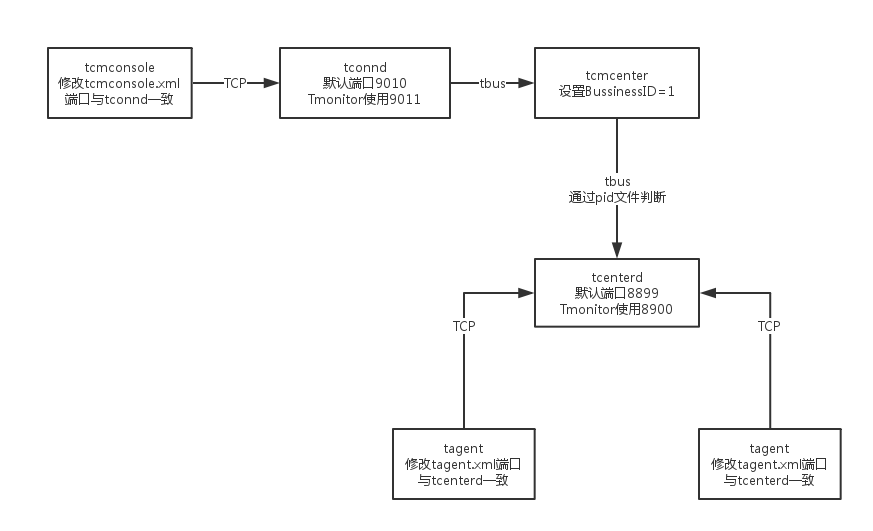
- Because on this machine tcaplus Also installed tcm Components , And tmonitor Of tcm Port conflict , So it needs to be modified /data/tmonitor/tmonitor_install Under the directory xml(tcmcenter.xml tcmconsole.xml tagent.xml tconnd.xml tcenterd.xml) Default port and manually pull up the process , The ports are used as follows
- chmod 777 /tmp/tcmconsole.pid This pid file tcaplus and tmonitor Can use , So you need to modify the permissions
- Then start each process in the direction of the arrow in the figure below , And log in tcmconsole Check whether the process is correct , Then pull up in turn dc_tconnd, dcsvr, sasvr process
- start 1.0.1.1 It can be pulled up directly dc_tconnd
- start 1.0.2.1 Pull up dcsvr An error will be reported during the process , see dcsvr Log , It is found that many connections are required mysql database . This is the old version tmonitor The remaining problems , It needs to be modified manually
- ~/tmonitor_install/dcsvr_1/cfg]$ vim dcsvr.xml Create an empty database according to the database name listed in this file
- First root land mysql, to tomitor User's permission to create database : grant ALL on.to 'tmonitor'@'100.78.65.157' identified by 'xxxx'; flush privileges
- then tmonitor The user login mysql -utmonitor -pxxxx -h100.78.65.157, Create the following database
- create database tmonitor
- create database db_route
- create database db_273_customscript
- create database db_1_autoupdate
- create database db_2_procstatus_data
- create database 0_tbus_data
- create database 0_thostinfo_data
- create database version
- And then use sed modify xml
- sed -i '/DBMSHost/c <DBMSHost>100.78.65.157</DBMSHost>' dcsvr.xml
- sed -i '/DBMSPassword/c <DBMSPassword>xxx</DBMSPassword>' dcsvr.xml
- sed -i '/DBMSUser/c <DBMSUser>tmonitor</DBMSUser>' dcsvr.xml
- After the modification, go to tcmconsole start-up dcsvr and sasvr process
- After all processes start successfully , The second part is done . If you need to uninstall or reinstall , perform /data/tmonitor_install/tmonitor_install.pl uninstall that will do
3. Business configuration
- Get into tmonitor page , Click on ” Access change ”
- Report method selection custom The way , Actively report to the node , tcm The way is sasvr Pull
- Mocha ITOM -> Apply for approval -> Access approval The following approval , cc_id Default fill 1
- Then click ”Monitor V2” Below ” Get into ” Button , Select the business just filled in , When you enter the database for the first time, you will make a mistake and say that the database information is not filled in , Go ahead and complete
- restart sasvr
- Be careful , Above picture Tmonitor The system automatically allocates business ID=1, This is the same as the one we matched before business_id It's the same . If it's not the same , Need modification xml Below BussinessID and TbusConf And restart , Again /tmp/tconnd_1.0.1.$instance_1.pid This _1 It should also be modified accordingly
- modify tcaplus Of xml, Add native ip To the white list , restart tcmcenter, Then go to ” Business configuration ” -> “ Collection policy configuration ”, Directly from IDC Copy from the cluster , Pay attention to revision ip And port , Submit update
- modify tcaplus center About sasvr Related configuration items , restart Then check that the mng_path Is there any data . Check that all processes have indicators reported . ( modify tcapcenter_cfg.xml, Be careful !!! The following figure enable To be converted into true, HttpGetSasvrInfoUrl final 0 To be converted into 1, With the above id bring into correspondence with )
- Business configuration -> Alarm receiver configuration -> Group management -> edit , Fill in the alarm receiver . Because this version has bug, So point editing is useless . Can only be modified from the database , Be careful app_id To include existing app and default
- Configure an alarm strategy , Test whether the alarm can be sent out
- Copy IDC The alarm strategy is applied to the new environment

边栏推荐
- 『忘了再学』Shell流程控制 — 39、特殊流程控制语句
- 中断和轮询
- 实战 | 如何制作一个SLAM轨迹真值获取装置?
- Quickly understand the commonly used asymmetric encryption algorithm, and no longer have to worry about the interviewer's thorough inquiry
- MIT 6.031 Reading5 : Version Control学习心得
- C语言的基本数据类型及其打印输出
- 微信小程序之flex属性
- Cloud native essay deep understanding of ingress
- 【深入理解TcaplusDB技术】Tmonitor后台一键安装
- 利用XtraDiagram.DiagramControl进行流程图形的绘制和控制
猜你喜欢

KS008基于SSM的新闻发布系统

quartus调用&设计D触发器——仿真&时序波验证
How to solve the task cache compilation problem caused by gradle build cache
![[deeply understand tcapulusdb technology] transaction execution of document acceptance](/img/d9/f6735906a130834c4b3e28de2b2617.png)
[deeply understand tcapulusdb technology] transaction execution of document acceptance

Linear regression analysis of parent-child height data set

You call this shit MQ?

Best practices for auto plug-ins and automatic batch processing in openvinotm 2022.1

使用OpenVINOTM预处理API进一步提升YOLOv5推理性能
DBMS in Oracle_ output. put_ How to use line

Wechat applet pop up the optional menu from the bottom
随机推荐
【深入理解TcaplusDB技术】Tmonitor后台一键安装
Actual combat | how to make a slam track truth acquisition device?
quartus调用&设计D触发器——仿真&时序波验证
Input adjustment of wechat applet
【深入理解TcaplusDB技术】一键安装Tmonitor后台
微信小程序之input前加图标
ExpressionChangedAfterItHasBeenCheckedError: Expression has changed after it was checked.
Tencent cloud tdsql-c heavy upgrade, leading the cloud native database market in terms of performance
leetcode:42. Rain water connection
火绒安全与英特尔vPro平台合作 共筑软硬件协同安全新格局
实战 | 如何制作一个SLAM轨迹真值获取装置?
leetcode:242. 有效的字母异位词
KS003基于JSP和Servlet实现的商城系统
Stick to five things to get you out of your confusion!
Gradle Build Cache引发的Task缓存编译问题怎么解决
【深入理解TcaplusDB技术】如何实现Tmonitor单机安装
微信小程序之下拉菜单场景
Quickly understand the commonly used asymmetric encryption algorithm, and no longer have to worry about the interviewer's thorough inquiry
Acquisition of wechat applet JSON for PHP background database transformation
Service stability governance