当前位置:网站首页>【ARM】讯为rk3568开发板lvds屏设置横屏显示
【ARM】讯为rk3568开发板lvds屏设置横屏显示
2022-06-22 21:06:00 【凉开水白菜】
讯为rk3568开发板lvds屏设置横屏显示
开发板:讯为rk3568
根文件系统:buildroot
系统:Linux
旋转 uboot logo 和内核 logo
这里我参考的是迅为资料中的09手册android系统和应用开发手册
修改/kernel/arch/arm64/boot/dts/rockchip/topeet_rk3568_lcds.dtsi设备树
这里的目录就是我们修改显示屏幕的目录,该目录下有两个设备树文件一个是屏幕的选择一个是屏幕的设置
&route_lvds{
status = "okay";
logo,rotate = <3>; // 新添加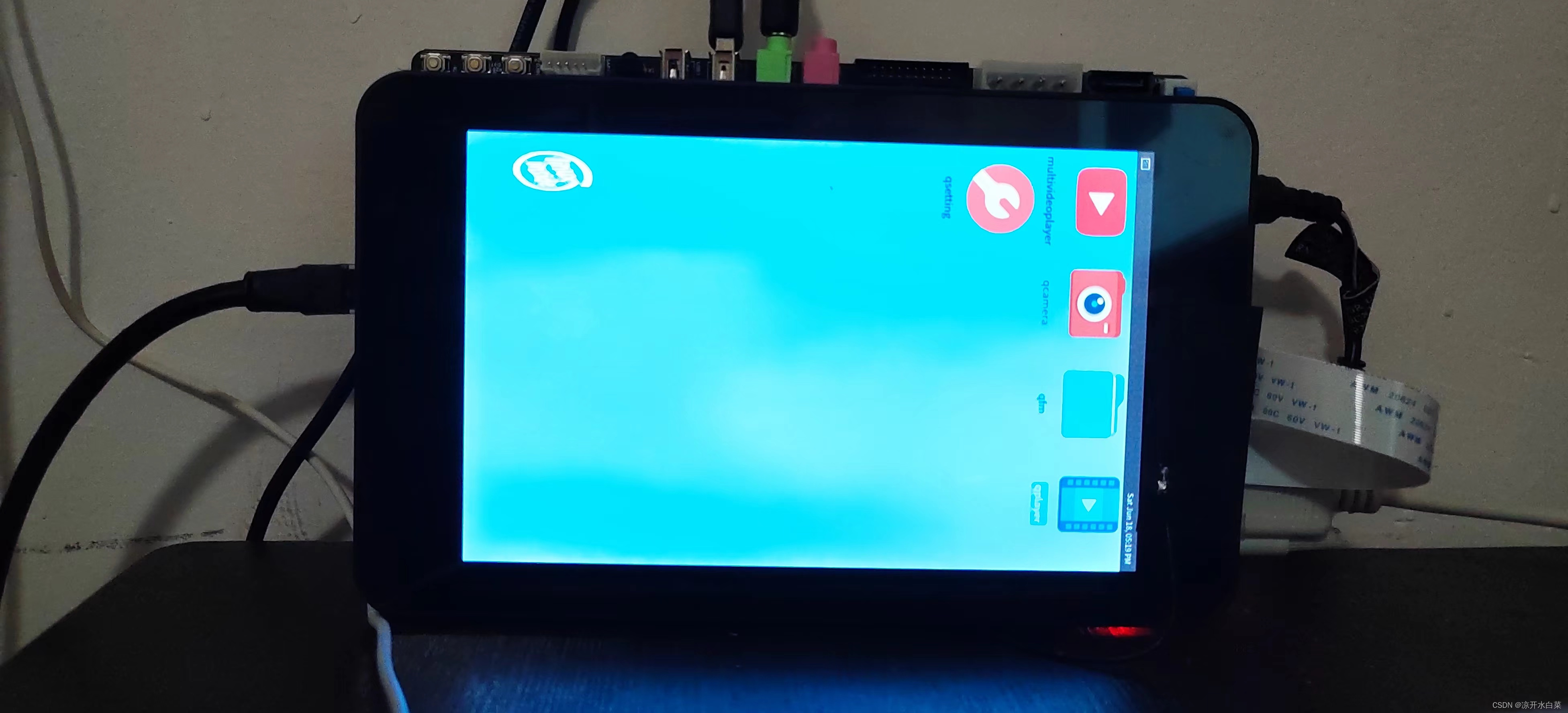
connect = <&vp2_out_lvds>;
};
其中:
logo,rotate = <1>;代表逆时针旋转 90 度,
logo,rotate = <2>;代表逆时针旋转 180 度,
logo,rotate = <3>;代表逆时针旋转 270 度,
logo,rotate = <0>;代表逆时针旋转 360 度。
这里根据显示需求对应显示角度,到这里卡机的时候我们的显示我们的内核logo显示已经是正常的了,但是系统启动过后发现桌面还是竖屏显示。
旋转buildroot系统桌面
这里我参考的是Rockchip buildrootWeston开发指南,该文档讲述的便是buildroot也就是迅为镜像中所示的屏幕相关配置用法,其中修改屏幕方向的配置方法为修改/etc/xdg/weston/weston.ini文件,我们可以在源码中进行修改也可以在进入开发板系统后进行修改。
vi /etc/xdg/weston/weston.ini

// 添加下面这段代码
[output]
name=LVDS-1
transform=90
# normal|90|180|270|flipped|flipped-90|flipped-180|flipped-270
如果需要动态配置屏幕方向,可以通过动态配置文件,如:
echo "output:all:rotate90" > /tmp/.weston_drm.conf # 所有屏幕旋转90度
echo "output:eDP-1::rotate180" > /tmp/.weston_drm.conf # eDP-1旋转180度
在该文件中还讲述了以下内容
有需要的可以进入源码的docs目录下查阅,我这里通过进入开发板系统进行修改需要重启后才会生效。 我这里触摸也没有问题,正常情况到这里就欧克了,如果出现触摸问题可以尝试下面的旋转触摸解决,这里我也是参考Android应用开发手册进行修改的,大家可以自行尝试。
旋转触摸
迅为支持的屏幕有 LVDS 7 寸屏幕,LVDS10.1 寸屏幕,MIPI 7 寸屏幕
LVDS 7 寸屏幕 和 MIPI 7 寸屏幕使用的触摸芯片是 ft5x06。 LVDS10.1 寸屏幕的触摸芯片
是 gt911。
触摸芯片是 ft5x06 的屏幕,修改
/kernel/arch/arm64/boot/dts/rockchip/topeet_rk3568_lcds.dtsi 设备树中的触摸节点,增加红色的代码,如下所示:
ft5x06:[email protected]38 {

	status = "disabled";
	compatible = "edt,edt-ft5306";
	reg = <0x38>;
	touch-gpio = <&gpio0 RK_PB5 IRQ_TYPE_EDGE_RISING>;
	interrupt-parent = <&gpio0>;
	interrupts = <RK_PB5 IRQ_TYPE_LEVEL_LOW>;
	reset-gpios = <&gpio0 RK_PB6 GPIO_ACTIVE_LOW>;
	touchscreen-size-x = <800>;
	touchscreen-size-y = <1280>;
	touch_type = <1>;
	touchscreen-inverted-x; // 新添加
	touchscreen-swapped-x-y; // 新添加
};
触摸芯片是 gt911 的屏幕,修改下面这个节点
gt9xx:[email protected]14 {

	compatible = "goodix,gt9xx";
	reg = <0x14>;
	interrupt-parent = <&gpio0>;
	interrupts = <RK_PB5 IRQ_TYPE_LEVEL_LOW>;
	reset-gpios = <&gpio0 RK_PB6 GPIO_ACTIVE_LOW>;
	touch-gpio = <&gpio0 RK_PB5 IRQ_TYPE_EDGE_RISING>;
	status = "disabled";
	tp-size = <911>;
	max-x = <1024>;
	max-y = <600>;
	touchscreen-inverted-x;// 新添加
	touchscreen-swapped-x-y;// 新添加
};
边栏推荐
- OJ每日一练——过滤多余的空格
- 2020-12-04
- 2021-07-27
- 2021-04-14
- 对 cookie 的添加/获取和删除
- Phantomjs实用代码段(持续更新中……)
- 2021-03-06
- Safe and reliable! Tianyi cloud data security management platform passed the evaluation
- Practice brings true knowledge: the strongest seckill system architecture in the whole network is decrypted. Not all seckills are seckills!!
- [kubernetes series] overview of kubernetes
猜你喜欢

The relationship between derivative and differential of function
![A group of K overturned linked lists [disassembly / overturning / assembly of linked lists]](/img/70/fb783172fa65763f031e6bd945cbd9.png)
A group of K overturned linked lists [disassembly / overturning / assembly of linked lists]

China Mobile's mobile phone users grow slowly, but strive for high profit 5g package users

Three cache methods and principles

2021-08-26

2021-04-14

2021-04-14

2021-04-16

异步FIFO

【Kubernetes 系列】Kubernetes 概述
随机推荐
Stop using system Currenttimemillis() takes too long to count. It's too low. Stopwatch is easy to use!
Greedy interval problem (2)
2021-08-21
10 Super VIM plug-ins, I can't put them down
Phantomjs实用代码段(持续更新中……)
2021-03-06
Greedy interval problem (3)
c# sqlsugar,hisql,freesql orm框架全方位性能测试对比 sqlserver 性能测试
别再用 System.currentTimeMillis() 统计耗时了,太 Low,StopWatch 好用到爆!
flutter外包,承接flutter项目
2021-04-14
2021-04-05
2021-04-14
OJ每日一练——跨越2020
ArcGIS application (20) the ArcGIS grid image symbol system prompts "this dataset does not have valid histogram required for classificati..."
uniapp 修改数组属性,视图不更新
DML:Data Manipulation Language 数据操纵语言
Learning the interpretable representation of quantum entanglement, the depth generation model can be directly applied to other physical systems
2021-03-06
Enjoy high-performance computing! Here comes the Tianyi cloud HPC solution