当前位置:网站首页>Quickly build a centralized logging platform through elk
Quickly build a centralized logging platform through elk
2022-07-25 07:25:00 【Brother Xing plays with the clouds】
At the beginning of the project , Everyone is in a hurry to get online , Generally speaking, you don't think too much about logs , Of course, the amount of logs is not large , So use log4net That's enough , With more and more applications , Logs are scattered everywhere The server Of logs Under the folder , It's really a little inconvenient , At this time, I think of , stay log4net Middle configuration mysql Data source , But there is a hole in it , be familiar with log4net Students know to write mysql There is one batch The threshold of , for instance batchcache There is 100 strip , Only write mysql, In this case , There is a delayed effect , And if the batchcache Middle discontent 100 In the words of , you are here mysql You can't see the latest 100 Logs . And adopt centralized mysql, involves tcp transmission , We should also understand the performance , and mysql There is no good log interface , I can only write it myself UI, So we have to continue to find other solutions , That is, the ELK.
One :ELK Name explanation
ELK Namely ElasticSearch + LogStash + Kibana, These three kinds match really well , First draw a picture for everyone to see .
1. LogStash
It can flow into their own The server On collection Log journal , Through the built-in ElasticSearch The plug-in is parsed and output to ES in .
2.ElasticSearch
This is a base Lucene Of Distributed Full text search framework , It can be done to logs Conduct Distributed Storage , It's kind of like hdfs Ha ...
3. Kibana
be-all log All logs are here ElasticSearch after , We need to show him , Right ? This is the time Kibana He did it , It can be displayed in multiple dimensions es Data in . This also solves
use mysql Storage brings problems that are difficult to visualize .
Two : Quickly build
The above is only the explanation of terms , To demonstrate , I'm only on one CentOS It is built .
1. The official download :https://www.elastic.co/cn/products, On the following picture , We found three corresponding products , Just download .
[[email protected] myapp]# ls elasticsearch kafka_2.11-1.0.0.tgz nginx-1.13.6.tar.gz elasticsearch-5.6.4.tar.gz kibana node elasticsearch-head kibana-5.2.0-linux-x86_64.tar.gz node-v8.9.1-linux-x64.tar.xz images logstash portal Java logstash-5.6.3.tar.gz service jdk1.8 logstash-tutorial-dataset sql jdk-8u144-linux-x64.tar.gz nginx kafka nginx-1.13.6 [[email protected] myapp]#
Here's what I downloaded elasticsearch 5.6.4,kibana5.2.0 ,logstash5.6.3 Three versions ... And then use tar -xzvf Decompress it .
2. logstash To configure
After decompressing , We went to the config Create a new one in the directory logstash.conf To configure .
[[email protected] config]# ls jvm.options log4j2.properties logstash.conf logstash.yml startup.options [[email protected] config]# pwd /usr/myapp/logstash/config [[email protected] config]# vim logstash.conf
And then do input ,filter,output Three big pieces , among input Is to absorb logs All under file log Suffix log file ,filter It's a filter function , No configuration here ,output Configure import to
hosts by 127.0.0.1:9200 Of elasticsearch in , An index every day .
input { file { type => "log" path => "/logs/*.log" start_position => "beginning" } }
output { stdout { codec => rubydebug { } }
elasticsearch { hosts => "127.0.0.1" index => "log-%{+YYYY.MM.dd}" } }
After configuration , We can get to bin Start... In the directory logstash 了 , The configuration file is set to conf/logstash.conf, As you can see from the following figure , Currently, it is 9600 port .
[[email protected] bin]# ls cpdump logstash logstash.lib.sh logstash-plugin.bat setup.bat ingest-convert.sh logstash.bat logstash-plugin ruby system-install [[email protected] bin]# ./logstash -f ../config/logstash.conf Sending Logstash's logs to /usr/myapp/logstash/logs which is now configured via log4j2.properties [2017-11-28T17:11:53,411][INFO ][logstash.modules.scaffold] Initializing module {:module_name=>"fb_apache", :directory=>"/usr/myapp/logstash/modules/fb_apache/configuration"} [2017-11-28T17:11:53,414][INFO ][logstash.modules.scaffold] Initializing module {:module_name=>"netflow", :directory=>"/usr/myapp/logstash/modules/netflow/configuration"} [2017-11-28T17:11:54,063][INFO ][logstash.outputs.elasticsearch] Elasticsearch pool URLs updated {:changes=>{:removed=>[], :added=>[http://127.0.0.1:9200/]}} [2017-11-28T17:11:54,066][INFO ][logstash.outputs.elasticsearch] Running health check to see if an Elasticsearch connection is working {:healthcheck_url=>http://127.0.0.1:9200/, :path=>"/"} [2017-11-28T17:11:54,199][WARN ][logstash.outputs.elasticsearch] Restored connection to ES instance {:url=>"http://127.0.0.1:9200/"} [2017-11-28T17:11:54,244][INFO ][logstash.outputs.elasticsearch] Using mapping template from {:path=>nil} [2017-11-28T17:11:54,247][INFO ][logstash.outputs.elasticsearch] Attempting to install template {:manage_template=>{"template"=>"logstash-*", "version"=>50001, "settings"=>{"index.refresh_interval"=>"5s"}, "mappings"=>{"_default_"=>{"_all"=>{"enabled"=>true, "norms"=>false}, "dynamic_templates"=>[{"message_field"=>{"path_match"=>"message", "match_mapping_type"=>"string", "mapping"=>{"type"=>"text", "norms"=>false}}}, {"string_fields"=>{"match"=>"*", "match_mapping_type"=>"string", "mapping"=>{"type"=>"text", "norms"=>false, "fields"=>{"keyword"=>{"type"=>"keyword", "ignore_above"=>256}}}}}], "properties"=>{"@timestamp"=>{"type"=>"date", "include_in_all"=>false}, "@version"=>{"type"=>"keyword", "include_in_all"=>false}, "geoip"=>{"dynamic"=>true, "properties"=>{"ip"=>{"type"=>"ip"}, "location"=>{"type"=>"geo_point"}, "latitude"=>{"type"=>"half_float"}, "longitude"=>{"type"=>"half_float"}}}}}}}} [2017-11-28T17:11:54,265][INFO ][logstash.outputs.elasticsearch] New Elasticsearch output {:class=>"LogStash::Outputs::ElasticSearch", :hosts=>["//127.0.0.1"]} [2017-11-28T17:11:54,266][INFO ][logstash.pipeline ] Starting pipeline {"id"=>"main", "pipeline.workers"=>2, "pipeline.batch.size"=>125, "pipeline.batch.delay"=>5, "pipeline.max_inflight"=>250} [2017-11-28T17:11:54,427][INFO ][logstash.pipeline ] Pipeline main started [2017-11-28T17:11:54,493][INFO ][logstash.agent ] Successfully started Logstash API endpoint {:port=>9600}
3. elasticSearch
This is also ELK The core of , When starting, be sure to pay attention to , because es It can't be root Account activation , So you also need to open one elsearch Account .
groupadd elsearch # newly build elsearch Group useradd elsearch -g elsearch -p elasticsearch # Create a new one elsearch user chown -R elsearch:elsearch ./elasticsearch # Appoint elasticsearch Belongs to elsearch Group
Next, let's start by default , Nothing to configure , Then you can probably see in the log that it is turned on 9200,9300 port .
[[email protected] bin]$ ./elasticsearch [2017-11-28T17:19:36,893][INFO ][o.e.n.Node ] [] initializing ... [2017-11-28T17:19:36,973][INFO ][o.e.e.NodeEnvironment ] [0bC8MSi] using [1] data paths, mounts [[/ (rootfs)]], net usable_space [17.9gb], net total_space [27.6gb], spins? [unknown], types [rootfs] [2017-11-28T17:19:36,974][INFO ][o.e.e.NodeEnvironment ] [0bC8MSi] heap size [1.9gb], compressed ordinary object pointers [true] [2017-11-28T17:19:36,982][INFO ][o.e.n.Node ] node name [0bC8MSi] derived from node ID [0bC8MSi_SUywaqz_Zl-MFA]; set [node.name] to override [2017-11-28T17:19:36,982][INFO ][o.e.n.Node ] version[5.6.4], pid[12592], build[8bbedf5/2017-10-31T18:55:38.105Z], OS[Linux/3.10.0-327.el7.x86_64/amd64], JVM[Oracle Corporation/Java HotSpot(TM) 64-Bit Server VM/1.8.0_144/25.144-b01] [2017-11-28T17:19:36,982][INFO ][o.e.n.Node ] JVM arguments [-Xms2g, -Xmx2g, -XX:+UseConcMarkSweepGC, -XX:CMSInitiatingOccupancyFraction=75, -XX:+UseCMSInitiatingOccupancyOnly, -XX:+AlwaysPreTouch, -Xss1m, -Djava.awt.headless=true, -Dfile.encoding=UTF-8, -Djna.nosys=true, -Djdk.io.permissionSUSECanonicalPath=true, -Dio.netty.noUnsafe=true, -Dio.netty.noKeySetOptimization=true, -Dio.netty.recycler.maxCapacityPerThread=0, -Dlog4j.shutdownHookEnabled=false, -Dlog4j2.disable.jmx=true, -Dlog4j.skipJansi=true, -XX:+HeapDumpOnOutOfMemoryError, -Des.path.home=/usr/myapp/elasticsearch] [2017-11-28T17:19:37,780][INFO ][o.e.p.PluginsService ] [0bC8MSi] loaded module [aggs-matrix-stats] [2017-11-28T17:19:37,780][INFO ][o.e.p.PluginsService ] [0bC8MSi] loaded module [ingest-common] [2017-11-28T17:19:37,780][INFO ][o.e.p.PluginsService ] [0bC8MSi] loaded module [lang-expression] [2017-11-28T17:19:37,780][INFO ][o.e.p.PluginsService ] [0bC8MSi] loaded module [lang-groovy] [2017-11-28T17:19:37,780][INFO ][o.e.p.PluginsService ] [0bC8MSi] loaded module [lang-mustache] [2017-11-28T17:19:37,780][INFO ][o.e.p.PluginsService ] [0bC8MSi] loaded module [lang-painless] [2017-11-28T17:19:37,780][INFO ][o.e.p.PluginsService ] [0bC8MSi] loaded module [parent-join] [2017-11-28T17:19:37,780][INFO ][o.e.p.PluginsService ] [0bC8MSi] loaded module [percolator] [2017-11-28T17:19:37,781][INFO ][o.e.p.PluginsService ] [0bC8MSi] loaded module [reindex] [2017-11-28T17:19:37,781][INFO ][o.e.p.PluginsService ] [0bC8MSi] loaded module [transport-netty3] [2017-11-28T17:19:37,781][INFO ][o.e.p.PluginsService ] [0bC8MSi] loaded module [transport-netty4] [2017-11-28T17:19:37,781][INFO ][o.e.p.PluginsService ] [0bC8MSi] no plugins loaded [2017-11-28T17:19:39,782][INFO ][o.e.d.DiscoveryModule ] [0bC8MSi] using discovery type [zen] [2017-11-28T17:19:40,409][INFO ][o.e.n.Node ] initialized [2017-11-28T17:19:40,409][INFO ][o.e.n.Node ] [0bC8MSi] starting ... [2017-11-28T17:19:40,539][INFO ][o.e.t.TransportService ] [0bC8MSi] publish_address {192.168.23.151:9300}, bound_addresses {[::]:9300} [2017-11-28T17:19:40,549][INFO ][o.e.b.BootstrapChecks ] [0bC8MSi] bound or publishing to a non-loopback or non-link-local address, enforcing bootstrap checks [2017-11-28T17:19:43,638][INFO ][o.e.c.s.ClusterService ] [0bC8MSi] new_master {0bC8MSi}{0bC8MSi_SUywaqz_Zl-MFA}{xcbC53RVSHajdLop7sdhpA}{192.168.23.151}{192.168.23.151:9300}, reason: zen-disco-elected-as-master ([0] nodes joined) [2017-11-28T17:19:43,732][INFO ][o.e.h.n.Netty4HttpServerTransport] [0bC8MSi] publish_address {192.168.23.151:9200}, bound_addresses {[::]:9200} [2017-11-28T17:19:43,733][INFO ][o.e.n.Node ] [0bC8MSi] started [2017-11-28T17:19:43,860][INFO ][o.e.g.GatewayService ] [0bC8MSi] recovered [1] indices into cluster_state [2017-11-28T17:19:44,035][INFO ][o.e.c.r.a.AllocationService] [0bC8MSi] Cluster health status changed from [RED] to [YELLOW] (reason: [shards started [[.kibana][0]] ...]).
4. kibana
It is also very simple to configure , You need to kibana.yml Specify what you need to read in the file elasticSearch Address and Internet accessible bind The address will do .
[[email protected] config]# pwd /usr/myapp/kibana/config
[[email protected] config]# vim kibana.yml
elasticsearch.url: "http://localhost:9200" server.host: 0.0.0.0
And then it starts , As can be seen from the log , It is currently on 5601 port .
[[email protected] kibana]# cd bin [[email protected] bin]# ls kibana kibana-plugin nohup.out [[email protected] bin]# ./kibana log [01:23:27.650] [info][status][plugin:[email protected]] Status changed from uninitialized to green - Ready log [01:23:27.748] [info][status][plugin:[email protected]] Status changed from uninitialized to yellow - Waiting for Elasticsearch log [01:23:27.786] [info][status][plugin:[email protected]] Status changed from uninitialized to green - Ready log [01:23:27.794] [warning] You're running Kibana 5.2.0 with some different versions of Elasticsearch. Update Kibana or Elasticsearch to the same version to prevent compatibility issues: v5.6.4 @ 192.168.23.151:9200 (192.168.23.151) log [01:23:27.811] [info][status][plugin:[email protected]] Status changed from yellow to green - Kibana index ready log [01:23:28.250] [info][status][plugin:[email protected]] Status changed from uninitialized to green - Ready log [01:23:28.255] [info][listening] Server running at http://0.0.0.0:5601 log [01:23:28.259] [info][status][ui settings] Status changed from uninitialized to green - Ready
5. Browser input :http://192.168.23.151:5601/ You can open it kibana Page ,, By default, let me specify a view Index.
Next, we are on the /logs Create a simple 1.log file , The content is “hello world”, And then in kibana Admiral logstash-* Change to log* ,Create The button will come out automatically .
[[email protected] logs]# echo 'hello world' > 1.log
After entering , Click on Discover, You can find the content you entered ~~~~ Isn't it handsome ...
If you put on head Installation package , You can also see that it does have a date pattern Index Indexes , Also bring their own 5 Default number of slices .
Okay , Let's say so much in this article , I hope it helps you .
边栏推荐
- Offline base tile, which can be used for cesium loading
- 新库上线| CnOpenDataA股上市公司股东信息数据
- PADS导出gerber文件
- Luo min from qudian, prefabricate "leeks"?
- 3. Promise
- MATLAB自编程系列(1)---角分布函数
- 《游戏机图鉴》:一份献给游戏玩家的回忆录
- A domestic open source redis visualization tool that is super easy to use, with a high-value UI, which is really fragrant!!
- js无法获取headers中Content-Disposition
- Luo min's backwater battle in qudian
猜你喜欢

Gan series of confrontation generation network -- Gan principle and small case of handwritten digit generation

2022天工杯CTF---crypto1 wp

集群聊天服务器:项目问题汇总

线代(矩阵‘)
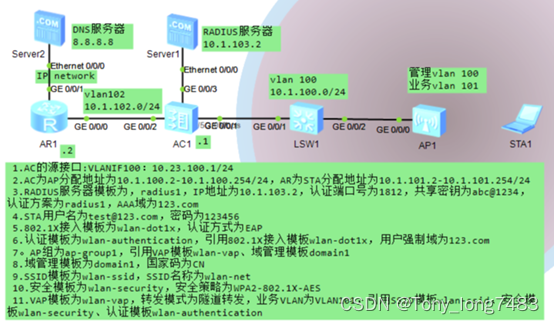
华为无线设备配置WPA2-802.1X-AES安全策略

华为无线设备配置WAPI-证书安全策略

NLP hotspots from ACL 2022 onsite experience

QT学习日记20——飞机大战项目

Oracle19 adopts automatic memory management. The AWR report shows that the settings of SGA and PGA are too small?

Million level element optimization: real-time vector tile service based on PG and PostGIS
随机推荐
[pytorch] the most common function of view
Default value of dart variable
Lidar construction map (overlay grid construction map)
Offline base tile, which can be used for cesium loading
[semidrive source code analysis] [drive bringup] 38 - norflash & EMMC partition configuration
Talk about practice, do solid work, and become practical: tour the digitalized land of China
Paper reading: UNET 3+: a full-scale connected UNET for medical image segmentation
leetcode刷题:动态规划06(整数拆分)
What are runtimecompiler and runtimeonly
Gan series of confrontation generation network -- Gan principle and small case of handwritten digit generation
Line generation (matrix ')
Price reduction, game, bitterness, etc., vc/pe rushed to queue up and quit in 2022
Million level element optimization: real-time vector tile service based on PG and PostGIS
[notes for question brushing] search the insertion position (flexible use of dichotomy)
Rust standard library - implement a TCP service, and rust uses sockets
30 times performance improvement -- implementation of MyTT index library based on dolphin DB
Common cross domain scenarios
[cloud native] the ribbon is no longer used at the bottom of openfeign, which started in 2020.0.x
Learn no when playing 10. Is enterprise knowledge management too boring? Use it to solve!
Completely replace the redis+ database architecture, and JD 618 is stable!