当前位置:网站首页>华为无线设备配置WPA2-802.1X-AES安全策略
华为无线设备配置WPA2-802.1X-AES安全策略
2022-07-25 07:12:00 【Tony_long7483】
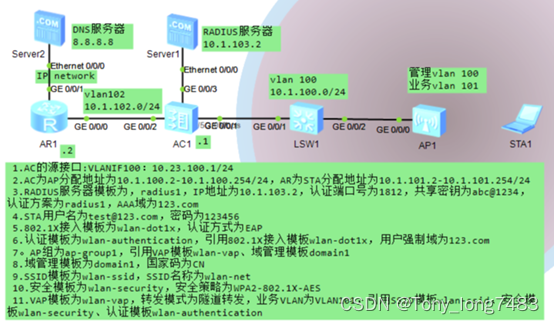
配置LSW和AC,使AP与AC之间能够传输CAPWAP报文
[LSW1]vlan batch 100
[LSW1-GigabitEthernet0/0/1]port link-type trunk
[LSW1-GigabitEthernet0/0/1]port trunk allow-pass vlan 100
[LSW1-GigabitEthernet0/0/2]port link-type trunk
[LSW1-GigabitEthernet0/0/2]port trunk allow-pass vlan 100
[LSW1-GigabitEthernet0/0/2]port trunk pvid vlan 100
[AC1]vlan batch 100
[AC1-GigabitEthernet0/0/1]port link-type trunk
[AC1-GigabitEthernet0/0/1]port trunk allow-pass vlan 100配置AC与上层网络设备互通
[AC1]vlan batch 101 102 103
[AC1-Vlanif101]ip add 10.1.101.1 24
[AC1-Vlanif102]ip add 10.1.102.1 24
[AC1-Vlanif103]ip add 10.1.103.1 24
[AC1-GigabitEthernet0/0/2]port link-type access
[AC1-GigabitEthernet0/0/2]port default vlan 102
[AC1-GigabitEthernet0/0/3]port link-type trunk
[AC1-GigabitEthernet0/0/3]port trunk allow-pass vlan 103
[AC1-GigabitEthernet0/0/3]port trunk pvid vlan 103
[AC1]ip route-static 0.0.0.0 0.0.0.0 10.1.102.2配置AC给AP分配IP地址,AR给STA分配IP地址
[AC1]dhcp enable
[AC1-Vlanif100]ip add 10.1.100.1 24
[AC1-Vlanif100]dhcp select interface
[AC1-Vlanif101]dhcp select relay
[AC1-Vlanif101]dhcp relay server-ip 10.1.102.2
[AR1]dhcp enable
[AR1-ip-pool-sta]gateway-list 10.1.101.1
[AR1-ip-pool-sta]dns-list 8.8.8.8
[AR1-ip-pool-sta]network 10.1.101.0 mask 24
[AR1-GigabitEthernet0/0/0]ip add 10.1.102.2 24
[AR1-GigabitEthernet0/0/0]dhcp select global
[AR1]ip route-static 10.1.101.0 24 10.23.102.1配置RADIUS认证参数
创建RADIUS服务器模板
[AC1]radius-server template radius1
[AC1-radius-radius1]radius-server authentication 10.1.103.2 1812
[AC1-radius-radius1]radius-server shared-key cipher [email protected]
创建RADIUS方式的认证方案
[AC1]aaa
[AC1-aaa]authentication-scheme radius1
[AC1-aaa-authen-radius1]authentication-mode radius
创建AAA域并配置域的RADIUS服务器模板和认证方案
[AC1-aaa]domain 123.com
[AC1-aaa-domain-123.com]radius-server radius1
[AC1-aaa-domain-123.com]authentication-scheme radius1配置802.1X接入模板,管理802.1X接入控制参数
创建802.1X接入模板
[AC1]dot1x-access-profile name wlan-dot1x
配置认证方式为EAP中继模式
[AC1-dot1x-access-profile-wlan-dot1x]dot1x authentication-method eap创建认证模板,绑定802.1X接入模板,并配置用户强制域
[AC1]authentication-profile name wlan-authentication
[AC1-authentication-profile-wlan-authentication]dot1x-access-profile wlan-dot1x
[AC1-authentication-profile-wlan-authentication]access-domain 123.com dot1x force配置AP上线
创建AP组
[AC1]wlan
[AC1-wlan-view]ap-group name ap-group1
创建域管理模板,在域管理模板下配置AC的国家码并在AP组下引用域管理模板
[AC1-wlan-view]regulatory-domain-profile name domain1
[AC1-wlan-regulate-domain-domain1]country-code cn
[AC1-wlan-view]ap-group name ap-group1
[AC1-wlan-ap-group-ap-group1]regulatory-domain-profile domain1
[AC1]capwap source interface Vlanif 100
在AC上离线导入AP,并将AP加入AP组
[AC1-wlan-view]ap auth-mode mac-auth
[AC1-wlan-view]ap-id 0 ap-mac 00e0-fc19-7cf0
[AC1-wlan-ap-0]ap-name ap1
[AC1-wlan-ap-0]ap-group ap-group1
配置WLAN业务参数
创建安全模板,并配置安全策略
[AC1]wlan
[AC1-wlan-view]security-profile name wlan-security
[AC1-wlan-sec-prof-wlan-security]security wpa2 dot1x aes
创建SSID模板,并配置SSID名称
[AC1-wlan-view]ssid-profile name wlan-ssid
[AC1-wlan-ssid-prof-wlan-ssid]ssid wlan-net
创建VAP模板,配置业务数据转发模式、业务VLAN,并且引用安全模板、认证模板和SSID模板
[AC1-wlan-view]vap-profile name wlan-vap
[AC1-wlan-vap-prof-wlan-vap]forward-mode tunnel
[AC1-wlan-vap-prof-wlan-vap]service-vlan vlan-id 101
[AC1-wlan-vap-prof-wlan-vap]security-profile wlan-security
[AC1-wlan-vap-prof-wlan-vap]authentication-profile wlan-authentication
[AC1-wlan-vap-prof-wlan-vap]ssid-profile wlan-ssid
配置AP组引用VAP模板,AP上射频0和射频1都使用VAP模板的配置
[AC1-wlan-view]ap-group name ap-group1
[AC1-wlan-ap-group-ap-group1]vap-profile wlan-vap wlan 1 radio 0
[AC1-wlan-ap-group-ap-group1]vap-profile wlan-vap wlan 1 radio 1配置AP射频的信道和功率
关闭射频的信道和功率自动调优功能
[AC1-wlan-view]rrm-profile name default
[AC1-wlan-rrm-prof-default]calibrate auto-channel-select disable
[AC1-wlan-rrm-prof-default]calibrate auto-txpower-select disable
配置AP射频的信道和功率
[AC1-wlan-view]ap-id 0
[AC1-wlan-ap-0]radio 0
[AC1-wlan-radio-0/0]channel 20mhz 6
[AC1-wlan-radio-0/0]eirp 127
[AC1-wlan-ap-0]radio 1
[AC1-wlan-radio-0/1]channel 20mhz 149
[AC1-wlan-radio-0/1]eirp 127
边栏推荐
- scrapy定时爬虫的思路
- Thread 类的基本用法
- Decrypting numpy is a key difficulty in solving the gradient
- BOM概述
- 10分钟看懂Jmeter 是如何玩转 redis 数据库的
- Kubernates-1.24.2 (latest version) + containerd + nexus
- Tp5.1 foreach adds a new field in the controller record, and there is no need to write all the other fields again without changing them (not operating in the template) (paging)
- 【电脑讲解】NVIDIA发布GeForce RTX SUPER系列显卡,游戏玩家福利来了!
- Default value of dart variable
- Basic usage of thread class
猜你喜欢

【云原生】原来2020.0.X版本开始的OpenFeign底层不再使用Ribbon了

9大最佳工程施工项目管理系统
MySQL remote login

【电脑讲解】NVIDIA发布GeForce RTX SUPER系列显卡,游戏玩家福利来了!

从ACL 2022 Onsite经历看NLP热点

2022天工杯CTF---crypto1 wp

Octopus network community call 1 starts Octopus Dao construction

Tp5.1 foreach adds a new field in the controller record, and there is no need to write all the other fields again without changing them (not operating in the template) (paging)

阿里云镜像地址&网易云镜像

RPC通信原理与项目技术选型
随机推荐
从ACL 2022 Onsite经历看NLP热点
Rongyun launched a real-time community solution and launched "advanced players" for vertical interest social networking
error: redefinition of
[computer explanation] NVIDIA released geforce RTX Super Series graphics cards, and the benefits of game players are coming!
Upload and download multiple files using web APIs
【terminal】x86 Native Tools Command Prompt for VS 2017
[Yugong series] July 2022 go teaching course 015 assignment operators and relational operators of operators
Ideal L9, can't cross a pit on the road?
When importing data in batches, you always prompt "failure reason: SQL parsing failure: parsing file failure:: null". What's the matter?
How can dbcontext support the migration of different databases in efcore advanced SaaS system
150. Evaluation of inverse Polish expression
Software engineering in Code: regular expression ten step clearance
"Wei Lai Cup" 2022 Niuke summer multi school training camp 1 supplementary problem solution (incomplete)
With apple not making money, the 2trillion "fruit chain" abandons "fruit" and embraces "special"
[semidrive source code analysis] [drive bringup] 39 - touch panel touch screen debugging
[daily question 1] 1184. Distance between bus stops
探讨影响自动化测试成败的重要因素
解密NumPy求解梯度的一个关键难点
Vscode saves setting configuration parameters to the difference between users and workspaces
knapsack problem