当前位置:网站首页>2-用线段构成图形、坐标转换
2-用线段构成图形、坐标转换
2022-06-23 07:56:00 【颐和园】
本文通过一个自定义 checkbox 按钮的例子,演示如何使用 Core Graphics 的多线段绘制功能绘制控件的 UI 。
CheckButton
首先创建 CheckButton 类:
// 1
class CheckButton: ShadowButton {
    override init(frame: CGRect) {
        super.init(frame: frame)
        commonInit()
    }
    required init?(coder aDecoder: NSCoder) {
        super.init(coder: aDecoder)
        commonInit()
    }
    // 2
    fileprivate func commonInit() {
        text = nil
    }
    // 3
    override public func selectDraw(_ frame: CGRect) {

        // 4
        super.selectDraw(frame)
        // 5
        let selectedColor = UIColor(red: 0, green: 249/255, blue: 192/255, alpha: 1)
        LinePainter.drawCheckMark(selectedColor, targetFrame: frame, shadow: outerShadow)
    }
	// 6
    override public func unselectDraw(_ frame: CGRect) {

        super.unselectDraw(frame)

        LinePainter.drawCheckMark(.white, targetFrame: frame, shadow: outerShadow)
    }
}
extension CheckButton {

    // 7
    override func touchesEnded(_ touches: Set<UITouch>, with event: UIEvent?) {
        isSelected = !isSelected
        setNeedsDisplay()
    }
    // 8
    override func touchesBegan(_ touches: Set<UITouch>, with event: UIEvent?) {}
}
- CheckButton 继承了 ShadowButton,因为它也希望拥有 ShadowButton 的内外阴影、填充背景的渐变色、圆角半径等属性。
- commonInit 方法中,我们将 text 属性置空,因为它不需要显示文本。
- drawSelect 方法,当选中状态时的绘制函数。
- 首先,调用继承过来的 drawSelect 方法。
- 然后调用 LinePainter 为我们绘制一个表示选中的绿色勾号。
- 覆盖 unselectDraw 方法。绘制未选中状态,跟 selectDraw 方法差不多,仅有的区别是改变了勾号的颜色为白色。
- touchBegan 方法,处理按钮的触摸,对于一个 checkbox 控件,让它在 select/unselect 之间切换即可。
- touchEnded 方法空实现,因为我们不想要释放触摸后状态复原的效果。
LinePainter
LinePainter 是我们遇到的第 3 个 Painter,它提供了多线段的绘制方法,以及为我们绘制勾号的方法。
class LinePainter {
    private let context: CGContext?

    init() {
        self.context =  UIGraphicsGetCurrentContext()
    }
    // 1.
    func polyLines(_ points: [CGPoint]) -> UIBezierPath {
        let path = UIBezierPath()

        for i in 0..<points.count {
            if i == 0 {
                path.move(to: points[0])
            }else{
                path.addLine(to: points[i])
            }
        }
        return path
    }

    // 2
    func drawCheckMark(_ color: UIColor, targetFrame: CGRect, shadow: NSShadow?) {
        if let context = context {

            // 3

            let originFrame = CGRect(x: 75, y: 22, width: 96, height: 96)
            let vertex1 = convert(CGPoint(x: 100, y: 78),originFrame: originFrame, newFrame: targetFrame)
            let vertex2 = convert(CGPoint(x: 117, y: 92), originFrame: originFrame,newFrame: targetFrame)
            let vertex3 = convert(CGPoint(x: 151, y: 48), originFrame: originFrame, newFrame: targetFrame)

            // 4
            let path = polyLines([vertex1, vertex2, vertex3])

            context.saveGState()
            // 5
            if let shadow = shadow {
                context.setShadow(offset: shadow.shadowOffset, blur: shadow.shadowBlurRadius, color: (shadow.shadowColor as! UIColor).cgColor)
            }
            // 6
            color.setStroke()
            // 7
            path.lineWidth = 7
            // 8
            path.lineJoinStyle = .round
            // 9
            path.stroke()
            context.restoreGState()

        }
    }

    // 10
    private func convert(_ point: CGPoint, originFrame: CGRect, newFrame: CGRect) -> CGPoint {
        let x:CGFloat = (point.x - originFrame.minX)/originFrame.width*newFrame.width + newFrame.minX
        let y:CGFloat = (point.y - originFrame.minY)/originFrame.height*newFrame.height + newFrame.minY
        return CGPoint(x:x, y: y)
    }
}
- polyLines 绘制多线段,参数是一个 CGPoint 数组。所谓多线段其实就是由多个点连接起来的折线而已。所以多线段的绘制本质上就是顶点(端点)的绘制。polyLines 函数返回一个 CGPath。
- 通过绘制多线段的方式绘制一个勾号。
- 一个勾号由三个顶点构成,我们分别计算了这 3 个顶点。每个顶点的计算都是调用 convert 函数得来的。
- 将三个顶点传入 polyLines 函数,从而计算出一个二维图形(勾号)。
- 如果有阴影,则在绘制时添加阴影。
- 设置绘制路径是颜色。
- 设置线宽。
- 设置顶点圆角。
- 绘制图形。
- convert 函数负责计算顶点坐标。设计图上的坐标需要进行一定的转换才能得到控件本身的坐标。以这里的例子来说,第一个点的坐标 75,22 是从设计图上画布上取到的坐标(你可以用 sketch)。它首先需要减去控件左上角在画布中的坐标,然后乘以按钮缩放后的比例(即控件在原图中的大小除以添加到 view 以后的实际大小),再加上控件放入 view 后 frame 的原点坐标,才能最终转换成正确的坐标。
测试
在 viewDidLoad 中:
		 let button = CheckButton(frame: CGRect(x: 100, y: 200, width: 100, height: 100))
        button.gradient = gradient()
        button.outerShadow = outerShadow()
        button.innerShadow = innerShadow()
        button.buttonRadius = 11

        button.backgroundColor = .white
        button.layer.cornerRadius = 20

        addSubview(button)

边栏推荐
- RTSP/ONVIF协议视频平台EasyNVR启动服务报错“service not found”,该如何解决?
- 抓包发现tcp会话中老是出现重复的ack和大量的tcp重传——SACK(Selective Acknowledgment, 选择性确认)技术
- Create an orderly sequence table and perform the following operations: 1 Insert element x into the table and keep it in order; 2. find the element with the value of X, and delete it if found; 3. outpu
- Using jetpack datastore for data storage
- Deep learning ----- different methods to implement lenet-5 model
- Deep learning ----- convolution (conv2d) bottom layer
- Pyspark on HPC (Continued): reasonable partition processing and consolidated output of a single file
- Ad object of Active Directory
- Tencent cloud account related
- GTEST死亡测试
猜你喜欢

Display proportion of sail soft accumulation diagram
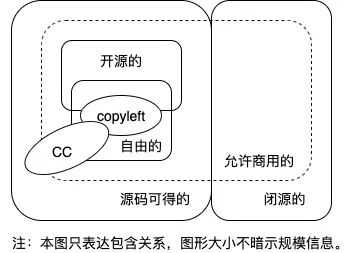
开源软件、自由软件、Copyleft、CC都是啥,傻傻分不清楚?

On ThreadLocal and inheritablethreadlocal, source code analysis

Captain Abu's soul torture

11 string function

RTSP/ONVIF协议视频平台EasyNVR启动服务报错“service not found”,该如何解决?

Deep learning ----- different methods to implement lenet-5 model

记一次高校学生账户的“从无到有”

黄蓉真的存在吗?

Apache Solr arbitrary file read replication
随机推荐
Production environment server environment setup + project release process
Sequence table Curriculum
Captain Abu's soul torture
Tensorboard的使用
转盘式视觉筛选机及其图像识别系统
开源技术交流丨批流一体数据同步引擎ChunJun数据还原-DDL功能模块解析
Openvino series 18 Real time object recognition through openvino and opencv (RTSP, USB video reading and video file reading)
Use of tensorboard
MySQL common skills
Fillet the tabbar with the flutter
如何在conda虚拟环境开启jupyter-notebook
Go language basic conditional statement if
Structure and usage of transform
C# richTextBox控制最大行数
APM performance monitoring practice of jubasha app
RTSP/ONVIF协议视频平台EasyNVR启动服务报错“service not found”,该如何解决?
5本财富自由好书的精华
Implementation of AVL tree
Easygbs cannot play video streams in webrtc format. What is the reason?
After reading five books, I summarized these theories of wealth freedom