当前位置:网站首页>longhorn安装与使用
longhorn安装与使用
2022-06-24 06:56:00 【TimeRovers】
longhorn安装与使用
一、longhorn介绍
1.1 配置介绍
longhorn默认存储目录是/var/lib/longhorn,使用yaml文件安装的也是在节点的这个目录下
二、安装
2.1 k8s方式安装longhorn
longhorn会创建自己命名空间和存储类
2.1.1 节点安装依赖
每个节点都需要安装iscsi-initiator-utils,ubuntu需要安装open-iscsi
yum -y install iscsi-initiator-utils
2.1.2 安装
(1)下载longhorn.yaml文件
可以指定版本下载。也可以直接安装,这里下载是为了修改配置
#kubectl apply -f https://raw.githubusercontent.com/longhorn/longhorn/v1.1.0/deploy/longhorn.yaml
wget https://raw.githubusercontent.com/longhorn/longhorn/v1.1.0/deploy/longhorn.yaml
(2)修改配置
- 修改pv保留策略
修改pv为保留策略,否则删除pvc的时候pv就会被删除
#找到文件中的StorageClass.data.reclaimPolicy字段,修改为Retain
reclaimPolicy: Retain
- 修改longhorn-frontend端口,便于访问
修改longhorn-frontend端口
#类型也需要修改为NodePort
type: NodePort
#找到longhorn-frontend的nodePort字段
nodePort: 30179
- 修改存储路径
#找到DaemonSet资源下的spec.template.containers.volumeMounts字段
将/var/lib/longhorn/修改为想要变更的存储路径,记得需要把文件中的所有/var/lib/longhorn/这个路径替换为变更的存储路径
(3)部署
- 部署
[[email protected] volumes]# kubectl apply -f longhorn.yaml
namespace/longhorn-system created
serviceaccount/longhorn-service-account created
clusterrole.rbac.authorization.k8s.io/longhorn-role created
clusterrolebinding.rbac.authorization.k8s.io/longhorn-bind created
customresourcedefinition.apiextensions.k8s.io/engines.longhorn.io created
customresourcedefinition.apiextensions.k8s.io/replicas.longhorn.io created
customresourcedefinition.apiextensions.k8s.io/settings.longhorn.io created
customresourcedefinition.apiextensions.k8s.io/volumes.longhorn.io created
customresourcedefinition.apiextensions.k8s.io/engineimages.longhorn.io created
customresourcedefinition.apiextensions.k8s.io/nodes.longhorn.io created
customresourcedefinition.apiextensions.k8s.io/instancemanagers.longhorn.io created
customresourcedefinition.apiextensions.k8s.io/sharemanagers.longhorn.io created
configmap/longhorn-default-setting created
podsecuritypolicy.policy/longhorn-psp created
role.rbac.authorization.k8s.io/longhorn-psp-role created
rolebinding.rbac.authorization.k8s.io/longhorn-psp-binding created
configmap/longhorn-storageclass created
daemonset.apps/longhorn-manager created
service/longhorn-backend created
deployment.apps/longhorn-ui created
service/longhorn-frontend created
deployment.apps/longhorn-driver-deployer created
- 查看部署结果
[[email protected] volumes]# kubectl get ns
NAME              STATUS   AGE
default           Active   105d
dev               Active   10d
kube-node-lease   Active   105d
kube-public       Active   105d
kube-system       Active   105d
longhorn-system   Active   3m8s

[[email protected] volumes]# kubectl get pod -n longhorn-system
NAME                                       READY   STATUS    RESTARTS   AGE
csi-attacher-5dcdcd5984-cvk6k              1/1     Running   0          2m38s
csi-attacher-5dcdcd5984-fp8q4              1/1     Running   0          2m38s
csi-attacher-5dcdcd5984-kjjg9              1/1     Running   0          2m38s
csi-provisioner-5c9dfb6446-df4qw           1/1     Running   0          2m38s
csi-provisioner-5c9dfb6446-dhjhn           1/1     Running   0          2m38s
csi-provisioner-5c9dfb6446-szcml           1/1     Running   0          2m38s
csi-resizer-54d484bf8-ggjxg                1/1     Running   0          2m38s
csi-resizer-54d484bf8-jg9p9                1/1     Running   0          2m38s
csi-resizer-54d484bf8-k74gp                1/1     Running   0          2m38s
csi-snapshotter-96bfff7c9-555kp            1/1     Running   0          2m37s
csi-snapshotter-96bfff7c9-dcc96            1/1     Running   0          2m37s
csi-snapshotter-96bfff7c9-pd8hb            1/1     Running   0          2m37s
engine-image-ei-cf743f9c-fkgx8             1/1     Running   0          3m2s
engine-image-ei-cf743f9c-rtgml             1/1     Running   0          3m2s
engine-image-ei-cf743f9c-zhdtv             1/1     Running   0          3m2s
instance-manager-e-206640f3                1/1     Running   0          2m58s
instance-manager-e-d25b6c2c                1/1     Running   0          2m54s
instance-manager-e-e04840b1                1/1     Running   0          3m1s
instance-manager-r-2e491629                1/1     Running   0          3m1s
instance-manager-r-384e572d                1/1     Running   0          2m57s
instance-manager-r-70cc0617                1/1     Running   0          2m53s
longhorn-csi-plugin-bb2bw                  2/2     Running   0          2m37s
longhorn-csi-plugin-mmchb                  2/2     Running   0          2m37s
longhorn-csi-plugin-vrpq6                  2/2     Running   0          2m37s
longhorn-driver-deployer-cdb7464c6-cwt98   1/1     Running   0          3m17s
longhorn-manager-52gn6                     1/1     Running   2          3m18s
longhorn-manager-597xc                     1/1     Running   2          3m18s
longhorn-manager-zltr8                     1/1     Running   1          3m18s
longhorn-ui-849c455d79-x9265               1/1     Running   0          3m17s

查看存储类
[[email protected] volumes]# kubectl get sc
NAME       PROVISIONER          RECLAIMPOLICY   VOLUMEBINDINGMODE   ALLOWVOLUMEEXPANSION   AGE
longhorn   driver.longhorn.io   Retain          Immediate           true                   3m44s
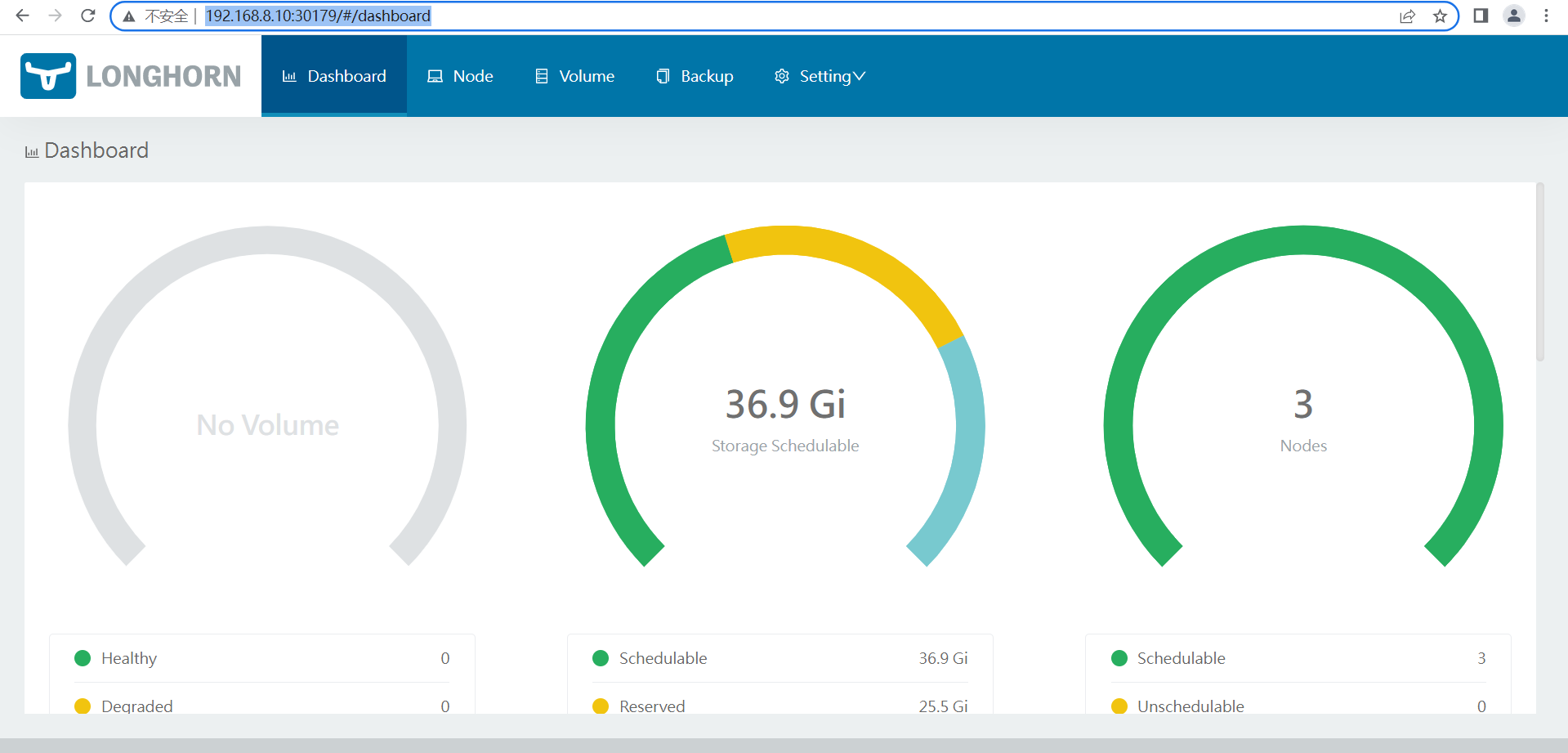
2.2.3 web访问
直接访问集群中任何一个节点加端口就可以了
http://192.168.8.10:30179/#/dashboard
可以手动创建pv,部署好这个服务之后,之后在longhorn存储类中创建的pvc如果没有匹配的pv,都会自动创建pv,与pvc想匹配的。所以不需要咱们手动创建
边栏推荐
- Use of swift basic closure /block (source code)
- Swift Extension NetworkUtil(网络监听)(源码)
- GraphMAE----論文快速閱讀
- Vulnhub target: boredhackerblog_ CLOUD AV
- [teacher zhaoyuqiang] use the Oracle tracking file
- 软件工程导论——第三章——需求分析
- Case examples of corpus data processing (cases related to sentence retrieval)
- 解决笔记本键盘禁用失败问题
- [ACNOI2022]做过也不会
- Question 1: the container that holds the most water
猜你喜欢

Cold thinking on the hot track: multiplier effect is the fundamental requirement of East West calculation

Leetcode 207: course schedule (topological sorting determines whether the loop is formed)

蓝桥杯_N 皇后问题

1-4metaploitable2 introduction

Swift extension chainlayout (UI chain layout) (source code)

Swift extension networkutil (network monitoring) (source code)
![[nilm] non intrusive load decomposition module nilmtk installation tutorial](/img/d0/bc5ea1cbca9ee96a2fe168484ffec4.png)
[nilm] non intrusive load decomposition module nilmtk installation tutorial

The monthly salary of two years after graduation is 36K. It's not difficult to say
![[run the script framework in Django and store the data in the database]](/img/6b/052679e5468e5a90be5c4339183f43.png)
[run the script framework in Django and store the data in the database]

On the H5 page, the Apple phone blocks the content when using fixed to locate the bottom of the tabbar
随机推荐
[test development] first knowledge of software testing
Chapter 4 line operation of canvas
Utilisation de la fermeture / bloc de base SWIFT (source)
ImportError: cannot import name ‘process_ pdf‘ from ‘pdfminer. Pdfinterp 'error completely resolved
C语言_字符串与指针的爱恨情仇
首次曝光 唯一全域最高等级背后的阿里云云原生安全全景图
Screenshot recommendation - snipaste
模型效果优化,试一下多种交叉验证的方法(系统实操)
How to use the virtual clock of FPGA?
Mousse shares listed on Shenzhen Stock Exchange: gross profit margin continued to decline, and marketing failed in the first quarter of 2022
Leetcode exercise - jumping game, combination summation
2022 PMP project management examination agile knowledge points (1)
QOpenGL显示点云文件
Leetcode 515 find the leetcode path of the maximum [bfs binary tree] heroding in each row
transformers PreTrainedTokenizer类
Model effect optimization, try a variety of cross validation methods (system operation)
Vulnhub target: boredhackerblog: social network
快速读论文----AD-GCL:Adversarial Graph Augmentation to Improve Graph Contrastive Learning
All you know is the test pyramid?
The first exposure of Alibaba cloud's native security panorama behind the only highest level in the whole domain