当前位置:网站首页>MongoDB的原理、基本使用、集群和分片集群
MongoDB的原理、基本使用、集群和分片集群
2022-06-25 09:37:00 【@@Mr.Fu】
文章目录
一、MongoDB的核心概念
概念
MongoDB是文档数据库,存储都是类似json的Bosn文件。
json与Bosn区别- 相同点
格式一摸一样。 - 不同点
json无法定义数据类型。Bosn可以定义具体的数据类型。
- 相同点
MongoDB与传统数据库的对比
SQL术语/概念 MongoDB术语/概念 解释说明 database database 数据库 table collection 数据库表\集合 row document 行\文档 colum field 数据字段\域 index index 索引 table joins 表连接\MongoDB没有表连接 primary key primary key 主键\MongoDB自动将_id字段设置主键
二、MongoDB的应用场景
场景
主要应用在微服务系统中。微服务+数据库的方式
如图:
缺陷
如果客户端同时获得商品信息和订单信息,会同时发出两次微服务查询才能获取到数据。
1、如果其中的一个微服务宕机,无法查询数据
2、如果客户端查询数据的并大量比较大,这样会导致系统出现性能问题。方案
使用MongoDB;如图:
三、MongoDB的项目落地
- 条件
- Demo微服务项目
- MongoDB
链接:https://pan.baidu.com/s/15WGk6KzjpLUnuIqWNN8YjA
提取码:gevi - MongoDB Compass
链接:https://pan.baidu.com/s/14PQmbyKiRAkE9ePzo2LXjg
提取码:cul2
- 步骤
安装MongoDB


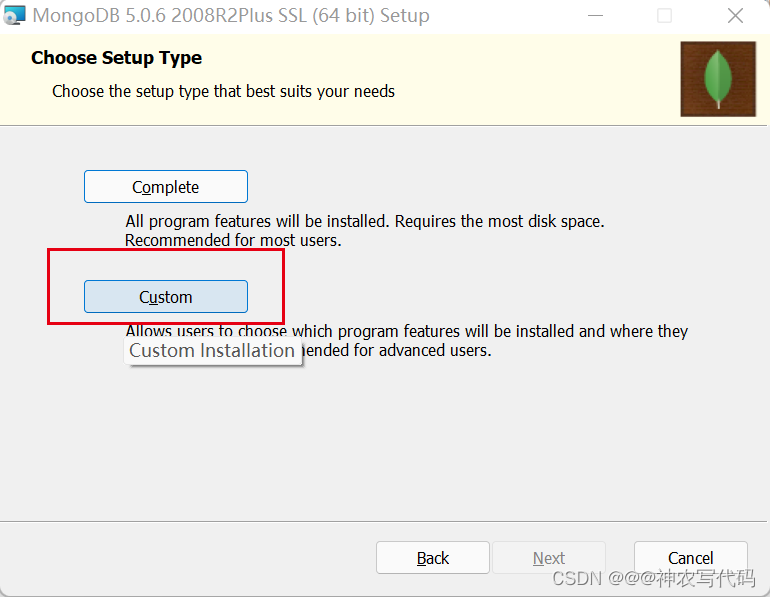


运行Mongodb
D:\SoftWare\MogoDB\bin>mongod.exe --config "D:\SoftWare\MogoDB\bin\mongod.cfg"运行结果如图:

MongoDB Compass 免安装
直接到根目录下,运行MongoDBCompass.exe 即可。
点击Connect,如图:
安装Nuget包
MongoDB.Driver项目实现
- 新建Person类和IPersonServer接口类
PersonServer 实现类
IPersonServer 接口类using MongoDB.Driver; namespace MongoDB.Demo.Server { public class PersonServer : IPersonServer { private readonly IMongoCollection<Person> mongoCollection; public PersonServer() { var client = new MongoClient("mongodb://localhost:27017"); mongoCollection = client.GetDatabase("PersonDB").GetCollection<Person>("person"); } /// <summary> /// 添加数据 /// </summary> /// <param name="per"></param> public void Create(Person per) { mongoCollection.InsertOne(per); } } }namespace MongoDB.Demo.Server { public interface IPersonServer { void Create(Person per); } } - 新建实例类 Person
using MongoDB.Bson; using MongoDB.Bson.Serialization.Attributes; using System; namespace MongoDB.Demo { public class Person { //设置自增长ID [BsonId] [BsonRepresentation(BsonType.ObjectId)] public string Id { get; set; } public string Name { get; set; } public string Sex { get; set; } public int Age { get; set; } public string CreateById { get; set; } public DateTime CreateByTime { get;set;} } } - 在项目Startup类中注册
public void ConfigureServices(IServiceCollection services) { services.AddControllers(); services.AddSwaggerGen(c => { c.SwaggerDoc("v1", new OpenApiInfo { Title = "MongoDB.Demo", Version = "v1" }); }); services.AddTransient<IPersonServer, PersonServer>(); } - 控制器中调用
    using Microsoft.AspNetCore.Http;
    using Microsoft.AspNetCore.Mvc;
    using MongoDB.Demo.Server;
    namespace MongoDB.Demo.Controllers
    {
        [Route("api/[controller]")]
        [ApiController]
        public class HomeController : ControllerBase
        {
           private readonly IPersonServer personServer;
            public HomeController(IPersonServer _personServer)
            {
                personServer = _personServer;
            }
            /// <summary>
            /// 添加数据到MongoDB
            /// </summary>
            /// <param name="per"></param>
            /// <returns></returns>
            [HttpPost]
            public IActionResult Post(Person per)
            {
                personServer.Create(per);
                return Ok(per);
            }
        }
    }
- 新建Person类和IPersonServer接口类
四、MongoDB的运行原理
原理
所有的模块之间是分层次的,MongoDB官方共有五大类型模块:核心模块、配置模块、事件模块、HTTP模块、mail模块、stream模块,它们之间的关系如图:
在这5个模块中,配置模块和核心模块是与MongoDB框架密切相关的。而事件模块则是HTTP模块与mail模块的基础。HTTP模块和mail模块的“地位”类似,它们都是更关注应用层面。
WiredTiger架构设计
原理

当MongoDB接收数据并转换成Bosn文件后发起请求到WiredTiger引擎,WiredTiger接收请求并处理请求将数据存储到缓存中,在将缓存中的数据隔60s或者数据到达2G的时候同步到磁盘中。
主要是做了两件事情:
1、将数据保存到缓存中
为什么将数据保存到缓存中?
减少IO操作,提升性能。
2、将缓存同步到磁盘中
为什么隔60s或者2G的时候同步数据?
当并发量大时候,防止缓存处理数据的性能大于磁盘的时候,导致同步是数据出现丢失。
WiredTiger防止数据丢失原理
使用双写架构
如图:
新增一个缓冲区。相当于消息队列的角色。
当上游和下游性能不一致的时候可以使用缓冲区。【RabbitMQ,kafka等】WiredTiger的索引结构
如图:
MongoDB中缓存和磁盘存储数据是通过B+tree的数据结构存储的,Root节点和Internal是存储索引数据【相当于一本书中的目录】,而leaf节点是用来存储数据的【相当于书中的页】。
五、MongoDB的 CURD操作
- 前提
using MongoDB.Driver; namespace MongoDB.Demo.Server { public class PersonServer : IPersonServer { private readonly IMongoCollection<Person> mongoCollection; public PersonServer() { var client = new MongoClient("mongodb://localhost:27017"); mongoCollection = client.GetDatabase("PersonDB").GetCollection<Person>("person"); } } } - 添加数据
/// <summary> /// 添加数据 /// </summary> /// <param name="per"></param> public void Create(Person per) { mongoCollection.InsertOne(per); } - 查询数据
/// <summary> /// 获取集合数据 /// </summary> /// <returns></returns> public IEnumerable<Person> GetList() { return mongoCollection.Find(p => true).ToList(); } - 分页查询
/// <summary> /// 分页查询 /// </summary> /// <param name="pagesize">行数</param> /// <param name="index">页数</param> /// <returns></returns> public IEnumerable<Person> GetDataByPage(int pagesize,int index) { return mongoCollection.Find(p => true).Skip((index - 1) * pagesize).Limit(pagesize).ToList(); } - 排序
/// <summary> /// 获取集合数据并排序 /// </summary> /// <returns></returns> public IEnumerable<Person> GetList() { return mongoCollection.Find(p => true).SortBy(per => per.CreateByTime).ToList(); } - 修改数据
/// <summary> /// 修改数据并添加新字段 /// </summary> /// <param name="id"></param> /// <param name="per"></param> public void Update(string id, Person per) { var update = Builders<Person>.Update; // update.AddToSet("modifybyid","admin");//新增字段 实体中必须有这个字段 否则查询的时候会报错 //mongoCollection.UpdateOne((p) => p.Id == id, update.AddToSet("modifybyid", "admin")); //修改字段 mongoCollection.UpdateOne((p) => p.Id == id, update.Set("Name", per.Name)); } - 删除数据
/// <summary> /// 删除数据 /// </summary> /// <param name="id"></param> public void delete(string id) { mongoCollection.DeleteOne((p) => p.Id == id); } - 创建索引
      /// <summary>
      /// 创建索引
      /// </summary>
      /// <returns></returns>
      public string CreateIndex()
      {
          var indexKeys = Builders<Person>.IndexKeys;
          return _products.Indexes.CreateOne(indexKeys.Descending("字段名称"));
      }
六、MongoDB的复制集
概念
MongoDB的复制集就是一份数据复制多份而已。如图:
作用
当一个MongoDB宕机后,还有其他的MongoDB实例可以提供使用。保证MongoDB的高可用。MongoDB 主从节点架构图

- 主节点:primary
负责数据的读和写。 - 从节点:secondary 建议至少有3个节点
- 当主节点宕机后,客户端可以从从节点中读取数据,保证MongoDB的高可用。
- 实现数据的读写分离。
- 主节点:primary
实现
- 条件
- MongoDB 3个节点
- MongoDB的Demo项目
- MongoDB配置步骤
- 新建三个节点配置文件,新建节点数据文件存储文件夹和日志文件夹
- 27018配置文件将replication 打开,并定义集群名称
# mongod.conf # for documentation of all options, see: # http://docs.mongodb.org/manual/reference/configuration-options/ # Where and how to store data. storage: dbPath: D:\SoftWare\MogoDB\ReplicaSet-data\data-27018 journal: enabled: true # engine: # wiredTiger: # where to write logging data. systemLog: destination: file logAppend: true path: D:\SoftWare\MogoDB\ReplicaSet-log\mongodb-27018.log # network interfaces net: port: 27018 bindIp: 127.0.0.1 #processManagement: #security: #operationProfiling: replication: replSetName: rs0 #sharding: ## Enterprise-Only Options: #auditLog: #snmp: - 27019配置文件将replication 打开,并定义集群名称
# mongod.conf # for documentation of all options, see: # http://docs.mongodb.org/manual/reference/configuration-options/ # Where and how to store data. storage: dbPath: D:\SoftWare\MogoDB\ReplicaSet-data\data-27019 journal: enabled: true # engine: # wiredTiger: # where to write logging data. systemLog: destination: file logAppend: true path: D:\SoftWare\MogoDB\ReplicaSet-log\mongodb-27019.log # network interfaces net: port: 27019 bindIp: 127.0.0.1 #processManagement: #security: #operationProfiling: replication: replSetName: rs0 #sharding: ## Enterprise-Only Options: #auditLog: #snmp: - 27020配置文件将replication 打开,并定义集群名称
    # mongod.conf

    # for documentation of all options, see:
    #   http://docs.mongodb.org/manual/reference/configuration-options/

    # Where and how to store data.
    storage:
      dbPath: D:\SoftWare\MogoDB\ReplicaSet-data\data-27020
      journal:
        enabled: true
    #  engine:
    #  wiredTiger:

    # where to write logging data.
    systemLog:
      destination: file
      logAppend: true
      path:  D:\SoftWare\MogoDB\ReplicaSet-log\mongodb-27020.log

    # network interfaces
    net:
      port: 27020
      bindIp: 127.0.0.1


    #processManagement:

    #security:

    #operationProfiling:

    replication:
       replSetName: rs0
    #sharding:

    ## Enterprise-Only Options:

    #auditLog:

    #snmp:
- 27018配置文件将replication 打开,并定义集群名称
- 运行实例(3)
mongod.exe -f D:\SoftWare\MogoDB\bin\ReplicaSet\mongod-27018.cfg mongod.exe -f D:\SoftWare\MogoDB\bin\ReplicaSet\mongod-27019.cfg mongod.exe -f D:\SoftWare\MogoDB\bin\ReplicaSet\mongod-27020.cfg 运行结果如图: 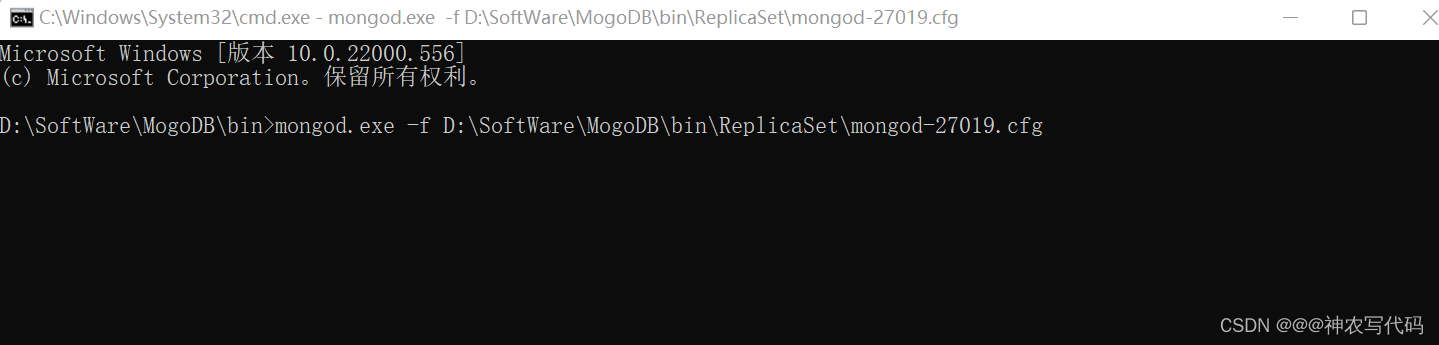
- 新建三个节点配置文件,新建节点数据文件存储文件夹和日志文件夹
- 条件


- 设置27018建立连接并设置为主节点,并添加从节点 #建立连接 在 bin 目录下 mongo.exe --host 127.0.0.1 --port 27018 #使用命令设置主节点 rs.initiate()
如图: 添加其他节点到Member中
 rs.add("127.0.0.1:27019") rs.add("127.0.0.1:27020")
如图:

- 查看状态命令 rs.status()
日志文件: "members" : [ { "_id" : 0, "name" : "127.0.0.1:27018", "health" : 1, "state" : 1, "stateStr" : "PRIMARY", "uptime" : 308, "optime" : { "ts" : Timestamp(1649306184, 3), "t" : NumberLong(1) }, "optimeDate" : ISODate("2022-04-07T04:36:24Z"), "lastAppliedWallTime" : ISODate("2022-04-07T04:36:24.437Z"), "lastDurableWallTime" : ISODate("2022-04-07T04:36:24.437Z"), "syncSourceHost" : "", "syncSourceId" : -1, "infoMessage" : "", "electionTime" : Timestamp(1649306012, 2), "electionDate" : ISODate("2022-04-07T04:33:32Z"), "configVersion" : 5, "configTerm" : 1, "self" : true, "lastHeartbeatMessage" : "" }, { "_id" : 1, "name" : "127.0.0.1:27019", "health" : 1, "state" : 2, "stateStr" : "SECONDARY", "uptime" : 137, "optime" : { "ts" : Timestamp(1649306184, 3), "t" : NumberLong(1) }, "optimeDurable" : { "ts" : Timestamp(1649306184, 3), "t" : NumberLong(1) }, "optimeDate" : ISODate("2022-04-07T04:36:24Z"), "optimeDurableDate" : ISODate("2022-04-07T04:36:24Z"), "lastAppliedWallTime" : ISODate("2022-04-07T04:36:24.437Z"), "lastDurableWallTime" : ISODate("2022-04-07T04:36:24.437Z"), "lastHeartbeat" : ISODate("2022-04-07T04:36:30.077Z"), "lastHeartbeatRecv" : ISODate("2022-04-07T04:36:29.665Z"), "pingMs" : NumberLong(0), "lastHeartbeatMessage" : "", "syncSourceHost" : "127.0.0.1:27018", "syncSourceId" : 0, "infoMessage" : "", "configVersion" : 5, "configTerm" : 1 }, { "_id" : 2, "name" : "127.0.0.1:27020", "health" : 1, "state" : 2, "stateStr" : "SECONDARY", "uptime" : 129, "optime" : { "ts" : Timestamp(1649306184, 3), "t" : NumberLong(1) }, "optimeDurable" : { "ts" : Timestamp(1649306184, 3), "t" : NumberLong(1) }, "optimeDate" : ISODate("2022-04-07T04:36:24Z"), "optimeDurableDate" : ISODate("2022-04-07T04:36:24Z"), "lastAppliedWallTime" : ISODate("2022-04-07T04:36:24.437Z"), "lastDurableWallTime" : ISODate("2022-04-07T04:36:24.437Z"), "lastHeartbeat" : ISODate("2022-04-07T04:36:30.077Z"), "lastHeartbeatRecv" : ISODate("2022-04-07T04:36:30.169Z"), "pingMs" : NumberLong(0), "lastHeartbeatMessage" : "", "syncSourceHost" : "127.0.0.1:27019", "syncSourceId" : 1, "infoMessage" : "", "configVersion" : 5, "configTerm" : 1 } ],
- 项目连接MongoDB集群
- 建立连接代码
按照MongoDB的默认写法,所有数据的读和写都是从主节点上执行的,从节点只做数据复制的任务。//只能从主节点中读取数据 var client = new MongoClient("mongodb://localhost:27018,localhost:27019,localhost:27020"); //可以从从节点读取数据 var client = new MongoClient("mongodb://localhost:27018,localhost:27019,localhost:27020/?readPreference=secondaryPreferred"); //或者 var client = new MongoClient("mongodb://localhost:27018,localhost:27019,localhost:27020"); client.WithReadPreference(ReadPreference.PrimaryPreferred); //Primary:默认参数 只从主节点上读取数据 // PrimaryPreferred:大部分从主节点上读取数据,只有主节点不可用时从Secondary上读取数据 //Secondary:只从Secondary节点上读取数据操作,存在的问题是Secondary节点的数据会比Primary节点的数据旧,如果没有可用的从节点,读请求会抛出异常。 //SecondaryPreferred:优先从Secondary节点上读取数据,Secondary节点不可用时从主节点读取数据。 //Nearest:不管是主节点,Secondary节点,从网络延迟最低的节点数读取数据。
- 建立连接代码
- 主节点宕机后从节点如何变成主节点
条件
- Heartbeat
- Vote (投票)
如图:
当主主节点宕机后,从节点会给自己先投一票,然后再去其他节点拉票,谁的票数多,谁就是主节点。
如果从节点的票数一样多,内部会有一个心跳检测机制,再次进行选举、投票。
投票规则:票数超过半数才能成为主节点;【节点数量为奇数最佳】- 节点数为奇数的优点
提升集群的高可用性 - 选举的原则
1、奇数节点
2、票数过半
七、MongoDB的分片集群
概念
MongoDB内部拆分数据,分开存储。
如图:
核心角色:
- 分片角色 shard
- 路由角色 Routers
- 配置角色 config 相当于微服务中注册中心
落地
- 条件
- MongoDB (总共10个实例)
- Demo项目
- 步骤
- 搭建分片复制集 (6个实例)
- mongod-27021.cfg 配置文件
# mongod.conf # for documentation of all options, see: # http://docs.mongodb.org/manual/reference/configuration-options/ # Where and how to store data. storage: dbPath: D:\SoftWare\MogoDB\shards-data\shard-27021 journal: enabled: true # engine: # wiredTiger: # where to write logging data. systemLog: destination: file logAppend: true path: D:\SoftWare\MogoDB\shards-log\mongodb-27021.log # network interfaces net: port: 27021 bindIp: 127.0.0.1 #processManagement: #security: #operationProfiling: replication: replSetName: sharding1 sharding: #分片集群名称 当前实例的角色(configsvr:配置中心实例,shardsvr:分片实例) clusterRole: shardsvr ## Enterprise-Only Options: #auditLog: #snmp: - mongod-27022.cfg 配置文件
# mongod.conf # for documentation of all options, see: # http://docs.mongodb.org/manual/reference/configuration-options/ # Where and how to store data. storage: dbPath: D:\SoftWare\MogoDB\shards-data\shard-27022 journal: enabled: true # engine: # wiredTiger: # where to write logging data. systemLog: destination: file logAppend: true path: D:\SoftWare\MogoDB\shards-log\mongodb-27022.log # network interfaces net: port: 27022 bindIp: 127.0.0.1 #processManagement: #security: #operationProfiling: replication: replSetName: sharding1 sharding: #分片集群名称 当前实例的角色(configsvr:配置中心实例,shardsvr:分片实例) clusterRole: shardsvr #sharding: ## Enterprise-Only Options: #auditLog: #snmp: - mongod-27023.cfg 配置文件
# mongod.conf # for documentation of all options, see: # http://docs.mongodb.org/manual/reference/configuration-options/ # Where and how to store data. storage: dbPath: D:\SoftWare\MogoDB\shards-data\shard-27023 journal: enabled: true # engine: # wiredTiger: # where to write logging data. systemLog: destination: file logAppend: true path: D:\SoftWare\MogoDB\shards-log\mongodb-27023.log # network interfaces net: port: 27023 bindIp: 127.0.0.1 #processManagement: #security: #operationProfiling: replication: replSetName: sharding1 sharding: #分片集群名称 当前实例的角色(configsvr:配置中心实例,shardsvr:分片实例) clusterRole: shardsvr ## Enterprise-Only Options: #auditLog: #snmp: - 备注
三个配置文件的 replSetName: sharding1 名称必须是一致的,代表着一组分片复制集。
十个配置文件的 clusterRole:shardsvr 名称必须是一致的,代表着是一组集群。 - 启动服务,并分配主从节点
#在MongoDB的bin目录下执行 #启动服务 mongod.exe -f D:\SoftWare\MogoDB\bin\shards\mongod-27021.cfg mongod.exe -f D:\SoftWare\MogoDB\bin\shards\mongod-27022.cfg mongod.exe -f D:\SoftWare\MogoDB\bin\shards\mongod-27023.cfg #连接27021,弄分配主从节点 mongo.exe --host 127.0.0.1 --port 27021 #初始化 27021 为主节点 rs.initiate() #添加子节点 rs.add("127.0.0.1:27022") rs.add("127.0.0.1:27023") #查看节点状态 rs.status() - mongod-27024.cfg 配置文件
# mongod.conf # for documentation of all options, see: # http://docs.mongodb.org/manual/reference/configuration-options/ # Where and how to store data. storage: dbPath: D:\SoftWare\MogoDB\shards-data\shard-27024 journal: enabled: true # engine: # wiredTiger: # where to write logging data. systemLog: destination: file logAppend: true path: D:\SoftWare\MogoDB\shards-log\mongodb-27024.log # network interfaces net: port: 27024 bindIp: 127.0.0.1 #processManagement: #security: #operationProfiling: replication: replSetName: sharding2 sharding: #分片集群名称 当前实例的角色(configsvr:配置中心实例,shardsvr:分片实例) clusterRole: shardsvr ## Enterprise-Only Options: #auditLog: #snmp: - mongod-27025.cfg 配置文件
# mongod.conf # for documentation of all options, see: # http://docs.mongodb.org/manual/reference/configuration-options/ # Where and how to store data. storage: dbPath: D:\SoftWare\MogoDB\shards-data\shard-27025 journal: enabled: true # engine: # wiredTiger: # where to write logging data. systemLog: destination: file logAppend: true path: D:\SoftWare\MogoDB\shards-log\mongodb-27025.log # network interfaces net: port: 27025 bindIp: 127.0.0.1 #processManagement: #security: #operationProfiling: replication: replSetName: sharding2 sharding: #分片集群名称 当前实例的角色(configsvr:配置中心实例,shardsvr:分片实例) clusterRole: shardsvr ## Enterprise-Only Options: #auditLog: #snmp: - mongod-27026.cfg 配置文件
# mongod.conf # for documentation of all options, see: # http://docs.mongodb.org/manual/reference/configuration-options/ # Where and how to store data. storage: dbPath: D:\SoftWare\MogoDB\shards-data\shard-27026 journal: enabled: true # engine: # wiredTiger: # where to write logging data. systemLog: destination: file logAppend: true path: D:\SoftWare\MogoDB\shards-log\mongodb-27026.log # network interfaces net: port: 27026 bindIp: 127.0.0.1 #processManagement: #security: #operationProfiling: replication: replSetName: sharding2 sharding: #分片集群名称 当前实例的角色(configsvr:配置中心实例,shardsvr:分片实例) clusterRole: shardsvr ## Enterprise-Only Options: #auditLog: #snmp: - 备注
三个配置文件的 replSetName: sharding2 名称必须是一致的,代表着一组分片复制集。
十个配置文件的 clusterRole:shardsvr 名称必须是一致的,代表着是一组集群。 - 启动服务,并分配主从节点
 #在MongoDB的bin目录下执行
 #启动服务
 mongod.exe -f D:\SoftWare\MogoDB\bin\shards\mongod-27024.cfg
 mongod.exe -f D:\SoftWare\MogoDB\bin\shards\mongod-27025.cfg
 mongod.exe -f D:\SoftWare\MogoDB\bin\shards\mongod-27026.cfg
 #连接27024,弄分配主从节点
 mongo.exe --host 127.0.0.1 --port 27024
 #初始化 27024 为主节点
 rs.initiate()
 #添加子节点
 rs.add("127.0.0.1:27025")
 rs.add("127.0.0.1:27026")
 #查看节点状态
 rs.status()
- mongod-27021.cfg 配置文件
- 搭建配置中心
- mongod-27010.cfg 配置文件
# mongod.conf # for documentation of all options, see: # http://docs.mongodb.org/manual/reference/configuration-options/ # Where and how to store data. storage: dbPath: D:\SoftWare\MogoDB\shards-data\ConfigServer\configserver-27010 journal: enabled: true # engine: # wiredTiger: # where to write logging data. systemLog: destination: file logAppend: true path: D:\SoftWare\MogoDB\shards-log\ConfigServer\configserver-27010.log # network interfaces net: port: 27010 bindIp: 127.0.0.1 #processManagement: #security: #operationProfiling: replication: #集群名称,如果不是同一个集群内的机器,请不要配置重复 replSetName: confset sharding: #分片集群名称 当前实例的角色(configsvr:配置中心实例,shardsvr:分片实例) clusterRole: shardsvr ## Enterprise-Only Options: #auditLog: #snmp: - mongod-27011.cfg 配置文件
# mongod.conf # for documentation of all options, see: # http://docs.mongodb.org/manual/reference/configuration-options/ # Where and how to store data. storage: dbPath: D:\SoftWare\MogoDB\shards-data\ConfigServer\configserver-27011 journal: enabled: true # engine: # wiredTiger: # where to write logging data. systemLog: destination: file logAppend: true path: D:\SoftWare\MogoDB\shards-log\ConfigServer\configserver-27011.log # network interfaces net: port: 27011 bindIp: 127.0.0.1 #processManagement: #security: #operationProfiling: replication: #集群名称,如果不是同一个集群内的机器,请不要配置重复 replSetName: confset sharding: #分片集群名称 当前实例的角色(configsvr:配置中心实例,shardsvr:分片实例) clusterRole: shardsvr ## Enterprise-Only Options: #auditLog: #snmp: - mongod-27012.cfg 配置文件
# mongod.conf # for documentation of all options, see: # http://docs.mongodb.org/manual/reference/configuration-options/ # Where and how to store data. storage: dbPath: D:\SoftWare\MogoDB\shards-data\ConfigServer\configserver-27012 journal: enabled: true # engine: # wiredTiger: # where to write logging data. systemLog: destination: file logAppend: true path: D:\SoftWare\MogoDB\shards-log\ConfigServer\configserver-27012.log # network interfaces net: port: 27012 bindIp: 127.0.0.1 #processManagement: #security: #operationProfiling: replication: #集群名称,如果不是同一个集群内的机器,请不要配置重复 replSetName: confset sharding: #分片集群名称 当前实例的角色(configsvr:配置中心实例,shardsvr:分片实例) clusterRole: shardsvr ## Enterprise-Only Options: #auditLog: #snmp: - 备注
三个配置文件的 replSetName: confset 名称必须是一致的,代表着一组配置中心集群。
十个配置文件的 clusterRole:shardsvr 名称必须是一致的,代表着是一组分片集群。 - 启动服务,并分配组主从节点
  #在MongoDB的bin目录下执行
  #启动服务
  mongod.exe -f D:\SoftWare\MogoDB\bin\shards\mongod-27010.cfg
  mongod.exe -f D:\SoftWare\MogoDB\bin\shards\mongod-27011.cfg
  mongod.exe -f D:\SoftWare\MogoDB\bin\shards\mongod-27012.cfg
  #连接27010,弄分配主从节点
  mongo.exe --host 127.0.0.1 --port 27010
  #初始化 27021 为主节点
  rs.initiate()
  #添加子节点
  rs.add("127.0.0.1:27011")
  rs.add("127.0.0.1:27012")
  #查看节点状态
  rs.status()
- mongod-27010.cfg 配置文件
- 搭建路由 (1个实例)
- mongod-27000.cfg
# mongod.conf # for documentation of all options, see: # http://docs.mongodb.org/manual/reference/configuration-options/ # Where and how to store data. #storage: #dbPath: D:\SoftWare\MogoDB\ReplicaSet-data\data-27021 #journal: #enabled: true # engine: # wiredTiger: # where to write logging data. systemLog: destination: file logAppend: true path: D:\SoftWare\MogoDB\shards-log\Router\Router-27000.log # network interfaces net: port: 27000 bindIp: 127.0.0.1 #processManagement: #security: #operationProfiling: #replication: #replSetName: rs0 sharding: configDB: confset/127.0.0.1:27011,127.0.0.1:27010,127.0.0.1:27012 ## Enterprise-Only Options: #auditLog: #snmp: - 备注
- 启动服务/连接服务,并注册
#在 bin 目录下启动服务 mongos.exe -f D:\SoftWare\MogoDB\bin\shards\Router\mongod-27000.cfg #建立连接 mongo.exe --host 127.0.0.1 --port 27000 #注册复制集【6个实例 127.0.0.1:27021\27022\27023\27024\27025\27026】到配置服务中 #用复制集名称批量注册 配置文件中的replSetName: sharding1 sh.addShard("sharding1/127.0.0.1:27021,127.0.0.1:27022,127.0.0.1:27023") #查看状态 sh.status() sh.addShard("sharding2/127.0.0.1:27024,127.0.0.1:27025,127.0.0.1:27026") #查看状态 sh.status() - Demo 项目连接MongoDB集群
#多个路由 内部自带了负载均衡 var client = new MongoClient("mongodb://127.0.0.1:27000,,,,,,"); - 数据分片规则
根据分片键来均分数据。- 分片规则
- 范围分片
- HASH分片
使用路由来设置分片键。
#启动路由服务,建立连接后,使用命令 #语法 sh.shardCollection("数据库名称.集合名称",{"分片键":"分片类型【hashed,默认是范围分片】"}) #如果回车这样执行会报错,设置分片规则是不允许用代码创建数据库,需要在路由里创建数据库才行,命令如下 sh.enableSharding("数据库名称") sh.shardCollection("数据库名称.集合名称",{"分片键":"分片类型【hashed/(1或者-1),默认是范围分片(1为升序-1为降序)】"}) #一个集合只能由一个分片键 - 分片规则
- mongod-27000.cfg
- 搭建分片复制集 (6个实例)
- 条件
边栏推荐
- Vscode attempted to write the procedure to a pipeline that does not exist
- Oracle function trigger
- Is it safe to open a stock account through the account opening QR code of the account manager?
- Solution to the problem of repeated startup of esp8266
- [wechat applet full stack development course] course directory (mpvue+koa2+mysql)
- Is it safe to open an account in a mobile phone or a securities company?
- 2022 meisai question a idea sharing
- Chitubox micromake l3+ slicing software configuration correspondence
- Force buckle -104 Maximum depth of binary tree
- [smart agriculture program] smart agriculture small program project is currently popular.
猜你喜欢
![[wechat applet full stack development course] course directory (mpvue+koa2+mysql)](/img/1c/ab39cf0a69d90a85665a099f5dbd26.jpg)
[wechat applet full stack development course] course directory (mpvue+koa2+mysql)

Use Navicat to compare data differences and structure differences of multi environment databases, and automatic DML and DDL scripts

8、智慧交通项目(1)

Question B of the East China Cup: how to establish a population immune barrier against novel coronavirus?

纳米数据世界杯数据接口,中超数据,体育数据比分,世界杯赛程api,足球比赛实时数据接口

SQL advanced

Remove the mosaic, there's a way, attached with the running tutorial

Mengyou Technology: six elements of tiktok's home page decoration, how to break ten thousand dollars in three days
![[zufe school competition] difficulty classification and competition suggestions of common competitions in the school (taking Zhejiang University of Finance and economics as an example)](/img/ee/2b8aebc1c63902d4d85ff71fd45070.jpg)
[zufe school competition] difficulty classification and competition suggestions of common competitions in the school (taking Zhejiang University of Finance and economics as an example)

独步武林,架构选型手册(包含 PDF)
随机推荐
Nano data World Cup data interface, CSL data, sports data score, world cup schedule API, real-time data interface of football match
oracle 函数 触发器
[buuctf.reverse] 121-125
Use Navicat to compare data differences and structure differences of multi environment databases, and automatic DML and DDL scripts
Fcpx quickly add subtitles | Final Cut Pro import fcpxml subtitle file does not match the video time? I got it in code
Neat Syntax Design of an ETL Language (Part 2)
C语言刷题随记 —— 猴子吃桃
JS tool function, self encapsulating a throttling function
How to "transform" small and micro businesses (II)?
203 postgraduate entrance examination Japanese self-study postgraduate entrance examination experience post; Can I learn Japanese by myself?
Vscode attempted to write the procedure to a pipeline that does not exist
Rxjs TakeUntil 操作符的学习笔记
How to download the school logo, school name and corporate logo on a transparent background without matting
manhattan_slam环境配置
Jetpack compose layout (I) - basic knowledge of layout
Grabcut image segmentation in opencv
Exception: gradle task assemblydebug failed with exit code 1
Best producer consumer code
Flutter Gaode map privacy compliance error
处理图片类库