当前位置:网站首页>[go]沙盒环境下调用支付宝扫码支付
[go]沙盒环境下调用支付宝扫码支付
2022-06-23 16:17:00 【CRAJA】
参考于这篇博客,在此基础上进行了封装
配置支付宝开放平台


沙盒下除了组织/公司必须和商户账号一样,其他可以随便填,之后得到这几个证书
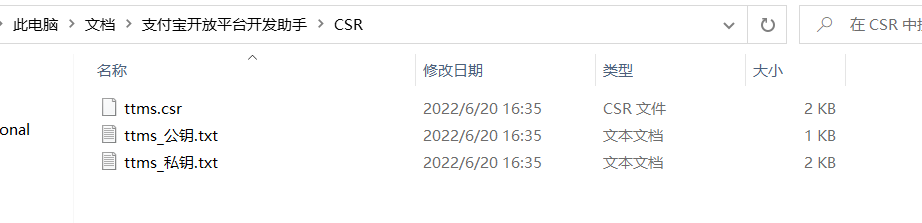
然后进入开发者平台上传csr证书来配置接口加签方式,(使用系统默认的密钥我总是没法测试成功)

之后下载这些证书用于程序中校验使用


服务端代码
.
├── cert
│   ├── alipayCertPublicKey_RSA2.crt
│   ├── alipayRootCert.crt
│   └── appCertPublicKey.crt
├── main.go
└── pay
    └── pay.go
pay.go
package pay

import (
	"errors"
	"fmt"
	"net/url"
	"strconv"

	"github.com/smartwalle/alipay/v3"
)

type AliPayClient struct {

	client    *alipay.Client
	notifyURL string
	returnURL string
}

// Config 初始化配置文件
type Config struct {

	KAppID               string // 应用ID
	KPrivateKey          string // 应用私钥
	IsProduction         bool   // 是否是正式环境
	AppPublicCertPath    string // app公钥证书路径
	AliPayRootCertPath   string // alipay根证书路径
	AliPayPublicCertPath string // alipay公钥证书路径
	NotifyURL            string // 异步通知地址
	ReturnURL            string // 支付后回调链接地址
}

// Init 客户端初始化
func Init(config Config) *AliPayClient {

	var err error
	var aliClient *alipay.Client
	doThat := func(f func() error) {

		if err = f(); err != nil {

			panic(err)
		}
	}
	doThat(func() error {

		aliClient, err = alipay.New(config.KAppID, config.KPrivateKey, config.IsProduction)
		return err
	})
	doThat(func() error {
     return aliClient.LoadAppPublicCertFromFile(config.AppPublicCertPath) })
	doThat(func() error {
     return aliClient.LoadAliPayRootCertFromFile(config.AliPayRootCertPath) })
	doThat(func() error {
     return aliClient.LoadAliPayPublicCertFromFile(config.AliPayPublicCertPath) })
	return &AliPayClient{
    client: aliClient, notifyURL: config.NotifyURL, returnURL: config.ReturnURL}
}

type Order struct {

	ID          string      // 订单ID
	Subject     string      // 订单标题
	TotalAmount float32     // 订单总金额,单位为元,精确到小数点后两位,取值范围[0.01,100000000]
	Code        ProductCode // 销售产品码,与支付宝签约的产品码名称
}

type ProductCode string

const (
	AppPay       ProductCode = "QUICK_MSECURITY_PAY"    // app支付
	PhoneWebPay  ProductCode = "QUICK_WAP_WAY"          // 手机网站支付
	LaptopWebPay ProductCode = "FAST_INSTANT_TRADE_PAY" // 电脑网站支付
)

var (
	ErrOrderAmountOver = errors.New("订单金额超限")
	ErrVerifySign      = errors.New("异步通知验证签名未通过")
)

// Pay 订单支付请求,返回支付界面链接及可能出现的错误
func (client *AliPayClient) Pay(order Order) (payUrl string, err error) {

	if order.TotalAmount < 0.01 || order.TotalAmount > 100000000 {

		return "", ErrOrderAmountOver
	}
	var p = alipay.TradePagePay{
    }
	p.NotifyURL = client.notifyURL
	p.ReturnURL = client.returnURL
	p.Subject = order.Subject
	p.OutTradeNo = order.ID
	p.TotalAmount = strconv.FormatFloat(float64(order.TotalAmount), 'f', 2, 32)
	p.ProductCode = string(order.Code)
	pay, err := client.client.TradePagePay(p)
	if err != nil {

		return "", err
	}
	return pay.String(), nil
}

// VerifyForm 校验form表单并返回对应订单ID(注意: callback为get,notify为post)
func (client *AliPayClient) VerifyForm(form url.Values) (orderID string, err error) {

	ok, err := client.client.VerifySign(form)
	if err != nil {

		return "", err
	}
	if !ok {

		return "", ErrVerifySign
	}
	orderID = form.Get("out_trade_no")
	var p = alipay.TradeQuery{
    }
	p.OutTradeNo = orderID
	rsp, err := client.client.TradeQuery(p)
	if err != nil {

		return "", fmt.Errorf("异步通知验证订单 %s 信息发生错误: %s", orderID, err.Error())
	}
	if rsp.IsSuccess() == false {

		return "", fmt.Errorf("异步通知验证订单 %s 信息发生错误: %s-%s", orderID, rsp.Content.Msg, rsp.Content.SubMsg)
	}
	return orderID, nil
}
模拟测试
注意异步响应地址和回调地址必须是公网可以访问到的。

package main

import (
	"log"
	"net/http"
	"strconv"

	"github.com/0RAJA/TestMod/alipay/pay"
	"github.com/gin-gonic/gin"
	"github.com/smartwalle/xid"
)

func init() {

	log.SetFlags(log.Lshortfile | log.Ltime)
}

const (
	kAppID               = "2021000121601691"
	kPrivateKey          = "XXXX"
	kServerDomain        = "http://XXXX:7999"
	AppPublicCertPath    = "cert/appCertPublicKey.crt"         // app公钥证书路径
	AliPayRootCertPath   = "cert/alipayRootCert.crt"           // alipay根证书路径
	AliPayPublicCertPath = "cert/alipayCertPublicKey_RSA2.crt" // alipay公钥证书路径
	NotifyURL            = kServerDomain + "/notify"
	ReturnURL            = kServerDomain + "/callback"
	IsProduction         = false
)

var AliPayClient *pay.AliPayClient

func main() {

	AliPayClient = pay.Init(pay.Config{

		KAppID:               kAppID,
		KPrivateKey:          kPrivateKey,
		IsProduction:         IsProduction,
		AppPublicCertPath:    AppPublicCertPath,
		AliPayRootCertPath:   AliPayRootCertPath,
		AliPayPublicCertPath: AliPayPublicCertPath,
		NotifyURL:            NotifyURL,
		ReturnURL:            ReturnURL,
	})
	var s = gin.Default()
	s.GET("/alipay", payUrl)
	s.GET("/callback", callback)
	s.POST("/notify", notify)
	s.Run(":8080")
}

//重定向到支付宝二维码
func payUrl(c *gin.Context) {

	orderID := strconv.FormatInt(xid.Next(), 10)
	url, err := AliPayClient.Pay(pay.Order{

		ID:          orderID,
		Subject:     "ttms购票:" + orderID,
		TotalAmount: 30,
		Code:        pay.LaptopWebPay,
	})
	if err != nil {

		log.Println(err)
		c.JSON(http.StatusOK, "系统错误")
		return
	}
	c.Redirect(http.StatusTemporaryRedirect, url)
}

//支付后页面的重定向界面
func callback(c *gin.Context) {

	_ = c.Request.ParseForm() // 解析form
	orderID, err := AliPayClient.VerifyForm(c.Request.Form)
	if err != nil {

		log.Println(err)
		c.JSON(http.StatusOK, "校验失败")
		return
	}
	c.JSON(http.StatusOK, "支付成功:"+orderID)
}

//支付成功后支付宝异步通知
func notify(c *gin.Context) {

	_ = c.Request.ParseForm() // 解析form
	orderID, err := AliPayClient.VerifyForm(c.Request.Form)
	if err != nil {

		log.Println(err)
		return
	}
	log.Println("支付成功:" + orderID)
	// 做自己的事
}
实际测试
项目跑起来之后访问ip地址+/alipay,然后重定向到这个二维码,然后使用沙盒支付宝进行扫码支付即可。


建议测试时使用类似frp的内网穿透工具,比较方便。
边栏推荐
- Date转换为LocalDateTime
- NPM install problem solving (NVM installation and use)
- 元宇宙带来的社会结构和资本制度演变
- ADC数字地DGND、模拟地AGND的谜团!
- Right leg drive circuit principle? ECG acquisition is a must, with simulation files!
- Freemark uses FTL files to generate word
- ASEMI肖特基二极管和超快恢复二极管在开关电源中的对比
- After the model is created, initialize the variables in con2d, convtranspose2d, and normalized batchnorm2d functions
- Why do we say that the data service API is the standard configuration of the data midrange?
- Can the asemi fast recovery diodes RS1M, us1m and US1G be replaced with each other
猜你喜欢

Digital twin excavator of Tupu software realizes remote control

Identify and stop the process that's listening on port 8080 or configure this application

Jetpack Compose 与 Material You 常见问题解答

Importance and purpose of test

华为手机通过adb安装APK提示“签名不一致,该应用可能已被修改”

ASEMI肖特基二极管和超快恢复二极管在开关电源中的对比
Coatnet: marrying revolution and attention for all data sizes

Network remote access raspberry pie (VNC viewer)
Comparison of asemi Schottky diode and ultrafast recovery diode in switching power supply
官方零基础入门 Jetpack Compose 的中文课程来啦!
随机推荐
Lamp architecture that your girlfriend can read
Is it cost-effective to buy a long-term financial product?
Here comes the official zero foundation introduction jetpack compose Chinese course!
官方零基础入门 Jetpack Compose 的中文课程来啦
The connection between supply and demand will no longer depend on the platform and center of the Internet Era
【解决】npm WARN config global `--global`, `--local` are deprecated. Use `--location=global`
Online communication - the combination of machine learning and knowledge reasoning in trusted machine learning (Qing Yuan talk, issue 20, Li Bo)
Thinking analysis of binary search method
The R language uses the GT package and the gtextras package to display tabular data gracefully and beautifully: gt of the gtextras package_ The sparkline function visualizes the line plot of the group
NLP paper reading | improving semantic representation of intention recognition: isotropic regularization method in supervised pre training
如何选择券商?手机开户安全么?
leetcode:面试题 08.13. 堆箱子【自顶而下的dfs + memory or 自底而上的排序 + dp】
IFLYTEK neuroimaging disease prediction program!
Golang writes to JSON files
公司招了个五年经验的测试员,见识到了真正的测试天花板
Rongyun: let the bank go to the "cloud" easily
Counter attack by flour dregs: MySQL 66 question! Suggested collection
get_ edges
炒股买股票需要怎么选择呢?安全性不错的?
golang日期时间time包代码示例: 根据生日获取年龄、生肖、星座