当前位置:网站首页>使用Qt连接MySql并创建表号、写入数据、删除数据
使用Qt连接MySql并创建表号、写入数据、删除数据
2022-07-24 05:21:00 【乔伊波伊 o(*^@^*)o】
前言
MySQL的重要性
Linux作为操作系统,Apache 或Nginx作为 Web 服务器,MySQL 作为数据库,PHP/Perl/Python作为服务器端脚本解释器。由于这四个软件都是免费或开放源码软件(FLOSS),因此使用这种方式不用花一分钱(除开人工成本)就可以建立起一个稳定、免费的网站系统,被业界称为“LAMP“或“LNMP”组合。
一、简介介绍Qt与MySql的联系
基本上,Qt 同 X Window 上的 Motif,Openwin,GTK 等图形界面库和 Windows 平台上的 MFC,OWL,VCL,ATL 是同类型的东西。
在此基础上,我们在做Ubuntu嵌入式开发,更好的可以选择MysQl服务器。
二、完成Qt与MySql服务的连接需要满足
- 安装MySql并设置环境
- 安装Qt并设置适用与MySql的环境
- 如果Qt报错:QMYSQL driver not loaded
1、 解决方法是把MySql的 libmysql.dll拷贝到相对应的编译器中
2、 注意:QT选用的Windows32位要对应32位的 libmysql.dll。
3、注意:QT选用的Windows64位要对应64位的 libmysql.dll。
4、注意:需要在工程文件中的xxxx.pro中添加 QT += sql 如下图所示
5、注意:选择C:\mysql-5.7.37-win32\lib中的libmysql.dll拷贝到 C:\Qt\Qt5.9.0\5.9\mingw53_32\bin中 (记得对应是32位还是64位的 一定要对应)libmysql.dll。
Qt源代码mainwindow.h
代码如下(示例):
#ifndef MAINWINDOW_H
#define MAINWINDOW_H

#include <QMainWindow>
#include <QMainWindow>
#include <QMessageBox>
#include <QSqlDatabase>
#include <QSqlError>
#include <QSqlQuery>
#include <QDebug>
#include <QLineEdit>
#include <QPushButton>
#include <QLabel>
#include <QGridLayout>

namespace Ui {

class MainWindow;
}

class MainWindow : public QMainWindow
{

    Q_OBJECT

public:
    explicit MainWindow(QWidget *parent = nullptr);
    ~MainWindow();

private:
    Ui::MainWindow *ui;

public:
   void myLayout();

private  slots:

   void button_1_clicked();
   void button_2_clicked();
   void button_3_clicked();
   void button_4_clicked();

protected:
    QLabel  *Label_1;
    QLabel  *Label_2;
    QLabel  *Label_3;
    QLabel  *Label_4;

    QLineEdit *Line_1;
    QLineEdit *Line_2;
    QLineEdit *Line_3;
    QLineEdit *Line_4;

    QPushButton *Button_1;
    QPushButton *Button_2;
    QPushButton *Button_3;
    QPushButton *Button_4;

};

#endif // MAINWINDOW_H
Qt源代码main.cpp
代码如下(示例):
#include "mainwindow.h"
#include <QApplication>

int main(int argc, char *argv[])
{

    QApplication a(argc, argv);
    MainWindow w;
    w.show();
    w.setFixedSize(300,200);
    w.setWindowTitle("MySql连接工具");
    w.myLayout();
    return a.exec();
}
Qt源代码mainwindow.cpp
代码如下(示例):
#include "mainwindow.h"
#include "ui_mainwindow.h"

MainWindow::MainWindow(QWidget *parent) :
    QMainWindow(parent),
    ui(new Ui::MainWindow)
{

    ui->setupUi(this);
}

MainWindow::~MainWindow()
{

    delete ui;
}


void MainWindow::myLayout()
{

    QWidget *centerWindow = new QWidget;
    this->setCentralWidget(centerWindow);

    Button_1 = new QPushButton("连接MySql");
    Button_2 = new QPushButton("添加数据");
    Button_3 = new QPushButton("更新数据");
    Button_4 = new QPushButton("删除数据");


    Line_1 = new QLineEdit;
    Line_2 = new QLineEdit;
    Line_3 = new QLineEdit;
    Line_4 = new QLineEdit;

    Label_1 = new QLabel("id");
    Label_2 = new QLabel("name");
    Label_3 = new QLabel("age");
    Label_4 = new QLabel("score");

    Button_1->setMinimumHeight(50);
    Button_2->setMinimumHeight(50);
    Button_3->setMinimumHeight(50);
    Button_4->setMinimumHeight(50);


    connect(Button_1,SIGNAL(clicked(bool)),this,SLOT(button_1_clicked()));
    connect(Button_2,SIGNAL(clicked(bool)),this,SLOT(button_2_clicked()));
    connect(Button_3,SIGNAL(clicked(bool)),this,SLOT(button_3_clicked()));
    connect(Button_4,SIGNAL(clicked(bool)),this,SLOT(button_4_clicked()));

    QGridLayout *layout = new QGridLayout;

    layout->addWidget(Line_1,0,1,1,3,Qt::Alignment());
    layout->addWidget(Line_2,1,1,1,3,Qt::Alignment());
    layout->addWidget(Line_3,2,1,1,3,Qt::Alignment());
    layout->addWidget(Line_4,3,1,1,3,Qt::Alignment());

    layout->addWidget(Button_1,4,0,Qt::Alignment());
    layout->addWidget(Button_2,4,1,Qt::Alignment());
    layout->addWidget(Button_3,4,2,Qt::Alignment());
    layout->addWidget(Button_4,4,3,Qt::Alignment());


    layout->addWidget(Label_1,0,0,Qt::Alignment());
    layout->addWidget(Label_2,1,0,Qt::Alignment());
    layout->addWidget(Label_3,2,0,Qt::Alignment());
    layout->addWidget(Label_4,3,0,Qt::Alignment());


    layout->setMargin(12);
    centerWindow->setLayout(layout);
}

void MainWindow::button_1_clicked()
{

    QSqlDatabase db = QSqlDatabase::addDatabase("QMYSQL");
    db.setHostName("127.0.0.1");//数据库服务器ip
    db.setUserName("root");//数据库用户名
    db.setPassword("123456");//数据库密码
    db.setDatabaseName("mydata");//使用哪个数据库
    //端口号就使用默认的3306吧,因为在本地
    if( !db.open() )//打开数据库,如果返回false表示打开失败
    {

        QMessageBox::warning(this,"错误",db.lastError().text() );//打开失败,显示错误信息
        return;
    }else
    {

        QMessageBox::warning(this,"恭喜~~~","Mysql连接成功!");
    }

    QSqlQuery query;
    QString sql = "create table student(id int primary key auto_increment,name varchar(255),age int,score int);";
    query.exec(sql);

}

void MainWindow::button_2_clicked()
{

    int id = Line_1->text().toInt();
    QString name = Line_2->text();
    int age = Line_3->text().toInt();
    int score = Line_4->text().toInt();
    QString sql = QString("insert into student(id,name,age,score) values('%1','%2','%3','%4')").arg(id).arg(name).arg(age).arg(score);
    QSqlQuery query;
    query.exec(sql);

}

void MainWindow::button_3_clicked()
{


        int id = Line_1->text().toInt();
        QString name = Line_2->text();
        int age = Line_3->text().toInt();
        int score = Line_4->text().toInt();
        QString sql = QString("update student set id='%1',name='%2',age='%3',score='%4' where id='%5'").arg(id).arg(name).arg(age).arg(score).arg(id);
        QSqlQuery query;
        query.exec(sql);


}

void MainWindow::button_4_clicked()
{


        int id = Line_1->text().toInt();
        QString sql = QString("delete from student where id = '%1'").arg(id);
        QSqlQuery query;
        query.exec(sql);


}
效果实图
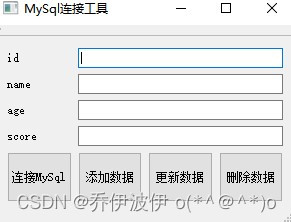
操作方法
- 将代码拷贝到工程中。
- 下载工程包直接导入。
导入包方法如下图所示


MySql环境设置并验证工具增加、删除数据功能。
边栏推荐
- [activiti] process variables
- 《机器学习》(周志华) 第5章 神经网络 学习心得 笔记
- Recommend a fully open source, feature rich, beautiful interface mall system
- STM32标准外设库(标准库)官网下载方法,附带2021最新标准固件库下载链接
- CRC-16 Modbus代码
- The SaaS mall system of likeshop single merchant is built, and the code is open source without encryption.
- Chapter 5 neural network
- Subsystem technology and ecology may memorabilia | square one plan launched, Boca launched xcm!
- 《统计学习方法(第2版)》李航 第14章 聚类方法 思维导图笔记 及 课后习题答案(步骤详细) k-均值 层次聚类 第十四章
- jupyter notebook一直自动重启(The kernel appears to have died. It will restart automatically.)
猜你喜欢
The SaaS mall system of likeshop single merchant is built, and the code is open source without encryption.

第四章 决策树总结

顺序栈 C语言 进栈 出栈 遍历

《统计学习方法(第2版)》李航 第15章 奇异值分解 SVD 思维导图笔记 及 课后习题答案(步骤详细)SVD 矩阵奇异值 十五章

信号与系统:希尔伯特变换
![[activiti] process variables](/img/5e/34077833f6eb997e64f186d4773e89.png)
[activiti] process variables
![[activiti] group task](/img/f1/b99cae9e840d3a91d0d823655748fe.png)
[activiti] group task

String methods and instances

Help transform traditional games into gamefi, and web3games promote a new direction of game development

Multi merchant mall system function disassembly lecture 05 - main business categories of platform merchants
随机推荐
西瓜书/南瓜书--第1,2章总结
Likeshop | single merchant mall system code open source no encryption -php
Zotero Quick Start Guide
如何解决训练集和测试集的分布差距过大问题
ThreadLocal stores the current login user information
在网络中添加SE通道注意力模块
es6常用特性
Numpy数组广播规则记忆方法 array broadcast 广播原理 广播机制
[activiti] process variables
《统计学习方法(第2版)》李航 第十三章 无监督学习概论 思维导图笔记
[MYCAT] related concepts of MYCAT
A small problem in labelme to VOC code
Common features of ES6
谷歌/火狐浏览器管理后台新增账号时用户名密码自动填入的问题
如何在网页上下载视频
[activiti] activiti environment configuration
【深度学习】手把手教你写“手写数字识别神经网络“,不使用任何框架,纯Numpy
PyTorch 单机多卡分布式训练
Numpy cheatsheet
[activiti] gateway