当前位置:网站首页>Wechat applet todo case
Wechat applet todo case
2022-07-24 13:48:00 【Lin yiconger】
From the https://ask.csdn.net/questions/7759861 simplified .
effect
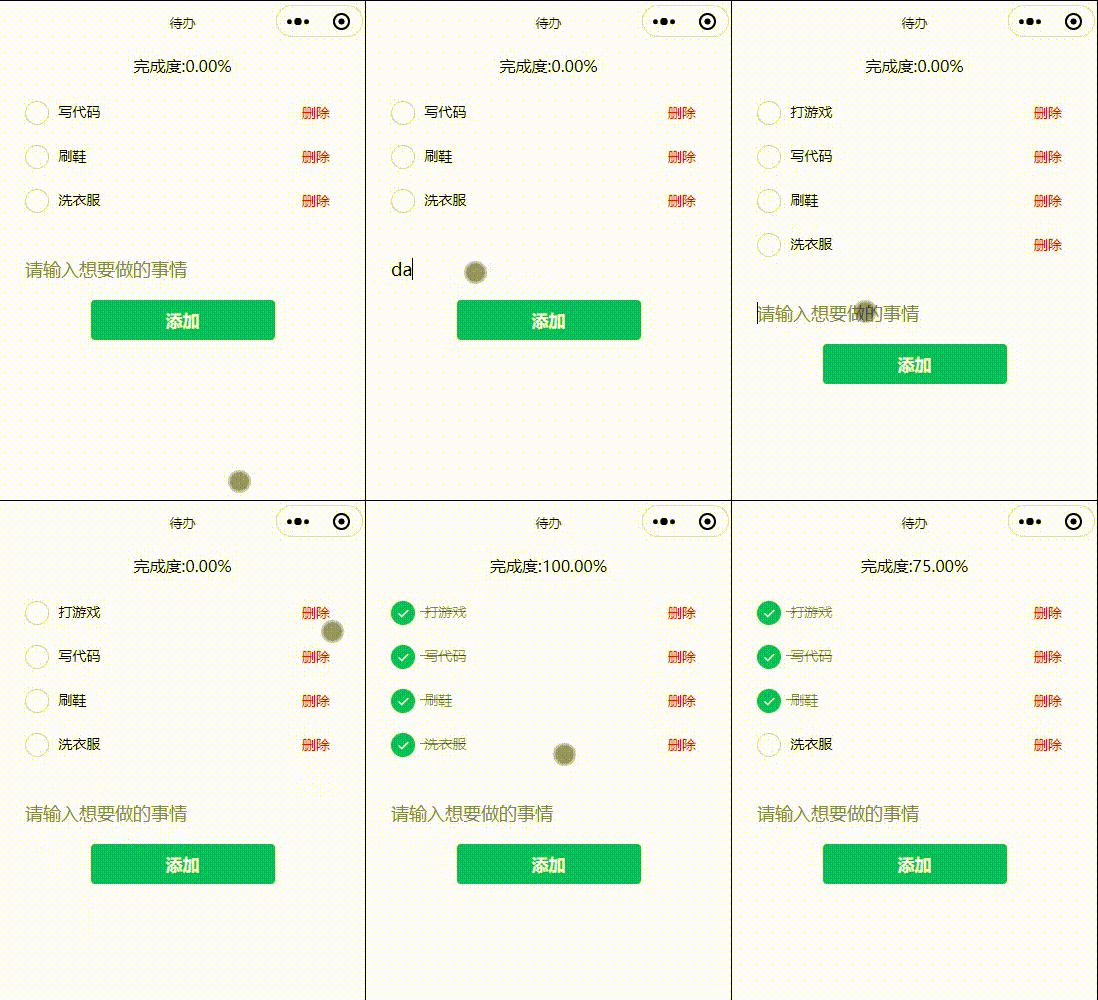
Code
index.js
Page({

  data: {

    //  To do list
    todoList: [
      {

        thing: ' Wash the clothes ',
        completed: false
      },
      {

        thing: ' Brush your shoes ',
        completed: false
      },
      {

        thing: ' Write code ',
        completed: false
      }
    ],
    //  To do list
    todoThing: ""
  },
  //  To do click
  todoClick(e) {

    //  from wxml Index of incoming hits
    let index = e.currentTarget.dataset.index;
    this.setData({

      //  Change entries by indexing
      [`todoList[${
      index}].completed`]: !this.data.todoList[index].completed
    })
  },
  //  To do input
  todoThingInput(e) {

    this.setData({
     todoThing: e.detail.value })
  },
  //  Add a button
  addClick() {

    this.setData({

      //  Add one more line at the end of the array
      [`todoList[${
      this.data.todoList.length}]`]: {

        thing: this.data.todoThing,
        completed: false
      },
      //  Clear the input box after adding
      todoThing: ''
    })
  },
  //  Delete button
  deleteClick(e) {

    //  from wxml Index of incoming hits
    let index = e.currentTarget.dataset.index;
    //  Delete todoList The index for index The entry of
    this.data.todoList.splice(index, 1)
    this.setData({

      //  Reassign the array
      todoList: this.data.todoList
    })
  }
})
index.wxml
<wxs module="tools">
  module.exports.getProgress = function (todo) {
    var length = todo.length;
    var checked = 0;
    for (var i = 0; i < todo.length; i++) {
      if (todo[i].completed) {
        checked++;
      }
    }
    return ' To complete the degree :' + (checked / length * 100).toFixed(2) + '%'
  }
</wxs>
<view class="todo-completion">{
   {tools.getProgress(todoList)}}</view>
<view class="todo-list">
  <view class="todo-item" wx:for="{
     {todoList}}" wx:key="unique" bindtap="todoClick" data-index="{
     {index}}">
    <!--  Click the entry to add a strikethrough  -->
    <view class="todo-form-label {
     {item.completed?'delete-line':''}}">
      <radio checked="{
     {item.completed}}" /> {
   {item.thing}}
    </view>
    <!-- catchtap Prevent bubbling and bind events  -->
    <view class="todo-delete" catchtap="deleteClick" data-index="{
     {index}}"> Delete </view>
  </view>
</view>
<view class="todo-form">
  <!-- bindconfirm  Trigger... When the finish button is clicked  -->
  <input class="form-item" type="text" placeholder=" Please enter what you want to do " value="{
     {todoThing}}" bindinput="todoThingInput" bindconfirm="addClick" />
  <button type="primary" bindtap="addClick"> add to </button>
</view>
index.wxss
.todo-form {

  padding: 20rpx 60rpx;
}

.todo-form .form-item {

  margin-bottom: 40rpx;
  font-size: 36rpx;
}

.todo-item .todo-form-label {

  /*  Block the event of the original component  */
  pointer-events: none;
}

.delete-line {

  /*  Add a strikethrough to the text  */
  text-decoration: line-through;
  color: rgba(0, 0, 0, .5);
}

.todo-list {

  padding: 30rpx 60rpx;
  display: flex;
  /*  Control appending from the header by style  */
  flex-direction: column-reverse;
}

.todo-list .todo-item {

  margin-bottom: 40rpx;
  align-items: center;
  display: inline-flex;
  font-size: 28rpx;
  justify-content: space-between;
}

.todo-item .todo-delete {

  line-height: 48rpx;
  padding: 0 20rpx;
  font-size: 28rpx;
  color: #ff0000;
}

.todo-completion{

  text-align: center;
  padding: 20rpx 0;
}
Complete code https://developers.weixin.qq.com/s/L1YEVWmD7LAo
边栏推荐
- 微信小程序 TODO案例
- R语言使用epiDisplay包的statStack函数基于因子变量通过分层的方式查看连续变量的统计量(均值、中位数等)以及对应的假设检验、对连续数据进行对数化之后符合参数检验条件自动执行参数检验
- The gather function of tidyr package of R language converts a wide table into a long table (a wide table into a long table), the first parameter specifies the name of the new data column generated by
- The KAP function of epidisplay package in R language calculates the value of kappa statistics (total consistency, expected consistency), analyzes the consistency of the results of multiple scoring obj
- R language uses the sum function of epidisplay package to calculate the descriptive statistical summary information of the specified variables in dataframe under different grouping variables, visualiz
- Network security - file upload blacklist bypass
- OWASP ZAP安全测试工具使用教程(高级)
- Data formatting widget
- CSDN garbage has no bottom line!
- Chapter VI bus
猜你喜欢


随机推荐
The KAP function of epidisplay package in R language calculates the value of kappa statistics (total consistency, expected consistency), analyzes the consistency of the results of multiple scoring obj
Flink高级特性和新特性(八)v2
Ansible服务常用命令模块详细解析
R language uses the sum function of epidisplay package to calculate the descriptive statistical summary information of the specified variables in dataframe under different grouping variables, visualiz
基于典型相关分析的多视图学习方法综述
Network security - Web information collection
Sringboot-plugin-framework 实现可插拔插件服务
Data formatting widget
使用Activiti创建数据库表报错,
R language test sample proportion: use the prop.test function to perform a single sample proportion test to calculate the confidence interval of the p value of the successful sample proportion in the
数据湖系列文章
R语言tidyr包的gather函数将从宽表转化为长表(宽表转化为长表)、第一个参数指定原多个数据列名称生成的新数据列名称、第二个参数指定原表内容值、第三个和第四个参数通过列索引指定不变的列名称列表
Difference between code signing certificate and SSL certificate
自动化运维之Ansible安装部署
关于不定方程解的个数的问题
Flink fault tolerance mechanism (V)
Network security - error injection
Network security - Cookie injection
申请了SSL数字证书如何进行域名验证?
Some simple commands