当前位置:网站首页>Cobalt strike installation tutorial
Cobalt strike installation tutorial
2022-06-25 01:11:00 【Xiaohu】
CobaltStrike
CobaltStrike It's a penetration test artifact , Known by the industry as CS Artifact .CobaltStrike It is divided into client and server , The server is a , There can be multiple clients , It can be used by the team for distributed cooperative operation .
CobaltStrike Integrated port forwarding 、 Service scan , Automatic overflow , Multimode port monitoring ,windows exe Trojans generate ,windows dll Trojans generate ,java Trojans generate ,office Macro virus generation , Horse binding . Fishing attacks include : Site cloning , Target information acquisition ,java perform , Browser automatic attack and other powerful functions !
Cobaltstrike teamserver Start of :
Turn on Cobaltstrike teamserver And operation GUI All interfaces need Java Environmental Science , The computer must have Java packed , To baidu .
After decompression , See these files in the file .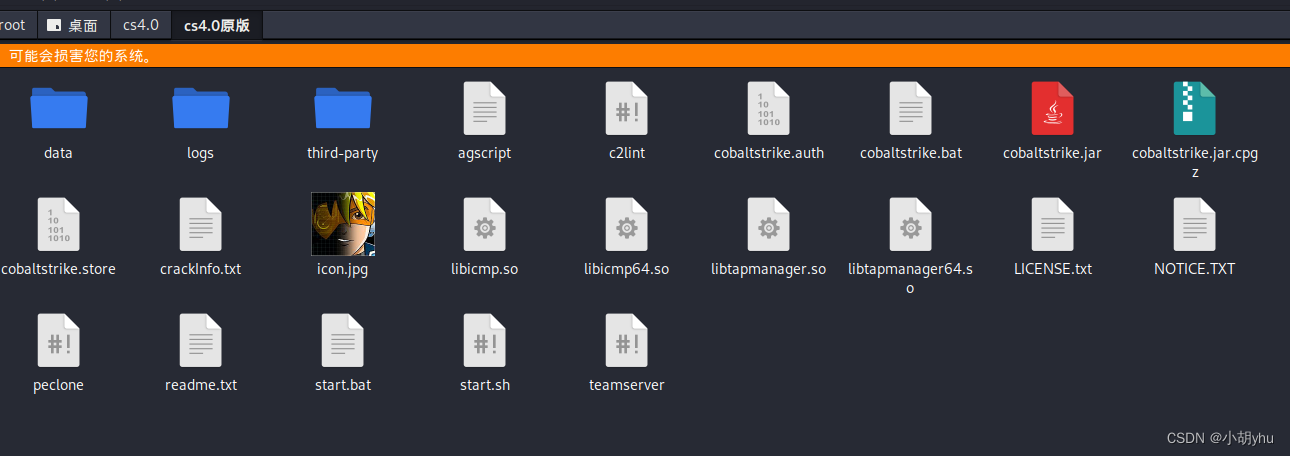 Direct operation
./teamserver 192.168.1.115 12345678
192.168.1.115     // network card IP Address
12345678    // password
 Start client
# ./start.sh
 here host fill kali Of ip, The password is the password we just started , The user name defaults to neo Just go , The port is also the default 50050.
Client after startup :
CobaltStrike Use 
CobaltStrike modular
· New Connection: Open a new connection window
· Preferences: preferences , Is set CobaltStrike Appearance
· Visualization: Show the host with different permissions ( It is mainly displayed in the form of output results )
· VPN Interfaces: Set up VPN Interface
· Listeners: Create a listener
· Script Interfaces: View and load CNA Script
· Close: close
cobaltstrike
 Set listener
 Set up Attack
 Looking for loopholes in the target , Carry out orders
 The target is on line
 Raise the right
边栏推荐
- Scala adapter pattern
- Hot fix sophix multi-channel patch solution
- 移动安全工具-dex2jar
- Welcome to the new world of Lenovo smart screen
- Leetcode 1248. 统计「优美子数组」(害,突然发现只会暴力枚举了)
- EVM Brief
- The basic principle and application of iterator and enhanced for
- Convert MySQL query timestamp to date format
- 2022r1 quick opening pressure vessel operation test questions and answers
- Using tcp/udp tools to debug the yeelight ribbon
猜你喜欢

LLVM TargetPassConfig

利用 Redis 的 sorted set 做每周热评的功能

Scala IO read by line

汇编语言(4)函数传参

Add information on the left and add parts on the right of the status bar
![[redis realizes seckill business ③] specific implementation of optimistic lock for oversold problem](/img/01/5ec4e5dae1748dce3d5dee33a24b0b.png)
[redis realizes seckill business ③] specific implementation of optimistic lock for oversold problem

Zuckerberg demonstrated four VR head display prototypes, and meta revealed the "family" of metauniverse
最新QQ微信域名防红PHP程序源码+强制跳转打开
Databinding quick start (still using findviewbyid?)

2022r1 quick opening pressure vessel operation test questions and answers

随机推荐
Scala trait exercise
Scala object blending trait
Sanic service startup failed
2022 simulated 100 questions of safety officer-c certificate examination and online simulated examination
[redis realizes seckill service ②] solution to oversold problem
2022年全国最新消防设施操作员(高级消防设施操作员)模拟题及答案
热力图展示相关矩阵
Activity lifecycle
Library management system code source code (php+css+js+mysql) complete code source code
使用 Loki 微服务模式部署生产集群
A website for programmers with a monthly salary of 30K
Ecological escort cloud service providers wave "Intel flag"
QT electronic clock
The interview questions and answers for the high-frequency software test of Dachang help you prepare for the golden nine silver ten
ContentResolver,拿到手机短信内容
ImageView展示网络图片
Syntax highlighting of rich text
最新QQ微信域名防红PHP程序源码+强制跳转打开
2022年危险化学品经营单位安全管理人员考试试题及模拟考试
Scala classes inherit multiple attributes