当前位置:网站首页>Docker learning - redis cluster -3 master and 3 slave - capacity expansion - capacity reduction building
Docker learning - redis cluster -3 master and 3 slave - capacity expansion - capacity reduction building
2022-07-25 13:06:00 【Uh huh**】
Illustration 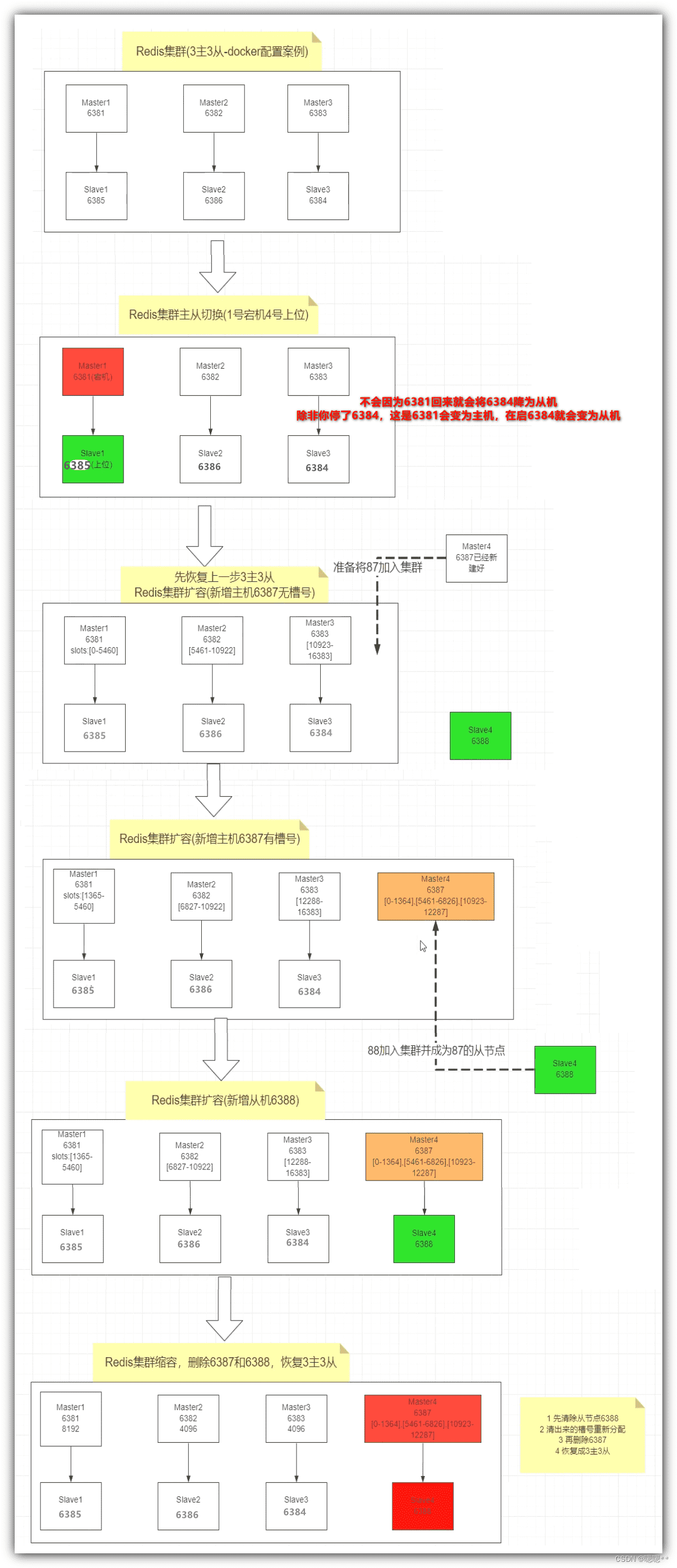
//  First step : Start six Redis machine
docker run -d --name=redis-node-1 --net host --privileged=true -v /www/server/redis_master_slave/master_slave1/master:/data redis:latest --cluster-enabled yes --appendonly yes --port 6381

docker run -d --name=redis-node-2 --net host --privileged=true -v /www/server/redis_master_slave/master_slave2/master:/data redis:latest --cluster-enabled yes --appendonly yes --port 6382

docker run -d --name=redis-node-3 --net host --privileged=true -v /www/server/redis_master_slave/master_slave3/master:/data redis:latest --cluster-enabled yes --appendonly yes --port 6383

docker run -d --name=redis-node-4 --net host --privileged=true -v /www/server/redis_master_slave/master_slave1/slave:/data redis:latest --cluster-enabled yes --appendonly yes --port 6384

docker run -d --name=redis-node-5 --net host --privileged=true -v /www/server/redis_master_slave/master_slave2/slave:/data redis:latest --cluster-enabled yes --appendonly yes --port 6385

docker run -d --name=redis-node-6 --net host --privileged=true -v /www/server/redis_master_slave/master_slave3/slave:/data redis:latest --cluster-enabled yes --appendonly yes --port 6386


// The second step : Enter any one redis Inside the host container : For each master Create a slave From the node
docker exec -it redis-node-1 /bin/bash

// Input yes
redis-cli --cluster create 192.168.19.107:6381 192.168.19.107:6382 192.168.19.107:6383 192.168.19.107:6384 192.168.19.107:6385 192.168.19.107:6386 --cluster-replicas 1


// The third step : Through one Redis host ( Non slave ), View the entire Redis State of the cluster  ==  The container I am currently entering is the host
redis-cli -p 6381
cluster info
cluster nodes


// According to the above figure cluster nodes Information about , here Redis The master-slave relationship allocated by the system is : Lord 6381->  from 6385、 Lord 6382->  from 6386、 Lord 6383->  from 6384


// Step four : test reids Storage : Find out key1、key4 There are errors in setting , because key1、key4 The hash value of belongs to other slots , That is, other hosts, such as hosts 6382、6383 Before you can save
// If you need to report no error in the current host , Automatically put key1、key4 Save to other machines , Get into redis The client uses the cluster mode :redis-cli -p 6381 -c
set key1 value1
set key2 value2
set key3 value3
set key4 value4
exit

// Step five :redis client   Optimize route jump  ==  Every time I run set、 Pay attention to the change of port number
redis-cli -c -p 6381
set key1 value1
set key2 value2
set key3 value3
set key4 value4
exit

// Step six : View cluster information ( Another order )cluster node  You can also see the cluster information
// Look at all of... In the cluster key Distribution of hosts , And master-slave relationship
redis-cli --cluster check 192.168.19.107:6381


// Step seven : Simulate the downtime of one of the hosts ( I take 6381 Host downtime is a test ), Check the corresponding slave 6385 Whether it can automatically become a host , Carry out leveling
exit
exit
docker stop redis-node-1
docker ps
docker exec -it redis-node-2 /bin/bash
redis-cli -c -p 6382

//  Step eight : The original host can be observed 6381 Slave of 6385 Automatic level replacement into host
cluster nodes


// Step nine : Re 6381 Get up , Observe 6381 Whether it will change back to the host ,6385 Become a slave
exit
exit
docker start redis-node-1
docker exec -it redis-node-2 /bin/bash
redis-cli -c -p 6382
// Step 10 : It can be observed that  6385 Will not come back because of the old leader 6381 It will be reduced to slave
cluster nodes


// Step 11 : Adjust architecture , take 6381 Become a host  6385 Become a slave
exit
exit
docker stop redis-node-5
// etc. 1 Minutes in the morning
docker start redis-node-5
docker exec -it redis-node-2 /bin/bash
redis-cli -c -p 6382
// The twelfth step : It can be observed that  6381 Become a host ,6385 Become a slave
cluster nodes

//==================== Capacity expansion starts ==============================================
// Thirteenth Step : Ready to expand , Add two machines , host 6387、 Slave 6388 Enter the cluster
exit
exit

docker run -d --name=redis-node-7 --net host --privileged=true -v /www/server/redis_master_slave/master_slave4/master:/data redis:latest --cluster-enabled yes --appendonly yes --port 6387

docker run -d --name=redis-node-8 --net host --privileged=true -v /www/server/redis_master_slave/master_slave4/slave:/data redis:latest --cluster-enabled yes --appendonly yes --port 6388

docker ps

// The fourteenth step : Get into redis-node7 Containers
docker exec -it redis-node-7 /bin/bash

// The fifteenth step : Add current redis Machine entry master colony
redis-cli --cluster add-node 192.168.19.107:6387 192.168.19.107:6381

// Check the cluster  ==  Discover new 6387 The host has no slot
redis-cli --cluster check 192.168.19.107:6381

// The sixteenth step : Order the entire cluster to reallocate slots , Make the new host 6387 There are also slots
// How to divide :16384/4=4096  fill 4096 go in
// To whom :6387 Mechanical Redis Defined ID identifier : fill ad03db99f539b78b0b57c37c529f9eb2f612bb18
// The whole plane : New configuration : fill all
// Assigned starting :yes
redis-cli --cluster reshard 192.168.19.107:6381

// The seventeenth step : Check the cluster  ==  Discover new 6387 The host has slots ( The original three slots , Everyone agreed to come over a little ) ==  And will cluster all key All reassigned
redis-cli --cluster check 192.168.19.107:6381

// The eighteenth step : take 6388 The assignment becomes 6387 Slave of
// Delete node command :redis-cli --cluster del-node  node IP: Node port number   Node identifier
redis-cli --cluster add-node 192.168.19.107:6388 192.168.19.107:6387 --cluster-slave --cluster-master-id ad03db99f539b78b0b57c37c529f9eb2f612bb18

// The nineteenth step : Check the cluster  ==  see 6387、6388 Whether it is a master-slave relationship
redis-cli --cluster check 192.168.19.107:6381

//==================== The expansion is over ==============================================


//==================== Shrinkage start - Delete the slave node first 6388, Slot reallocation , Delete the master node 6387, Return to 3 Lord 3 from ====
// The twentieth step : Delete from node 6388
redis-cli --cluster del-node  192.168.19.107:6388 dc89a64b98290f4164e4ba1b6e8841a8b9d8d763

// Step 21 : Check the cluster  ==  View slave nodes 6388 Removed from cluster
redis-cli --cluster check 192.168.19.107:6381

// Step 22 : Start reallocating slots
// Number of slots allocated :4096
// Who receives the assigned slot :6381 Node ID identifier   fill :2d8bb525e25ecb239dbe059f8545eda64182e514
// Who assigns slots :6387 Node ID identifier   fill :ad03db99f539b78b0b57c37c529f9eb2f612bb18
//done
redis-cli --cluster reshard 192.168.19.107:6381

// Step 23 : Check the cluster  =  so 6387 Of key All allocated to 6381
redis-cli --cluster check 192.168.19.107:6381

// Step 24 : Delete from node 6388
redis-cli --cluster del-node  192.168.19.107:6387 ad03db99f539b78b0b57c37c529f9eb2f612bb18

// Step 25 : Check the cluster  ==  Look at the master node 6387 Removed from cluster
redis-cli --cluster check 192.168.19.107:6381

//==================== End of volume reduction ==============================================
The whole construction process 
边栏推荐
- clickhouse笔记03-- Grafana 接入ClickHouse
- [advanced C language] dynamic memory management
- go : gin 自定义日志输出格式
- yum和vim须掌握的常用操作
- JS sorts according to the attributes of the elements in the array
- Zero basic learning canoe panel (14) -- led control and LCD control
- 【视频】马尔可夫链蒙特卡罗方法MCMC原理与R语言实现|数据分享
- Atcoder beginer contest 261 f / / tree array
- 程序的内存布局
- [机器学习] 实验笔记 – 表情识别(emotion recognition)
猜你喜欢

Zero basic learning canoe panel (13) -- trackbar

“蔚来杯“2022牛客暑期多校训练营2 补题题解(G、J、K、L)

【视频】马尔可夫链蒙特卡罗方法MCMC原理与R语言实现|数据分享

Business visualization - make your flowchart'run'(3. Branch selection & cross language distributed operation node)

mysql函数汇总之日期和时间函数

零基础学习CANoe Panel(16)—— Clock Control/Panel Control/Start Stop Control/Tab Control

Leetcode 0133. clone diagram

How to use causal inference and experiments to drive user growth| July 28 tf67
零基础学习CANoe Panel(13)—— 滑条(TrackBar )
如何用因果推断和实验驱动用户增长? | 7月28日TF67
随机推荐
LeetCode 0133. 克隆图
零基础学习CANoe Panel(13)—— 滑条(TrackBar )
Masscode is an excellent open source code fragment manager
交换机链路聚合详解【华为eNSP】
Is the securities account opened by qiniu safe? How to open an account
Atcoder beginer contest 261e / / bitwise thinking + DP
Emqx cloud update: more parameters are added to log analysis, which makes monitoring, operation and maintenance easier
Want to go whoring in vain, right? Enough for you this time!
[advanced C language] dynamic memory management
[CSDN year-end summary] end and start, always on the way - "2021 summary of" 1+1= Wang "
Substance designer 2021 software installation package download and installation tutorial
I want to ask whether DMS has the function of regularly backing up a database?
牛客论坛项目部署总结
2022.07.24 (lc_6126_design food scoring system)
Detailed explanation of flex box
Simple understanding of flow
Software testing interview question: Please list the testing methods of several items?
Mysql 远程连接权限错误1045问题
跌荡的人生
A hard journey