当前位置:网站首页>yum和vim须掌握的常用操作
yum和vim须掌握的常用操作
2022-07-25 12:36:00 【i跑跑】
目录
1.yum--软件包管理器
yum在Linux下的主要作用就是软件的管理:安装卸载。在我使用的centos 7中,不仅有yum安装,还有源码安装和rpm包安装。
源码安装:需要用户自己编译,很麻烦
rpm包安装:安装什么就是什么,其中的很多插件也需要自己去找,也很麻烦
只有yum安装是最简洁方便的,本篇笔记中以记录yum为准。
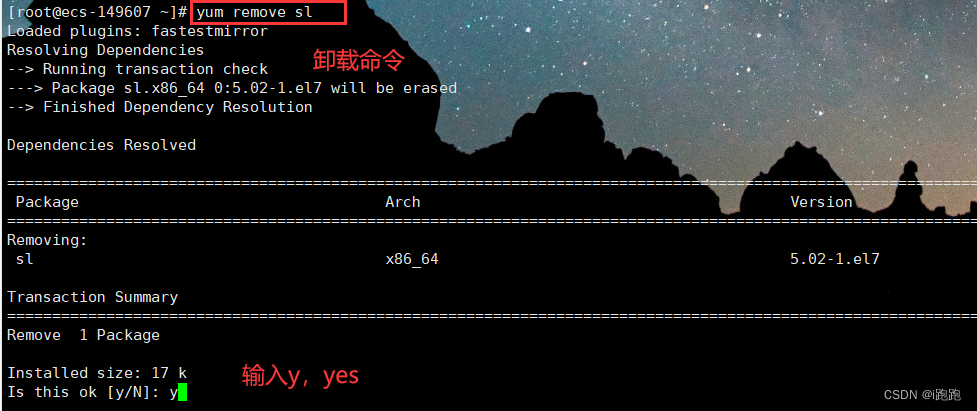
yum卸载
yum remove 软件包名以sl命令为例,运行 sl :

我已经安装好sl了,先演示卸载:

yum安装
yum install 软件包名安装 sl命令为例:


我们安装别人软件的条件:
需要别人给我们先把代码编译成可执行程序;
并且将编译好的软件放在我们能下载到的地方。
在手机上:
就好比我们手机上的应用市场,可以搜索到对应软件,下载相应软件,应用市场会访问相应公司服务器,为用户提供下载功能
在Linux上:
我们是用户,用的是Linux机器,相当于手机,yum相当于应用市场,还有一个Linux服务器,提供下载功能
查看软件包
通过 yum list命令可以罗列出当前一共有哪些软件包. 包的数目是非常多的:
为了方便查找,我们一般我们需要使用 grep 命令只筛选出我们关注的包:
yum list | grep 软件包名

安装lrzsz
yum install lrzszlrzsz 可以将windows下的文件直接拖拽到Linux下,也可以使用rz命令,进行选择:

2.vim的使用
首先我们来安装vim,-y是跳过询问,直接安装
yum install -y vimvim 是一个编辑器,只能用来写代码,用它的原因是它是多模式的编辑器,功能强大,下面我们来看看常用的基本操作。
进入/退出vim
编辑器,就要有编辑对象,创建一个.c文件,进入操作如下:

退出的话按shift + : 进入底行模式,可以在最下面输入命令,输入 q 即可:

模式切换
进入文本默认是命令模式,无法在其中写入文本,这时我们可以按 i 键,进入插入模式,进行文本编辑:


每个模式下左下角都会有相对应的字母,如上述图中所示。

如果进入到底行模式下后,又想回到命令模式下,同样按 esc 键即可;底行模式和插入模式不能直接切换,必须经过命令模式。

命令模式下文本批量化操作
复制粘贴
y按两次--yy,能复制此行
数字+yy 复制多行
p是粘贴,默认粘贴在光标的下一行
数字+p 是粘贴多少行
dd是剪切 数字+dd剪切多行
u是撤销刚才操作
ctrl + r 对u操作进行撤销
定位操作
vim不支持滑动,在大文本下:
shift+g :光标定位至文本末尾
gg 光标定位至文本最开始
数字+shift+g:光标定位到指定行
shift+4:光标定位至行末
shift+6:光标定位到行开始
w和b:向前向后以单词进行光标移动
h、j、k、l :左移、下移、上移、右移
替换操作
shift+ ~:(esc下面) 大小写替换
r :替换光标所在字符、数字+r:替换多个字符
shift+r:批量化替换(覆盖操作)
x:删掉光标位置的字符、数字+x:批量删除
边栏推荐
- Zero basic learning canoe panel (15) -- CAPL output view
- 阿里云技术专家秦隆:可靠性保障必备——云上如何进行混沌工程?
- Detailed explanation of flex box
- 【Flutter -- 布局】层叠布局(Stack和Positioned)
- Requirements specification template
- Eccv2022 | transclassp class level grab posture migration
- Make a general cascade dictionary selection control based on jeecg -dictcascadeuniversal
- EMQX Cloud 更新:日志分析增加更多参数,监控运维更省心
- Detailed explanation of switch link aggregation [Huawei ENSP]
- Word style and multi-level list setting skills (II)
猜你喜欢

2022 年中回顾 | 大模型技术最新进展 澜舟科技
软件测试面试题目:请你列举几个物品的测试方法怎么说?
Chapter5 : Deep Learning and Computational Chemistry

零基础学习CANoe Panel(12)—— 进度条(Progress Bar)

【问题解决】org.apache.ibatis.exceptions.PersistenceException: Error building SqlSession.1 字节的 UTF-8 序列的字
[problem solving] org.apache.ibatis.exceptions PersistenceException: Error building SqlSession. 1-byte word of UTF-8 sequence

【历史上的今天】7 月 25 日:IBM 获得了第一项专利;Verizon 收购雅虎;亚马逊发布 Fire Phone
![[problem solving] ibatis.binding BindingException: Type interface xxDao is not known to the MapperRegistry.](/img/00/65eaad4e05089a0f8c199786766396.png)
[problem solving] ibatis.binding BindingException: Type interface xxDao is not known to the MapperRegistry.

Make a general cascade dictionary selection control based on jeecg -dictcascadeuniversal
Clickhouse notes 03-- grafana accesses Clickhouse

随机推荐
【AI4Code】《GraphCodeBERT: Pre-Training Code Representations With DataFlow》 ICLR 2021
shell基础知识(退出控制、输入输出等)
JS 将伪数组转换成数组
2022.07.24 (lc_6124_the first letter that appears twice)
吕蒙正《破窑赋》
零基础学习CANoe Panel(16)—— Clock Control/Panel Control/Start Stop Control/Tab Control
intval md5绕过之[WUSTCTF2020]朴实无华
【Rust】引用和借用,字符串切片 (slice) 类型 (&str)——Rust语言基础12
【10】 Scale bar addition and adjustment
Synergetic process
Mysql 远程连接权限错误1045问题
Zero basic learning canoe panel (13) -- trackbar
"Wei Lai Cup" 2022 Niuke summer multi school training camp 2 supplementary problem solution (g, J, K, l)
word样式和多级列表设置技巧(二)
零基础学习CANoe Panel(14)——二极管( LED Control )和液晶屏(LCD Control)
Detailed explanation of switch link aggregation [Huawei ENSP]
A hard journey
Moving Chinese figure liushenglan
Can flinkcdc import multiple tables in mongodb database together?
What does the software testing process include? What are the test methods?