当前位置:网站首页>Zero basic learning canoe panel (13) -- trackbar
Zero basic learning canoe panel (13) -- trackbar
2022-07-25 12:50:00 【Ant soldier】
- I am a Ant soldier , Focus on the field of on-board diagnosis , Especially good at CANoe Tool use
- Looking for organizations , Answer questions and solve doubts , Fishing and chatting , Blog source code , Click to add 【 Love each other and family 】
- Zero base learning CANoe Panel Summary of design catalogue , Click the jump
Preface
Slide bar (TrackBar ) You can slide the slider to set the value , For example, set the speed, etc
Demonstrate hardware and software environment
Windows11 x64;CANoe 11 SP2 x64
Catalog

Property settings
- Let's play one.
TrackBarandNumeric Up/DownControl ,Numeric Up/DownControl is used to displayTrackBarControl value
Value range
- You can set the maximum and minimum values of the slider

Vertical slider or horizontal slider

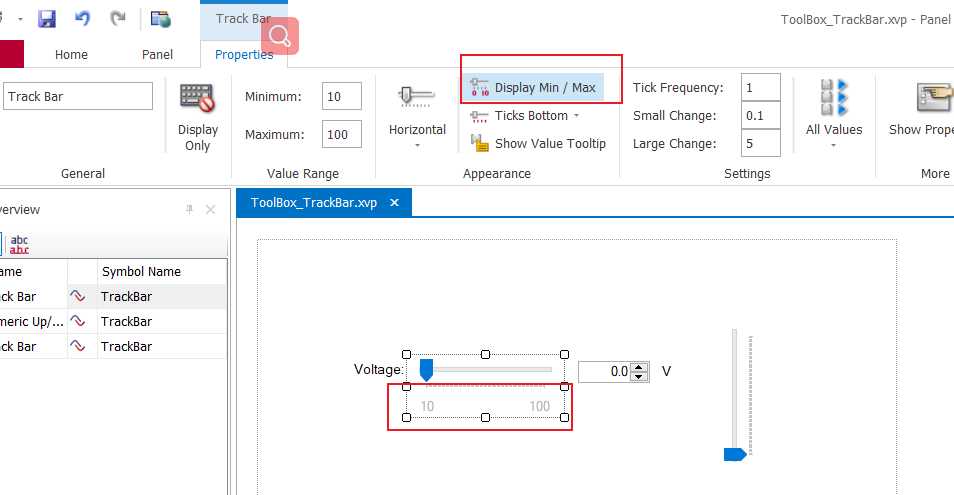
Whether to display the value range
- Whether the sliding strip (TrackBar ) The value range of is displayed
Calibration line (Ticks )
1️⃣ Whether the tick mark shows , And display location
- 10------------100 The dotted line of is the scale line , We choose
Ticks TopYou can change the tick mark below the slider by default to above - You can also choose
No TicksJust remove the scale mark

2️⃣ The smallest unit of the tick mark
- Is the dotted line on it too dense to see , That's because the default minimum unit (
Tick Frequency) yes 1, We set it to 10

3️⃣ Minimum moving unit (`Small change` )
- We can drag the slider to move the setting value , You can also add or subtract through the left and right keys of the keyboard , Then press the addition and subtraction of the keyboard to be the minimum moving unit , And the smallest unit of the scale line (
Tick Frequency) If the smallest moving unit (Small change) Integer multiple
4️⃣ Maximum movement (Large change )
- We don't need to drag the slider with the mouse , There is no need to press the left and right keys of the keyboard , We are on the left or right of the slider , Click the left mouse button , This is the time , The number of slider increases or decreases is the maximum movement (
Large change)
Whether to display the value of the slider
Show Value Tooltip: When you move the slider , Display the value of the slider .
Slider bound symbol Whether the value is updated in real time
All value:When you drag the slider to set the value , The slider didn't move , Corresponding symbol The value of will change followingOnly Last Value:Only when you mouse released When , Corresponding symbol Will change .

summary


- Have the most simple life , The furthest dream , Even if it's freezing tomorrow , Lu Yao's horse died !
- If this blog is helpful to you , please “ give the thumbs-up ” “ Comment on ”“ Collection ” One key, three links Oh ! It's not easy to code words , Everyone's support is my driving force to stick to it .

边栏推荐
- Cmake learning notes (II) generation and use of Library
- More accurate and efficient segmentation of organs-at-risk in radiotherapy with Convolutional Neural
- 2022.07.24(LC_6124_第一个出现两次的字母)
- R language uses wilcox The test function performs Wilcox signed rank test to obtain the confidence interval of the population median (the default output result includes the confidence interval of 95%
- Software testing interview question: Please list the testing methods of several items?
- 【AI4Code】《Contrastive Code Representation Learning》 (EMNLP 2021)
- 需求规格说明书模板
- 基于JEECG制作一个通用的级联字典选择控件-DictCascadeUniversal
- 什么是CI/CD?
- 零基础学习CANoe Panel(14)——二极管( LED Control )和液晶屏(LCD Control)
猜你喜欢

Leetcode 0133. clone diagram

想要白嫖正则大全是吧?这一次给你个够!

【运维、实施精品】月薪10k+的技术岗位面试技巧
ECCV2022 | TransGrasp类级别抓取姿态迁移
![[ROS advanced chapter] Lecture 9 programming optimization of URDF and use of xacro](/img/a2/9b676d0f1b33cc7d413cee6c52d76d.png)
[ROS advanced chapter] Lecture 9 programming optimization of URDF and use of xacro
The first scratch crawler

零基础学习CANoe Panel(12)—— 进度条(Progress Bar)

Pytorch advanced training skills

What is ci/cd?

If you want to do a good job in software testing, you can first understand ast, SCA and penetration testing
随机推荐
想要做好软件测试,可以先了解AST、SCA和渗透测试
【AI4Code】《CoSQA: 20,000+ Web Queries for Code Search and Question Answering》 ACL 2021
[rust] reference and borrowing, string slice type (& STR) - rust language foundation 12
485 communication (detailed explanation)
【5】 Page and print settings
Deep learning MEMC framing paper list
Numpy first acquaintance
跌荡的人生
What does the software testing process include? What are the test methods?
【C语言进阶】动态内存管理
A hard journey
Spirng @Conditional 条件注解的使用
Keeping MySQL highly available
[ROS advanced chapter] Lecture 9 programming optimization of URDF and use of xacro
零基础学习CANoe Panel(14)——二极管( LED Control )和液晶屏(LCD Control)
论文解读(MaskGAE)《MaskGAE: Masked Graph Modeling Meets Graph Autoencoders》
Pytorch environment configuration and basic knowledge
Ministry of Public Security: the international community generally believes that China is one of the safest countries in the world
艰辛的旅程
【8】 Clever use of color finder