当前位置:网站首页>基于JEECG制作一个通用的级联字典选择控件-DictCascadeUniversal
基于JEECG制作一个通用的级联字典选择控件-DictCascadeUniversal
2022-07-25 12:13:00 【瀚岳-诸葛弩】
字典是所有MIS系统不可缺少的重要组成部分。为减少输入,标准化输入内容,使得数据更加准确地被输入。往往需要在数据库中配置各种各样的字典表。如下图:
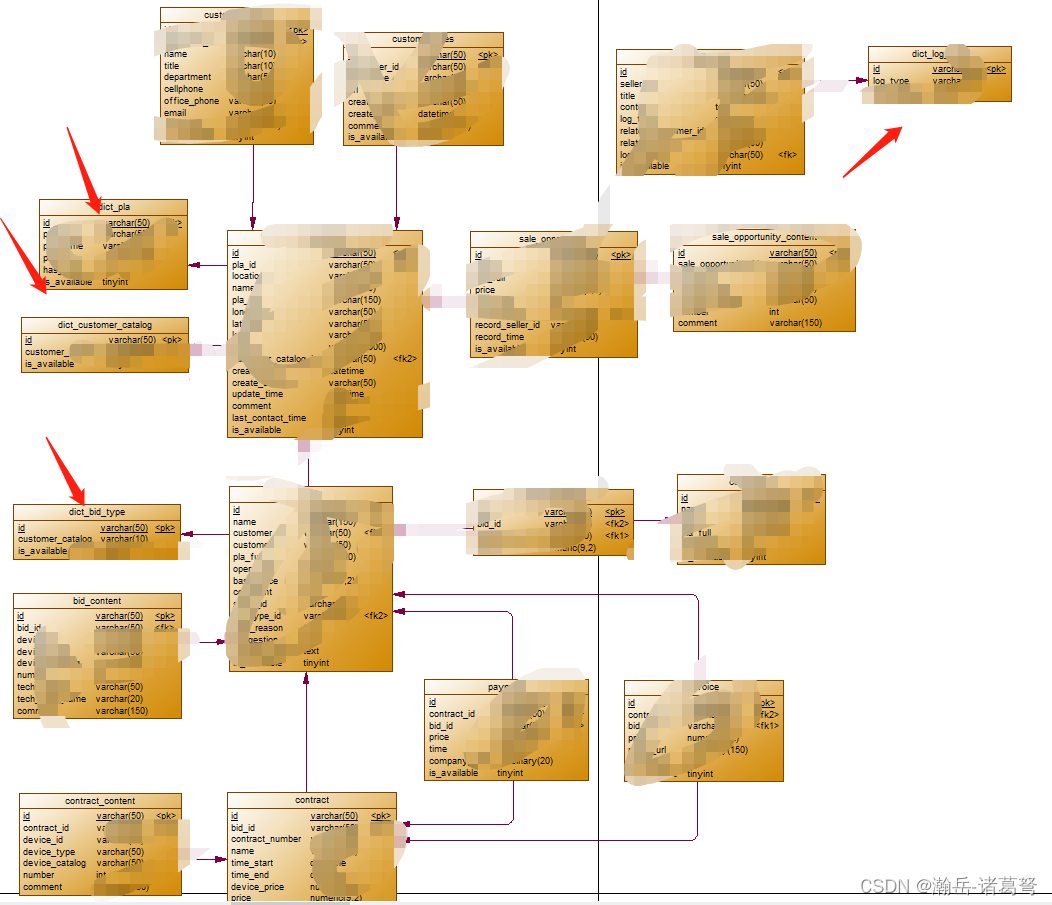
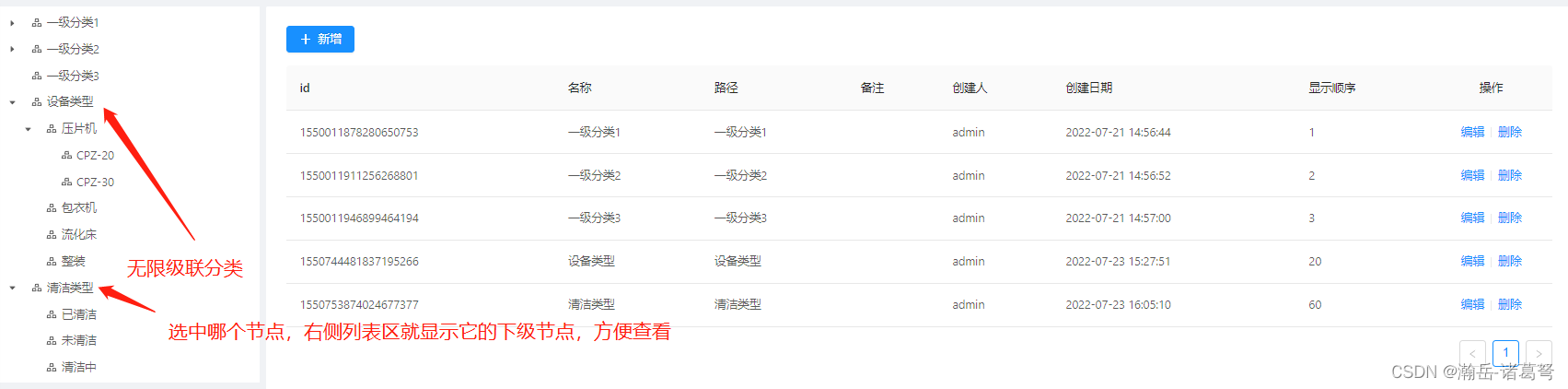
而绝大部分字典的字段简单,且高度一致。建议一个通用的字典表,并设计一个灵活度高的字典选择控件能大大提高效率。很多低代码开发平台提供了基础字典的通用方式,但灵活度上稍有欠缺,如:显示效果不好,不能管理级联(树状)字典信息……以JEECG所提供的字典管理为例,如下图所示:

针对上面两个问题,进行一个方便管理,方便自定义的通用字典选择控件
(1)数据库表设计

(2)具体效果
(3)使用配置

(4)效果展示

目前共配置了4种方式,可通过对组件的修改,不断增加选择样式。获取值通过@getSelectedItem方法,获取的是对象,属性丰富。如下:
复选框获取值

单选框获取值

下拉框获取值

下拉树获取值

(5)代码下载
见有道云笔记(下面的代码端是图太多发不了文章凑字的,直接下载有道云笔记里的代码文件即可,欢迎交流)
数据库表结构,放置于boot数据库
/*
 Navicat MySQL Data Transfer

 Source Server         : 116.62.233.186
 Source Server Type    : MySQL
 Source Server Version : 50737
 Source Host           : 116.62.233.186:3306
 Source Schema         : hanlin_boot

 Target Server Type    : MySQL
 Target Server Version : 50737
 File Encoding         : 65001

 Date: 23/07/2022 16:13:36
*/

SET NAMES utf8mb4;
SET FOREIGN_KEY_CHECKS = 0;

-- ----------------------------
-- Table structure for dict_cascade_universal
-- ----------------------------
DROP TABLE IF EXISTS `dict_cascade_universal`;
CREATE TABLE `dict_cascade_universal`  (
  `id` varchar(36) CHARACTER SET utf8mb4 COLLATE utf8mb4_general_ci NOT NULL,
  `create_by` varchar(50) CHARACTER SET utf8mb4 COLLATE utf8mb4_general_ci NULL DEFAULT NULL COMMENT '创建人',
  `create_time` datetime NULL DEFAULT NULL COMMENT '创建日期',
  `update_by` varchar(50) CHARACTER SET utf8mb4 COLLATE utf8mb4_general_ci NULL DEFAULT NULL COMMENT '更新人',
  `update_time` datetime NULL DEFAULT NULL COMMENT '更新日期',
  `sys_org_code` varchar(64) CHARACTER SET utf8mb4 COLLATE utf8mb4_general_ci NULL DEFAULT NULL COMMENT '所属部门',
  `pid` varchar(36) CHARACTER SET utf8mb4 COLLATE utf8mb4_general_ci NULL DEFAULT NULL COMMENT '父级节点',
  `has_child` varchar(3) CHARACTER SET utf8mb4 COLLATE utf8mb4_general_ci NULL DEFAULT NULL COMMENT '是否有子节点',
  `name` varchar(32) CHARACTER SET utf8mb4 COLLATE utf8mb4_general_ci NULL DEFAULT NULL COMMENT '名称',
  `show_order` int(11) NULL DEFAULT NULL COMMENT '显示顺序',
  `comment` text CHARACTER SET utf8mb4 COLLATE utf8mb4_general_ci NULL COMMENT '备注',
  `del_flag` int(11) NULL DEFAULT 0 COMMENT '是否删除',
  `path` varchar(32) CHARACTER SET utf8mb4 COLLATE utf8mb4_general_ci NULL DEFAULT NULL COMMENT '路径',
  PRIMARY KEY (`id`) USING BTREE
) ENGINE = InnoDB CHARACTER SET = utf8mb4 COLLATE = utf8mb4_general_ci ROW_FORMAT = Dynamic;

SET FOREIGN_KEY_CHECKS = 1;
组件文件:放置于前端component任意文件夹处
<template>
  <div>
    <div v-if='controlType=="弹出窗口树"'>
      hello,树
    </div>
    <div v-else-if='controlType=="dropdown"'>
      <a-select @change="onChange" style="width: 220px" v-model='selectedItemId'>
        <a-select-option v-for='item in options' :value="item.key">
          {
   { item.title }}
        </a-select-option>
      </a-select>
<!--      {
   {selectedItems}}-->
    </div>
    <div v-else-if='controlType=="treeSelect_single"'>
      <a-tree-select
        v-model="selectedItemId"
        style="width: 100%"
        :dropdown-style="{ maxHeight: '300px', overflow: 'auto' }"
        :tree-data="options"
        :placeholder="placeholder"
        @change='onChange'
      >
      </a-tree-select>
<!--      {
   {selectedItems}}-->
    </div>
    <div v-else-if='controlType=="radiobox_group"'>
      <a-radio-group name="radioGroup" v-model='selectedItems' @change="onChange">
        <a-radio v-for="item in options" :value="item">
          {
   {item.title}}
        </a-radio>
      </a-radio-group>

<!--      {
   {selectedItems}}-->
    </div>
    <div v-else-if='controlType=="checkbox_group"'>
      <a-checkbox-group @change="onChange" v-model='selectedItems'>
        <a-checkbox v-for='item in options' :value="item">
          {
   {item.title}}
        </a-checkbox>
      </a-checkbox-group>
<!--      {
   {selectedItems}}-->
    </div>
    <div v-else>
      请配置控件类型
    </div>
  </div>
</template>

<script>
import { httpAction, getAction, postAction } from '@/api/manage'

export default {
  name: 'KingDictCascadeUniversal',
  props: {
    DictRootId: '',
    controlType: '',//弹出窗口树、下拉菜单、下拉树菜单、单选框、复选框
    placeholder:''
  },
  data() {
    return {
      dictName: '',
      dictPath: '',
      dictId: '',
      options:[],
      selectedItems:[],
      selectedItemId:""
    }
  },
  methods: {
    getArrayItem(arr){
      let that = this
      arr.forEach(function(arrItem){
        if (arrItem.key === that.selectedItemId) {
          that.selectedItems = arrItem
          that.selectedItems.children=[]
          return
        }

        if (arrItem.children != null && arrItem.children.length > 0) {
          that.getArrayItem(arrItem.children)
        }
      })
    },
    onChange:function(){
      //region 获取对象信息 selectedItems
      let that = this
      switch(this.controlType){
        case "dropdown":
          let rsArr = this.options.filter(function(item){
            return item.key === that.selectedItemId
          })
          this.selectedItems = rsArr[0]
          break
        case "treeSelect_single":

          this.getArrayItem(this.options)
          break
      }
      //endregion

      this.$emit('getSelectedItems', this.selectedItems)
    },
    getTreeNodes(arr, pid, rootNode){
      debugger
      let that = this

      let parentNodes = arr.filter(function(item){
        return item.pid === pid
      })

      parentNodes.forEach(function(item) {
        let optionObj = new Object();
        optionObj.key = item.id
        optionObj.value = item.id
        optionObj.title = item.name
        optionObj.path = item.path

        if(rootNode == null){
          optionObj.children = []
          that.options.push(optionObj)
        }
        else{
          rootNode.children.push(optionObj)
        }
        that.getTreeNodes(arr, optionObj.key, optionObj)
      })
    }
  },
  created(){
    let that = this
    this.options = []
    let params = new Object()
    params.rootID = this.DictRootId

    getAction('/jeecg-system/kingsystem/dictCascadeUniversal/getAllNodesFromRoot', params).then(function(res) {
      if(that.DictRootId == "-1")
      {
        that.DictRootId = "0"
      }
      that.getTreeNodes(res, that.DictRootId, null)
    })
  }
}
</script>

<style scoped>

</style>
调用示例:放置于views下任意文件夹后端
<template>
  <div>
    <kingDictCascadeUniversal DictRootId='1550011878280650753' controlType='dropdown' @getSelectedItems='getSelectedValue'></kingDictCascadeUniversal>
    <br>

    <kingDictCascadeUniversal DictRootId='1550011878280650753' controlType='checkbox_group' @getSelectedItems='getSelectedValue'></kingDictCascadeUniversal>
    <br>
    <kingDictCascadeUniversal DictRootId='1550011911256268801' controlType='radiobox_group' @getSelectedItems='getSelectedValue'></kingDictCascadeUniversal>

    <br>
    <kingDictCascadeUniversal DictRootId='1550744481837195266' controlType='treeSelect_single' style='width:200px' placeholder='请选择' @getSelectedItems='getSelectedValue'></kingDictCascadeUniversal>

    {
   {selectedItems}}
  </div>
</template>
<script>
import kingDictCascadeUniversal from '@comp/kingsystem/KingDictCascadeUinversal/KingDictCascadeUniversal'
export default {
  components: {
    kingDictCascadeUniversal,
  },
  data(){
    return {
      selectedItems:{}
    }
  },
  methods:{
    getSelectedValue(rs){
      this.selectedItems = rs
    }
  }
};
</script>
后端代码:根据jeecg,按需自动生成。或通过mybatisplus生成(略)
边栏推荐
- Technical management essay
- 弹性盒子(Flex Box)详解
- Is the securities account opened by qiniu safe? How to open an account
- 2.1.2 application of machine learning
- 【五】页面和打印设置
- Script set random user_ agent
- Pytorch main module
- Spirng @Conditional 条件注解的使用
- Microsoft azure and Analysys jointly released the report "Enterprise Cloud native platform driven digital transformation"
- 推荐系统-协同过滤在Spark中的实现
猜你喜欢

JS 将伪数组转换成数组

LeetCode 0133. 克隆图
![[ROS advanced chapter] Lecture 9 programming optimization of URDF and use of xacro](/img/a2/9b676d0f1b33cc7d413cee6c52d76d.png)
[ROS advanced chapter] Lecture 9 programming optimization of URDF and use of xacro

弹性盒子(Flex Box)详解

Build a series of vision transformer practices, and finally meet, Timm library!

Want to go whoring in vain, right? Enough for you this time!
![[advanced C language] dynamic memory management](/img/b7/6586b35500eb8f39a3ea8c125fb572.png)
[advanced C language] dynamic memory management

MySQL exercise 2
Leetcode 1184. distance between bus stops

More accurate and efficient segmentation of organs-at-risk in radiotherapy with Convolutional Neural
随机推荐
公安部:国际社会普遍认为中国是世界上最安全的国家之一
flinkcdc可以一起导mongodb数据库中的多张表吗?
Software testing interview question: Please list the testing methods of several items?
Perf performance debugging
Leetcode 1184. distance between bus stops
If you want to do a good job in software testing, you can first understand ast, SCA and penetration testing
Pairwise comparison of whether the mean values between R language groups are the same: pairwise hypothesis test of the mean values of multiple grouped data is performed using pairwise.t.test function
Microsoft azure and Analysys jointly released the report "Enterprise Cloud native platform driven digital transformation"
Want to go whoring in vain, right? Enough for you this time!
基于Caffe ResNet-50网络实现图片分类(仅推理)的实验复现
Ecological profile of pytorch
2022河南萌新联赛第(三)场:河南大学 I - 旅行
Does MySQL have flush privileges
logstash
【Flutter -- 实例】案例一:基础组件 & 布局组件综合实例
More accurate and efficient segmentation of organs-at-risk in radiotherapy with Convolutional Neural
Selenium use -- installation and testing
SSTI 模板注入漏洞总结之[BJDCTF2020]Cookie is so stable
Alibaba cloud technology expert Qin long: reliability assurance is a must - how to carry out chaos engineering on the cloud?
PyTorch主要模块