当前位置:网站首页>零基础学习CANoe Panel(13)—— 滑条(TrackBar )
零基础学习CANoe Panel(13)—— 滑条(TrackBar )
2022-07-25 12:25:00 【蚂蚁小兵】
- 我是蚂蚁小兵,专注于车载诊断领域,尤其擅长于对CANoe工具的使用
- 寻找组织 ,答疑解惑,摸鱼聊天,博客源码,点击加入【相亲相爱一家人】
- 零基础学习CANoe Panel设计目录汇总,点击跳转
前言
滑条(TrackBar )可以滑动滑块来设置值,比如设置车速等
演示软硬件环境
Windows11 x64;CANoe 11 SP2 x64

属性设置
- 放一个
TrackBar和Numeric Up/Down控件,Numeric Up/Down控件用来显示TrackBar控件的值
取值范围
- 可以设置滑条的最大值和最小值

垂直滑条还是水平滑条

是否显示取值范围
- 是否把滑条(TrackBar )的取值范围给显示出来
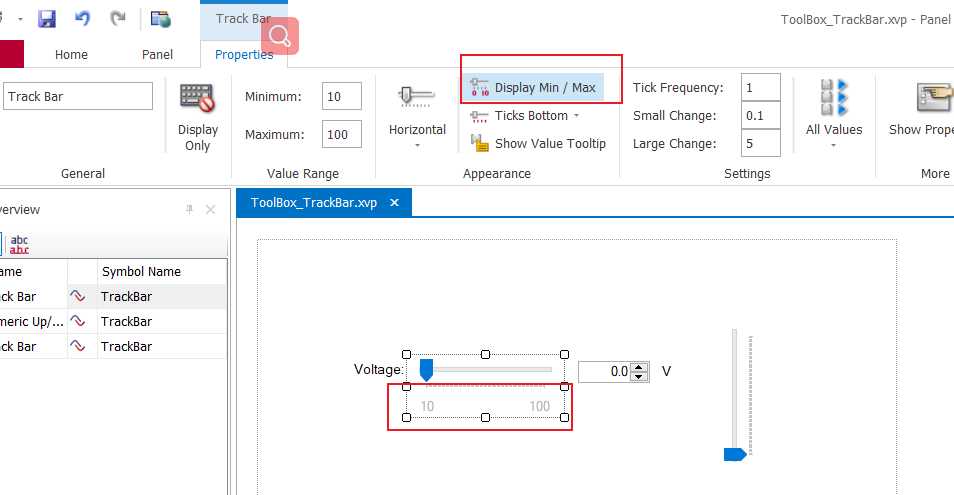
刻度线(Ticks )
1️⃣ 刻度线是否显示,以及显示位置
- 10------------100 的虚线就是刻度线,我们选择
Ticks Top可以把刻度线默认在滑条下方的改成上方 - 也可以选择
No Ticks就去掉刻度线了

2️⃣刻度线的最小单位
- 上面的虚线是不是密密麻麻看不清,那是因为默认的最小单位(
Tick Frequency)是1,我们设置成10

3️⃣ 最小移动单位(`Small change` )
- 我们可以拖动滑块移动设置值,也可以通过键盘的左右键来加减,则按一下键盘的加减数就是最小移动单位,且刻度线的最小单位(
Tick Frequency)要是最小移动单位(Small change)的整数倍
4️⃣ 最大移动量(Large change )
- 我们即不用鼠标拖动滑条,也不用键盘的左右按键,我们就在滑块的左边或者右边,点一下鼠标左键,这个时候,滑块增减的数就是最大移动量(
Large change)
是否显示滑块的值
Show Value Tooltip: 当你移动滑块的时候,显示滑块的值。
滑块绑定的symbol值是否实时更新
All value:当你拖动滑块设置值的时候,滑块没动一下,相应的symbol的值就会跟着变化以下Only Last Value:只有当你鼠标released的时候,相应的symbol的值才会变化。

总结


- 要有最朴素的生活,最遥远的梦想,即使明天天寒地冻,路遥马亡!
- 如果这篇博客对你有帮助,请 “点赞” “评论”“收藏”一键三连 哦!码字不易,大家的支持就是我坚持下去的动力。

边栏推荐
- A hard journey
- "Autobiography of Franklin" cultivation
- 启牛开的证券账户安全吗?是怎么开账户的
- Pytorch environment configuration and basic knowledge
- 论文解读(MaskGAE)《MaskGAE: Masked Graph Modeling Meets Graph Autoencoders》
- 力扣 83双周赛T4 6131.不可能得到的最短骰子序列、303 周赛T4 6127.优质数对的数目
- 我在源头SQLServer里面登记绝对删除的数据,传到MaxComputer,在数据清洗的时候写绝对
- More accurate and efficient segmentation of organs-at-risk in radiotherapy with Convolutional Neural
- 【三】DEM山体阴影效果
- Perf performance debugging
猜你喜欢

Selenium use -- installation and testing

微软Azure和易观分析联合发布《企业级云原生平台驱动数字化转型》报告

Moving Chinese figure liushenglan

Pytorch project practice - fashionmnist fashion classification

【Flutter -- 布局】层叠布局(Stack和Positioned)

【运维、实施精品】月薪10k+的技术岗位面试技巧

2022.07.24(LC_6124_第一个出现两次的字母)

Want to go whoring in vain, right? Enough for you this time!

2022.07.24 (lc_6126_design food scoring system)
![[advanced C language] dynamic memory management](/img/b7/6586b35500eb8f39a3ea8c125fb572.png)
[advanced C language] dynamic memory management
随机推荐
perf 性能调试
Moving Chinese figure liushenglan
MySQL exercise 2
【AI4Code】《InferCode: Self-Supervised Learning of Code Representations by Predicting Subtrees》ICSE‘21
Table partition of MySQL
Jenkins configuration pipeline
【AI4Code】《GraphCodeBERT: Pre-Training Code Representations With DataFlow》 ICLR 2021
mysql实现一张表数据插入另一张表
More accurate and efficient segmentation of organs-at-risk in radiotherapy with Convolutional Neural
Monit installation and use
【5】 Page and print settings
Experimental reproduction of image classification (reasoning only) based on caffe resnet-50 network
基于Caffe ResNet-50网络实现图片分类(仅推理)的实验复现
Implementation of recommendation system collaborative filtering in spark
【2】 Grid data display stretch ribbon (take DEM data as an example)
我想问DMS有没有定时备份某一个数据库的功能?
PyTorch可视化
【十】比例尺添加以及调整
【Rust】引用和借用,字符串切片 (slice) 类型 (&str)——Rust语言基础12
【4】 Layout view and layout toolbar usage