当前位置:网站首页>Several common problems of SQL server synchronization database without public IP across network segments
Several common problems of SQL server synchronization database without public IP across network segments
2022-07-24 06:39:00 【Lin Feifan 1998】
Problem description
host 1: Publisher
Aliyun server -- There are public ip
host 2: Subscribers
The notebook -- No public network ip
Small amount of data , Mainly familiar with the operation process of publish and subscribe .
host 2 Just as a host 1 Local backup of , After you request to modify the data on the ECS , Can pass sql server The publish and subscribe function of will synchronize the local data .
There is no step-by-step introduction , Step by step , You can read the following
problem 1
Ali cloud, sql server After configuration , Can't use local sql server Client remote login .
Check the following
1. The firewall in alicloud's console , Open Alibaba cloud's 1433 port ( default sql server Access port )
That's important , There is no mention of !!!

2. We need to take the sql manager Medium sql server In service sql server Agent on ( It was originally disabled )

3. Remote server to open sql server User name password login method , And set up the proxy account and password

To this step , It should be in the notebook sql server adopt ip Address , And just set up the proxy account and password to log in to the ECS .
--------------------------------------------------------------------------------------
problem 2
Publish and subscribe process
First in the cloud sql server Client's
Copy --- Release --- New release
1. Choose which way to publish

In this regard, you can query the differences among the four publications
it is to be noted that : When the transaction is released , The published table should have a primary key
2. How to connect to the publisher
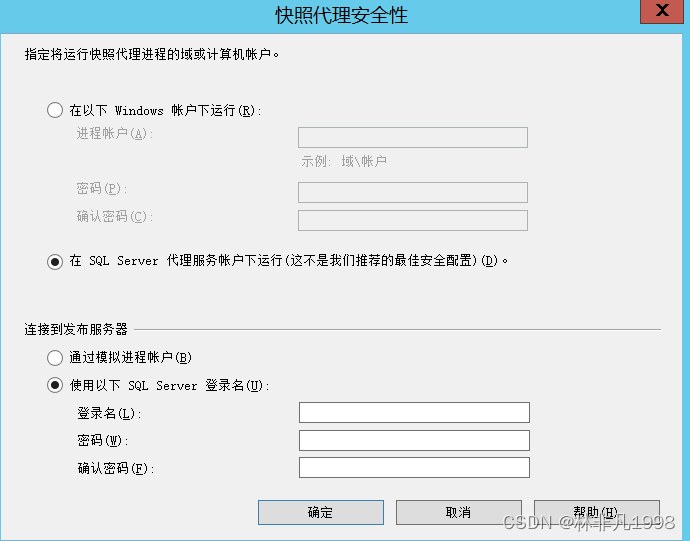
On the Internet, it is generally recommended to create a new user name in both the cloud and the local , The code is the same windows Account , Then here we choose windows Run under account .
I'm going to use sql server Login name
Note here --- The login name is sql server Login name of ( It's usually sa the )
-------------------------
That's the publisher
-------------------------
Subscribers
1. Use the alias

When choosing a publisher in this step , Use the actual server name ( Use windows The name of the login method ), Out of commission ip Address .
Here, add the publisher alias to the subscriber , See below for details
https://blog.csdn.net/u010457730/article/details/97276313
2. Push subscription or pull subscription

Here I have a question I don't understand , I'll talk about it later .
3. Connect to the distributor

Note here , To fill in the sql server Login name .
It's the login ,sa that
Login is not a server name , Remember this .
At this point , Check the synchronization status of subscribers

See if it's ticked ---- This means that the previous settings are correct , Subscribers can access the publisher .
I filled in the wrong user name at the beginning , When checking the synchronization status, an error is still reported .
--------------------------------------------------------------------------------
Next , Let's see if the subscriber's data is synchronized , If not synchronized , Look at the job history of the subscriber


Maybe it's still a mistake
But what is this misinformation ???
“ Replication agent is having problems . For more information , See previous job step history messages or Replication Monitor ”
Originally, we need to find the specific error information at the publisher ...

Start the Replication Monitor at the publisher
After selecting a specific release on the left , Double click the wrong subscription in all subscriptions on the right , View specific error reports

The truth --
Due to an operating system error 3, The process could not read the file D:\XXXX\X.pre
The reason is -- This path is where the snapshot file is stored at the publisher , But because it's not a network folder , Can't be visited .
Here's a simple solution
Follow this example
https://www.cnblogs.com/mrray/archive/2011/03/17/1987123.html
Directly put the snapshot folder of the publisher -- The name is repldata Copy of to a file location on the subscriber side
Modify the snapshot location at the subscriber side
Copy -- local subscription --- Specific subscriptions --- Right click --- attribute
Change the snapshot folder location to the local location .
It's amazing , It only needs to be modified once .

To this step , My problem is solved , Here are some questions and thoughts
1. Many holes , But look for more information , It can always be solved . This confidence is exercised in solving problems over and over again .
2. Lack of theoretical basis , Some configuration operations are prone to problems . For example, I don't know the specific mechanism of publish and subscribe , It's hard to think of the problem that the snapshot folder can't be accessed .
3. My situation is quite special , One has a public network ip, None of them . What I saw on the Internet , Usually it's a LAN , Or both hosts have a public network ip Of ( This means that the publisher , Subscribers can use only ip Address visit each other ). So I've always suspected that my network structure can't use publish and subscribe in principle ( Because the publisher can't “ find ” Subscribers ). This is also my choice to run the agent from the subscriber in the configuration , Because subscribers can definitely “ find ” There are public ip Of the publisher . This problem needs to be studied in detail .
4. These four releases - What's the difference in the way you subscribe ? What is the principle of snapshot folder ? These are two questions that need to be clarified .
5.sql server Why there are so many pits for this common function ... Maybe I'm too busy . But at least this problem is solved , I've grown a little bit .
边栏推荐
猜你喜欢

Restful API introduction

Log collection and analysis platform

【LVGL(重要)】样式属性API函数及其参数

Process and planned task management

RAID的配置实验

Flink production environment configuration recommendations

LVM and disk quota
Yiwen node installation, download and configuration

MySQL Index & execution plan

Leetcode refers to offer jz5 to replace the space string
随机推荐
Work summary of a test Manager / Test Supervisor / test director
CentOS operating system security reinforcement
DHCP principle and configuration
RAID5和LVM组合使用
API process and code structure
[222] memory overflow and location
Explain the event cycle mechanism and differences between browser and node in detail
进程和计划任务管理
Animation effect
【波形/信号发生器】基于 STC1524K32S4 for C on Keil
Iterators and generators
文件系统与日志分析
Solutions to the failure of wechat TBS online kernel installation
Login page + summary
File system and log analysis
Secondary processing of template data
Install Apache manually
MySQL批量修改数据表编码及字符集为utf8mb4
进程和计划任务管理
SSH远程访问及控制