当前位置:网站首页>Hello playwright: (7) simulate keyboard and mouse
Hello playwright: (7) simulate keyboard and mouse
2022-06-22 17:04:00 【Dotnet cross platform】
Although in the previous section , We have been able to pass FillAsync or ClickAsync To input and click elements . however , There are other scenes , We have to simulate the user using the keyboard 、 Mouse and page interaction . For example, online documents :
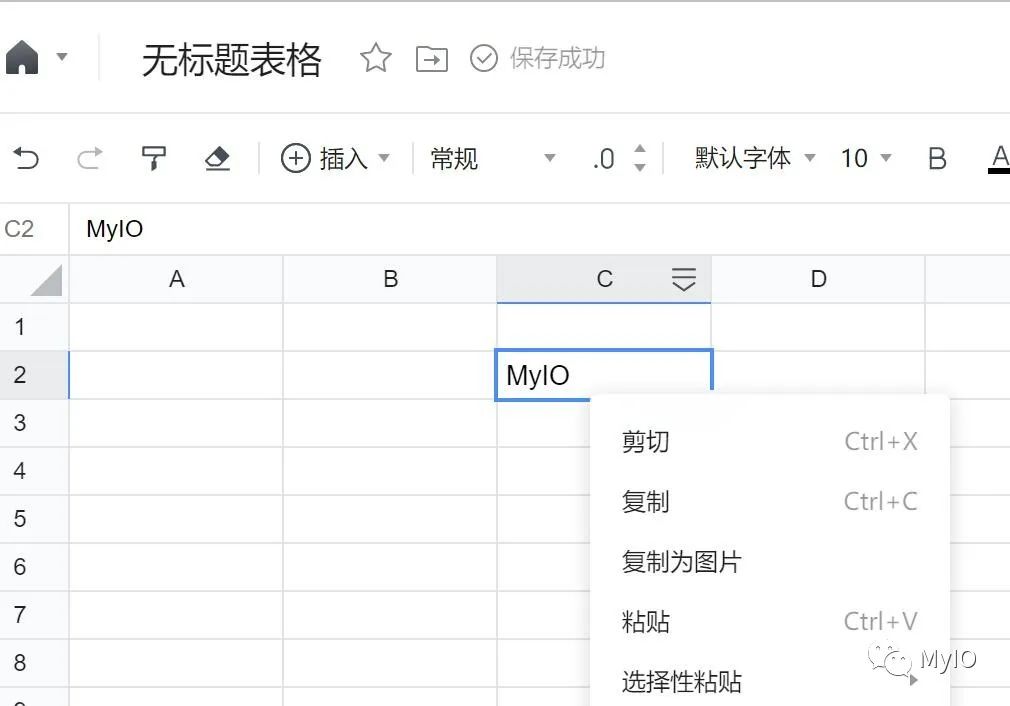
Page.Keyboard object
Keyboard Provides... For managing virtual keyboards API, It will be page Generate the correct keydown、keypress and keyup event .
for example , Implement the following process :
Hold down Shift Key input characters a, Get capital letters A
Enter characters in actual case Bc
Hold down Shift Key not put , Press again 3 Second left arrow , Re release Shift key , Reach selected ABc Purpose
Input Backspace key , Delete selected text
Input text MyIO
The code is as follows :
await page.Keyboard.PressAsync("Shift+KeyA");
await page.Keyboard.TypeAsync("Bc");

await page.Keyboard.DownAsync("Shift");
for (var i = 0; i <3; i++)
    await page.Keyboard.PressAsync("ArrowLeft");
await page.Keyboard.UpAsync("Shift");

await page.Keyboard.PressAsync("Backspace");

await page.Keyboard.InsertTextAsync("MyIO");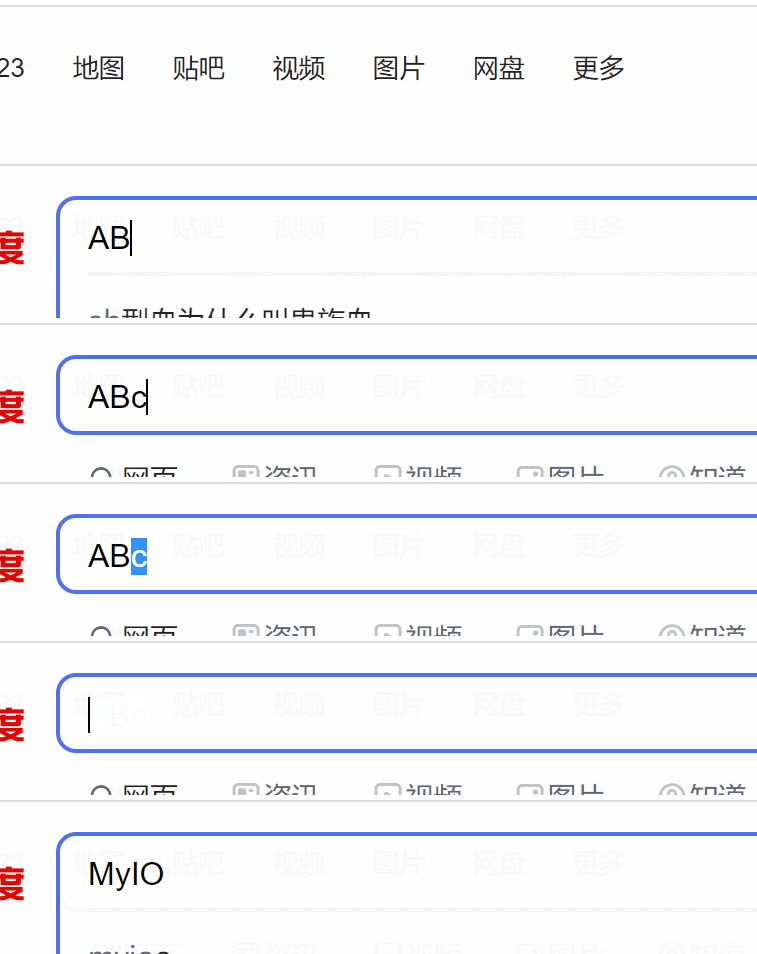
It's used here 3 Different input methods :
PressAsync, Enter a single character , Can and modifier keys ( for example Shiift) Use a combination ofTypeAsync, Enter individual characters one by oneInsertTextAsync, Input text , What's special is that it doesn't trigger keydown, keyup perhaps keypress event
Page.Mouse object
Mouse Provides for managing the virtual mouse API, The origin coordinate is page MainFrame The upper left corner of the view .
for example , Implement the following process :
Move the mouse to " more " link
Right click " translate " Icon
The code is as follows :
var moreLink = page.Locator("//*[@id=\"s-top-left\"]/div");
var box = await moreLink.BoundingBoxAsync();
await page.Mouse.MoveAsync(box.X , box.Y );

var moreDiv = page.Locator("id=s-top-more");
box = await moreDiv.BoundingBoxAsync();
await page.Mouse.ClickAsync(box.X + (box.Width / 3 / 2), box.Y + (box.
Height / 3 / 2), new MouseClickOptions { Button = MouseButton.Right });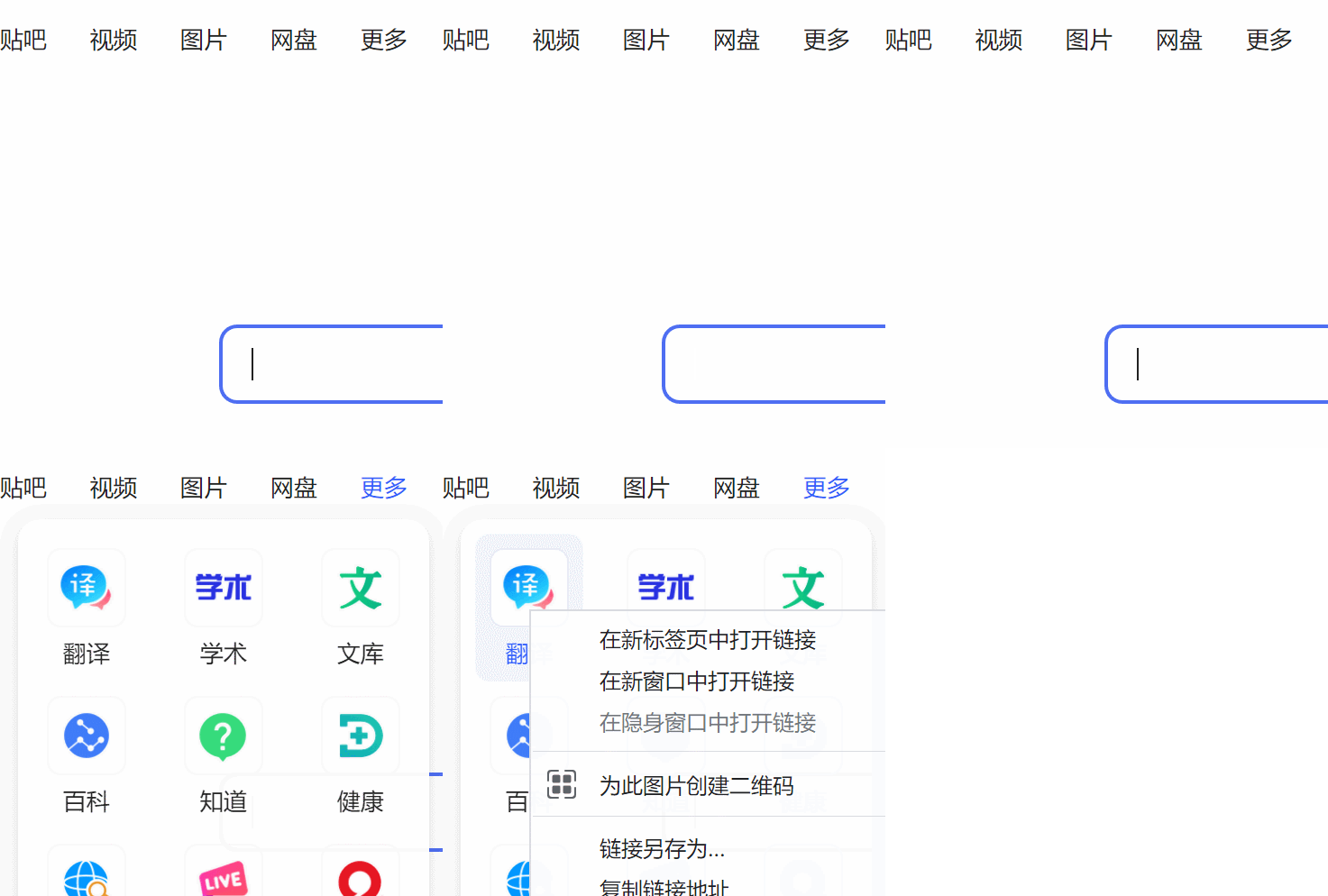
Here we use a little trick , There is no need to guess " more " Where the link is located .Locator There's a name BoundingBoxAsync Methods , It returns the position of the element (X and Y) And size ( Width and height ).
By the location and size of the element , We can precisely control the mouse position , And there's no need to worry about UI Different resolutions interfere with operation .
Add microsignals 【MyIO666】, Invite you to join the technical exchange group
边栏推荐
猜你喜欢

写给 Kubernetes 工程师的 mTLS 指南

华为云招募工业智能领域合作伙伴,强力扶持+商业变现
每秒處理10萬高並發訂單的樂視集團支付系統架構分享

NLog自定义Target之MQTT

JMeter use case
![[C language] deeply analyze the storage of integer and floating-point types in memory](/img/8b/12a4dc7a0c0e34e2add007592971dd.jpg)
[C language] deeply analyze the storage of integer and floating-point types in memory

How to add a "security lock" to the mobile office of government and enterprises?

Qt笔记-QMap自定义键(key)

UI自动化定位利器-xpath实战

Gridhome, a must-have static site generator for beginners
随机推荐
In the era of video explosion, who is supporting the high-speed operation of video ecological network?
Purchase guide - how to purchase a high-quality conference tablet, these aspects must be compared
spark的NaiveBayes中文文本分类
How to open an account in flush? Is it safe to open an account online?
Gridhome, a must-have static site generator for beginners
.NetCore实现图片缩放与裁剪 - 基于ImageSharp
Hydra installation and use
JSP learning (2) -- JSP script elements and instructions
Bidirectional data binding V-model and v-decorator
华为云招募工业智能领域合作伙伴,强力扶持+商业变现
scala的相等性
企业级软件开发新模式:低代码
Linux system maintenance: mysql8.0.13 source code download and installation "fool" operation steps (Linux centos6.8) test available series
.NET 发布和支持计划介绍
LETV group payment system architecture sharing for processing 100000 high concurrent orders per second
Test for API
Interface (optimization type annotation)
mysql-5.6.21-centos6.5源码安装配置
spark Executor执行结果的处理源码
Windows8.1 64 installed by mysql5.7.27