当前位置:网站首页>[C language] detailed knowledge of document operation
[C language] detailed knowledge of document operation
2022-07-24 12:45:00 【Ahao_ te】
List of articles
1、 Why use files
Before , All our data were destroyed after the program ended , If there is still some data to be retained after the program ends , The file function will solve this problem well .
Using files, we can store data on computer disk , Data persistence .
2、 What is a document
There are two kinds of documents
- Program files : Including source files (.c), Target file (.obj), Executable file (.exe).
- Data files : Data file is a file that the program inputs from disk and puts into memory , Or a file that outputs program data to disk .
Before , What we mean by input and output refers to the interaction between memory and terminal , For example, output the data in memory to the screen , Save the data entered by the keyboard in memory .
This chapter , It becomes the interaction between memory and disk , We will output data to disk , Or input disk data into memory for use .
3、 Opening and closing of files
3.1、 The file pointer
Each used data file opens up an area in memory , This area is called File information area , Used to store information about documents . This information is stored in a structure variable , The structure type is system declared , named FILE.
struct _iobuf {

        char *_ptr;
        int   _cnt;
        char *_base;
        int   _flag;
        int   _file;
        int   _charbuf;
        int   _bufsiz;
        char *_tmpfname;
       };
typedef struct _iobuf FILE;
Every time you open a file , The system will automatically create FILE Structural variables , Users don't need to care about details .
Generally, this structure is maintained through a pointer .
For example, we create a pointer variable
FILE* pf;
such pf The pointer points to the file information area opened by the data file , So that we can change the contents of the file in the subsequent operations .
3.2、 Opening and closing of files
C Language policy , Open the file and use fopen function , File close use fclose function .
Use fopen Function to open a file , Function will return a pointer to this file .
filename Represents the file path , If you only fill in the file name, you will find the file name in the same directory as the source file , If through absolute path , Will access more accurately .
mode Represents the reading and writing mode of the document .
// Open file
FILE * fopen ( const char * filename, const char * mode );
The file must be closed after it is opened , Otherwise, there will be resource occupation , And I can't open this file anymore .
// Close file
int fclose ( FILE * stream );
Open and close files
int main()
{

	FILE* pf = fopen("test.txt", "w");
	if (pf == NULL)
	{

		printf("%s\n", strerror(errno));
		return 1;
	}
	// Operation file
	//...
	fclose(pf);
	return 0;
}
How files are used
| How files are used | meaning | If the specified file does not exist |
|---|---|---|
| “r”( read-only ) | To enter data , Open an existing text file | error |
| “w”( Just write ) | To output data , Open a text file | Create a new file |
| “a”( Additional ) | Add data to the end of the text file | Create a new file |
| “wb”( Just write ) | To output data , Open a binary file | Create a new file |
| “rb”( read-only ) | To enter data , Open a binary file | error |
| “ab”( Additional ) | Add data to the end of a binary file | error |
| “r+”( Reading and writing ) | For reading and writing , Open a text file | error |
| “w+”( Reading and writing ) | For reading and writing , Suggest a new file | Create a new file |
| “a+”( Reading and writing ) | Open a file , Read and write at the end of the file | Create a new file |
| “rb+”( Reading and writing ) | Open a binary file for reading and writing | error |
| “wb+”( Reading and writing ) | For reading and writing , Create a new binary file | Create a new file |
| “ab+”( Reading and writing ) | Open a binary file , Read and write at the end of the file | Create a new file |
4、 Sequential reading and writing of files
4.1、 What is flow
What is flow ?
stay C Language provides us with three streams
stdin( Standard input stream keyboard )
stdout ( Standard output stream The screen )
stderr ( Standard output error stream The screen )
4.2、fputc and fgetc
fputc Is the character output function , It can output data in memory to file or screen .
It is used for all output streams
int fputc ( int character, FILE * stream );
int main()
{

	// Output to file is to write data to file
	FILE* pf = fopen("test.txt", "w");
	if (pf == NULL)
	{

		printf("%s\n", strerror(errno));
		return 1;
	}

	char i = 0;
	for (i = 'a'; i <= 'z'; i++)
	{

		fputc(i, pf);// Output to a file to save .
		fputc(i, stdout); // Output to screen display .
	}

	fclose(pf);
	return 0;
}
fgetc Is a character input function , Be able to get data from all streams .
Read successfully and return 1, Reading failed and returned EOF(0)
int fgetc ( FILE * stream );
int main()
{

	// Input through file means reading data from file
	FILE* pf = fopen("test.txt", "r");
	if (pf == NULL)
	{

		printf("%s\n", strerror(errno));
		return 1;
	}

	// Reading documents
	//int ch = fgetc(pf);
	//printf("%c\n", ch);
	//ch = fgetc(pf);
	//printf("%c\n", ch);
	int ch = 0;
	while ((ch = fgetc(pf)) != EOF)
	{

		printf("%c ", ch);
	}

	fclose(pf);
	pf = NULL;
	return 0;
}
4.3、fputs and fgets
fputs Output a string of characters to the stream .
Applicable to all output streams
int fputs ( const char * str, FILE * stream );
int main()
{

	FILE* pf = fopen("test.txt", "w");
	if (pf == NULL)
	{

		printf("%s\n", strerror(errno));
		return 1;
	}

	fputs("hello bit\n", pf);// output to a file
	fputs("hello bit\n", pf);// output to a file

	fputs("hello bit\n", stdout);// Output to the screen

	fclose(pf);
	pf = NULL;

	return 0;
}
fgets Is a text line input function , In the flow num Characters are entered into str in
Used for all input streams
char * fgets ( char * str, int num, FILE * stream );
There are two cases of return
- If the number of characters in the stream is greater than num, Then input num-1 Characters to str after , The first num Input characters \0, return str.
- If the number of characters in the stream is less than num, Then input all characters from the stream , return str.
int main()
{

	FILE* pf = fopen("test.txt", "r");
	if (pf == NULL)
	{

		printf("%s\n", strerror(errno)); // Two kinds of   Get the error code information before printing
		perror("fopen"); // Print error messages directly
		return 1;
	}
	char s[10];
	char p[20];
	//4 Characters plus one \0
	// Return string s
	fgets(s, 5, pf);
	printf("%s\n", s);

	// Read from file 20 Characters or finish reading , Put in p Array
	// Return string p
	fgets(p, 20, pf);
	printf("%s\n", p);

	fclose(pf);
	pf = NULL;

	return 0;
}
4.4、fscanf and fprintf
fprintf Is the format output function , It outputs the formatted data to the stream .
Apply to all streams
int fprintf(FILE* stream, const char* format);
struct S
{

	char arr[10];
	int age;
	float score;
};

int main()
{

	struct S s = {
     "zhangshan",25,50.5f};

	FILE* pf = fopen("test.txt", "w");
	if (pf == NULL)
	{

		perror("fopen");
		return 1;
	}
	// Write  ( The data in memory is output to disk )
	// File storage data :zhangshan 25 50.5f
	fprintf(pf,"%s %d %f",s.arr,s.age,s.score);

	// Screen output :zhangshan 25 50.5f
	fprintf(stdout,"%s %d %f",s.arr,s.age,s.score);


	fclose(pf);
	pf = NULL;
	return 0;
}
fscanf Is the format input function , Format the data in the stream into .
Apply to all streams
int fscanf(FILE* stream, const char* format);
struct S
{

	char arr[10];
	int age;
	float score;
};

int main()
{

	struct S s = {
     0 };

	FILE* pf = fopen("test.txt", "r");
	if (pf == NULL)
	{

		perror("fopen");
		return 1;
	}
	// read  ( The data in the disk is input into memory )
	// take pf The data in is formatted and input into the structure
	fscanf(pf, "%s %d %f", &(s.arr), &(s.age), &(s.score));

	// Two ways to print to the screen
	/*printf("%s %d %f\n", s.arr, s.age, s.score);*/
	fprintf(stdout, "%s %d %f", s.arr, s.age, s.score);


	fclose(pf);
	pf = NULL;
	return 0;
}
4.5、fread and fwrite
The previous file sequential read / write functions are applicable to all streams ,
and fread and fwrite Only for documents , And they are all read and written through binary .
fwrite It is through binary output , Write the data in memory to the file in binary mode
size_t fwrite(const void* ptr, size_t size, size_t count, FILE* stream);
- ptr Represents the output to the file by ptr The data pointed to
- size Represents how many bytes are output to the file at a time
- count Represents the total number of outputs
- stream Represents file flow
- The function returns How many times to successfully output to the file .
struct S
{

	char arr[10];
	int age;
	float score;
};

int main()
{

	struct S s = {
     "zhangsan", 25, 50.5f };

	FILE* pf = fopen("test.txt", "wb");
	if (pf == NULL)
	{

		perror("fopen");
		return 1;
	}
	// The structure &s Data at , Every time sizeof(struct S) byte , in total 1 Time , Output to pf in
	fwrite(&s, sizeof(struct S), 1, pf);

	fclose(pf);
	pf = NULL;
	return 0;
}
fread It is through binary input , Input binary data of the file into memory .
size_t fread ( void * ptr, size_t size, size_t count, FILE * stream );
- ptr Represents file data input to ptr The memory space pointed to .
- size Represents how many bytes are input each time .
- count Represents the total number of entries .
- stream Represents file flow .
- The function returns the total number of successful reads .
struct S
{

	char arr[10];
	int age;
	float score;
};

int main()
{

	struct S s = {
     0 };

	FILE* pf = fopen("test.txt", "rb");
	if (pf == NULL)
	{

		perror("fopen");
		return 1;
	}
	// Read binary
	fread(&s, sizeof(struct S), 1, pf);
	fprintf(stdout, "%s %d %f", s.arr, s.age, s.score);

	fclose(pf);
	pf = NULL;
	return 0;
}
4.6、sscanf and sprintf
sscanf and sprintf It has nothing to do with flow , They are the relationship between strings and formatted data .
sscanf From a string s Get formatted data in .
int sscanf(const char* s, const char* format);
struct S
{

	char arr[10];
	int age;
	float score;
};

int main()
{

	struct S s = {
     0 };
	char buf[100] = {
     "zhangsan 20 40.5f" };
	sscanf(buf, "%s %d %f", s.arr, &(s.age), &(s.score));

	printf("%s %d %f", s.arr, s.age, s.score);
	return 0;
}
sprintf Put the formatted data into the string .
int sprintf(char* str,const char* format);
struct S
{

	char arr[10];
	int age;
	float score;
};

int main()
{

	struct S s = {
     "zhangsan", 20 ,40.5f };
	char buf[100] = {
     0 };
	sprintf(buf, "%s %d %f", s.arr, s.age, s.score);

	printf("%s\n", buf);
	return 0;
}
5、 Random reading and writing of documents
Several functions for random file reading and writing are very simple .
5.1、fseek
fseek Is a function to locate the file pointer , Can pass the starting address of the file pointer , Offset positioning pointer .
int fseek ( FILE * stream, long int offset, int origin );
- stream It's a file pointer
- offset Represents the offset
- origin Represents the starting address The starting address is SEEK_SET(0 Position start ) SEEK_CUR( The current location of the file pointer ) SEEK_END( End of file ).
#include <stdio.h>
int main ()
{

  FILE * pFile;
  pFile = fopen ( "example.txt" , "wb" );
  fputs ( "abcdef" , pFile );
  fseek ( pFile , 3 , SEEK_SET );
  fgets (pFile); //d
  fclose ( pFile );
  return 0;
}
5.2、ftell and rewind
ftell Function can tell you where the file pointer is now , from 0 Start counting .
long int ftell ( FILE * stream );
rewind Function to return the file pointer to the starting position .
void rewind ( FILE * stream );
It is worth noting that :fgetc() Function will cause the function pointer to shift backward by one bit
int main()
{

	FILE* pf = fopen("test.txt", "r");
	if (pf == NULL)
	{

		perror("fopen");
		return 1;
	}
	// According to documents abcdefgh

	fseek(pf, 3, SEEK_SET);
	char ch = fgetc(pf);// Be careful fetc(pf) bring pf Moved back one
	printf("%c ", ch); //d
	printf("%d ", ftell(pf)); //4

	fseek(pf, 2, SEEK_CUR);
	ch = fgetc(pf);
	printf("%c ", ch);//g  because fgetc bring pf Moved backward again

	fseek(pf, -3, SEEK_END);
	ch = fgetc(pf);
	printf("%c ", ch);//f


	//ftell  Returns the offset of the file pointer from its starting position
	//long int ftell(FILE* stream);
	printf("%d ", ftell(pf));//6

	//rewind  Return the file pointer to the beginning of the file
	rewind(pf);
	printf("%d", ftell(pf));//0
	fclose(pf);
	pf = NULL;
	return 0;
}
6、 Text files and binaries
Functions that read and write sequentially through files , We can find that there are two kinds of data files , text file and Binary .
This is noteworthy , If we want to store one 10000 Put the data into the file .
If you use a text file , Then you need to store 5 Characters (1 individual 1,4 individual 0), Then it will consume 5 Bytes ,
If stored in binary (fwrite), So just 4 The bytes ,
So different storage methods , Will make the file size different .
7、 Determination of the end of file reading
7.1、feof
feof The function is used after the file is read , Judge whether the reason for the end of the file is due to the end of the end of the file .
There are different ways to judge different documents , therefore
- For text files , If the return value is EOF(fgetc) perhaps NULL(fgets), Then it's not the end of the file , Instead, the input failed .
- For binaries , Judge whether the return value is less than the actual number of times to read . If it is less than, it is not because the end of the file is reached , Instead, the read failed . If ==, Then it's the end of the file .
#include <stdio.h>

int main ()
{

  FILE * pFile;
  int n = 0;
  pFile = fopen ("test.txt","rb");
  if (pFile==NULL)
  {

  	perror ("Error opening file");
  }
  else
  {

    while (fgetc(pFile) != EOF)
    {

      ++n;
  	}
  	// Judge after reading , If true, it means the end is reached .
    if (feof(pFile))
    {

      puts ("End-of-File reached.");
      printf ("Total number of bytes read: %d\n", n);
    }
    else puts ("End-of-File was not reached.");
    fclose (pFile);
  }
  return 0;
}
8、 File buffer
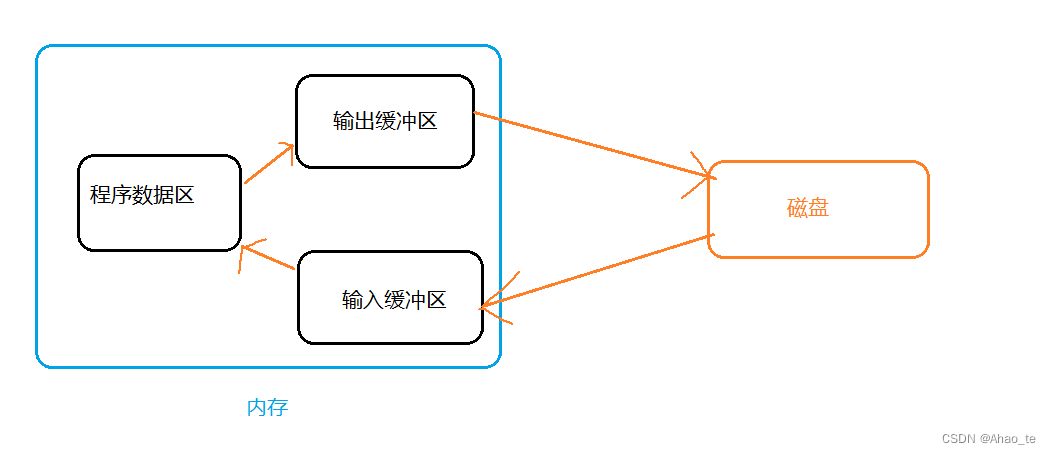
stay C Language standards , There is File buffer system , File buffer system means that the system automatically creates a block for the file being used File buffer , The data output from memory to disk is first sent to the output buffer in memory , Wait until the output buffer is full, and then put it into the disk . If you input data from disk into memory , It is also the input buffer sent to memory first , When it is full, it will be sent to the program data area .
End of this chapter
边栏推荐
- More functions and functions of the metauniverse lie in the deep transformation of the traditional way of life and production
- 做自媒体视频剪辑有免费可商用的素材网站吗?
- English语法_不定代词 - 概述
- 月薪 3万人民币是一种怎样的体验?做自媒体可以达到这种水平吗
- TypeNameExtractor could not be found
- Analysis of ISP one click download principle in stm32
- Efficientformer: lightweight vit backbone
- Video realizes the control of video progress, playback and pause
- Unity rotation test
- 如何用WebGPU流畅渲染百万级2D物体?
猜你喜欢

Okaleido tiger NFT is about to log in to binance NFT platform

Implementing deep learning framework from zero -- further exploration of the implementation of multilayer bidirectional RNN

The setting float cannot float above the previous Div
nacos部署
![[function test] test of the project - login and post function](/img/64/c9bbf34964622f4f013b1184eeb1e0.jpg)
[function test] test of the project - login and post function

leetcode第 302 场周赛复盘

Native Crash的一切

Ansible的安装及部署
SQL JOIN 入门使用示例学习左连接、内连接、自连接

English grammar_ Indefinite pronouns - Overview
随机推荐
猿人学第七题
Behind the rapid growth, Huawei cloud Wulanchabu data center is the green way
雪花算法(PHP)
TypeNameExtractor could not be found
元宇宙更多的功能和作用在于对于传统生活方式和生产方式的深度改造
SQL JOIN 入门使用示例学习左连接、内连接、自连接
Raspberry pie self built NAS cloud disk -- raspberry pie built network storage disk
SSM医院住院管理系统
Slow motion animation, window related data and operations, BOM operations [DOM (V)]
ASP. Net core deployment Manual: 1. Deployment Basics
突破内存墙能带来什么?看火山引擎智能推荐服务节支增效实战
nacos部署
SSH服务突然连接不了案例总结
C language course design -- hotel management system
More functions and functions of the metauniverse lie in the deep transformation of the traditional way of life and production
Case summary of SSH service suddenly unable to connect
Reserved instances & Savings Plans
EfficientFormer:轻量化ViT Backbone
泰山OFFICE技术讲座:段落边框的布局难点
SSM在线考试系统含文档