当前位置:网站首页>Ansible的安装及部署
Ansible的安装及部署
2022-07-24 12:10:00 【野124】
实验环境:
1.设定克隆模板
2.克隆三台主机
3.开启三台设定主机的主机名,网络,确保三台主机能相互通信
4.在westos_ansible中设定共享软件仓库,安装epel源。确保可以列出ansible
1.Ansible对于企业运维的重大意义
Ansible是近几年越来越火的一款运维自动化工具,其主要功能是帮助实现IT工作的自动化、降低人为操作失误、提高业务自动化率、提升运维工作效率,Angible基于Python开发,而DevOps在国内已然是一种趋势, Python被逐步普及,运维人员自己开发工具的门槛逐步降低,得益于此,方便对Ansible二次开发。Ansible没有客户端,因此底层通信依赖于系统软件, Linux系统下基于OpenSSH通信, Windows系统下基于PowerShell,管理端必须是Linux系统
2.Ansible的安装
安装epel源
dnf install ansible -y
ansible --version

ansible的基本信息:
/etc/ansible/ansible.conf 全局配置文件,默认很少修改
/etc/ansible/hosts 全局主机清单清单文件
3.构建Anisble清单
清单就是ansible控制主机的列表
/etc/ansible/hosts 全局清单文件
清单查看:
ansible 清单中组名称 [-i 清单文件] --list-hosts
ansible ungrouped --list-hosts 列出没有设置清单名称的主机ip
ansible all --list-hosts 列出所有主机
单层清单
[westos]
192.168.43.203
192.168.43.204
[test1]
192.168.43.203
172.25.254.100
172.25.254.200
[test2]
192.168.43.204
172.25.254.200
嵌套清单
[testall:children]
test1
test2

测试:
ansible westos --list-hosts
ansible test1 --list-hosts
ansible test2 --list-hosts
ansible testall --list-hosts

通过指定主机名称或IP的范围可以简化Ansible主机清单
语法:vim /etc/ansible/hosts
[westostest]
192.168.43.[10:20]
测试: ansible westostest --list-hosts

vim /mnt/westos
[westos]
1.1.1.1
2.2.2.2
测试
ansible westos --list-hosts -i /mnt/westos

ansible命令指定清单的正则表达式
* 所有 192.168.43.* 在网段192.168.43中的所有主机
: 逻辑或 westos:test1 主机在westos清单中或者在test1清单中
:& 逻辑与 westos:&test2 主机即在westos清单也在test2清单中
:! 逻辑非 westos:!test2 在westos中不在test2中
~ 以关键字开头~(192|172) 以条件192或者条件172开头

4.Ansible配置文件参数详解
ansible 清单中组名称 -m 模块 -u remote_user
/etc/ansible/ansible.cfg 基本配置文件,找不到其他配置文件此文件生效
~/.ansible.cfg 用户当前目录中没有ansible.cfg此文件生效
./ansible.cfg 优先级最高
[defaults] 基本信息设定
inventory= 指定清单路径
remote_user= 在受管主机上登陆的用户名称,未指定使用当前用户
ask_pass= 是否提示输入SSH密码,如果公钥登陆设定为false
library= 库文件存放目录
local_tmp= 本机临时命令执行目录
remote_tmp= 远程主机临时py命令文件存放目录
forks= 并发数量
host_key_checking= 第一次连接受管主机时是否要输入yes建立host_key
sudo_user= 默认sudo用户
ask_sudo_pass= 每次在受控主机执行ansible命令时是否询问sudo密码
module_name= 默认模块,默认使用command,可以修改为shell
log_path= 日志文件路径
[privilege_escalation] 身份信息设定
become= 连接后是否自动切换用户
become_method= 设定切换用户的方式,通常用
sudo become_user= 在受管主机中切换到的用户,通常为root
become_ask_pass 是否需要为become_method提示输入密码,默认为false
5.构建用户级Ansible操作环境
在westso_ansible主机中建立用户useradd devops
设置密码echo westos | passwd –stdin devops
切换到用户su - devops
执行:ansible westos –m ping –u root -k
cd .asnible/
cp etc/devops/ansible.cfg .
vim /home/ansible/.ansible/ansible.cfg


ansible westos =m shell –a ‘useradd devops’ –u root –k
ansible westos –m shell –a ‘echo westos | passwd –stdin devops’ –u root -k
ansible westso –m shell –a‘echo“devopsALL=(ALL) NOPASSWD: ALL>>/etc/sudoers”’-uroot -k

免密认证
ansible westos –m file –a ‘path=/home/devops/.ssh owner=devops group=devops mode=0700 state=directory’ –u root

ansible westos –m copy –a ‘src=/home/devops/.ssh/id_rsa.pub dest=/home/devops/.ssh/auth
orized_keys owner=devops group=devops mode=0600’
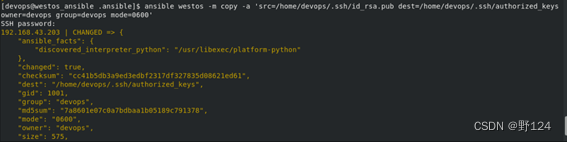
vim /home/ansible/.ansible/ansible.cfg


用户级免密Ansible操作环境已创建成功
边栏推荐
- An analysis of the CPU surge of an RFID tag management system in.Net
- QT notes - EventFilter event filter
- Common formulas and application scenarios of discrete distribution
- Judge whether a group of cards can become shunzi (the size of the king is 14,15)
- C进阶——数据的存储
- 如何将Typora中图片上传到csdn
- [Commons beanautils topic] 004 beanautils topic
- Makefile quick use
- 6k+ star, a deep learning code base for Xiaobai! One line of code implements all attention mechanisms!
- QT notes - qtablewidget table spanning tree, qtreewidget tree node generates table content
猜你喜欢

Basic usage of GCC
Aruba learning notes 04 Web UI -- Introduction to configuration panel

Qt5.12 + vs2019 cannot locate the program input point in the dynamic link library

基于ARM和FPGA的数字示波器设计——QMJ
Learn some programming: anti unemployment "vaccine"

QT notes - realize form adaptation
![[mathematical basis of Cyberspace Security Chapter 9] finite field](/img/2b/27ba1f3c6ec2ecff4538f9a63a79e8.jpg)
[mathematical basis of Cyberspace Security Chapter 9] finite field

Do you regret learning it?

C进阶——数据的存储

The art of management - driving software R & D efficiency through leadership

随机推荐
如何将Typora中图片上传到csdn
Oracle 11.2.0.4 ASM single instance does not start automatically with system startup
[mathematical basis of Cyberspace Security Chapter 3] congruence
Use and expansion of fault tolerance and fusing
Chapter 1 Introduction
Share the typora tool
Import the data in MariaDB into columnstore
Script redis write project notes
In kuborad graphical interface, operate kubernetes cluster to realize master-slave replication in MySQL
Open source DNS software powerdns BIND9 mydns
Dynamic memory management
Day3: branch structure
The difference between where and having
Microsoft SQL Server database language and function usage (XII)
Svn server and client installation (Chinese package) and simple use
Please ask whether Oracle CDC does not support checkpointing. When the task is suspended and restarted during the real-time collection process, is the data changed
一文看懂MES系统能实现企业哪些目标
Understand what goals the MES system can achieve
Browser logic vulnerability collection
The biggest crisis for testers in the workplace is not at the age of 30, but being laid off in middle age