当前位置:网站首页>Rip configuration instance learning record
Rip configuration instance learning record
2022-07-23 12:59:00 【Amateur visionary】
RIP Configure the instance
Routing information protocol RIP(Routing Information Protocol) It is a routing protocol based on distance vector algorithm , Using the number of jumps as the measurement standard . because 15 Jump to maximum , therefore RIP It can only be applied to small-scale networks , Such as campus network and other regional networks with relatively simple structure ;
List of articles
1、 The goal of the experiment
adopt RIP Configuration of to realize network interworking
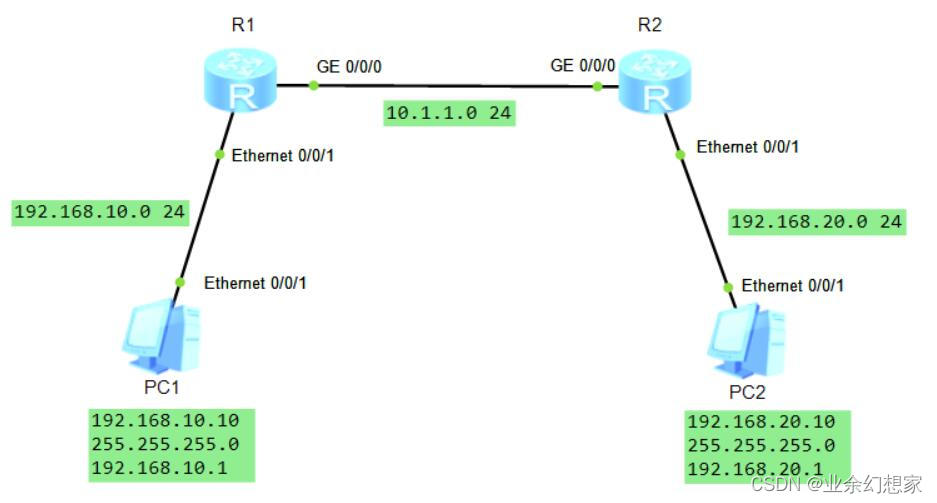
2、 Network topology
notes :PC Of IP Address 、 Subnet mask and gateway , Click on PC Enter self configuration 
3、 Configuration steps
(1) Configure ports by topology IP Address
R1:
<Huawei>system-view  // Enter the system view
[Huawei]sysname R1  // Rename the device
[R1]interface GigabitEthernet0/0/1
[R1-GigabitEthernet0/0/1]ip address 20.1.1.1 24  // configure port  IP  Address
[R1-GigabitEthernet0/0/1]quit
[R1]interface GigabitEthernet0/0/0
[R1-GigabitEthernet0/0/0]ip address 10.1.1.1 24  // configure port  IP  Address
[R1-GigabitEthernet0/0/0]quit
R2:
<Huawei>system-view  // Enter the system view
[Huawei]sysname R2  // Rename the device
[R2]interface GigabitEthernet0/0/1
[R2-GigabitEthernet0/0/1]ip address 30.1.1.1 24  // configure port  IP  Address
[R2-GigabitEthernet0/0/1]quit
[R2]interface GigabitEthernet0/0/0
[R2-GigabitEthernet0/0/0]ip address 10.1.1.2 24  // configure port  IP  Address
[R2-GigabitEthernet0/0/0]quit
(2) start-up RIP And enable in the specified network segment RIP
notes : Use network Command enable RIP The network address of , It must be the address of the natural network segment . Otherwise there will be mistakes :(Error: The network address is invalid, and the specified address must be major-net address without any subnets.) Simply speaking , You just need to enter the main class network address of the interface . example : To configure R1 when , Out of commission network 10.1.1.0 , And should be used network 10.0.0.0 , because 10.1.1.1 The main class address of is 10.0.0.0; Another example 192.168.10.1 The main class address of is 192.168.10.0
R1:
[R1]rip 1  // start-up  RIP
[R1-rip-1]version 2  // Specify Global RIP edition
[R1-rip-1]network 20.0.0.0  // Enable... In the specified network segment RIP
[R1-rip-1]network 10.0.0.0  // Enable... In the specified network segment RIP
[R1-rip-1]quit
R2:
[R2]rip 1  // start-up  RIP
[R2-rip-1]version 2  // Specify Global RIP edition
[R2-rip-1]network 10.0.0.0  // Enable... In the specified network segment RIP
[R2-rip-1]network 30.0.0.0  // Enable... In the specified network segment RIP
[R2-rip-1]quit
4、 test
(1) View routing table
R1:
[R1]display ip routing-table  // View routing table
Route Flags: R - relay, D - download to fib
------------------------------------------------------------------------------
Routing Tables: Public
         Destinations : 7        Routes : 7

Destination/Mask    Proto   Pre  Cost      Flags NextHop         Interface

       10.1.1.0/24  Direct  0    0           D   10.1.1.1        GigabitEthernet0/0/0
       10.1.1.1/32  Direct  0    0           D   127.0.0.1       GigabitEthernet0/0/0
       20.1.1.0/24  Direct  0    0           D   20.1.1.1        GigabitEthernet0/0/1
       20.1.1.1/32  Direct  0    0           D   127.0.0.1       GigabitEthernet0/0/1
       30.1.1.0/24  RIP     100  1           D   10.1.1.2        GigabitEthernet0/0/0  // RIP  route
      127.0.0.0/8   Direct  0    0           D   127.0.0.1       InLoopBack0
      127.0.0.1/32  Direct  0    0           D   127.0.0.1       InLoopBack0
R2:
[R2]display ip routing-table
Route Flags: R - relay, D - download to fib
------------------------------------------------------------------------------
Routing Tables: Public
         Destinations : 7        Routes : 7

Destination/Mask    Proto   Pre  Cost      Flags NextHop         Interface

       10.1.1.0/24  Direct  0    0           D   10.1.1.2        GigabitEthernet0/0/0
       10.1.1.2/32  Direct  0    0           D   127.0.0.1       GigabitEthernet0/0/0
       20.1.1.0/24  RIP     100  1           D   10.1.1.1        GigabitEthernet0/0/0  // RIP  route
       30.1.1.0/24  Direct  0    0           D   30.1.1.1        GigabitEthernet0/0/1
       30.1.1.1/32  Direct  0    0           D   127.0.0.1       GigabitEthernet0/0/1
      127.0.0.0/8   Direct  0    0           D   127.0.0.1       InLoopBack0
      127.0.0.1/32  Direct  0    0           D   127.0.0.1       InLoopBack0
(2) Test connectivity
use PC1 Go to ping PC2 Of IP Address , Found that it has been connected 
use PC2 Go to ping PC1 It can also be connected 
5、 Summary
RIP It is mainly used when updating and maintaining routing information 4 A timer : Update timer 、 Aging timer 、 Garbage collection timer 、 Inhibit timer .
RIPv1 and RIPv2 The main difference :
RIPv1 It's a classed routing protocol ;RIPv1 Can not support VLSM, The protocol message does not carry mask information , Manual summary is not supported , It only supports publishing protocol messages by broadcasting ;
RIPv2 It's a classless routing protocol ;RIPv2 Can support VLSM, The protocol message carries mask information , Manual summary is supported , Support plaintext authentication and MD5 authentication , It supports sending messages in the form of broadcast or multicast ;
RIP Routing disadvantages :
because 15 Jump to maximum , therefore RIP It can only be applied to small-scale networks ; Slow convergence ; The route selected according to the number of hops , Not necessarily the best route .
When the network fails or the network topology changes ,RIP The network may generate routing loops . You can pass the maximum number of hops 、 Horizontal segmentation 、 Toxicity reversal 、 Trigger update 、 Suppression time and other technologies to avoid the generation of loops .
If there are mistakes in the article , Welcome to criticize and correct
边栏推荐
- OSPF 多区域配置实例学习记录
- app编译打包部署手册
- 2020-09-20
- Unity3d HD rendering pipeline cannot play video on the model
- Delete node in binary sort tree
- 学习日记——(路由与交换技术)动态路由(rip协议)和静态路由
- Knowledge points and skills of Wireshark network analysis is so simple
- Briefly describe the similarities and differences between raft and Paxos in design
- 学习日记——(路由与交换技术)三层交换机
- 帧中继网配置实例学习记录
猜你喜欢

OSPF comprehensive experiment

How to write a web page with a common text editor

Gameframework:resource loading, resource loading, dependency loading, task pool, object pool, reference count
静态路由配置实例学习记录

Learning diary - (routing and switching technology) dynamic routing (RIP protocol) and static routing

静态路由原理与配置

STP 配置实例学习记录
Secret key remote login server to realize secret free login
Quick solution: xshell can't drag into folders or software packages

Learning diary - (routing and switching technology) OSPF Protocol
随机推荐
DNS domain name resolution service
深度优先找出图中顶点U到顶点V的所有简单路径
OSPF comprehensive experiment
Manually configure DHCP service
Understand the article frankly and get the HTTP protocol cache
0 shortest path problem leetcode743. Network delay time
0 dynamic programming leetcodde313. super ugly number
How to write a web page with a common text editor
Reading Phoenix Architecture - History and knowledge of RPC
制作本地apt源离线安装
C language can also write Plants vs. Zombies
Build FRPC client in NAS [super brainless]
DHCP原理与配置
0 double pointer leetcode844. Compare strings with backspace
jenkins部署
Unity3d+moba+ skill indicator (I)
PDF Online preview, use of pdf.js
2020-10-16
psutil监控的简单使用
C custom queue set