当前位置:网站首页>静态路由配置实例学习记录
静态路由配置实例学习记录
2022-07-23 05:47:00 【业余幻想家】
静态路由配置实例
由手动设置的路由称为静态路由,静态路由是固定不变的,不会随着网络拓扑的改变而自动改变
文章目录
1、实验目标
学习静态路由的配置方法,理解路由器逐跳转发的特性。
2、网络拓扑图
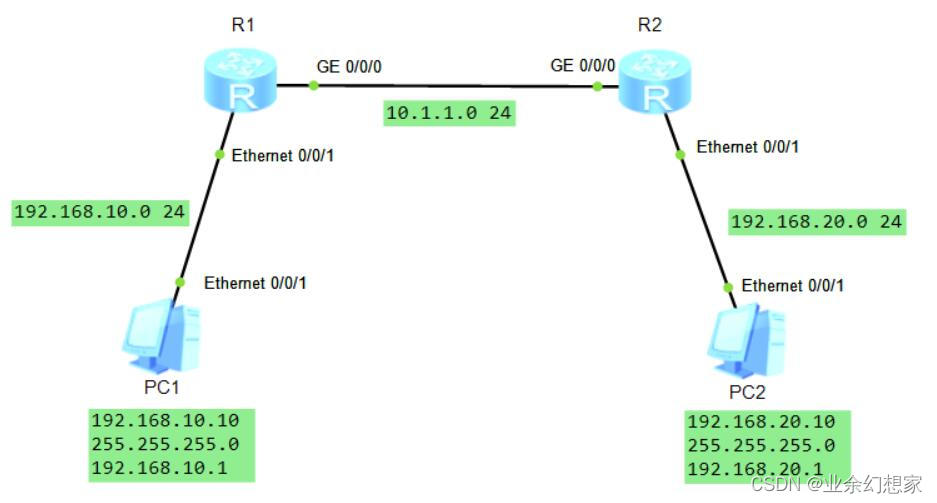
3、配置步骤
(1)按拓扑图配置端口 IP 地址
R1 配置:
<R1>system-view  //进入系统视图
[R1]interface GigabitEthernet0/0/0
[R1-GigabitEthernet0/0/0]ip address 10.1.1.1 24  //配置端口 IP 地址(IP 地址: 10.1.1.1 子网掩码: 24)
[R1-GigabitEthernet0/0/0]quit
[R1]interface Ethernet0/0/1
[R1-Ethernet0/0/1]ip address 192.168.10.1 24  //配置端口 IP 地址(IP 地址: 192.168.10.1 子网掩码: 24)
[R1-Ethernet0/0/1]quit
R2 配置:
<R2>system-view  //进入系统视图
[R2]interface GigabitEthernet0/0/0
[R2-GigabitEthernet0/0/0]ip address 10.1.1.2 24  //配置端口 IP 地址(IP 地址: 10.1.1.2 子网掩码: 24)
[R2-GigabitEthernet0/0/0]quit
[R2]interface Ethernet0/0/1
[R2-Ethernet0/0/1]ip address 192.168.20.1 24  //配置端口 IP 地址(IP 地址: 192.168.20.1 子网掩码: 24)
[R2-Ethernet0/0/1]quit
(2)配置静态路由
R1 配置:
[R1]ip route-static 192.168.20.0 24 10.1.1.2 //ip route-static [目标地址网段] [目标地址子网掩码] [下一跳 IP 地址]
R2 配置:
[R2]ip route-static 192.168.10.0 24 10.1.1.1 //ip route-static [目标地址网段] [目标地址子网掩码] [下一跳 IP 地址]
4、测试
(1)查看建立的路由条目,看有没有静态路由
提示:使用 display ip routing-table 命令查看路由表
查看 R1 路由表:
[R1]display ip routing-table  //查看路由表
Route Flags: R - relay, D - download to fib
------------------------------------------------------------------------------
Routing Tables: Public
         Destinations : 7        Routes : 7

Destination/Mask    Proto   Pre  Cost      Flags NextHop         Interface

       10.1.1.0/24  Direct  0    0           D   10.1.1.1        GigabitEthernet
0/0/0
       10.1.1.1/32  Direct  0    0           D   127.0.0.1       GigabitEthernet
0/0/0
      127.0.0.0/8   Direct  0    0           D   127.0.0.1       InLoopBack0
      127.0.0.1/32  Direct  0    0           D   127.0.0.1       InLoopBack0
   192.168.10.0/24  Direct  0    0           D   192.168.10.1    Ethernet0/0/1
   192.168.10.1/32  Direct  0    0           D   127.0.0.1       Ethernet0/0/1
   192.168.20.0/24  Static  60   0          RD   10.1.1.2  GigabitEthernet  // R1 中这条就是静态路由
0/0/0
查看 R2 路由表:
[R2]display ip routing-table  //查看路由表
Route Flags: R - relay, D - download to fib
------------------------------------------------------------------------------
Routing Tables: Public
         Destinations : 7        Routes : 7

Destination/Mask    Proto   Pre  Cost      Flags NextHop         Interface

       10.1.1.0/24  Direct  0    0           D   10.1.1.2        GigabitEthernet
0/0/0
       10.1.1.2/32  Direct  0    0           D   127.0.0.1       GigabitEthernet
0/0/0
      127.0.0.0/8   Direct  0    0           D   127.0.0.1       InLoopBack0
      127.0.0.1/32  Direct  0    0           D   127.0.0.1       InLoopBack0
   192.168.10.0/24  Static  60   0          RD   10.1.1.1          GigabitEthernet  // R2 中这条就是静态路由
0/0/0
   192.168.20.0/24  Direct  0    0           D   192.168.20.1    Ethernet0/0/1
   192.168.20.1/32  Direct  0    0           D   127.0.0.1       Ethernet0/0/1
(2)PC1 可以和 PC2 互通
用 PC1 去 ping PC2的 IP 地址,发现已经 ping 通了注:访问主机 IP 地址时前几条可能会出现 Request timeout! (请求超时) 提示,属于正常现象

用 PC2 去 ping PC1的 IP 地址,发现也可以 ping 通注:访问主机 IP 地址时前几条可能会出现 Request timeout! (请求超时) 提示,属于正常现象

5、小结
配置静态路由主要是理解目标地址网段以及下一跳的概念。
在路由表中,静态路由的 Proto 字段显示为 Static,默认情况下,路由优先级 Pre 为 60,路由开销为 0。
静态路由的优点:不占用网络带宽和系统资源,安全。
静态路由的缺点:当网络中发生故障,静态路由不会自动修正,必须由网络管理员手工逐条配置,不能自动根据网络状态变化做出相应调整。
边栏推荐
- Article on the basic technology needed to build hybrid app
- HCIP---MGRE环境下的OSPF综合实验
- Routing and switching technology - static routing
- Knowledge points and skills of Wireshark network analysis is so simple
- FTP experiment and overview
- FTP 配置实例学习记录
- Explain TCP segmentation and IP fragmentation in detail
- 手动配置DHCP服务
- 直白理解一文搞定http协议缓存
- Learning diary - (routing and switching technology) single arm routing
猜你喜欢
Nas里搭建Frpc客户端【超级无脑】

MySQL性能优化,索引优化

LSM-tree(Log Structured-Merge Tree)的理解

HCIP-HCIA知识回顾(二)

jenkins用到的插件

OSPF comprehensive experiment

Unity3d:assetbundle simulation loading, synchronous loading, asynchronous loading, dependent package loading, automatic labeling, AB browser, incremental packaging

C #: quick sort. If there is the same number, it will be ignored, and then continue the previous search direction to find the next number that meets the requirements for replacement
Routing and switching technology - static routing

Unity3d: vector calculation, AOE graph intersection
随机推荐
《wireshark网络分析就是这么简单》知识点与技巧
Explanation of websocket protocol
Liveness、Readiness 和 Startup Probes
How to write a web page with a common text editor
Learning diary (routing and switching technology) -- floating static routing and default routing
Explain the establishment of TCP connection in detail
C # custom stack
强一致性和弱一致性的分析思路以及分布式场景的并发技巧
C (CSharp) wechat official account development - basic configuration
Hcip - HDLC and PPP protocols
Delete node in binary sort tree
【读书笔记《凤凰架构》- 构架可靠的大型分布式系统.周志明】(一)
The correspondence between the concept of go ability and the concept of software development ability
Unity3d+gameframework: resource analysis, resource dependency, circular dependency detection
Article on the basic technology needed to build hybrid app
如何解决if语句太多
jenkins部署
学习日记——(路由与交换技术)网络地址转换 NAT技术
[AUTOSAR storage stack NVM]
OSPF comprehensive experiment