当前位置:网站首页>Rhcsa sixth note
Rhcsa sixth note
2022-07-24 13:43:00 【bear(emo)】
- Linux Type of user in
(1)Linux Users under can be divided into three categories :
The super user —— The user is called root, It has all permissions , Only system maintenance ( for example : Establish users, etc ) Or other necessary circumstances to log in with super user , To avoid security problems in the system .
System users ( Dummy user )—— yes Linux Users necessary for the normal operation of the system . Mainly to meet the corresponding system process The document is established at the request of the owner , for example :bin、daemon、adm、lp Waiting for users . System users cannot log in .
Ordinary users —— To enable users to use Linux System resources , Most of our users fall into this category .
(2)Linux Which file stores user information in ? And what do the fields mean ?
stay Linux in , The user account 、 password 、 User group information and user group password are stored in different configuration files .
File function : File name
User account file : /etc/passwd
User password : /etc/shadow
User group account file : /etc/group
User group password file :/etc/gshadow
- User account file ——/etc/passwd passwd It's a text file , Used to define the user account of the system , Because all users are right passwd Have the right to read , So this file Only user accounts are defined in , Without saving the password .

root:x:0:0:root:/root:/bin/bash
common 7 A field
root: user name
x: Default field :: First, the password is stored ,x Means the password passes shadow The protection of the
0:uid: user id, There's a user name , Another user ID , It's all unique
0:qid: Group id
Root: The personal data : full name , Age , Personal home addresses can have user names by default
/root: Home directory
/bin/bash: Refers to the use of shell type
- User password file ——/etc/shadow

root:$6$hAg/flAcylb7pvh6$GsuWKeRISUD3/wXViDohzqo1fTrTJcqb0cOAIvs9ED9rJMx6yXBqxvlnF/Ud3N/9Yo.nJbU/rg9JCQ7cXSnPi0:19186:0:99999:7:::
common 9 A field
Root: user name
$6……: Encrypted password
19184: The number of days from the first year of the 20th century : Last password change time
0: Minimum time interval : It refers to the number of days in which the password cannot be changed
99999: Maximum interval , How many days must the password be changed , The default is 99999, No restrictions
7: How many days in advance to tell the password is about to expire , The default is 7 God
The first 7 Field omission : How many days does the password expire to disable users
The first 8 Field omission : Password expiration date
The first 9 Field omission : Keep unused , For future development and reuse
3) User group account file ——/etc/group Each group in the system , stay /etc/group There is a line in the file , Any user can read the user group account information profile .

root:x:0:
There are four fields in total
Root: Group name
X: Password placeholder
0:gid
Omit : Show the members of the Group ( Except for users with the same name as the group name )
(3)Linux What is the file in which the group information is stored ? And what do the fields mean ?
1)Linux There are two types of groups in :
Basic group ( Private group ): When establishing an account , If the group to which the account belongs is not specified , The system will create a group with the same user name , This group is the basic group .
Additional group ( Public group ): Can accommodate multiple users , All users in the group have the rights owned by the group .
The meaning of the field is the same as
- Create the following users 、 Group 、 And group membership :
- Create a sysmgrs Group
[[email protected] ~]# groupadd sysmgrs
- Create user natasha At the same time specified sysmgrs As natasha Additional groups of

- Create user harry At the same time specified sysmgrs As harry Additional groups of

- Create user sarah Appoint shell The type is /sbin/false( You do not have access to interactive on the system shell)

- Set up natasha、harry and sarah The password for 123

- Create user lockuser, And specify home directory as /home/lock, Then lock the user


- Create user limituser,gid by 1555,userid by 1666, Let its password in 10 Expires in days

- Unlock lockuser, And set that the password must be changed the next time you log in

- Give Way natasha With modification harry Password permissions (sudo)
- Create user testuser And set the password , Change the user name to normaluser

- Delete lockuser
Userdel [-r] lockuser
- create a file , And give authority 611( Two ways , A kind of guoa, A kind of nnn)


5、 Create directory , And give authority 755( Two ways , A kind of guoa, A kind of nnn)

ditto
6. create a file , And modify the owner and group of the file to other users

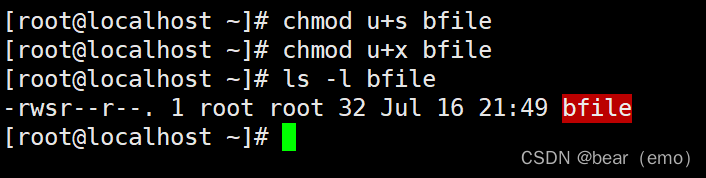
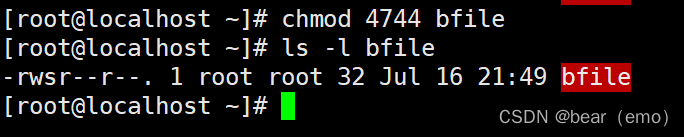
7. Set up suid, Set for file suid( Two ways u+s and nnnn) The way
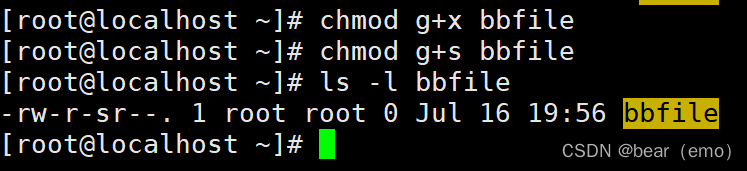
8. Set up sgid, Set for file sgid( Two ways g+s and nnnn) The way

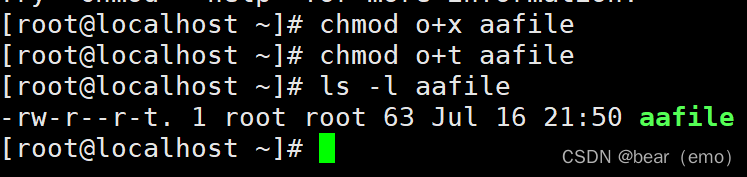
9. Set up sbit, Set for directory sbit( Two ways o+t and nnnn) The way

10. create a file , Query file acl

Set for file acl The user is testuser1 Permission is rwx

Set for file acl Of mask: Permission is r-x

边栏推荐
猜你喜欢

网络安全——报错注入

爱可可AI前沿推介(7.24)

rhce第一次作业

网络安全——中间人攻击渗透测试

Chapter VI bus

Network security - file upload blacklist bypass

为什么函数式接口 Comparator 中有 “两个抽象方法”?

网络安全——文件上传白名单绕过

Swarm intelligence collaborative obstacle avoidance method inspired by brain attention mechanism

Network security - file upload penetration test
随机推荐
Is it safe for Huatai Securities to open an account through channels? Is it formal
Sringboot-plugin-framework 实现可插拔插件服务
position: -webkit-sticky; /* for Safari */ position: sticky;
Flink高级特性和新特性(八)
网络安全——中间人攻击渗透测试
Flink综合案例(九)
Simple use and difference of symmetric res, AES and asymmetric RSA (JWT)
【无标题】
Network security -- Service Vulnerability scanning and utilization
基于典型相关分析的多视图学习方法综述
Explain flex layout in detail
Swarm intelligence collaborative obstacle avoidance method inspired by brain attention mechanism
申请了SSL数字证书如何进行域名验证?
R language uses the sum function of epidisplay package to calculate the descriptive statistical summary information of the specified variables in dataframe under different grouping variables, visualiz
Ggarrange function of R language ggpubr package combines multiple images and annotates them_ Figure add annotation, annotation, annotation information for the combined image, and add annotation inform
Bayesian width learning system based on graph regularization
Mass data excel download - the author of this article only tried to download 510000 data, which took 7 seconds
网络安全——Cookie注入
Editor formula
深入浅出边缘云 | 2. 架构