当前位置:网站首页>JVM debugging tool -arthas
JVM debugging tool -arthas
2022-06-24 07:05:00 【Angryshark_ one hundred and twenty-eight】
Download address
link :https://pan.baidu.com/s/1CMAR1wto-vSLIeKtlCsXJQ
Extraction code :naza
start-up Arthas
> java -jar arthas-boot.jar --target-ip=0.0.0.0

Enter sequence number to select the process to view

The user executing the program needs to have the same permissions as the target process . For example admin User to execute :sudo su admin && java -jar arthas-boot.jar or sudo -u admin -EH java -jar arthas-boot.jar.
If attach Not on the target process , You can see ~/logs/arthas/ Log in directory .
Browser view

Monitoring related
Perform method monitoring -monitor Class name Method
[[email protected]]> monitor com.*.*.PointerDao.SnidModel toString
Check the return value of the function -watch Class name Function name returnObj
[[email protected]]> watch com.oidd.*.Common.* encrypt returnObj

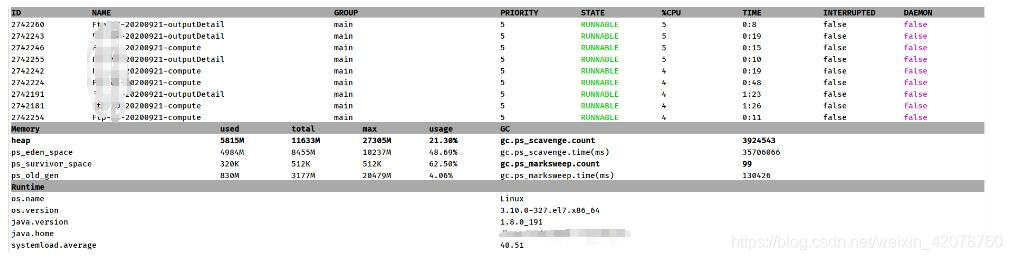
View process information -dashboard
[[email protected]]> dashboard

Method internal call path , And output the time consumption of each node on the method path -trace
Output the call path of the current method to be called -stack
Method to execute the spatiotemporal tunnel of data , Record the input and return information of each call of the specified method , And can observe these different time adjustments -tt
Generate flame chart -profiler
profiler The command supports the generation of flame diagrams of application hotspots . Essentially through continuous sampling , Then the collected sampling results are generated into a flame diagram .
profiler  The basic operation structure of the command is  profiler action [actionArg]

 Parameter description
 Parameter name 	 Parameter description
action	 What to do
actionArg	 Property name pattern
[i:]	 Sampling interval ( Company :ns)( The default value is :10'000'000, namely 10 ms)
[f:]	 Dump the output to the specified path
[d:]	 Run profiling for the specified seconds
[e:]	 Which event to track (cpu, alloc, lock, cache-misses etc. ), The default is cpu
start-up profiler
$ profiler start
Started [cpu] profiling
By default , The generated is cpu The flame chart of , namely event by cpu. It can be used –event Parameter to specify .
Get the collected sample The number of
$ profiler getSamples
23
see profiler state
$ profiler status
[cpu] profiling is running for 4 seconds
You can view the current profiler What kind of sample are you taking event And sampling time .
stop it profiler
Generate svg Format results
$ profiler stop
profiler output file: /tmp/demo/arthas-output/20191125-135546.svg
OK
By default , The generated results are saved in the working directory of the application arthas-output Catalog . Can pass --file Parameter to specify the output result path . such as :
$ profiler stop --file /tmp/output.svg
profiler output file: /tmp/output.svg
OK
Generate html Format results
By default , The result file is svg Format , If you want to generate html Format , It can be used –format Parameter assignment :
$ profiler stop --format html
profiler output file: /tmp/test/arthas-output/20191125-143329.html
OK
Or in –file The file name is used in the parameter to specify the name format . such as –file /tmp/result.html .
View... Through a browser arthas-output Below profiler result
By default ,arthas Use 3658 port , You can turn on : http://localhost:3658/arthas-output/ Check out arthas-output Under directory profiler result
Click to see the specific results :
If it is chrome browser , It may take several refreshes .
JVM Relevant command
Print the specified thread stack -thread Threads ID
[[email protected]]> thread 2742303

see JVM Information -jvm
[[email protected]]> jvm

see JVM environment variable -sysenv
[[email protected]]> sysenv

see JVM System attribute -sysprop
[[email protected]]> sysprop

see JVM Diagnostic configuration -vmoption
[[email protected]]> vmoption
View the current JVM Of Perf Counter Information -perfcounter
View and modify logger-logger
View the static properties of the class -getstatic
perform ognl expression -ognl
see Mbean Information about -mbean
View heap information -heapdump
Class related commands
View the loaded classes -sc wildcard
[[email protected]]> sc *

View loaded methods -sm wildcard
[[email protected]]> sm *

Decompile class —jad Class name
[[email protected]]> jad com.*.*.Common.GlobalVariable

Memory compiler , Memory compilation .java File for .class file -mc
Load external .class file ,redefine To JVM in -redefine
dump The... Of the class has already been loaded byte code Go to a specific directory -dump
see classloader Inheritance tree of ,urls, Class loading information , Use classloader Go to getResource-classloader
Other basic commands
help—— View command help
cat—— Print file contents , and linux Inside cat Command similar
echo– Printing parameters , and linux Inside echo Command similar
grep—— Match lookup , and linux Inside grep Command similar
tee—— Copy standard input to standard output and specified file , and linux Inside tee Command similar
pwd—— Return to the current working directory , and linux Command similar
cls—— Clear the current screen area
session—— View information about the current session
reset—— Reset enhancement class , Will be Arthas All the enhanced classes are restored ,Arthas All enhanced classes will be reset when the server is shut down
version—— Output current target Java Process loaded Arthas Version number
history—— Print command history
quit—— Quit current Arthas client , other Arthas The client is not affected
stop—— close Arthas Server side , all Arthas All clients exit
keymap——Arthas List of shortcuts and custom shortcuts
边栏推荐
- 【JUC系列】Executor框架之CompletionFuture
- Spark累加器和廣播變量
- 【问题解决】虚拟机配置静态ip
- What is the role of domain name websites? How to query domain name websites
- Spark参数调优实践
- 你有一个机会,这里有一个舞台
- [binary tree] - middle order traversal of binary tree
- Let's talk about BOM and DOM (5): dom of all large Rovers and the pits in BOM compatibility
- decade
- Counter attack of flour dregs: MySQL 66 questions, 20000 words + 50 pictures
猜你喜欢

智能视觉组A4纸识别样例
Counter attack of flour dregs: MySQL 66 questions, 20000 words + 50 pictures

Record -- about the method of adding report control to virtual studio2017 -- reportview control

数据同步工具 DataX 已经正式支持读写 TDengine

Application configuration management, basic principle analysis

开源与创新
leetcode:84. The largest rectangle in the histogram

JVM调试工具-jvisualvm

Challenges brought by maker education to teacher development

虚拟文件系统
随机推荐
JSON formatting method advantages of JSON over XML
Multi sensor fusion track fusion
Go excel export tool encapsulation
Project demo
How to send SMS in groups? What are the reasons for the poor effect of SMS in groups?
Cloud native high availability and Disaster Recovery Series (I): pod break up scheduling
Typora charges? Build vs Code markdown writing environment
Spark parameter tuning practice
How do I turn off win10 automatic update? What are the good ways?
GPU frequency of zhanrui chip
Programmers use personalized Wallpapers
Leetcode概率题面试突击系列11~15
File system notes
[binary tree] - middle order traversal of binary tree
How to operate the little red book account: making good use of the theory of long tail words
学生管理系统页面跳转及数据库连接
How do I reinstall the system? How to install win10 system with USB flash disk?
应用配置管理,基础原理分析
Go breakpoint continuation
【JUC系列】Executor框架之CompletionFuture