当前位置:网站首页>Pychart configuration pyqt5
Pychart configuration pyqt5
2022-07-25 04:43:00 【biigpanda】
The premise of configuration is that Python as well as PyQt5, How to install can refer to 《Windows PyQt5 Installation instructions 》, I won't repeat it here , Remember where the installation directory is , This directory will be used next .
1、 Configure the entrance
open Pycharm, choice File->Settings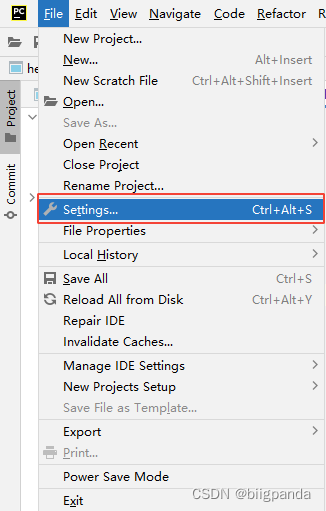
2、 To configure Qt Designer
Configure as shown below Qt Designer Path and working directory
Name
You can take it , But it's best to choose a recognized name , Call directly here QtDesigner.
Program
Namely designer The path of .designer The path is python Under installation path , such as
D:\Program Files\Python39\Lib\site-packages\qt5_applications\Qt\bin\designer.exe
Working directory
I.e. working directory , Use here $ProjectFileDir$, Indicates the file directory where the project is located , You can click... On the right + Number selection , You can also type .

3、 To configure PyUIC Tools
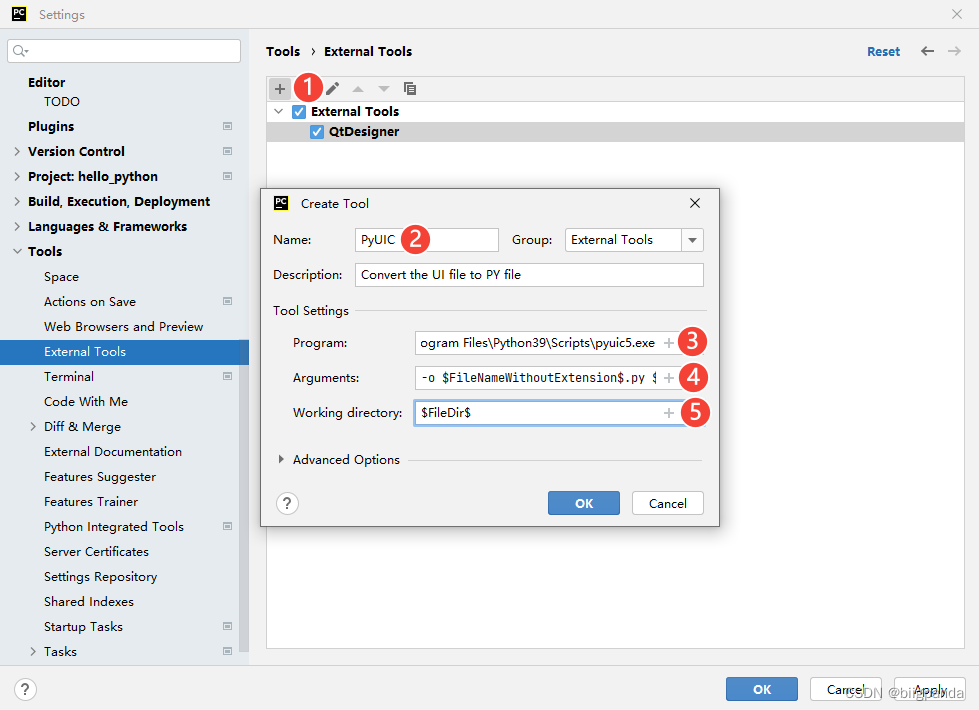
PyUIC Can be .ui The file is converted to .py file , for py A file called , The configuration method is shown in the figure below :
Name
You can also take it at will , But take a recognizable name , Take... Here PyUIC.
Program
namely pyuic5 File path , stay python Installation directory Scripts Inside , Such as :
D:\Program Files\Python39\Scripts\pyuic5.exe

 Some versions are not in this directory , But in
D:\Program Files\Python39\Lib\site-packages\qt5_applications\Qt\bin\
 Specifically, you can search this file
Arguments
Conversion parameters , Enter the following parameters , It means to specify the input and output file :
-o $FileNameWithoutExtension$.py $FileName$
Working directory
I.e. working directory , Where does the converted file exist , Choose peace here ui The same directory as the file is ok :
$FileDir$
4、 test
(1) Create a new one Pycharm engineering , Select the project directory , Other defaults will do .
And then through Pycharm In the menu bar Tools->External Tools, Choose the configured QtDesigner, start-up designer.
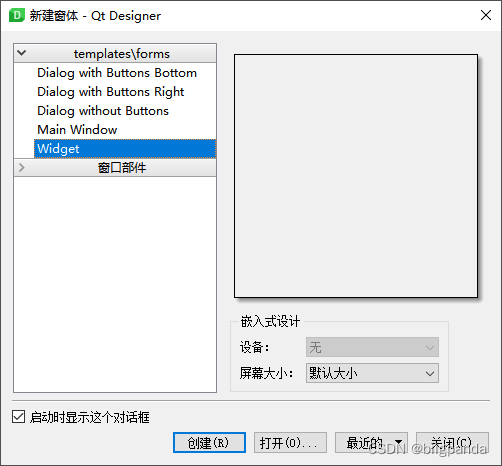
(2) stay designer Create a new one in Wdiget:
(3) Through the left sidebar , Select the drag method and drag it to the work window , add to Lable、pushButton:

(4) Then save to the project location , Save as test.ui.
(5) Switch to Pycharm, Found under the project directory test.ui file , Right click the file , And select PyUIC convert , Here's the picture :

After successful execution , You'll find out that there's a test.py file , This document is ui Converted py file

(6) Call the UI, stay main.py(main.py It is the file generated by default when creating the project ) Delete the original code in the file , And enter the following code to call :
import sys
from PyQt5.QtWidgets import QMainWindow, QApplication

import test

#######################  Global variables #########################
app = QApplication(sys.argv)
num = 0


class MyWindows(test.Ui_Form, QMainWindow):
    def __init__(self):
        super(MyWindows, self).__init__()
        self.setupUi(self)
        self.label.setText("click:{}".format(num))


my_windows = MyWindows()  #  Instantiate objects
my_windows.show()  #  Display window


####################### button click #########################
def button_click():
    global num
    num += 1
    my_windows.label.setText("click:{}".format(num))


my_windows.pushButton.clicked.connect(button_click)

sys.exit(app.exec_())
(7) Right click execution main.py, Here's the picture :


Test success !
边栏推荐
- After the failure of listing in Hong Kong, tuba rabbit terminated its gem IPO, and the founder responded
- How to merge cells in a table by markdown
- 实战|记一次攻防演练打点
- 今天很重要
- Grafana visual configuration diagram histogram
- @ResponseBody注解的总结
- HTC new VR all-in-one machine vive focus plus release: price 5699 yuan!
- MySQL 中RDS 链接数突然上涨怎么查?
- Method of setting document comments in idea (graphic version)
- Sony announced the closure of Beijing mobile phone factory! The production line will be moved to Thailand, and the cost can be reduced by half!
猜你喜欢

01 create project warehouse
Definition and basic terms of tree

MCU experiment record

Construction of Seata multilingual system

二、MySQL数据库基础

Wechat applet experiment case: simple idiom dictionary

Summary of UPR optimization suggestions of unity

The interviewer asked MySQL transactions, locks and mvcc at one go. I

Actual combat | record an attack and defense drill management

Bubble mart's market value evaporated by HK $21billion in seven days, which can't be sold in China, and its future at sea is uncertain
随机推荐
Only list the data of the specified field GetData ($table, '*', $where, $order)
Definition and basic terms of tree
GDT,LDT,GDTR,LDTR
What tools are available to connect and manage polardb for PostgreSQL databases?
Libenent and libev
LVGL 8.2 Slider
Geely and Daimler set up a joint venture to produce pure electric smart in China!
Maker concept design to adapt to popular education
Method of setting document comments in idea (graphic version)
Win11 experience
Paper:《Peeking Inside the Black Box: Visualizing Statistical Learning with Plots of Individual Condi
2019 telecast retest test questions
How many rows does PostgreSQL need to partition for each table?
[daily question] 731. My schedule II
5年经验的大厂测试/开发程序员,怎样突破技术瓶颈?大厂通病......
2、 Mysql database foundation
How to use ide tool hhdbcs to create a data table containing 1000 simulated data in Oracle database, and
The LAF protocol elephant of defi 2.0 may be one of the few profit-making means in your bear market
6.7 billion dollars! The acquisition of IDT by Renesas Electronics was finally approved!
Detailed explanation of security authentication of mongodb