当前位置:网站首页>Creation of unity Bezier curve
Creation of unity Bezier curve
2022-07-25 17:51:00 【Xiaosheng yunmu】
Unity Creation of Bezier curve
effect

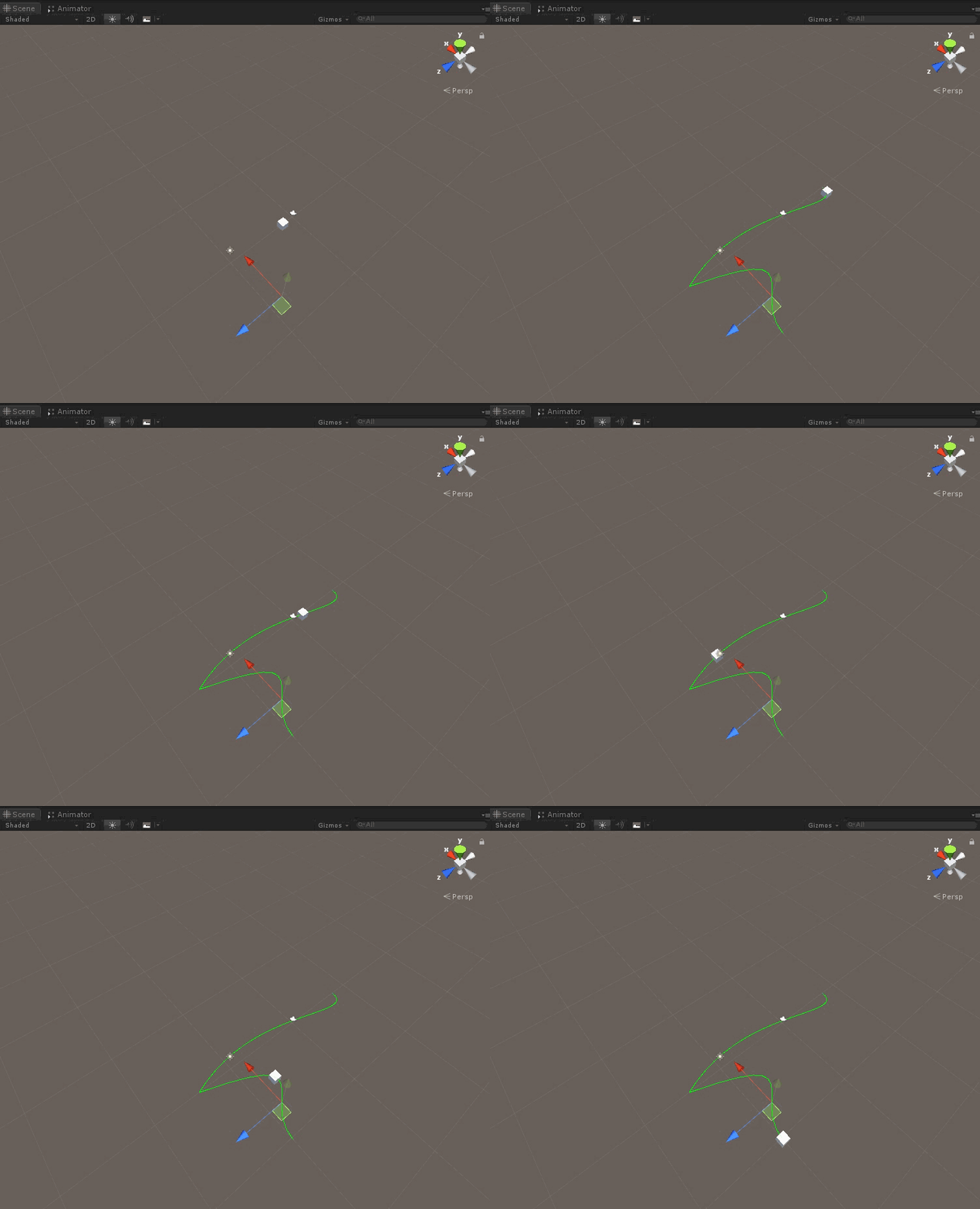
Bezier curve principle
Commonly used Bezier curve , It is the mathematical curve of two-dimensional graphics application . Curve definition : The starting point 、 Termination point 、 The control points . By adjusting the control points , The shape of the Bezier curve changes .
First order straight line
How to put C C C The point is within the set time , from A A A Point to move to B B B spot ? Set a time here t , t ∈ ( 0 , 1 ) t ,t \in(0,1) t,t∈(0,1),

Set up t t t Within time O A ⃗ \vec{OA} OA It is reduced to O E ⃗ \vec{OE} OE, O B ⃗ \vec{OB} OB The unit vector of is extended to O F ⃗ \vec{OF} OF.
O E ⃗ = O A ⃗ ( 1 − t ) \vec{OE}=\vec{OA}(1-t) OE=OA(1−t)
O F ⃗ = O B ⃗ × t \vec{OF}=\vec{OB}\times t OF=OB×t
O C ⃗ = O A ⃗ ( 1 − t ) + O B ⃗ × t \vec{OC}=\vec{OA}(1-t)+\vec{OB}\times t OC=OA(1−t)+OB×t
So you can get C C C The point is within the set time , from A A A Point to move to B B B Interpolation of points .
Vector3 AB = (1 - t) * OA + t * OB;
Second order curve

The second-order algorithm is based on the first-order Algorithm , That is to deal with... Separately A B ⃗ \vec{AB} AB and B C ⃗ \vec{BC} BC
 Vector3 AB = (1 - t) * OA + t * OB;
 Vector3 BC = (1 - t) * OB + t * OC;
then A B ⃗ \vec{AB} AB and B C ⃗ \vec{BC} BC It also performs first-order algorithm processing
Vector3 ABC = (1 - t) * AB + t * BC;
Third order curve
Third order is similar to bivalent , Keep accumulating .
   Vector3 AB = (1 - t) * OA + t * OB;
   Vector3 BC = (1 - t) * OB + t * OC;
   Vector3 CD = (1 - t) * OC + t * OD;

   Vector3 ABC = (1 - t) * AB + t * BC;
   Vector3 BCD = (1 - t) * BC + t * CD;

   result = (1 - t) * ABC + t * BCD;
The next four high-level are similar . Commonly used in daily life is the third order , That is, four points determine a curve .
stay unity Application in
The aim is to pass the Bessel curve , Get the point on the curve , In order to establish motion path data .
Through the editing extension tool of the interface , Build Bessel tools .


#if UNITY_EDITOR
    public class BesselPathCreat : ScriptableWizard
    {
        public string Name = "Path";
        //  The radius of the point
        public float radius = 1;
        //  Density of curve points
        public int densityCurve = 1;
        /// <summary>
        ///  Draw curve control points  --  Sub objects of this script
        /// </summary>
        public List<GameObject> PathPointList = new List<GameObject>();

        DrawGizmosLine drawGizmosLint;
        GameObject game;

        [MenuItem("FrameWorkSong//FrameWork/3. Create Bessel path ", false, 3)]
        static void CreateBasselPath()
        {
            ScriptableWizard.DisplayWizard<BesselPathCreat>("CreateBasselPath", " establish ", " Add some ");

        }
        /// <summary>
        ///  Create button trigger
        /// </summary>
        void OnWizardCreate()
        {
            if (PathPointList.Count > 4)
            {
                var level = ScriptableObject.CreateInstance<BasselPathTemplet>();
                level.BasselPathPoints = drawGizmosLint.CurvePoints;
                AssetDatabase.CreateAsset(level, @"Assets/FrameWorkSong/Data/" + Name + ".asset");// Create resources in the incoming path
                AssetDatabase.SaveAssets(); // Storage resources
                AssetDatabase.Refresh(); // Refresh

            }


            DestroyObject();
        }
        /// <summary>
        ///  Turn off the trigger
        /// </summary>
        void DestroyObject()
        {
            if (game)
            {
                DestroyImmediate(game);
            }
            for (int i = 0; i < PathPointList.Count; i++)
            {
                DestroyImmediate(PathPointList[i]);
            }
        }
        void OnWizardUpdate()
        {

        }
        /// <summary>
        ///  Add a button to trigger
        /// </summary>
        // When the user presses the "Apply" button OnWizardOtherButton is called.
        void OnWizardOtherButton()
        {

            if (PathPointList.Count == 0)
            {
                game = new GameObject();
                drawGizmosLint = game.AddComponent<DrawGizmosLine>();
            }
            BasselPath basselPath = new BasselPath();
            DrawGizmosPointLine drawGizmos = basselPath.MianPiont.AddComponent<DrawGizmosPointLine>();
            PathPointList.Add(basselPath.FrontPiont);
            PathPointList.Add(basselPath.MianPiont);
            PathPointList.Add(basselPath.BackePiont);
            drawGizmos.SelfPoint = basselPath.Piont;
            drawGizmosLint.SelfPoint = PathPointList;
            drawGizmosLint.densityCurve = densityCurve;
            drawGizmosLint.radius = radius;
        }
        void OnDestroy()
        {
            DestroyObject();
        }


    }
#endif
It's used here , Class to create editor wizards . Details can be found in the official website api https://docs.unity3d.com/cn/current/ScriptReference/ScriptableWizard.html
Bessel's creation method
 public class BasselPath
    {
        List<GameObject> piont = new List<GameObject>();
        GameObject mianPiont;
        GameObject frontPiont;
        GameObject backePiont;
        public BasselPath()
        {
            mianPiont = new GameObject();
            mianPiont.transform.position = Vector3.zero;
            frontPiont = new GameObject();
            frontPiont.transform.position = Vector3.zero + (Vector3.right * 5);

            backePiont = new GameObject();
            backePiont.transform.position = Vector3.zero + (Vector3.left * 5);

            piont.Add(frontPiont);
            piont.Add(mianPiont);
            piont.Add(backePiont);
            backePiont.transform.SetParent(mianPiont.transform);
            frontPiont.transform.SetParent(mianPiont.transform);
            mianPiont.AddComponent<DrawGizmosPoint>();
            frontPiont.AddComponent<DrawGizmosPoint>();
            backePiont.AddComponent<DrawGizmosPoint>();
        }

        public GameObject MianPiont { get => mianPiont; set => mianPiont = value; }
        public GameObject FrontPiont { get => frontPiont; }
        public GameObject BackePiont { get => backePiont; }
        public List<GameObject> Piont { get => piont; }
    }


    /// <summary>
    ///  Draw nodes
    /// </summary>
    public class DrawGizmosPoint : MonoBehaviour
    {
        public float radius = 1;
        private void OnDrawGizmos()
        {
            // Draw points
            Gizmos.color = Color.blue;
            Gizmos.DrawSphere(transform.position, radius * 0.5f);
        }
    }
    /// <summary>
    ///  Draw nodal lines
    /// </summary>
    public class DrawGizmosPointLine : MonoBehaviour
    {
        public float radius = 1;
        public List<GameObject> SelfPoint = new List<GameObject>();
        private void OnDrawGizmos()
        {
            List<Vector3> controlPointPos = SelfPoint.Select(point => point.transform.position).ToList();


            // Draw the curve control point line
            Gizmos.color = Color.red;
            for (int i = 0; i < controlPointPos.Count - 1; i += 3)
            {
                Gizmos.DrawLine(controlPointPos[i], controlPointPos[i + 1]);
                Gizmos.DrawLine(controlPointPos[i + 1], controlPointPos[i + 2]);
            }
        }
    }
    /// <summary>
    ///  draw a curve
    /// </summary>
    public class DrawGizmosLine : MonoBehaviour
    {
        public float radius;
        public int densityCurve;
        public List<GameObject> SelfPoint;
        public List<Vector3> CurvePoints;
        private void OnDrawGizmos()
        {
            List<Vector3> controlPointPos = SelfPoint.Select(point => point.transform.position).ToList();
            if (controlPointPos != null)
            {
                CurvePoints = GetDrawingPoints(controlPointPos, densityCurve);
            }

            // draw a curve
            if (CurvePoints.Count >= 4)
            {
                Gizmos.color = Color.green;
                // Point density
                foreach (var item in CurvePoints)
                {
                    Gizmos.DrawSphere(item, radius * 0.5f);
                }
                // curve
                for (int i = 0; i < CurvePoints.Count - 1; i++)
                {
                    Gizmos.DrawLine(CurvePoints[i], CurvePoints[i + 1]);
                }
            }


        }
        /// <summary>
        ///  Get drawing points
        /// </summary>
        /// <param name="controlPoints"></param>
        /// <param name="segmentsPerCurve"></param>
        /// <returns></returns>
        public List<Vector3> GetDrawingPoints(List<Vector3> controlPoints, int segmentsPerCurve)
        {
            List<Vector3> points = new List<Vector3>();
            //  The starting point of the next paragraph and the ending point of the upper paragraph are the same , So it is  i+=3
            for (int i = 1; i < controlPoints.Count - 4; i += 3)
            {

                var p0 = controlPoints[i];
                var p1 = controlPoints[i + 1];
                var p2 = controlPoints[i + 2];
                var p3 = controlPoints[i + 3];
                float dis = Vector3.Distance(p0, p3);
                int count = Mathf.CeilToInt(segmentsPerCurve * dis);
                if (count < segmentsPerCurve)
                {
                    count = segmentsPerCurve;
                }

                for (int j = 0; j <= count; j++)
                {
                    var t = j / (float)count;
                    points.Add(CalculateBezierPoint(t, p0, p1, p2, p3));
                }
            }
            return points;
        }
        //  Third order formula
        Vector3 CalculateBezierPoint(float t, Vector3 p0, Vector3 p1, Vector3 p2, Vector3 p3)
        {
            Vector3 result;

            Vector3 p0p1 = (1 - t) * p0 + t * p1;
            Vector3 p1p2 = (1 - t) * p1 + t * p2;
            Vector3 p2p3 = (1 - t) * p2 + t * p3;

            Vector3 p0p1p2 = (1 - t) * p0p1 + t * p1p2;
            Vector3 p1p2p3 = (1 - t) * p1p2 + t * p2p3;

            result = (1 - t) * p0p1p2 + t * p1p2p3;
            return result;
        }

    }
边栏推荐
- TME2022校园招聘后台开发/运营开发/业务运维/应用开发笔试(I)编程题的一点自我分析
- 排序还需要了解的信息以及链表
- 【解决方案】Microsoft Edge 浏览器 出现“无法访问该页面”问题
- Nineteen year old summary
- EDI docking commercehub orderstream
- What is an IP SSL certificate and how to apply for it?
- go channel简单笔记
- Redistemplate solves the problem of oversold inventory in the seckill system with high speed - redis transaction + optimistic lock mechanism
- mysql case when
- PageHelper can also be combined with lambda expressions to achieve concise paging encapsulation
猜你喜欢

HCIP第一天实验

排序还需要了解的信息以及链表

RedisTemplate解决高并发下秒杀系统库存超卖方案 — Redis事务+乐观锁机制

「数字安全」警惕 NFT的七大骗局

EDI 对接CommerceHub OrderStream
Principle and implementation of UDP penetration NAT in P2P

window10系统下nvm的安装步骤以及使用方法

Stm32 paj7620u2 gesture recognition module (IIC communication) program source code explanation
P2P 之 UDP穿透NAT的原理与实现

Nineteen year old summary

随机推荐
Several implementations of PHP to solve concurrency problems
交友活动记录
「数字安全」警惕 NFT的七大骗局
Briefly describe synchronized and lock upgrade
How to rectify the unqualified EMC of electronic products?
哈夫曼树的构建
绘制pdf表格 (二) 通过itext实现在pdf中绘制excel表格样式设置中文字体、水印、logo、页眉、页码
电子产品“使用”和“放置”哪个寿命更长??
Cet
PageHelper还能结合Lambda表达式实现简洁的分页封装
After consulting about how to deal with DDL in Flink SQL client, how to add fields and jobs to the mapping table in Fink SQL?
ROS学习笔记(四)ros 无法rosdep init 或者update解决方法
[Hardware Engineer] about signal level driving capability
EDI 对接CommerceHub OrderStream
有没有什么不起眼却挣钱的副业?
Nineteen year old summary
Calculation date or date formatting
2022/7/23
Installation and operation instructions of SVN client (TortoiseSVN)
MySQL数据库常用命令