当前位置:网站首页>Station B video comment crawling - take the blade of ghost destruction as an example (and store it in CSV)
Station B video comment crawling - take the blade of ghost destruction as an example (and store it in CSV)
2022-07-24 05:33:00 【DoYouKnowArcgis】
First, analyze the website , Get into 【 Debugging interface 】, Look for “ Comment on ” The address of .
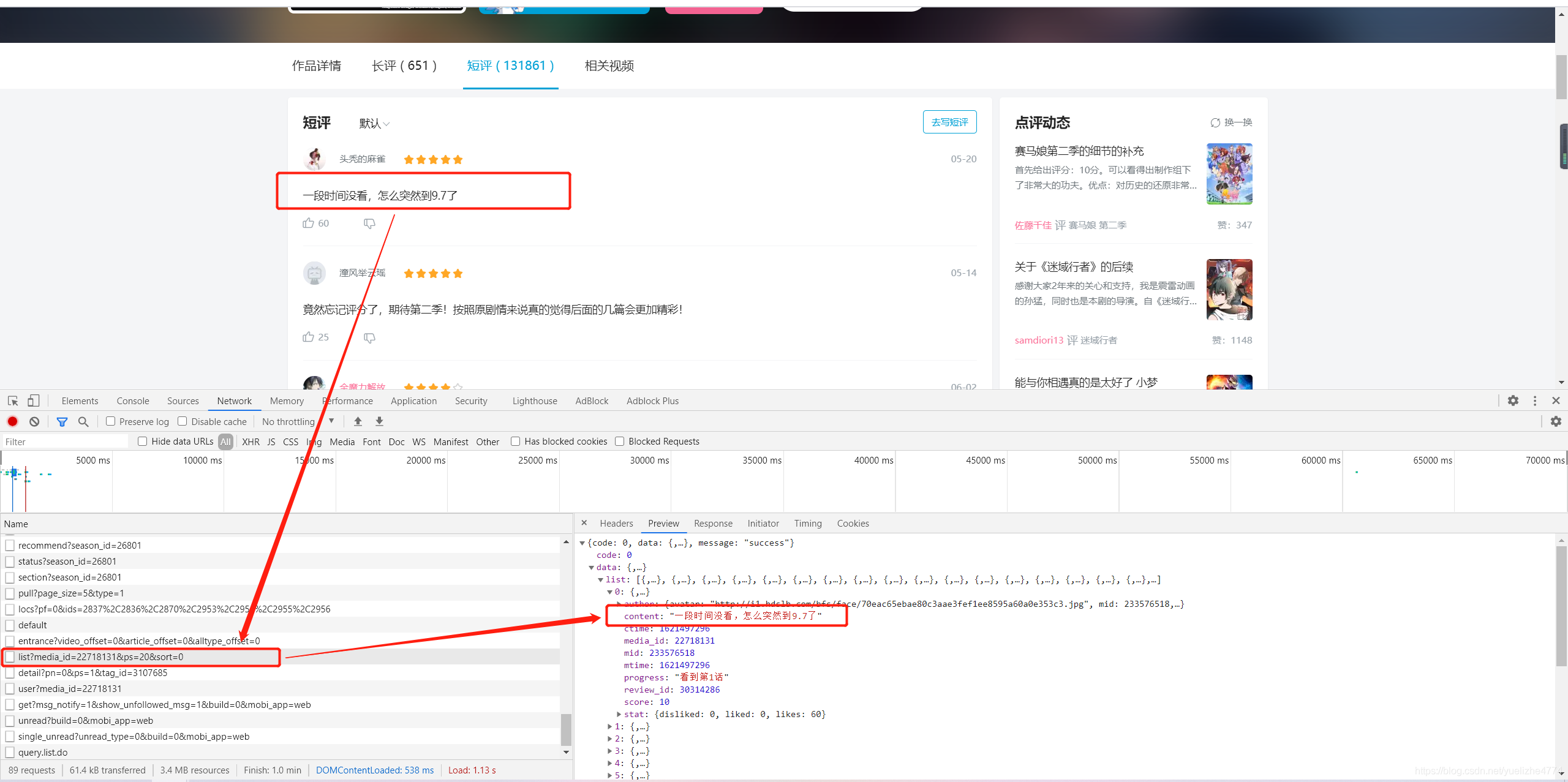

obtain Ghost killing blade Source address of comments
“https://api.bilibili.com/pgc/review/short/list?media_id=22718131&ps=20&sort=0”
Open source address , You can find that this is the current page .

Analyze the source address
https://api.bilibili.com/pgc/review/short/list?media_id=22718131&ps=20&sort=0
Analyze the three red numbers , Get the first number “22718131” It's the code of the blade of ghost destruction , The second number is the number of comments on the current page , The third number is the page number .
Next , Filter the comment content of the source address 、 analysis ; Pick out what we need .
———————————————————— For the time being, I'll write about it first ( If you don't understand, you can comment ).
The code is as follows .
import time
import csv
import requests
import json

headers = {"User-Agent": "Mozilla/5.0 (Windows NT 10.0; WOW64) AppleWebKit/537.36 (KHTML, like Gecko) Chrome/55.0.2883.87 Safari/537.36"}# Pretend to be a browser , Bypass anti climbing
url='https://api.bilibili.com/pgc/review/short/list?media_id=22718131&ps=20&sort=0'
#  send out get request
w = requests.get(url, headers=headers).text
json_comment=json.loads(w)
total=json_comment['data']['list']#url in list Content stored in
num=json_comment['data']['total']#total The content in , How many in all url
# In the following words   It's too troublesome   Although there are many variables   Readability has become higher   But when you cycle again   There will be some small problems    You need to write it again   So just use  “total” It's more comfortable
# uname = json_comment['data']['list']# user name
# utime = json_comment['data']['list']# Time
# user_grade =json_comment['data']['list']# fraction
# s=json_comment['data']#url Everything in
j = 0
header = [' user name ',' Time of publication ',' fraction ',' Comment on '," Number of likes "," Don't like "]# by CSV Create the first line ( head
with open('test.csv','a+',newline='',encoding='utf-8') as f:# write in CSV
    writer = csv.DictWriter(f,fieldnames=header)
    writer.writeheader()
    while j < 1:
        total = json_comment['data']['list']
        for i in range(len(total)):
            # uname = total[i]['uname']
            comment = total[i]['content']  #  obtain url Comments in
            uame = total[i]['author']['uname'] # User name
            ctime = total[i]['ctime']# Get the timestamp of the comment
            xtime = time.strftime("%Y-%m-%d %H:%M:%S", time.localtime(int(ctime)))# The timestamp is converted to  %Y-%m-%d %H:%M:%S
            score = total[i]['score'] # fraction
            # like   Don't like
            star_disliked = total[i]['stat']['disliked']
            # star_like = total[i]['stat']['liked']
            star_likes = total[i]['stat']['likes']
            outdata = [{" user name ": uame, " Time of publication ": xtime, " fraction ": score, " Comment on ": comment," Number of likes ":star_likes," Don't like ":star_disliked}]
            # print(outdata)
            writer.writerows(outdata)# write in CSV
        j += 1
        next = json_comment['data']['next']  #  obtain next The content in
        # print(next)   #79714616963704
        next1 = str(next)# Get comments on the next page index
        url1 = url + '&cursor=' + next1  #  Now  url Updated     user name   Time of publication   fraction   Comment on   It's all updated
        response = requests.get(url1, headers=headers).text  #  Get the initial data again
        json_comment = json.loads(response) # The current cycle ends   The value here is the initial value of the next cycle
边栏推荐
猜你喜欢






随机推荐
如何强制卸载Google浏览器,不用担心Google打开为白板,亲测有效。
关键字_02break与continue
自定义MVC 2.0
/etc/rc.local 设置UI程序开机自启动
随意写写 cookie,sessionStorage,localStorage和session
Opengl在屏幕上绘制一个锥体,该锥体有四个面,每个面都是三角形。为该锥体添加光照和纹理效果
数据类型概括
关于作为行业人从业人员的一点思考
6.在屏幕上绘制一条贝塞尔曲线和一个贝塞尔曲面
按钮 渐变
Tabs tab (EL tabs)_ Cause the page to jam
【STL】Map &unordered_ map
Cmake笔记
Keywords_ 02break and continue
OpenGL draws two points on the screen, a blue point on the right, using anti aliasing technology, and a red point on the left, without anti aliasing technology. Compare the difference between the two
JS链表中的快慢指针
C语言从入门到入土(三)
Draw a circle and a square on the screen. The square is in front and the circle is behind. You can move the square through the keyboard. In the following cases, the square can only move within the cir
Some thoughts on being a professional
Programmer tools collection! (Reprinted)